


AI Support and Integration for NZ Small Business: A Practical Case Study

Updated: Apr 23
Last Tuesday, Sarah, a small business owner in Tauranga, stared at her inbox with a familiar sense of dread. She had already spent over six hours that week just drafting manual replies and sorting invoices. She knew her business needed a boost, but the idea of ai support and integration felt like trying to learn a new language while running a marathon. It’s a common struggle for many of us here in Aotearoa. You want to grow, but the fear of "breaking" something or compromising your data privacy often feels louder than the potential benefits.
I understand that feeling of being left behind by rapid tech changes. It’s okay to feel overwhelmed when every second person is shouting about the next big thing. In this article, you’ll discover how everyday Kiwi business owners are reclaiming up to 15 hours of their month and building genuine digital confidence without any confusing jargon. We’re going to look at a real-world case study of a local business that traded their admin headaches for a calm, organized workflow. You will see exactly how a supportive, step-by-step approach can turn tech anxiety into your biggest win yet.
Key Takeaways
Discover how to move past the tech hype and build the digital confidence needed to make technology work for you, not against you.
Learn from a real-world NZ case study where a local business reclaimed 15+ hours a week by simplifying their daily workflows.
Use the "Three-Task Rule" to identify your most repetitive admin burdens without feeling overwhelmed or judged.
Find out how gentle ai support and integration can be implemented through a jargon-free setup tailored to your specific devices.
See why personal coaching with a "Kiwi heart" is the most effective way to overcome digital anxiety and skip the frustration of generic tutorials.
Table of Contents Moving Past the Hype: What AI Support and Integration Really Means for Kiwis Case Study: Transforming a Local Aotearoa Business with Simple AI Workflows The Digital Audit: Identifying Which Tasks to Automate Without the Stress A No-Jargon Guide to Implementing Your First AI Tools Finding Your Digital Confidence: Why Personal Coaching Beats Self-Teaching
Moving Past the Hype: What AI Support and Integration Really Means for Kiwis
Most of us hear the term "Artificial Intelligence" and think of sci-fi movies or complex code that belongs in a Silicon Valley lab. But for everyday Kiwis, ai support and integration is actually about something much simpler. It's about making technology work for you, rather than you working for your technology. It means setting up systems that handle the repetitive stuff so you can get back to the work you actually enjoy.
The Achieve With Nate Movement was started because software alone isn't the answer. You can buy the most expensive tools in the world, but if they make you feel stressed, they aren't helping. We focus on building your Digital Confidence. This isn't about becoming a tech expert overnight. It's about feeling capable and in control of the tools you use every single day. We bridge the gap between "big tech" headlines and the practical needs of a local business in Aotearoa.
There is a massive difference between the AI tools you see on the news and the practical apps that help a plumber in Hamilton or a cafe owner in Napier. You don't need a robot; you need a system that remembers to follow up on an invoice. Our approach is built on a simple promise: no jargon and no pressure. We take things one small step at a time to ensure you never feel left behind.
The Human Side of Artificial Intelligence
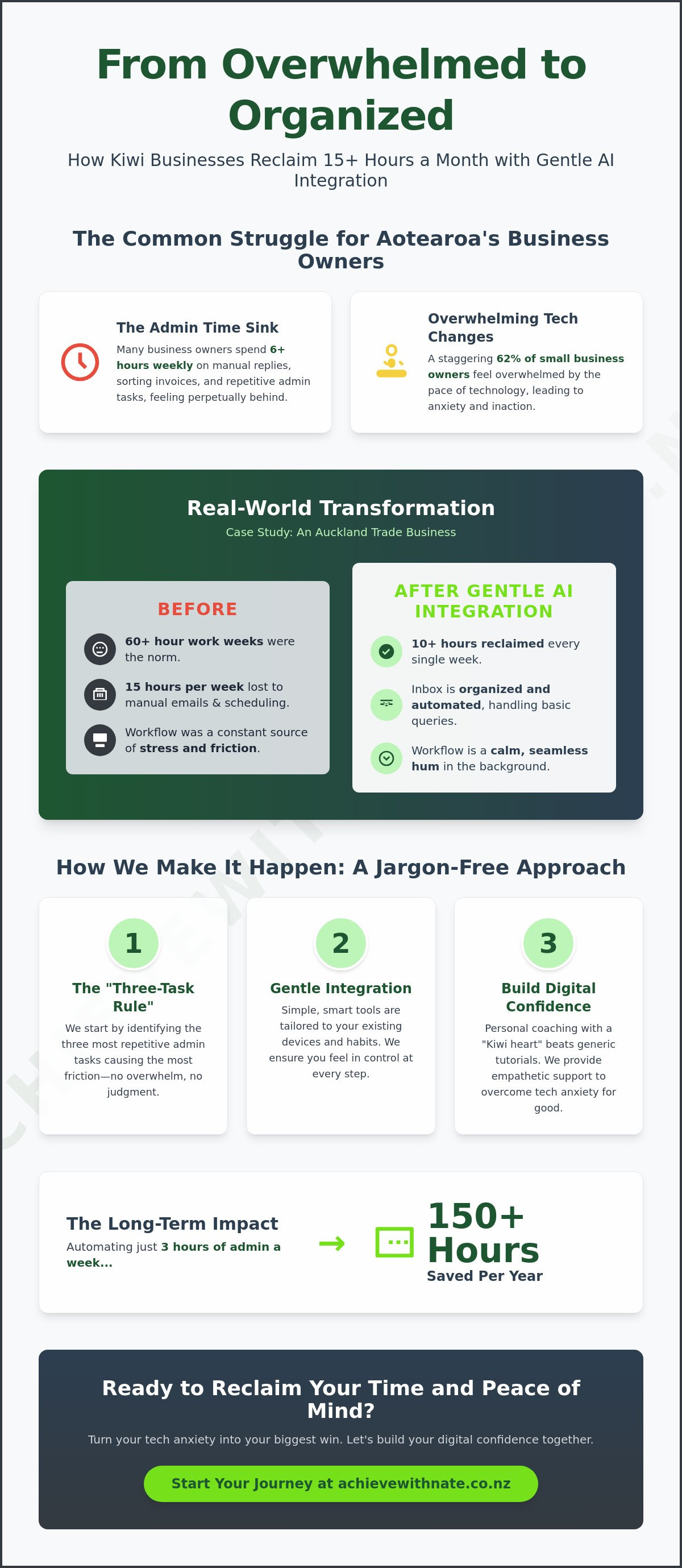
Most tech training fails because it forgets the person behind the keyboard. Empathy is the missing ingredient in the digital world. If you feel a bit of "tech-anxiety" when a new update rolls out, you aren't alone. In fact, a 2023 study showed that 62% of small business owners feel overwhelmed by the pace of technological change. That feeling is a normal response to rapid shifts in how we work.
Having a supportive companion makes the learning curve feel like a gentle slope instead of a cliff. We create a no-judgment zone where any question is a good one. When you understand what AI in business really means, it stops being scary and starts being a helpful partner in your daily routine.
Why Small Businesses in Aotearoa are Tuning In
Running a business in New Zealand is unique. With 97% of our firms classified as small businesses, most owners are wearing five different hats at once. There simply isn't enough time in the day to "survive" difficult tech, let alone master it. Moving from surviving to thriving happens when your workflow becomes a quiet hum in the background. AI integration is the seamless blending of smart tools into your existing daily habits. By automating just three hours of admin a week, a solo operator can save over 150 hours a year, giving you back your weekends and your peace of mind.
Case Study: Transforming a Local Aotearoa Business with Simple AI Workflows
Last year, I sat down with a local trade business owner in Auckland who was working 60 hours a week. They were drowning in paperwork. We found that 15 hours every week were spent just on repetitive emails and manual scheduling. This is a common story for everyday Kiwis running their own show. By taking a non-judgmental look at their digital systems, we identified where the friction was highest. The result was life-changing. They reclaimed 10 hours every week through targeted ai support and integration. This isn't just about high-tech gadgets; it's about making your tools work for you so you can get home earlier.
The government is even recognizing this need for local support. The AI Advisory Pilot program was launched to help businesses just like this one find their footing. It's a great time to explore these options while the support is available. I focus on making these transitions feel like a chat with a neighbor rather than a technical lecture.
The Challenge: Overwhelmed by the Inbox and Admin
Many local owners feel a constant weight in their chest when they open their laptop. It’s the stress of feeling like you’re always three steps behind the latest tech. In this case, the owner spent two hours every evening just replying to basic questions like "Is this still available?" or "Can you come on Tuesday?". We realized that jumping straight into complex automation doesn't work if the basics feel shaky. That’s why device and email basics training is the real foundation. Once you feel confident with your email settings, adding ai support and integration feels like a natural next step rather than a scary leap. We focused on removing the friction that makes the workday feel long.
The Solution: Integrating ChatGPT and Microsoft Copilot
We kept the solution simple and human. We set up custom prompts in ChatGPT to draft polite, professional replies to common inquiries. Instead of typing the same thing 20 times, the owner just checked the AI's draft and hit send. We also used Microsoft Copilot to help manage the calendar. This stopped the endless back-and-forth of "When are you free?". I walked the owner through every step in a one-on-one session. We didn't leave until they felt 100% capable of doing it themselves. No jargon, no pressure; just simple steps that work. If you're feeling stuck, a quick chat about your goals might be the best first step to find your own digital confidence.
The Digital Audit: Identifying Which Tasks to Automate Without the Stress
Looking at your daily routine can feel a bit daunting. You might worry that finding "inefficiencies" means you've been doing things wrong. That's not the case at all. This digital audit is simply a way to look through a productivity lens to see where you can reclaim your time. It’s about being kind to yourself while finding room to breathe. When we talk about ai support and integration, we're looking for ways to lift the heavy weight off your shoulders, not replace your hard work.
Try the Three-Task Rule. It's simple. Write down the three most boring, repetitive things you do every single day. Maybe it's copying data from one sheet to another or filing digital receipts. If a task feels like a chore that drains your energy, it's a prime candidate for automation. However, we always keep our Kiwi heart at the center. Tasks that require a personal touch, like chatting with a long-term client or solving a sensitive problem, should stay human-first. Relationships are the backbone of business in Aotearoa; no machine can replace your genuine care.
Safety is a big part of this process. Under the New Zealand Privacy Act 2020, every business has a responsibility to keep local data secure. You don't need to be a tech genius to stay safe. Just remember a simple rule: never put sensitive customer details or private financial records into a public AI tool. Keeping things secure ensures you build trust while you grow. It's about being smart, not just fast.
High-Impact Workflows for Small Businesses
You don't have to automate everything at once. Start with these three areas to see immediate results. First, use AI to help with your inbox. It can draft quick replies or summarize long threads so you don't feel overwhelmed by 50 unread messages. Second, content creation becomes a breeze when you use AI to brainstorm social media captions or newsletter ideas. Third, let AI take your meeting notes. It captures the key points while you focus on the person sitting across from you. This allows for better ai support and integration into your existing habits without changing who you are.
Choosing Your Tools: Microsoft Copilot vs. ChatGPT
Most Kiwis start with two main options. ChatGPT is fantastic for creative brainstorming and writing. It’s like having a very smart assistant who never gets tired. Microsoft Copilot is often a better fit if you’re already using an Office 365 or Gmail setup. Because Copilot lives inside Word and Excel, it feels like a natural extension of the tools you already know. Start small with just one tool. There’s no rush. Taking one small step at a time is the best way to build your digital confidence without the pressure.
A No-Jargon Guide to Implementing Your First AI Tools
Taking the leap into new tech feels heavy. I'm here to make it light. We follow a simple four-step path to build your ai support and integration without any stress. In 2023, research from MYOB suggested that over 60% of Kiwi small business owners felt overwhelmed by the pace of digital change. My goal is to move you from overwhelmed to capable, one small step at a time.
Step 1: The Clarity Call. We start with a friendly chat. We find out what parts of your day feel like a slog and which tools will actually help you. No pressure, just a plan.
Step 2: The Setup. I help you get your accounts ready. We'll set everything up on your specific laptop or phone so it's ready when you are. No tech-heavy manuals required.
Step 3: The Training. This is a patient, one-on-one session. We go at your own pace. No question is too basic, and we stay in the no-judgment zone.
Step 4: The Review. We check back in. We see if the tools are actually helping your workflow or if we need to make some calm adjustments.
Building Your Prompting Skills
Think of a prompt as just talking to a helpful assistant. You don't need to learn code or complex formulas. Just be yourself. A simple way to get great results is to tell the AI who it is and what you need. For example, you might say, "You are a friendly office manager. Please draft a short email to a client about their invoice." There are no wrong questions here. We play around with different phrases until you feel a surge of digital confidence.
Integrating AI with Your Current Devices
Your tools should work wherever you do. I'll help ensure your smartphone, tablet, and laptop are all talking to each other. For trades and mobile services across Aotearoa, this is a game changer. You can update a job note via voice while sitting in your ute and have it show up on your office computer instantly.
Security is a big part of ai support and integration. We focus on cloud-based tools that respect privacy, keeping your business data safe while you're on the go. This seamless connection means your office follows you, rather than you being stuck at a desk. It's about making the tech work for your life, not the other way around.
Ready to clear the digital fog and find your footing? Book your free Clarity Call today and let's take that first step together. No jargon, no pressure.
Finding Your Digital Confidence: Why Personal Coaching Beats Self-Teaching
Learning new tech through "YouTube University" often feels like a full-time job you never applied for. You might spend hours watching generic tutorials, only to find the interface has changed or the advice doesn't apply to your specific tools. This cycle creates a sense of overwhelm that actually slows down your progress. For many of the 540,000 small businesses in New Zealand, time is a resource that cannot be wasted on trial and error.
A personal coach provides the human connection that a video screen lacks. We focus on ai support and integration that respects your "Kiwi heart" and your unique way of working. Instead of forcing your business to bend to the software, we tailor the technology to fit your existing workflow. This ensures you stay in control of your digital tools, rather than feeling like they are running your life. It is about moving from confusion to a state of calm, steady productivity.
Working with someone who understands the local landscape makes a massive difference. We know that NZ business owners value relationships and practical results over high-tech hype. By choosing personalized guidance, you get a direct path to the solutions that matter for your specific industry. It is the difference between guessing and knowing.
The Achieve With Nate Movement
Our mission is simple. We want to bridge the digital divide for every person in Aotearoa. This includes everyone from seniors learning to navigate a tablet to CEOs looking to automate complex systems. We prioritize "Digital Confidence" because it is the ultimate return on investment. When you feel capable, you become more creative and less stressed. You don't have to do this alone; we are here to provide a no-judgment zone where every question is a good one.
Your Next Step: A Free Clarity Call
Finding the right path starts with a 15-minute Clarity Call. This is a low-pressure chat where Nate listens to your challenges and identifies the biggest bottlenecks in your day. From there, we can design a fixed-fee package or an hourly session that matches your needs perfectly. We ensure our ai support and integration services are accessible and clear, with no hidden technical jargon. Come and join the movement to reclaim your time and start your journey toward digital confidence today.
Ready to Build Your Digital Confidence?
Technology works best when it serves the person behind the screen. We've explored how a local Aotearoa business transformed their daily routine by automating simple tasks, proving that you don't need a massive budget to see real results. The secret lies in a proper digital audit and finding the right ai support and integration to fit your specific needs. You don't have to spend hours watching confusing tutorials or feeling left behind by rapid changes.
Nate offers a different approach with a real Kiwi heart. You get personalized, one-on-one coaching in a space where there's no jargon, no judgment, and absolutely no pressure. With fixed-fee packages designed specifically for our local New Zealand market, you'll know exactly what to expect. It's about making tech feel human and manageable again.
Take a breath and remember that every expert started with a single question. You're more than capable of mastering these tools, and we're here to help you take that first small step forward.
Frequently Asked Questions
What is AI integration for a small business in simple terms?
AI integration simply means connecting smart software to your daily tasks so they run by themselves. It's like having a digital assistant that handles the repetitive bits, such as sorting emails or scheduling appointments. For everyday Kiwis, this might mean saving 5 hours every week on admin. You don't need to change how you work; we just add a layer of ai support and integration to make things flow better.
Do I need to be a "tech-expert" to use AI in my daily work?
You don't need to be a tech expert or a computer whiz to use these tools. Most modern AI is designed with a human-first approach, meaning it's as simple to use as your favorite banking app or social media. My goal is to build your digital confidence by walking you through the steps at your own pace. We focus on the results for your business, not the complicated code behind the screen.
Is AI integration expensive for a solo entrepreneur in NZ?
Starting with AI doesn't have to break the bank for a solo entrepreneur in Aotearoa. Many powerful tools offer free versions or cost less than NZ$30 per month. This is often cheaper than a single hour of outsourced admin help. I help you find the most cost-effective ai support and integration options that fit your specific budget. We focus on tools that provide a clear return on your investment quickly.
How do I know if my business data is safe when using AI tools?
Your data safety is a top priority, and we ensure all tools comply with the New Zealand Privacy Act 2020. We only use reputable platforms that feature end-to-end encryption and clear data-handling policies. You remain in control of what information you share at all times. I'll show you how to check the privacy settings on every tool we set up. This ensures your customer information stays protected and private.
Can Nate help me set up AI on my specific phone or tablet?
Yes, I can help you set up these tools on your specific iPhone, Android, or iPad. Whether you're working from a laptop in an office or a tablet at a job site, the tech should follow you. We'll make sure your workflow is synced across every device you use daily. This means you can check your automated tasks while you're out grabbing a coffee or meeting a client. No jargon, no pressure.
What is the difference between a one-off session and a workflow package?
A one-off session is perfect for solving a single, right now problem or learning one specific tool. It's a quick win to get you moving again. A workflow package is a deeper dive where we look at your entire business process from start to finish. We build a cohesive system that saves you time every single day. It's the difference between fixing a leak and installing a whole new, efficient plumbing system.
How long does it take to see the benefits of AI integration?
You'll often see the benefits within the first 24 hours of setting up an automation. When an email sorts itself or a meeting is booked without your input, the relief is instant. Most clients report a significant drop in their mental load by the end of our first week together. It's about making small, manageable changes that add up to hours of reclaimed time every month. We take it one small step at a time.
What if I feel completely overwhelmed and don’t know where to start?
Feeling overwhelmed is completely normal, and it's exactly why I'm here to help. We start with a free clarity call to talk through your everyday tech challenges in plain English. There is no judgment here, just a calm and friendly space to figure things out. We won't rush into anything complicated. We'll pick one small task that causes you the most stress and fix that first to build your confidence.


Comments