


Best Productivity Apps for Small Business NZ 2026: A Gentle Guide

Updated: Jun 22
What if the secret to getting more done isn't adding another app to your phone, but actually letting go of the ones that cause you stress? It’s easy to feel overwhelmed by the endless stream of new tools, especially when you just want to focus on your craft. Real business workflow optimization nz shouldn't feel like a chore. It should feel like a deep breath. You deserve a digital workspace that supports you rather than one that demands your constant attention and a dozen different subscriptions.
We know the frustration of manual data entry and the fear that AI is becoming too complex to handle. You aren't alone in feeling this way. In this gentle guide, we'll show you how to simplify your digital life using the right tools for 2026. We'll explore how to connect your systems like Xero so they work for you, and how to use modern AI tools with total confidence. You'll discover a path toward a calmer, more productive day that leaves you with more time for what truly matters.
Key Takeaways
Learn why choosing fewer, more effective apps can help you escape "app fatigue" and create a much calmer digital workspace.
Identify whether a visual or list-based tool is the right match for your personality to help keep your daily tasks organized.
Discover how business workflow optimization nz helps your systems like Xero talk to each other, finally ending the chore of manual data entry.
Explore how to use AI as a gentle "first drafter" for emails and meeting notes, giving you more time to focus on your actual craft.
Understand why having a patient mentor can give you the confidence to master new tools at your own comfortable pace.
Table of Contents
The Productivity Trap: Why NZ Small Businesses Need Fewer Apps in 2026
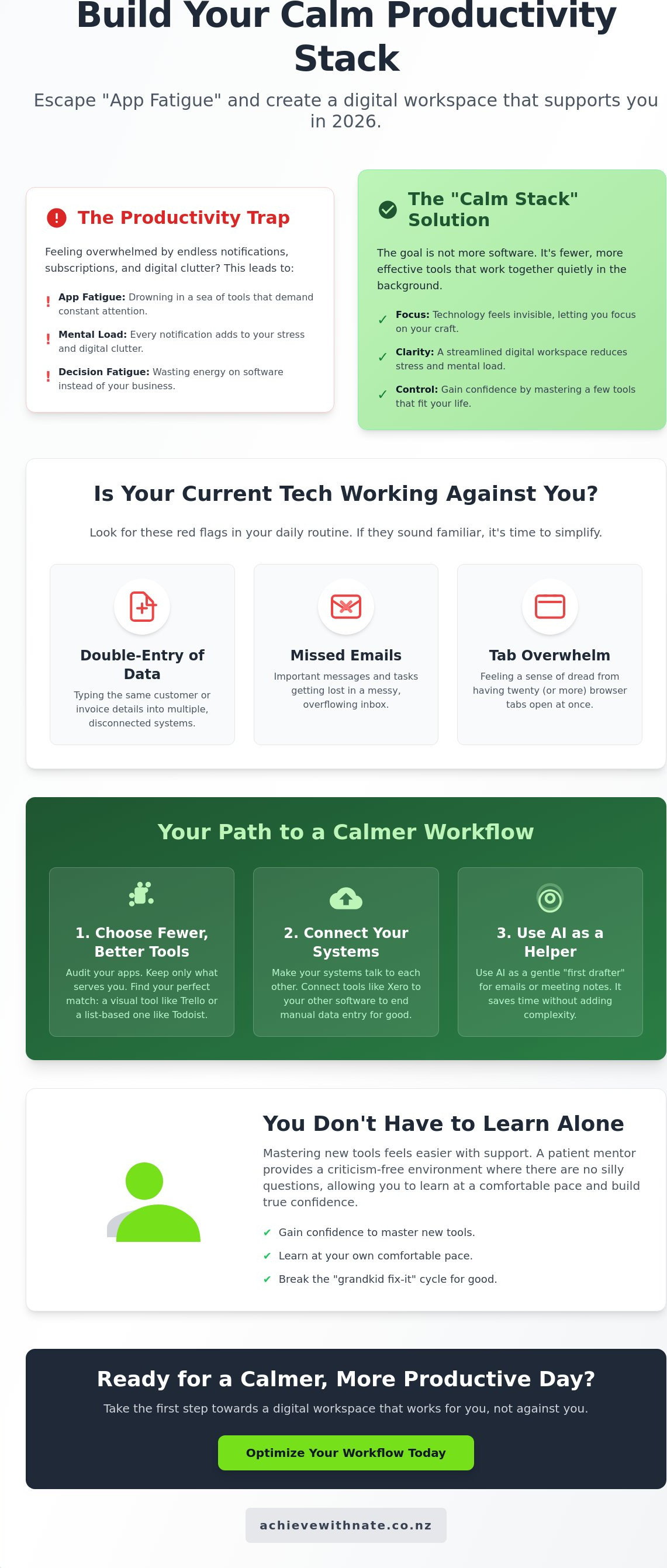
Many Kiwi business owners feel like they're drowning in a sea of subscriptions. You might have signed up for a tool to save time, only to find you're spending hours just trying to keep it updated. This is the reality of app fatigue. In 2026, the goal isn't to have more software; it's to build a "Calm Productivity Stack." This means choosing a few reliable tools that work together quietly in the background without needing constant supervision. True business workflow optimization nz is simply the art of making technology feel invisible so you can focus on your actual work.
Understanding how your business operates is the first step toward peace of mind. Many professionals use Business process management (BPM) to look at the big picture. It's about finding where things get stuck and smoothing them out without adding more complexity. When we look at business workflow optimization nz, we're looking for solutions that fit your life, not the other way around. A tool should be a quiet helper, not a loud guest that constantly demands your attention.
To better understand how to choose the right tools for your business, watch this helpful video:
The Emotional Cost of Too Many Tools
Digital clutter is heavy. Every notification and every "update required" message adds to your mental load. This leads to decision fatigue, where you're too tired to make important choices for your business because you've spent all your energy on software. We've all been through the "grandkid fix-it" cycle. You wait for a tech-savvy relative or a younger staff member to visit so they can "just fix it" for you. It's time to break that cycle and gain your own confidence. By creating a criticism-free environment, you can learn at your own pace. There are no silly questions when you're trying to reclaim your time.
Signs Your Current Tech is Working Against You
Sometimes, the very tools meant to help us start causing more trouble. Look out for these red flags in your daily routine:
Double-entry of data: You're typing the same customer details into three different systems.
Missed emails: Important messages are getting lost in a messy inbox.
Tab overwhelm: You have twenty browser tabs open and feel a sense of dread when you look at them.
If this sounds familiar, 2026 is your year to audit rather than add. You don't need a new "magic" app to fix a broken process. You need to see what you already have and make it work better for you. A great place to start is with a personal technology audit nz. This gentle checklist helps you reclaim your digital life by identifying what's helping and what's just taking up space. Taking this incremental, manageable action is the best way to move toward a workspace that feels supportive and light.
Essential Task and Project Management Tools for Kiwis
Living in your inbox is a heavy way to run a business. It feels like you're always reacting to the loudest person rather than doing your best work. In 2026, we have simple ways to move those tasks into a space that feels calm and organized. This is a core part of business workflow optimization nz. It isn't about being "high-tech." It's about giving your brain a rest. Whether you're a solo tradie in Christchurch or running a small team in Auckland, the right tool should feel like a supportive friend.
Choosing between Trello, Todoist, and Monday.com depends on how your mind works. Some of us need to see pictures and boards. Others find peace in a clean, simple list. While many are exploring new AI productivity tools, the foundation of your day usually starts with where you write things down. For Kiwis on the move, these tools must work perfectly on a phone. You might be at a job site or between meetings; you need to know your plan is right there in your pocket. Monday.com is excellent if your team is growing, but it can feel a bit much if you're just starting out. We often recommend starting smaller to keep your stress levels low.
Trello: The Visual Way to See Your Day
Trello is wonderful for visual thinkers. It uses the "Kanban" method. This is just a way of saying you move cards from "To Do" to "Done." It provides instant mental relief to see a project moving across the screen. You can even set it up to move cards automatically when you finish a task. No coding is needed. It's a great fit for creatives or trades who need to see exactly where every job stands at a single glance.
Todoist: For the List-Lovers and Minimalists
If you love a good checklist, Todoist is likely your best match. It's minimalist and keeps things quiet. You can set up recurring tasks so you never miss an NZ tax deadline or a GST filing again. It integrates beautifully with your digital calendar. This means your "to-do" list and your "where-to-be" list become one. If you're not sure which path to take, our one-on-one digital coaching can help you find the tool that fits your natural rhythm.
Breaking the habit of checking your email every five minutes takes time. These tools are designed to hold your thoughts so you don't have to. When you know your tasks are safe in a system you trust, you can finally focus on your actual craft. It's about taking small, manageable steps toward a workday that feels light and supportive.
Smart AI Tools That Actually Reduce Your Workload (Not Your Sanity)
Artificial intelligence can feel like a lot to take in. You might hear people talking about it as if it's going to change every single thing overnight. In 2026, we see it differently. AI is a supportive companion, not a replacement for the human touch. It's there to help you with the small, repetitive tasks that drain your energy. When you use these tools correctly, they become a quiet part of your business workflow optimization nz, helping you stay focused on the parts of your work you actually enjoy.
Think of ChatGPT or Claude as a gentle first drafter. They aren't meant to do all your thinking for you. Instead, they can help you get those first few sentences down for a client email or a blog post. If you've ever stared at a blinking cursor for twenty minutes, you know how heavy that silence feels. These tools help you break through that initial block so you can get back to being yourself.
Meeting Assistants: Reclaiming Your Concentration
Have you ever finished a thirty-minute Zoom call only to realize you were so busy taking notes that you didn't really listen? Tools like Otter.ai and Fireflies can change that. These meeting assistants join your calls and listen for you. They turn a long chat into a simple, three-point action list instantly. It's a wonderful way to stay present with the person on the screen.
For our NZ business community, it's important to be mindful of the Privacy Act 2020. Being respectful of your clients' data is a core part of building trust. Always let people know if you're using an AI note-taker. It's a small, kind gesture that keeps everyone feeling safe and understood. When used openly, these tools simply help you remember the details that matter most.
AI for Content and Communication
Blank page syndrome is a common struggle for many small business owners. Whether you're writing a newsletter or updating your website, getting started is the hardest part. AI drafting tools are perfect for overcoming this hurdle. You can give them a few basic ideas, and they'll provide a structure you can then refine with your own unique Kiwi voice. For healthcare organisations and charities looking to nurture their community further, check out Throughmotion Ltd. to discover how they support audience growth. You don't want to sound like a robot; you want to sound like a neighbor who knows their stuff.
For those of us who aren't designers, Canva Magic Studio is a breath of fresh air. It helps you create professional branding and social media posts without the technical overwhelm. If you're looking for more guidance on how to start, you might find this guide on AI training for small business New Zealand helpful. It's designed to be a stress-free entry point into these new technologies. Taking incremental, manageable actions today can lead to a much calmer workspace tomorrow.
Connecting the Dots: Workflow Optimization for the NZ Market
Having a collection of great apps is a wonderful start. But if those apps don't talk to each other, you end up doing the heavy lifting yourself. This is where business workflow optimization nz truly shines. It's about building bridges between your tools so that information flows naturally from one place to the next. For those seeking professional help with digital strategy and ICT solutions, Business Analysis & Solutions provides expert consultancy to drive organisational efficiency. For most Kiwi businesses, this starts with the "Xero Connection." When your project management tool and your accounting software are in sync, you stop worrying about whether an invoice was sent or a payment was logged. Everything just feels lighter.
One of the most rewarding areas to simplify is how you welcome new people to your business. You can learn how to automate client onboarding nz without losing that personal, friendly touch that makes your business special. It's about letting the technology handle the repetitive forms and emails. This leaves you with more energy for a warm welcome call or the actual work you were hired to do. When the "boring bits" happen automatically, you can focus on building real relationships.
Step 1: Identify Your "Digital Friction" Points
Friction is that small sigh you give when you have to copy a name from an email into a spreadsheet. If you find yourself doing the same manual task three times, it's time to look for a better way. We call this the "Three-Strike Rule." Before you buy more software, try mapping out your current steps on a simple piece of paper. Seeing the path your information takes helps you spot where things get stuck. It’s a low-pressure way to visualize your day before making any changes.
Step 2: Choosing the Right Glue (Integrations)
You don't need to be a computer expert to connect your apps. Tools like Zapier act as the "glue" that holds your digital workspace together. They use simple "recipes" to move data between systems. For example, when someone fills out a form on your website, Zapier can automatically create a new contact and send a welcome note. Seeing how business workflow optimization saves 5+ hours a week is often the moment our clients feel a huge sense of relief. It's about reclaiming your time so you can get back to your craft.
If you're feeling stuck on which tools should talk to each other, we can help you find the right path. Our Business Workflow Optimization service is designed to help you set up these connections at a pace that feels comfortable for you.
Building Your Calm Digital Workflow with One-on-One Support
Having a list of the best apps is a wonderful start. But we know that software alone isn't the answer. The real key to a better workday is confidence. It's the feeling of opening your laptop and knowing exactly where everything is. You deserve a digital workspace that feels supportive rather than demanding. We believe that technology should serve you, not the other way around. Bridging the digital divide doesn't have to be a stressful sprint. It can be a steady, quiet walk toward a more organized life.
Many business owners feel a sense of inadequacy when they can't "just figure it out." We want to remove that weight from your shoulders. Having a non-judgmental mentor to help you set things up makes all the difference. It's about having someone in your corner who understands the local Kiwi context. Nate helps you find your footing at your own pace, ensuring you feel seen and understood throughout the process. This human connection is what turns a confusing tool into a helpful companion.
Personalized Coaching vs. Online Tutorials
We've all tried to find answers in YouTube videos. Often, those tutorials move too fast or use words that don't make sense. They can leave you feeling more confused and frustrated than when you started. There is immense value in one-on-one support where you can stop and ask questions. Whether you're looking to master your devices or need patient tech help for your email, we focus on clarity. We skip the jargon and focus on the practical steps that actually matter to your daily routine.
Your Incremental Path to Digital Confidence
You don't need to change every single habit by tomorrow morning. Real progress happens when you start with one small change this week. Perhaps it's just connecting one app to Xero or setting up a single automated reply. Over time, these small wins build a foundation of strength. A professional digital productivity audit is a great way to see where you stand. It helps us identify where business workflow optimization nz can save you the most time and mental energy. We look at the individual behind the screen first, making sure every change feels manageable and right for you.
Taking the first step toward a stress-free future is a kind thing to do for yourself. If you're ready to move toward a calmer way of working, you can fill out an Expression of Interest today. There's no pressure and no complex sales pitch. It's just a simple invitation to start a conversation about reclaiming your time. No matter how fast the digital world moves, you can find your footing. Taking incremental, manageable actions is the most powerful way to build a business that feels as good as it looks.
Your Path to a Calmer Workday
Finding the right balance with technology doesn't have to be a source of stress. We've explored how choosing fewer, more effective apps can lift the weight of app fatigue off your shoulders. By focusing on tools that talk to each other and using AI as a gentle assistant, you're already on your way to a more peaceful routine. Real business workflow optimization nz is about making your digital life feel light and supportive so you can get back to the work you love.
You don't have to walk this path alone. Whether you need personalized one-on-one digital coaching or want to make AI integration simple, we're here to help. We provide non-judgmental, patient support for Kiwis who want to bridge the digital divide at their own speed. It's about finding your footing and feeling seen in a fast-moving world.
Ready to reclaim your time? Let’s build your digital confidence together.
Every journey toward a calmer workspace starts with a single, manageable action. You've got this.
Frequently Asked Questions
What are the best productivity apps for a one-person NZ business in 2026?
For a solo owner, Trello and Todoist are excellent starting points for managing your daily tasks. Trello helps you see your work as a series of visual cards, while Todoist is perfect if you prefer a clean, simple list. Adding Otter.ai to summarize your client calls can also give you back valuable hours. These tools are designed to be supportive companions that grow with you at your own comfortable pace.
Is AI safe for my small business data in New Zealand?
Yes, AI tools are generally safe as long as you follow the Privacy Act 2020 guidelines. It's important to check your privacy settings and ensure you aren't sharing sensitive client data without consent. Being open with your customers about using AI note-takers builds trust. We focus on helping you understand these settings so you can use modern tools with total confidence and peace of mind.
Do I need to be "tech-savvy" to use workflow automation?
You don't need to be a computer expert to benefit from business workflow optimization nz. Many modern automation tools use simple, visual "recipes" that don't require any coding knowledge at all. It’s more about understanding the steps in your workday than understanding complex software. We can help you identify where your digital friction is and show you how to smooth it out using friendly, low-stakes methods.
How much time does it actually take to set up these productivity tools?
Setting up a basic productivity tool usually takes less than an hour of your time. You can create your first Trello board or Todoist list in about 30 minutes. The key is to take incremental, manageable actions rather than trying to change your entire business at once. We recommend starting with one small process, like your daily to-do list, and building your digital confidence from there.
Can these apps integrate with Xero for my bookkeeping?
Most leading productivity apps integrate beautifully with Xero to save you from manual data entry. Using a tool like Zapier allows your project management cards or website forms to talk directly to your accounting software. This connection is a powerful part of business workflow optimization nz because it keeps your records current. It ensures your bookkeeping stays accurate while you focus on your actual craft and clients.
What if I find technology too stressful to learn on my own?
It's completely normal to feel a sense of anxiety when faced with rapid technological change. If learning on your own feels too heavy, working with a patient mentor can provide a psychological safe space. One-on-one coaching allows you to ask questions without judgment and learn at a speed that feels right for you. You don't have to struggle in silence; supportive help is always available.
Are there free versions of these productivity apps available?
Most of the apps we recommend offer generous free versions that are perfect for small businesses. Trello, Todoist, and Canva all have tiers that let you explore their features without any financial commitment. This allows you to test a tool to see if it fits your natural rhythm before you ever spend a cent. It’s a great, low-pressure way to start simplifying your digital life today.
How do I know which app is right for my specific industry?
Choosing the right app often comes down to whether you are a visual thinker or someone who prefers lists. Trades and creatives often find the visual boards in Trello very reassuring for tracking their various jobs. Professional services, like consultants or accountants, might prefer the structured lists in Todoist. We can help you look at your specific industry needs during a digital productivity audit to find your match.


Comments