


Help Cleaning Up My Email Inbox: A Stress-Free Guide for Kiwis

Last Monday morning, you likely opened your laptop and felt that heavy, familiar weight in your chest as the unread count climbed even higher. You're certainly not alone in this. Many Kiwis tell us they feel a deep sense of "inbox dread" every single time they log in. You might be looking for help cleaning up my email inbox because you're tired of the constant interruptions from junk mail and the nagging fear of accidentally deleting something important. It's perfectly okay to feel overwhelmed. The digital world moves incredibly fast, and it's easy to feel like you've lost your footing.
We understand that your inbox often feels less like a tool and more like a mountain of unfinished chores. This guide is here to help you transform that chaotic digital space into a calm, organized home where you feel completely in control of your technology. We'll walk through a patient, step-by-step system to bring your unread count down to a manageable level. You'll learn how to set up a simple routine that keeps the clutter away for good, ensuring your digital life feels steady and unhurried once again.
Key Takeaways
Understand why "inbox dread" is a natural response to digital noise and why it's not your fault that things feel overwhelming.
Learn the vital difference between archiving and deleting so you can clear your view without the fear of losing important information.
Explore why getting personalized help cleaning up my email inbox offers more privacy and lasting success than using automated third-party apps.
Discover a simple three-folder system designed to keep your messages organized and your daily unread count manageable.
Find out how a supportive, non-judgmental mentor can help you build a steady routine that keeps your digital life calm and organized.
Table of Contents
Why an Overflowing Inbox Feels So Stressful (and Why It’s Not Your Fault)
Many people believe they are simply "bad at computers" because their unread count is in the thousands. This is a common misconception. If you have been searching for help cleaning up my email inbox, you likely already know how heavy that unread count feels. What you are experiencing is "Inbox Anxiety." This is a genuine psychological response to digital clutter. Our brains were never designed to process hundreds of individual demands on our attention every single day. It is a heavy burden to carry alone.
Modern marketing has transformed our private spaces into a digital "war zone." Your inbox used to be a place for letters from friends or family. Now, it is filled with noisy sales pitches and endless newsletters. Managing this chaos is part of the wider field of communications management, a task that has become increasingly complex for everyone. Feeling overwhelmed is the standard response to this environment. It is not a personal failure. To better understand how to tackle this digital clutter, watch this helpful video:
The Hidden Cost of Digital Clutter
Every unread email acts like a tiny, unfinished chore sitting in the back of your mind. This constant background noise drains your mental energy throughout the day, even when you are away from your computer. In New Zealand, missing a message can have real consequences. Important notifications from your bank or updates from government agencies can easily get lost among the junk mail. Simply ignoring the pile doesn't help. In fact, it often creates more long-term stress as the mountain of messages grows taller.
Moving From Guilt to Digital Confidence
Digital confidence is the ability to use tools without fear. Often, well-meaning family members will offer to "just do it for you," but this "grandkids" approach doesn't solve the underlying anxiety. You remain dependent on others, and the fear of the unknown stays. We believe that asking for help cleaning up my email inbox should happen in a criticism-free environment. Through the Achieve With Nate Movement, we act as a supportive companion. We focus on teaching you the skills to handle your technology with ease, so you never have to feel inadequate again. Taking these small, manageable steps is the best way to reclaim your digital calm.
The 3 Pillars of a Clean Inbox: Unsubscribe, Archive, and Automate
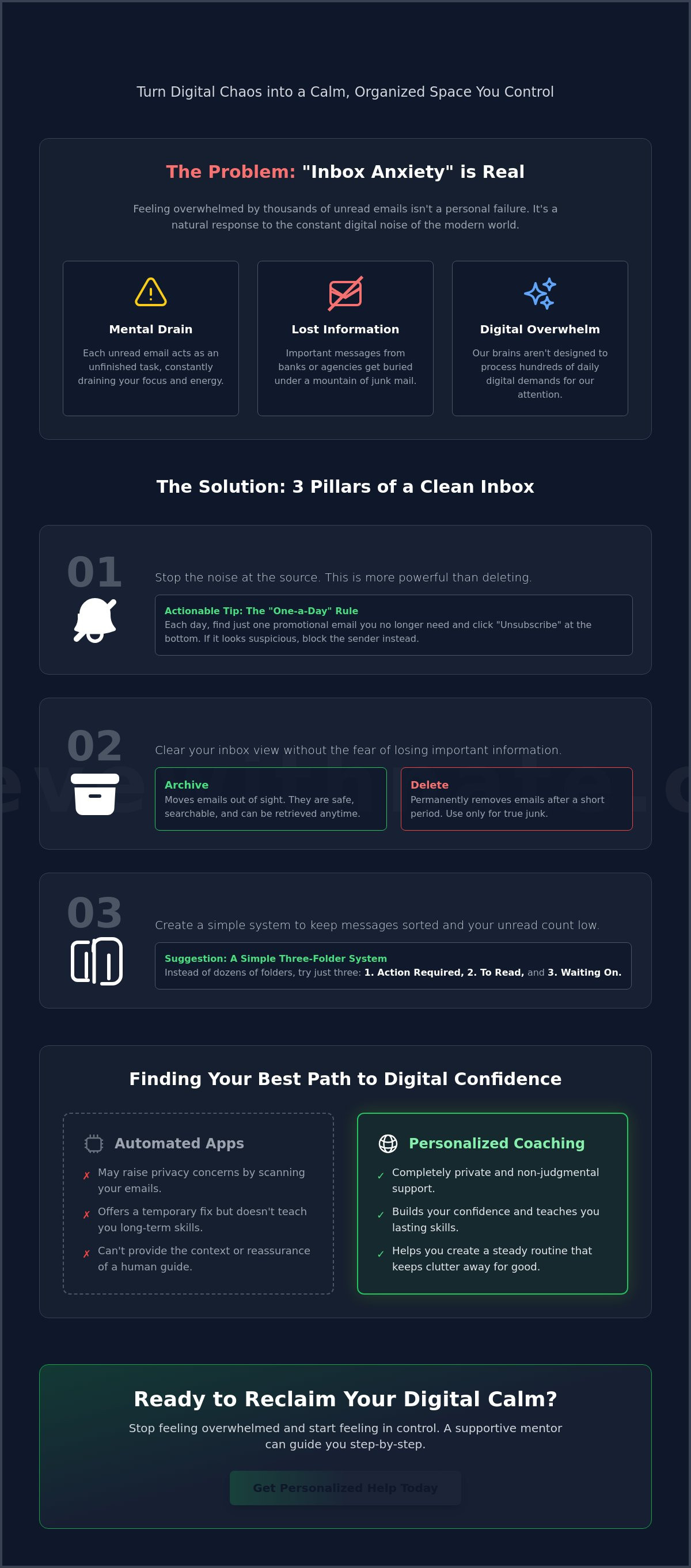
Many people believe that a clean inbox must be completely empty. This is a common myth that actually adds more pressure. You don't need to reach "Inbox Zero" to find peace. Instead, the goal is to create a space that feels manageable and calm. Finding effective strategies to manage email overload often starts with three simple actions: unsubscribing, archiving, and using basic sorting tools. If you have been looking for help cleaning up my email inbox, these three pillars are your foundation.
Unsubscribing: Stopping the Noise at the Source
Deleting a single newsletter feels good for a second, but it doesn't stop the next one from arriving tomorrow. Unsubscribing is much more powerful because it cuts off the noise at the source. Many of us treat our inboxes like a filing cabinet for every shop we've ever visited in New Zealand. You don't need those weekly sales updates if they only cause you stress. Try the "One-a-Day" rule. Every time you open your mail, find just one newsletter you no longer read and click unsubscribe. Look for the link at the very bottom of the email. If the email looks suspicious or you don't recognize the sender, it's safer to just block them rather than clicking any links inside.
Archiving: The "Safety Net" for Your Peace of Mind
The fear of accidentally deleting something important is a huge source of digital anxiety. This is where archiving becomes your best friend. Archiving is a non-destructive way to declutter your screen. When you archive an email, it disappears from your main view but stays in your account forever. Think of it as moving a paper from your desk into a neat folder in the attic. If you ever need to find that receipt or flight confirmation later, you can simply use the search bar. This is the "Google" method of email management. You don't need to know exactly where it is; you just need to type a keyword to find it. This safety net allows you to clear your screen without the worry of losing your history.
Once you have stopped the new noise and cleared the old clutter, you can set up simple ways to sort what's left. You can create basic folders for things like "Bills" or "Family" so they have a dedicated home. This simple automation keeps your primary view quiet and focused. If you feel a bit stuck on where to click first, our Device and Email Basics Training can provide a gentle hand to guide you through these steps at your own pace.
Email Cleanup Tools vs. Personalized Coaching: Finding Your Best Path
When you start looking for help cleaning up my email inbox, your first instinct might be to look for a quick technical fix. You'll likely find several automated apps promising to clear your clutter in seconds. While these tools have their place, they often act like a "black box." You press a button, things disappear, but you aren't quite sure where they went or how to get them back. For many Kiwis, this creates a new kind of digital anxiety rather than solving the old one.
Automated apps don't teach you the habits needed to keep the mess from returning. They simply hide the symptoms for a while. If you want a solution that lasts, you need a path that balances efficiency with actual learning. Our device and email basics training is designed to be that middle ground. It provides the support you need to clean your space while ensuring you understand every step of the process.
The Pros and Cons of Automated Cleanup Apps
Programs like CleanEmail or Unroll.Me are popular because they are fast. CleanEmail, for example, starts at about $29.99 per year for a single account. These tools are useful if you have ten thousand emails and just want them gone. However, there are significant trade-offs to consider:
Privacy Concerns: To work, these apps require full access to your personal messages. Under the Privacy Act 2020, it's important to be cautious about which third-party services you allow to read your private data.
Hidden Complexity: Setting up filters and "rules" within an app can be just as confusing as the inbox itself.
Temporary Relief: Without a change in how you manage mail daily, the clutter will simply pile up again in a few months.
Why One-on-One Support Wins for Absolute Beginners
A patient, human mentor offers something an app never can: an explanation of "the why." When we work together, we don't just click buttons for you. We help you build the digital confidence to handle your technology independently. This is especially helpful when dealing with local New Zealand accounts like Spark or Xtra, which sometimes have their own unique quirks.
Having a supportive companion by your side means you can ask questions without fear of judgment. If a specific folder isn't working for you, we troubleshoot it in real-time. We focus on your specific needs and your pace. This approach turns a stressful chore into a steady, manageable skill. You aren't just getting a cleaner screen; you're gaining the peace of mind that comes from being in total control of your digital home.
Your Step-by-Step Plan to Reclaim Digital Calm in Aotearoa
Starting the journey to a tidy inbox doesn't have to be a weekend-long project. In fact, we recommend taking it slow. If you are looking for help cleaning up my email inbox, the best approach is one that respects your time and your energy. We use a simple, manageable plan that focuses on clearing the view today so you can breathe easier tomorrow. You don't need to be a tech expert to follow these steps. You just need a little bit of patience and a gentle system.
The first step is a "Massive Archive." Take every single email older than three months and move it into your archive folder. This clears your immediate view without the terrifying risk of deleting something important. Once your main screen is clear, set up three simple folders to handle new mail:
Action Required: For things you need to do or reply to right now.
Waiting: For emails where you are waiting on someone else to get back to you.
Reference: For receipts, tickets, or information you just want to keep.
Try to dedicate just 15 minutes a day to the "Top 5" method. Instead of looking at the whole pile, just focus on the most recent five emails. Deal with them, move them to their folders, and then stop. This keeps the work manageable. We also suggest a "Search, Don’t Sort" philosophy. Modern email tools have powerful search bars. You don't need dozens of tiny folders. Just archive the mail and search for it later. You can even learn how to use my phone better to handle these quick sorts while you're waiting for the kettle to boil.
The "Fresh Start" Technique
If your inbox currently has thousands of messages, move everything into one folder called "To Sort." This gives you a blank screen immediately. Seeing a clean slate has incredible psychological power. It reduces that heavy feeling of "inbox dread" instantly. The emails still exist, but they are no longer shouting for your attention. You can then go into that folder during your 15-minute sessions and chip away at it whenever you feel ready. It's about making progress at a pace that feels good to you.
Staying Secure While You Clean
As you clean, you might see scary notifications claiming your "inbox is full" or your "account is locked." Be very careful. These are often phishing scams designed to look like official alerts. Never click links in emails that ask for your password or personal details. Staying safe is just as important as staying organized. You can find more tips on safe online habits NZ for 2026 to ensure your digital home stays protected. If you'd like a supportive companion to walk through this plan with you, feel free to reach out for a friendly chat today.
How One-on-One Digital Coaching Turns Email Chaos into Confidence
Even with a clear plan, the actual work of tidying your digital life can feel like a lonely task. It is completely natural to want a bit of extra support when things feel stuck. When you ask for help cleaning up my email inbox through one-on-one coaching, you aren't just getting a set of instructions. You are gaining a supportive companion who understands that technology can be frustrating. Our approach is built on a foundation of neighborly kindness and a strictly criticism-free environment. There is no judgment here, only steady progress toward your goals.
The Achieve With Nate Movement is based on a "Done With You" philosophy. This means we sit beside you, either in person or virtually, and work through the clutter together. We don't just take over your mouse and click buttons while you watch in confusion. Instead, we ensure you understand every step. We focus on small, manageable actions that build your skills over time. This approach ensures that once your inbox is clean, you have the knowledge and the confidence to keep it that way. We would love to hear about your specific hurdles during a complimentary introductory consultation.
What to Expect in a Coaching Session
Our sessions move at a calm, unhurried pace that is tailored entirely to your specific speed. We don't use complicated jargon or rush through the steps. We provide practical help with the devices you already use every day. Whether you prefer your iPad, your iPhone, or a traditional PC, we make sure the lessons fit your hardware. We also specialize in the email tools most common here in Aotearoa. We can help you master Gmail, Outlook, or even legacy accounts like Xtra Mail. We focus on the tools that matter most to your daily life.
Ready to Start Your Journey?
You deserve to open your computer without feeling a weight in your chest. Technology should work for you, serving as a helpful tool rather than a source of constant stress. Taking that first step can feel big, but we are here to make it as easy as possible. You don't have to face the digital mountain alone. By reaching out today, you are choosing to reclaim your time and your peace of mind. We invite you to Join the Achieve With Nate Movement and start your journey toward a calmer, more organized digital home. Let's turn that email chaos into lasting confidence together.
Reclaiming Your Digital Peace of Mind
You now have a simple roadmap to turn that overwhelming pile of messages into a quiet, organized space. Remember that archiving is your safety net; it allows you to clear your screen without the fear of losing important records. By taking small, 15-minute steps each day, you can stop the noise at the source and finally feel in control of your technology again. It's about making progress at a pace that feels good to you.
If you still feel a bit unsure about where to click first, getting professional help cleaning up my email inbox can make all the difference. We provide personalized, one-on-one coaching for Kiwis in a completely no-judgment, stress-free environment. We understand the specific quirks of local tools like Xtra Mail and Spark, and we're here to act as your supportive companion. You deserve to use your devices without feeling inadequate or overwhelmed.
You are invited to book a patient, one-on-one session to clean up your inbox today. Your digital world doesn't have to be a source of dread. With a little bit of support and a steady, unhurried pace, you can find your footing and enjoy a calm, manageable inbox. Every small action you take is a step toward a simpler, more peaceful life online.
Common Questions About Clearing Your Inbox
Is it safe to use third-party apps to clean my email?
Safety depends on the specific tool, but privacy is a major consideration. Most automated apps require full access to your private messages to work. Under the Privacy Act 2020, Kiwis should be cautious about sharing data with third-party services. Personalized coaching is often a safer, more private alternative. You keep total control of your account while learning the skills to manage it yourself without giving away your password.
What is the quickest way to delete thousands of unread emails at once?
The fastest way to clear your view is to use the "Massive Archive" technique. Instead of permanent deletion, you can select all messages older than a certain date and move them to your archive. This clears your screen instantly. It removes the "inbox dread" without the fear of losing an important record or a precious memory. You can then chip away at the pile during your daily 15-minute sessions.
How do I stop getting so much junk mail in the first place?
Unsubscribing is the most powerful way to stop the noise at its source. In New Zealand, the Unsolicited Electronic Messages Act 2007 requires all commercial emails to have a functional unsubscribe link. Use the "one-a-day" rule to slowly clear out newsletters you no longer read. This is much more effective than just deleting individual messages, as it prevents the next one from ever reaching your inbox.
Will I lose my old photos or receipts if I archive my emails?
No, you will not lose any of your attachments or information. Archiving simply moves the email out of your main view and into a searchable storage area. It's like moving a stack of papers from your kitchen table into a neat filing cabinet. Everything is still there whenever you need it. You can find any archived photo or receipt later by using a quick keyword search.
How much does it cost to have someone help me clean my inbox?
The cost depends on whether you choose an automated app or personalized support. Some cleanup apps charge annual subscription fees, while coaching is an investment in your own digital skills. While we don't list set prices here, we focus on providing value through permanent habit-building. When you look for help cleaning up my email inbox, consider whether you want a quick technical fix or a long-term boost in confidence.
Can Nate help me with my specific email provider like Xtra or Gmail?
Yes, our coaching covers all the major providers used by Kiwis. We have extensive experience with Gmail, Outlook, and Apple Mail. We also specialize in local New Zealand providers like Spark and Xtra Mail. We work with you on your specific devices, whether you prefer using a tablet, a smartphone, or a laptop. The goal is to make your specific technology work better for you.
What happens if I accidentally delete an important email?
Most email services have a "Trash" or "Bin" folder that holds deleted items for about 30 days. If you realize the mistake quickly, you can usually move the message back to your inbox. This common fear is exactly why we recommend archiving as a safer alternative when you need help cleaning up my email inbox. Archiving removes the risk of accidental loss while still giving you a clean, calm screen.
How long does a typical email cleanup session take?
Our sessions are intentionally unhurried and move at a pace that feels comfortable for you. A typical session lasts long enough to set up a simple system and clear your immediate view. We don't believe in rushing or overwhelming you with too much information at once. We focus on making steady, manageable progress so you feel empowered and in control of your digital home before the session ends.


Comments