


How to Automate Client Onboarding NZ: A Calm Guide for Small Businesses

What if your next new client felt fully welcomed and prepared before you even finished your morning coffee? You likely started your business to share your craft, not to spend your late nights trapped in a cycle of repetitive admin. It is common to feel a bit overwhelmed by modern tech or worried that you will miss a vital step in a new project. Learning how to automate client onboarding nz is about removing that digital friction so you can focus on the people who matter most.
We understand that the digital world moves fast. With 82% of New Zealand small businesses now using AI, it is easy to feel like you are falling behind. However, automation does not have to be cold or complicated. You can create a stress-free welcome that respects local rules, like the new IPP 3A privacy notifications that began in May 2026. This guide will show you how to reclaim your time using simple, supportive tools. We will walk through how to build a gentle workflow that looks after your clients and your own peace of mind.
Key Takeaways
Understand why a smooth onboarding bridge is the key to moving from a "yes" to productive work without the manual stress.
Discover how to automate client onboarding nz to end the "calendar dance" and finally reclaim your quiet evenings.
Learn why choosing "tool harmony" over complex software helps you build a reliable system that you can actually trust.
Follow a simple five-step plan to audit your current process and map out a journey that makes your clients feel truly welcome.
See how a personalized approach to business workflow optimization can help you clear your "digital ceiling" and find your footing with ease.
Table of Contents
What is Client Onboarding Automation and Why Does it Matter in NZ?
Onboarding is more than just a business checklist. It is the bridge between a client saying "yes" and you beginning the actual work. Think of it as a form of organizational socialization. It is how you set the tone for your whole relationship. When you learn how to automate client onboarding nz, you aren't just buying software. You are building a system that looks after people with care and precision.
Many of our local businesses hit what we call a "Digital Ceiling." You want more clients, but you're already at your limit with paperwork. It's a common struggle that keeps many talented people from reaching their goals. You might even worry that automation feels a bit impersonal. In reality, it's the opposite. By letting a tool handle the repetitive tasks, you have more energy to be present for the person behind the screen. Plus, you get 100% consistency for every single new client. No one gets forgotten. No steps are skipped. Every person who trusts you gets the exact same high-quality welcome.
To better understand this concept, watch this helpful video:
The Invisible Costs of Manual Admin
Think about the hours you lose to the "calendar dance." You send an email. They reply two days later. You've already filled that spot. That back-and-forth is a massive drain on your focus. Then there is the mental load of remembering every tiny detail. Did you send the contract? Did they pay the deposit? This constant checking leads to a state of admin fatigue. It's common for tiredness to make it much easier to make mistakes in client data. A simple typo in an email address or a missed GST number can cause hours of fix-it work later on.
Why NZ Small Businesses are Moving to Automated Workflows
Our local business landscape is changing quickly. By May 2026, Kiwi consumers expect a digital-first experience that is both fast and secure. We also have specific local rules to navigate, such as managing GST and ensuring we meet new privacy obligations under IPP 3A. Learning how to automate client onboarding nz handles these details without you having to think twice. Whether you are running a busy trade business in Northland or a creative consultancy in Dunedin, these tools support a much better work-life balance. You can finally step away from the computer and trust that your business is running smoothly in the background.
The 4 Pillars of a Calm, Automated Onboarding System
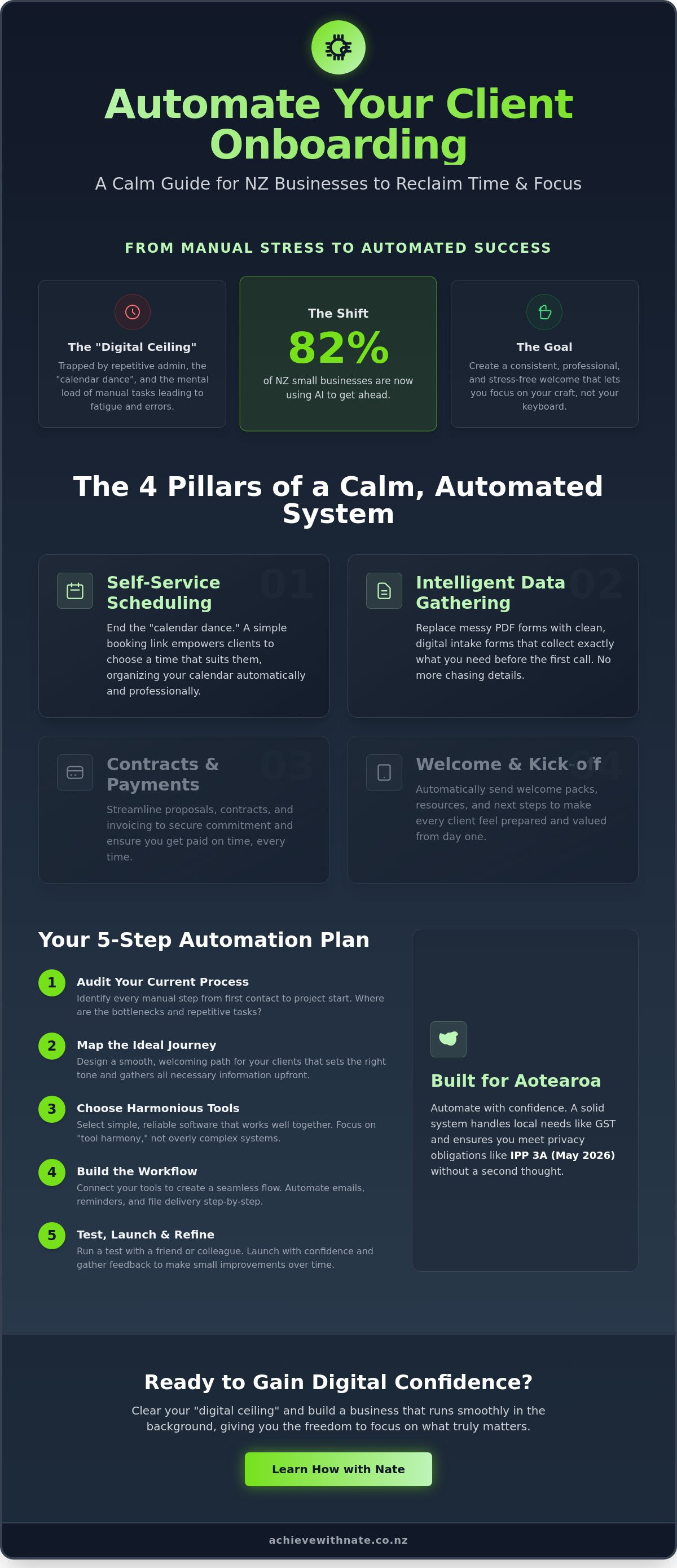
Building a supportive system for your business is like building a house. You need a solid foundation so everything else stays level. When you look at how to automate client onboarding nz, it helps to break the process down into four simple pillars. These pillars work together to hold up your business. They ensure you don't have to carry the weight of every single task yourself. By setting these up, you create a path for your clients that feels clear, professional, and very welcoming.
This approach is not about making your business feel like a machine. It is about using technology to protect your time and your energy. Following customer onboarding best practices means you are looking after the relationship from the very first second. You are removing the friction that often makes new projects feel stressful for both you and the person you are helping.
Pillar 1 & 2: Scheduling and Data
The first pillar is self-service scheduling. We all know the "calendar dance" where you send five emails just to find one hour that works. Using a simple booking link changes everything. It lets your clients choose a time that suits their own schedule. This simple shift is a core part of Business Workflow Optimization. It removes the back-and-forth and lets you wake up to a calendar that is already organized for you.
The second pillar is information gathering. Instead of sending messy PDF forms that are hard to fill out, you can use digital intake forms. These forms collect exactly what you need before the first call. You won't have to chase people for missing details later. It makes the start of the work feel light and focused. If this feels like a big jump, a bit of one-on-one digital coaching can help you get these forms set up perfectly.
Pillar 3 & 4: Contracts and Welcoming
The third pillar covers your legals and finance. Electronic signatures make it easy for clients to say "yes" right from their phones. You can set your system to send the contract and the first invoice automatically. This means you get paid faster and your legal protections are always in place. It's a reliable way to handle the "business" side of things without it feeling cold or difficult.
The final pillar is the warm welcome. As soon as the contract is signed, your system can deliver a "Welcome Pack." This might be a simple guide on what happens next or a helpful video. You can even use AI to help draft these messages so they feel personal and kind. This immediate response gives your clients confidence. They know they are in good hands, and you haven't had to lift a finger to reassure them.
Choosing the Right Tech Stack for Aotearoa
When you look at how to automate client onboarding nz, you might feel like you need a degree in computer science. You don't. In fact, having too many tools often leads to digital clutter that causes more stress than it solves. We always aim for "Tool Harmony." This means choosing a few high-quality tools that work together in a simple, quiet way. You want software that feels like a supportive friend, not a demanding boss who keeps asking for updates.
For most of us in New Zealand, the heart of our business is Xero. It is the "Kiwi Core" for a reason. It handles our GST and talks to our local banks without a fuss. Starting your automation journey here makes sense. It is a platform you likely already know and trust. If you are worried about the cost of setting up new systems, the NZ Government AI Advisory Pilot is a fantastic resource. It was designed to help small businesses like yours harness new technology with co-funding support. This can be a great way to fund your transition to a more efficient way of working.
The Starter Pack: Low-Cost, High-Impact
You do not need a complex CRM system right away. A simple starter pack often works best for maintaining your peace of mind. We recommend starting with these basics:
Calendly: This handles your scheduling. It has a great free version that removes the back-and-forth of booking meetings.
Typeform or Google Forms: These provide a clean, non-threatening way for clients to share their details. They look professional and are very easy for your clients to use on their phones.
Stripe or Xero: These tools handle your payments. This ensures you get paid without the awkward follow-up emails, making the start of your project feel much lighter.
Connecting the Dots with Automation
Once you have your tools, you need a way to make them talk to each other. This is where Zapier comes in. Think of Zapier as the "glue" for your business. It connects your apps so you do not have to copy and paste data by hand. For example, you can set up a "Zap" so that when a new client fills out your intake form, a new contact is automatically created in Xero. It is a digital assistant that never sleeps. Using Zapier is a key step in learning how to automate client onboarding nz effectively. It handles the boring bits so you can stay focused on the human side of your work. If the tech still feels a bit daunting, our AI support and integration services can help you get these pieces talking perfectly.
Your 5-Step Guide to Automating Onboarding Without the Stress
Taking the first step toward a more efficient business can feel a little bit like standing on the edge of a cold lake. You know the water will be refreshing once you are in, but that initial dip feels daunting. It is completely normal to worry about "breaking" the system or losing that personal touch your clients love. Learning how to automate client onboarding nz is a journey of small, manageable steps. You don't have to change everything today. We find that a steady, unhurried approach is the best way to build digital confidence without the late-night stress.
Step 1 & 2: Auditing and Mapping
We recommend starting away from the computer. Grab a pack of Post-it notes and find a clear space on your wall. Write down every single thing you do from the moment a client says "yes" to the moment you start the work. This "Post-it Note" method helps you visualize your workflow in a way that isn't threatening. You will likely see "friction points" where clients often drop off or where you feel most stuck. If you want to dive deeper into how these tools fit your specific needs, our AI Training for Small Business NZ guide offers a stress-free look at what is possible.
Once your current process is on the wall, map out the "Ideal Journey." Ask yourself how you want your client to feel during this time. Do you want them to feel supported? Informed? Excited? By focusing on the emotional state of your client, you ensure that your automation stays human. You are building a bridge that makes their experience better, not just faster.
Step 3, 4 & 5: Building and Testing
Now it is time to build your "Minimum Viable System." Follow the "One-at-a-time" rule. Don't try to automate your whole business in one afternoon. Start with just one piece, like your scheduling or your intake form. When you have one piece working, you will feel a sense of empowerment that makes the next step easier. It is about incremental progress, not overnight perfection.
Before you send your new system to a real client, run a "Ghost Test." Ask a mate or a trusted colleague to run through the process as if they were a new customer. This helps you catch any broken links or confusing bits in a safe, criticism-free environment. Finally, once you launch, set a "Review Date" for one month from now. This is your chance to check in and see if the automation still feels like "you." You are always in control of the tech; the tech is never in control of you. If you would like a helping hand to get started, you can book a Digital Productivity Audit to see exactly where your time is going.
Gaining Digital Confidence: Moving Forward with Nate
Starting something new is often the hardest part. Even when you know the benefits, technology can feel like a mountain that is too steep to climb. It is completely okay to feel a bit hesitant. You might worry that you will lose your personal touch or get lost in a complex setup. Learning how to automate client onboarding nz doesn't have to be a solo mission. Having a local guide who understands our specific market makes all the difference. We want your business to run smoothly so you can get back to enjoying your life here in Aotearoa.
My approach is centered on one-on-one digital coaching. I believe that the person behind the screen is far more important than the software itself. We work together to find the right balance for your specific needs. This isn't about being a high-tech authority. It is about neighborly kindness and practical, hands-on help. When we look at how to automate client onboarding nz together, we focus on building your digital confidence at a pace that feels right for you.
Why a "Done-With-You" Approach Works Best
Many people have a quiet fear that they might "break the internet" if they click the wrong button. You are not alone in that feeling. With my business workflow optimization, we move past that fear together. We don't just hand you a manual and walk away. We build your system side-by-side. This ensures the workflows fit your unique personality and your way of doing things. You get the benefit of ongoing support. You are never left alone to stare at a screen you don't understand. We make sure you feel seen, heard, and fully supported.
Ready to Reclaim Your Time?
If you are ready to create a stress-free welcome for your clients, let's have a low-pressure chat. You can fill out our expression of interest form as a simple first step. It is a quiet, no-stakes way to start your journey toward a lighter workload. We can talk about your goals and see how a digital productivity audit might help you find more space in your day. Remember, technology is just a tool to help you do what you do best. You are always the driver. By taking incremental, manageable actions, you can build a business that truly looks after you and your clients.
Your Path to a Lighter Workday
You now have a clear map to move from manual admin to a system that looks after itself. We have explored how simple tools can remove the friction that often causes late-night stress. By building your pillars one at a time, you ensure your business stays human while becoming much more efficient. Learning how to automate client onboarding nz is not just a technical change. It's a vital investment in your own well-being and the happiness of your clients.
If the steps still feel a little daunting, you don't have to walk this path alone. I provide personalized one-on-one technology coaching designed specifically for the needs of our local small businesses. As a specialist in NZ small business workflows, I offer patient, non-judgmental support to help you find your footing. We can work together to create a system that feels right for your unique way of working. Let’s build your calm business workflow together; fill out an Expression of Interest here. You have everything you need to create a business that serves you. Taking incremental, manageable actions is the best way to build a business that truly supports the life you want to lead.
Frequently Asked Questions
Is automated onboarding too impersonal for a small NZ business?
Automation actually gives you more space to be personal. By letting a tool handle the repetitive paperwork, you have more energy to focus on the human connection. You can still write your own warm messages and voice notes. The tech just handles the "boring bits" like scheduling and data entry so you don't have to.
What is the cheapest way to start automating my client onboarding?
You can start for free by using basic versions of tools like Google Forms and Calendly. These simple apps allow you to collect information and book meetings without any initial cost. Learning how to automate client onboarding nz doesn't require a big budget. It just requires a few small, manageable steps to get your first workflow running.
Do I need to be a "tech person" to set up these automations?
No, you definitely don't need to be an expert. Most modern tools are designed for regular people who want to save time. They use simple buttons and clear menus rather than complex code. If you feel a bit stuck, our one-on-one digital coaching provides a patient, non-judgmental environment to help you find your footing.
How much time can I actually save by automating my onboarding?
You can reclaim several hours of your week. A 2024 study of the Digital Boost program showed that 23% of users spent significantly less time on their daily tasks after adopting digital tools. In specific industries like property management, automation is estimated to cut administrative workloads by 40% to 60% as of May 2026.
Will my clients find automated forms and links confusing?
Most clients find clear, digital paths much easier to follow. They appreciate knowing exactly what to do next without waiting for a manual email. As long as you use plain language and simple links, your clients will feel looked after. It creates a professional first impression that builds trust from the very start.
What happens if the automation fails or a link breaks?
You are always in control of your business. If a link doesn't work, you can simply send a manual email while you fix the issue. We always recommend running a "Ghost Test" with a friend before going live. This helps you catch any small errors in a safe environment before a real client sees them.
Can I still send personal messages if I have an automated system?
Yes, you can and should keep your personal touch. Automation is just a supportive tool, not a replacement for your personality. You might automate the contract and the invoice, but then send a personal welcome video once the work begins. This balance keeps your business efficient while remaining deeply human.
Which tools are best for New Zealand GST and tax compliance?
Xero is the gold standard for our local market. It is built specifically to handle New Zealand GST and tax rules with ease. When you learn how to automate client onboarding nz by connecting your forms to Xero, your finance and compliance stay accurate. This removes the stress of manual data entry and keeps your records tidy for the IRD.


Comments