


How to Build Meaningful Digital Connection: A Stress-Free Guide for Kiwis

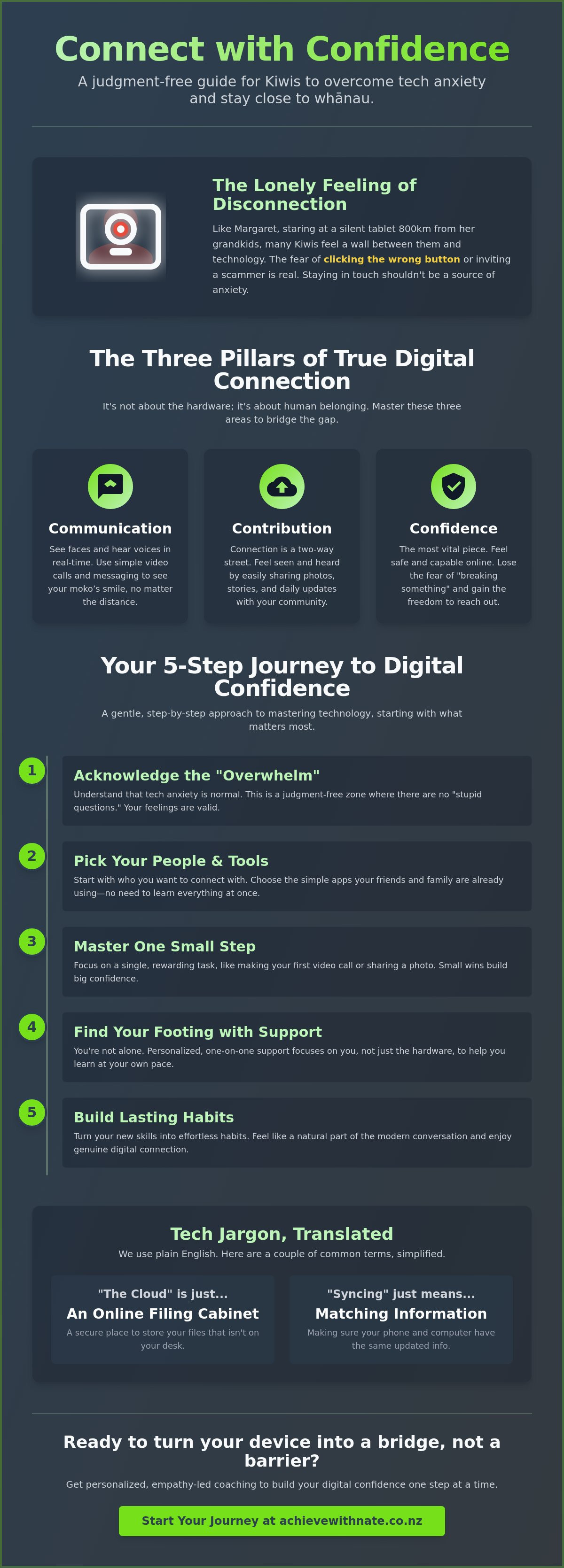
Last Sunday, 72 year old Margaret sat in her Christchurch lounge, staring at a silent tablet while her grandkids celebrated a birthday 800 kilometres away in Auckland. She desperately wanted to join the party, but the fear of clicking the wrong button or accidentally inviting a scammer kept her screen dark. It's a lonely feeling when the tech meant to bring us together feels like a wall instead. You likely agree that staying in touch shouldn't feel like a chore or a source of constant anxiety. For many everyday Kiwis, the dream of a seamless digital connection is often overshadowed by confusing jargon and the pressure to keep up with a fast-moving world.
This guide is here to change that. I'll show you how to bridge the gap between technology and a real human touch without any of the tech-induced stress. You'll learn to stay connected with your whānau and friends using simple, low-pressure methods that keep you safe and in control. We will walk through the small steps to video call your grandkids with confidence, manage your emails without the worry, and finally feel like a natural part of the modern conversation. No jargon, no pressure; just one small step at a time.
Key Takeaways
Learn why tech anxiety is a normal part of life today and how to move past the "overwhelm" in a judgment-free way.
Explore how to foster a genuine digital connection with your whānau across Aotearoa without the technical headaches.
Get practical advice on picking the best tools for your needs, focusing on the simple apps your friends and family are already using.
Discover a gentle, five-step approach to mastering technology one small step at a time, starting with the people who matter most.
See how personalized, one-on-one support can help you find your footing and build lasting digital confidence at your own pace.
Table of Contents What Does Digital Connection Really Mean for Everyday Kiwis? Overcoming the "Digital Divide": Why Tech Anxiety is Normal Choosing the Right Tools to Stay Connected with Whānau How to Build Your Digital Connection in 5 Simple Steps Finding Your Footing: Personalized Tech Support in Aotearoa
What Does Digital Connection Really Mean for Everyday Kiwis?
You might feel like technology is a hurdle you have to jump every day. For many of us in Aotearoa, a screen can feel cold or confusing. But being truly linked to others is simply the ability to use online tools to maintain your real-world relationships. It's not about the hardware; digital connection is a tool for human belonging.
This matters more than ever because our whānau are often spread across the motu. Whether your loved ones are in Auckland or Bluff, staying close shouldn't feel like a chore. There is a big difference between just being "online" and being truly "connected." Being online means you have an internet plan, but being connected means you have the digital confidence to use it. By understanding the digital divide, we can see that the gap isn't just about who has a computer; it's about who feels capable using one. We want to move away from the idea that technology is a barrier to human warmth. It's actually a bridge.
The Three Pillars of Personal Connection
Communication: This is about more than just text. It's using tools like video calls and messaging to see faces and hear voices. It's seeing your moko’s smile in real time from hundreds of kilometers away.
Contribution: Connection is a two-way street. It's the joy of being able to share photos, stories, and daily updates with your community. It helps you feel seen and heard in your social circles.
Confidence: This is the most vital piece. It's feeling safe and capable while you're navigating the digital landscape. When you lose the fear of "breaking something," you gain the ability to reach out.
Beyond the Hardware: Why the Human Touch Matters
It's easy to get caught up in talk about gigabytes or software updates. But remember that technology is just the bridge; the people on either side are what count. You don't need to be a tech genius to stay in touch with your friends and family. You just need a bit of guidance that speaks your language and respects your pace.
If you're feeling overwhelmed, a digital connection coach NZ can help you find the right tools for your specific needs. They focus on the human side of the screen. They help you find the simplest way to reach your goals without the stress. No jargon, no pressure; just a helping hand to get you where you want to be. One small step is all it takes to turn a confusing device into a way to stay close to the people who matter most.
Overcoming the "Digital Divide": Why Tech Anxiety is Normal
Life in Aotearoa moves fast. By 2026, the digital world has shifted yet again, making it easy to feel like you are standing still while everything else zooms ahead. If you feel a bit lost, you aren't alone. It's not a lack of ability. It's simply the speed of change. This feeling of "tech anxiety" is a common experience for many everyday Kiwis. Whether it's a new update on your phone or a confusing government website, the pressure to stay updated is real. This is a "no judgement" zone. There are truly no stupid questions. Learning new tools is a journey that shouldn't feel like a chore.
The National Library of New Zealand identifies the four dimensions of digital inclusion as a way to understand this gap. These dimensions include motivation and trust. If you don't trust the technology or feel motivated because it seems too complex, you won't want to get started. Traditional IT support often focuses on fixing a broken screen or a slow laptop; empathy-led coaching is different. It focuses on the person holding the device. It's about building your confidence, not just your hardware. We want to help you foster a genuine digital connection with your loved ones and your community without the stress.
Breaking Down the Jargon Barrier
Technical manuals are often written by experts for other experts. They fail the everyday user because they use confusing "computer-speak" that feels like a foreign language. Let's simplify things. "The Cloud" is just "online storage," like a digital filing cabinet that isn't sitting on your desk. "Syncing" just means making sure two devices have the same information. Understanding these terms is the first step toward feeling capable. Mastering device and email basics training is your first hurdle. Once you clear that, the rest of the digital world starts to make sense. We use plain English to ensure you feel empowered, not patronized.
The Psychological Safe Space for Learning
The fear of "I might break it" is the most common hurdle for many seniors and beginners. You won't break it. Modern devices are quite resilient. With simple safety checks and a patient mentor, you can explore your tablet or laptop without worry. This safety is vital for building a digital connection that lasts. You should always learn at your own pace without any pressure to perform or "keep up" with a group. Having someone who listens and understands your specific frustrations makes all the difference. If you want to see how easy it can be, a friendly chat is a great way to start your journey toward digital confidence.
Choosing the Right Tools to Stay Connected with Whānau
Finding a way to build a digital connection shouldn't feel like a chore. It's about finding the right bridge to reach the people you love. Most everyday Kiwis feel a bit of pressure to learn every new app, but the secret is much simpler. You only need to learn what your whānau is already using. If your grandkids are always on one specific app, that's the only one you need to worry about. We want technology to bring you joy, not a headache. Keeping your digital toolkit small makes it much easier to manage. One or two reliable tools are plenty. No jargon, no pressure.
Video Calling Made Simple
Seeing a face makes a world of difference. It's a powerful way to feel like you're in the same room, even if you're at opposite ends of Aotearoa. Here are the three most common choices for staying in touch:
FaceTime: This is perfect if you and your family all use iPhones or iPads. It's built-in and starts with just one tap.
WhatsApp: This is a fantastic all-rounder. It works on almost any smartphone and is very popular for free video calls over home Wi-Fi.
Zoom: Save this one for the big events. It's great for family birthdays where 10 or 20 people want to join the conversation at once.
For a stress-free call, try to sit facing a bright window so your face is clear. Check that your thumb isn't covering the microphone at the bottom of the phone. Most importantly, don't worry if you struggle to find the hang-up button the first few times. We've all been there. A 2021 report on digital inclusion showed that regular video calls can reduce the risk of social isolation for retirees by as much as 30 percent. It's well worth the small effort to learn.
Social Media and Messaging for Beginners
Social media doesn't have to be a scary place. You can use platforms like Facebook or Instagram purely as a digital photo album. It's a lovely way to see updates from the family without needing to pick up the phone every day. Group chats are another wonderful tool. They act like a digital dinner table where everyone can share a quick joke or a photo of their lunch. It keeps you in the loop with the small, daily moments of whānau life without any fuss.
It's okay to set some rules for yourself. You don't need to check your phone every time it pings. Digital confidence means being in control of the tech, not letting the tech control you. If it starts to feel like a distraction, it's perfectly fine to put the device in another room for the evening. We're taking this one small step at a time to ensure your digital connection remains a source of genuine happiness.
How to Build Your Digital Connection in 5 Simple Steps
Building a digital connection shouldn't feel like climbing Mount Cook in jandals. It's about finding a rhythm that works for you without the stress. Most Everyday Kiwis feel a bit of "tech-anxiety" when trying something new. That's completely normal. You can move at your own pace by following these five gentle steps.
Start with a "Why": Identify one specific person you want to talk to more often. Maybe it is a grandchild in London or a sister in Napier. When you have a face in mind, the technology feels like a bridge rather than a barrier.
Pick one tool: You don't need to learn every app on the market. If your family uses WhatsApp, focus only on that. Master one tool before even looking at another. No jargon, no pressure.
Book a "Clarity Call": You don't have to struggle alone. Getting professional advice ensures your settings are correct from day one. It saves hours of frustration later.
Practice in a safe environment: Try out your new skills with a patient friend or a coach first. This is a no-judgment zone where it is okay to push the wrong button.
Celebrate the small wins: Did you send a heart emoji? Did you successfully unmute your mic? These are huge victories for your digital confidence.
Setting Up Your Digital Environment
Your device should be your friend, not a puzzle. Start by organizing your home screen. Move your main connection apps to the front page so they are easy to find. Reliability is also key. In New Zealand, roughly 87 percent of households now have access to Ultra-Fast Broadband (UFB). If your video calls are blurry, check if your plan is up to date. Finally, keep things safe. Use a simple passcode and never share your private passwords with strangers online.
The One Small Step Philosophy
Short bursts of learning are the secret to success. Spending 15 minutes practicing a video call is far more effective than a three-hour marathon that leaves you feeling drained. You will soon find you can troubleshoot the easy stuff, like turning on your Wi-Fi, all by yourself. Digital mastery is a journey of small, consistent steps. It is about progress, not perfection. You are becoming more capable every single day.
If you're feeling stuck and want a helping hand to get started, Nate is here to walk you through it. Book your free Clarity Call today and let's build your confidence together.
Finding Your Footing: Personalized Tech Support in Aotearoa
Sometimes, trying to learn technology in a big group feels like trying to catch a moving train. You might feel like you're holding others back, or perhaps the instructor moves too quickly through the steps. This can make building a genuine digital connection feel more like a chore than a joy. For everyday Kiwis, the secret isn't more information; it's the right kind of support. Group settings can be intimidating, especially when you're worried about asking a "silly" question. One-on-one coaching changes that dynamic entirely, turning a stressful lesson into a calm conversation.
Working with a mentor allows you to focus on what actually matters to your life. You don't need to learn every single app or setting. You just need to master the ones that bring value to your day. Whether it's staying in touch with whānau or managing your own admin, the goal is to make you feel capable and independent. This personalized approach ensures that the pace is always yours to set.
Personalized Support vs. General Help
A digital confidence coach NZ doesn't use a one-size-fits-all manual. Instead, we create a custom plan that respects your specific "tech history." General help often ignores the fact that everyone starts from a different place. We focus on the tasks you want to do, like video calling or safe online shopping. This relationship-based learning means you have a steady hand to guide you through the bumps. No jargon, no pressure. Just real progress.
Your Free Clarity Call
Taking that first step can feel a bit daunting, so we keep it simple. A free clarity call is a low-stakes way to talk about what's frustrating you. There's no need to prepare anything complicated. Just bring your questions, because there truly are no bad ones. We'll chat about your goals and see how we can reach them together. It's a friendly, neighborly way to start your journey toward digital independence without any stress.
As we head toward 2026, the world will keep changing, but you don't have to feel left behind. A strong digital connection helps you stay part of the conversation with friends and family. It's about finding your footing at your own speed. You deserve to feel confident every time you pick up your device. Let's take that first small step together and make technology work for you, not the other way around.
Take Your Next Step Toward Digital Confidence
Building a meaningful digital connection shouldn't feel like a chore. It's about finding simple ways to stay close to your whānau and feel part of our modern world. You've seen that tech anxiety is a common experience for many of the 5.2 million people currently living in Aotearoa, and choosing the right tools is the first step toward feeling more capable. By following a few clear steps and seeking support that fits your pace, you can move past the frustration and start enjoying the benefits of being online.
Nate provides a patience-first approach designed specifically for everyday Kiwis. There's no jargon and a firm no-pressure guarantee, ensuring you feel respected regardless of your current skill level. If you're ready to stop feeling overwhelmed and start feeling in control, help is just a conversation away. Book your Free 15-Minute Clarity Call with Nate today to discuss your goals in a calm, friendly environment. You've got this, and we're here to walk through it with you one small step at a time.
Frequently Asked Questions
What is the easiest way for a senior to stay connected with family?
Video calling apps like WhatsApp or FaceTime are often the simplest entry points for everyday Kiwis. These tools allow for a face-to-face digital connection that feels much more personal than a standard phone call. Many people find that using a tablet is easier than a small phone screen because the buttons are larger and the layout is much clearer for tired eyes.
Is it safe for me to use video calling apps on my phone?
Yes, video calling is very safe when you use reputable apps like WhatsApp or Skype that use end-to-end encryption. According to Netsafe NZ, keeping your apps updated is the best way to stay secure. Just make sure you only accept calls from people already in your contact list. This keeps your experience private, secure, and completely stress-free.
How much does a digital confidence coach cost in New Zealand?
Professional coaching rates in Aotearoa vary, but you can generally expect to pay between NZ$60 and NZ$150 per hour for private sessions. Some community organizations offer free workshops, while specialized services like Achieve With Nate focus on personalized, one-on-one support. It's all about finding the right fit for your specific pace and your personal budget.
Can I learn to use technology if I have never used a computer before?
You absolutely can learn, no matter your starting point or your age. Learning is a journey that happens one small step at a time; it's never too late to start. Many people who once felt tech-allergic now use their devices daily to check the news or chat with grandkids. We start with the basics, so you never feel rushed or judged.
What is the best internet connection for video calling in NZ?
A Fibre connection is the gold standard for a stable digital connection in New Zealand. As of 2024, Chorus reports that Fibre is available to 87 percent of Kiwis. If you can't get Fibre at your address, a 4G or 5G wireless broadband plan is a reliable second choice. These options ensure smooth video calls without the frustration of the screen freezing.
How do I avoid online scams while trying to stay connected?
The best rule is to never click on links in unexpected messages or share your passwords with anyone. In 2023, Kiwis reported over NZ$26 million in losses to scams, so being cautious is a very smart move. If a message feels urgent or a bit off, simply close it. Talk to a trusted friend or your coach before you do anything else.
Do I need a brand-new device to get started with digital connection?
You don't need the latest, most expensive gadget to get started today. Most smartphones or tablets from the last 4 years will work perfectly for video calls and emails. If your device can still run the latest software updates, it's safe and capable. We can look at what you already own and see if it meets your needs before you spend any money.
What is the first step to take if I feel overwhelmed by technology?
The first step is to take a deep breath and remind yourself that it's okay to feel this way. Technology moves fast, but you don't have to keep up with everything at once. Reach out for a friendly chat or a Free Clarity Call to talk about what you want to achieve. No jargon, no pressure; just a simple conversation to help you find your footing.


Comments