


How to Organize Digital Photos: A Stress-Free Guide for Kiwis

Last summer, you likely captured a perfect sunset over the Coromandel. But when you went to find it recently, you were met with a "Storage Full" alert and a mountain of unsorted files instead. It's a heavy feeling when your most precious memories feel trapped behind a screen. You might even worry that one wrong click could delete years of family history forever.
You aren't alone in this. Many Kiwis feel overwhelmed by the sheer volume of images sitting on their devices. This guide will teach you how to organize digital photos nz style; it is a simple, step-by-step way to clear the clutter without the tech-induced headache. You deserve a photo library that brings you peace of mind rather than a sense of stress.
We will explore how to pick the right storage for your needs, how to ensure your backups are secure under the May 2026 privacy standards, and how to manage new photos with confidence. No matter how fast the digital world moves, you can find your footing and protect your life's story one manageable step at a time.
Key Takeaways
Understand why your photo library feels overwhelming and how to start fresh with a kinder, low-pressure perspective.
Learn a simple three-step method for how to organize digital photos nz style to reclaim your phone storage and peace of mind.
Explore the best cloud storage options for Kiwis to ensure your memories are safe, private, and easy to access from any device.
Create a calm habit with a ten-minute monthly ritual that keeps your digital life clutter-free and makes searching for specific photos effortless.
Table of Contents
Why Digital Photo Overwhelm Happens (and Why It's Not Your Fault)
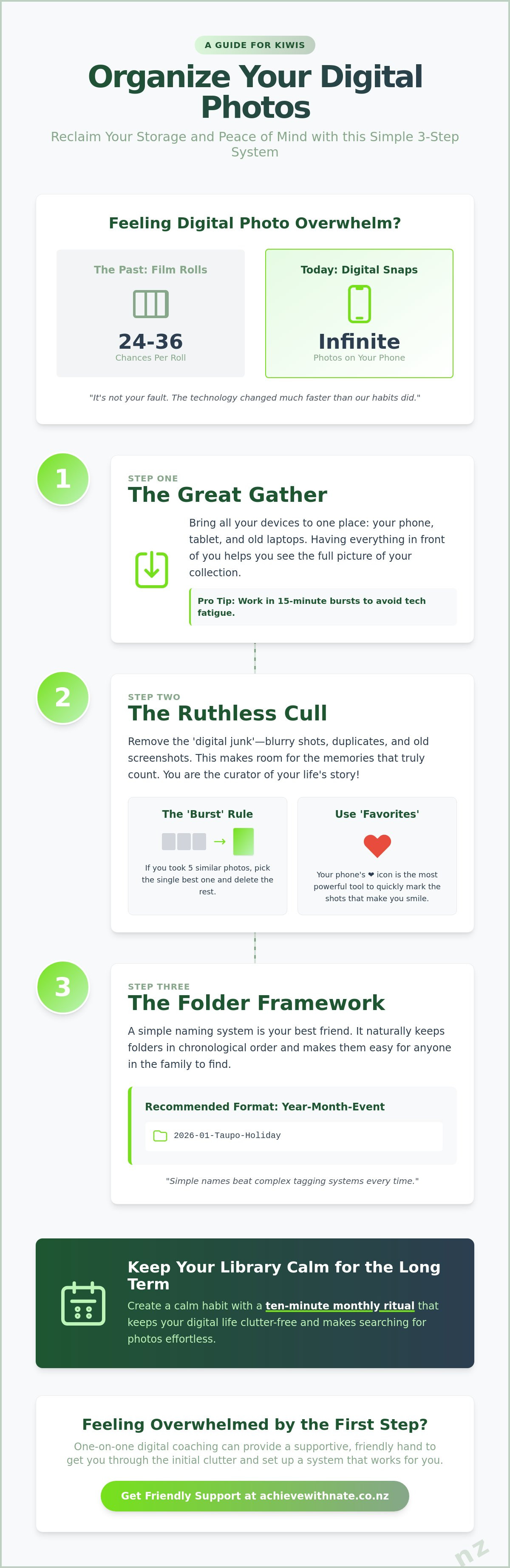
Remember the days of dropping a film canister at the local chemist? You had 24 or 36 chances to get the shot right. Today, our phones let us take infinite snaps without a second thought. It is a wonderful gift, but it also creates a digital mountain that feels impossible to climb. If you feel stuck looking at a full iCloud or Google account, please know it is not your fault. The technology changed much faster than our habits did.
Learning how to organize digital photos nz style isn't about becoming a computer expert. It is simply the act of making your favorite memories easy to find again. Think of it like tidying a physical shoebox of old prints. You don't need a perfect system on day one. You just need a little bit of progress to feel lighter and more in control of your library.
To help you visualize a better way to manage your files, watch this helpful video on simple folder structures:
Many people use image organizer software to help with this task, but the most important step is always emotional. It is about giving yourself permission to let go of the digital clutter that doesn't matter so you can focus on what does.
Identifying Your 'Digital Junk' Drawer
Most of our storage is taken up by what we call digital junk. This includes accidental pocket photos, blurry shots of a moving car, or screenshots of grocery lists from three years ago. When we keep every single file, the truly special moments get buried. Clearing out these extras makes it much easier to see the photos that actually tell your life story.
The Emotional Benefit of a Tidy Library
A clean library is a gift to your daily wellbeing. It stops those frustrating storage notifications that always seem to pop up at the worst times. More importantly, it gives you confidence. There is a deep sense of joy in being able to pull out your phone and show a grandchild a photo of their parents in just a few seconds. It turns your device from a source of anxiety back into a treasure chest of memories.
A Simple 3-Step System to Organize Your Photos
Starting is often the hardest part. We tend to put this task off because it feels like a marathon. Instead, think of it as a series of short, gentle walks. You can learn how to organize digital photos nz by breaking the process into three manageable stages. Try working in 15-minute bursts while you enjoy a cuppa. This keeps your energy up and prevents the heavy feeling of tech fatigue from taking over.
Step 1 is the Great Gather. Bring all your devices to one table. This includes your current phone, your tablet, and even that old laptop sitting in the spare room. Having everything in one place helps you see the full picture of your collection. It stops the worry that a precious memory is hidden away on a device you've forgotten about.
Step 2 is the Ruthless Cull. This is where you remove the digital junk we identified earlier. It might feel a bit scary to hit delete, but you are actually making room for the memories that truly count. You are the curator of your own life story.
Step 2: How to Cull Without Fear
Use the 'Burst' Rule for quick decisions. If you took five photos of the same sunset over the Tasman Sea, pick the single best one and delete the other four. The 'Favorites' heart icon on your phone is your most powerful tool to mark the shots that truly make you smile. If you find the gathering process overwhelming, one-on-one digital coaching can provide a supportive hand to get you through the initial clutter.
Step 3: Naming Folders for Easy Searching
Step 3 is the Folder Framework. A simple naming system is your best friend. We recommend the 'Year-Month-Event' format, such as 2026-01-Taupo-Holiday. This naturally keeps your folders in chronological order. Following a digital preservation guide can help ensure these files stay safe for the next generation. Simple names beat complex tagging systems because they are easy to maintain when life gets busy. They make it easy for anyone in the family to find what they need without a struggle.
Choosing the Right Digital Home in New Zealand
Once you have gathered your memories, you need a safe place to keep them. Many Kiwis feel nervous about 'The Cloud'. Put simply, the cloud is just a very secure computer in a data center that keeps your photos safe for you. It means if you lose your phone while walking the dog at the beach, your photos aren't gone forever. You might worry about what happens if you stop paying for storage. Usually, your photos stay safe; you just won't be able to add new ones until you clear space or restart your subscription.
For most of us, picking a provider comes down to what phone we already have. Apple iCloud is the easiest choice if you love your iPhone. It works quietly in the background without you needing to do anything. Google Photos is a fantastic alternative, especially if you want to share albums with family members who use different types of phones. Microsoft OneDrive is another solid option, particularly if you already use their software for work or home admin.
iCloud vs. Google Photos: Which is Easier?
Choosing between these tools can help you master your smartphone and tablet more effectively. iCloud is built into your Apple devices, making it the most seamless 'set and forget' option. Google Photos offers powerful search tools that help you find 'Grandma' or 'Christmas 2025' in an instant. Both are excellent ways to learn how to organize digital photos nz without feeling like you are fighting the technology.
Managing Your Storage and Your Budget
Before you sign up for a plan, check how much space you actually need. As of May 2026, Apple offers 50GB for just NZ$1.69 a month. This is often plenty for a modest collection. If you have a massive library, Microsoft 365 Personal provides 1TB of storage for NZ$17.00 a month. You can use your Xtra mail or Gmail account to keep an eye on storage alerts. This ensures you never miss a notification that your 'digital home' is getting full.
While the cloud is great, we always recommend a local backup too. Keeping a physical hard drive in your drawer at home provides extra peace of mind. Since May 1, 2026, New Zealand has stricter privacy rules about how your data is handled, which makes using reputable providers even more important. However, a physical drive is a reliable safety net you can hold in your hand. If you feel stuck choosing the right plan for your budget, a digital productivity audit can help you find the best fit for your needs.
Keeping Your Digital Library Calm for the Long Term
Organizing your memories is a beautiful start, but keeping them tidy is what brings lasting peace. You don't need to spend hours on this every week. Instead, think of it as a gentle monthly check-in. This ongoing care is a great way to build digital confidence. It proves that you are in charge of your devices, not the other way around.
Modern technology has a few tricks to help you stay organized without the hard work. Both Apple and Google use clever AI search features. You can simply type 'dog' or 'beach' into your search bar to find photos instantly. It is like having a helpful assistant who knows exactly where every memory is hidden. Once you've cleared the clutter, celebrate your success. Order one physical print or a photo book from a local shop. Holding a real photo in your hands is a wonderful reward for your effort.
The 'Once a Month' Maintenance Habit
We recommend an 'End-of-Month' ritual. Set a recurring reminder on your phone to spend just 10 minutes deleting the junk from the past 30 days. Use a 'One In, One Out' rule for things like screenshots or temporary photos of grocery lists. This small habit keeps your library calm and prevents that old feeling of overwhelm from creeping back in. It is the secret to how to organize digital photos nz for good.
Getting One-on-One Help When You're Stuck
Sometimes the tech still feels a bit heavy, and that is perfectly okay. You don't have to do this alone. If you feel stuck mid-process or just want someone to walk through it with you, Nate offers personalized digital coaching. We can sit down together, side-by-side, and sort through your library at your own pace. There is no judgment here, just a supportive hand to help you find your footing in the digital world.
Ready to Reclaim Your Favorite Memories?
You now have a clear path to turn that digital mountain back into a collection of cherished moments. By using the simple gather, cull, and folder method, you can finally clear the clutter from your devices. Whether you choose iCloud or Google, having a secure digital home gives you the peace of mind you deserve. Learning how to organize digital photos nz is a journey of small, manageable steps. You don't have to do it all in one afternoon.
If the technology still feels a bit daunting, remember that help is just a conversation away. You can book a stress-free session to organize your photos with Nate. I provide patient, non-judgmental coaching for all levels with local NZ support tailored specifically to your devices. Every session comes with a no-stress guarantee to ensure you feel supported and seen throughout the process.
Take your time with this. Your life's story is worth the effort. You are more than capable of mastering these tools and protecting your memories one step at a time.
Frequently Asked Questions
Is it safe to store all my photos in the cloud?
Yes, storing your photos in the cloud is very safe, especially with the extra protections provided by New Zealand's Privacy Amendment Act 2025. Since May 1, 2026, new regulations ensure that organizations must be transparent about how they handle your personal information. Using a reputable provider means your memories are protected by professional security systems that are much stronger than a simple password on your home computer.
What happens to my photos if my phone breaks or gets lost?
Your photos will stay perfectly safe as long as you have a backup system running in the background. Because your images are stored securely online, they aren't tied to the physical life of your phone. This is the main reason why learning how to organize digital photos nz is so important. You can simply log into your account from a new device and all your cherished memories will be right there waiting for you.
Do I need a special computer to organize my digital photos?
You don't need any expensive or high-tech equipment to manage your photo library. Most modern smartphones, tablets, and basic laptops are more than capable of doing the job. The goal is to use the simple tools you already own more effectively. You can create a clean, searchable library using the standard apps that are already on your device, which helps keep the process low-pressure and easy to manage.
How can I share my organized albums with family in NZ or overseas?
Sharing your memories is very simple once you have a folder system in place. Most cloud services allow you to create a shared album and invite family members using their email address. Whether your loved ones are just down the road or living on the other side of the world, they can see your latest photos instantly on their own screens. It is a wonderful way to keep the family connected without any technical struggle.
Can someone help me organize my photos if I'm not good with technology?
Yes, you can absolutely get a helping hand if the task feels too heavy. Many people find that working side-by-side with a patient guide makes all the difference. One-on-one digital coaching is designed to support you at your own pace in a criticism-free environment. We can walk through the steps together until you feel confident and empowered to manage your digital library on your own, ensuring your family history is preserved forever.


Comments