


Microsoft Copilot NZ: A Minimalist Guide for Everyday Kiwis (2026)

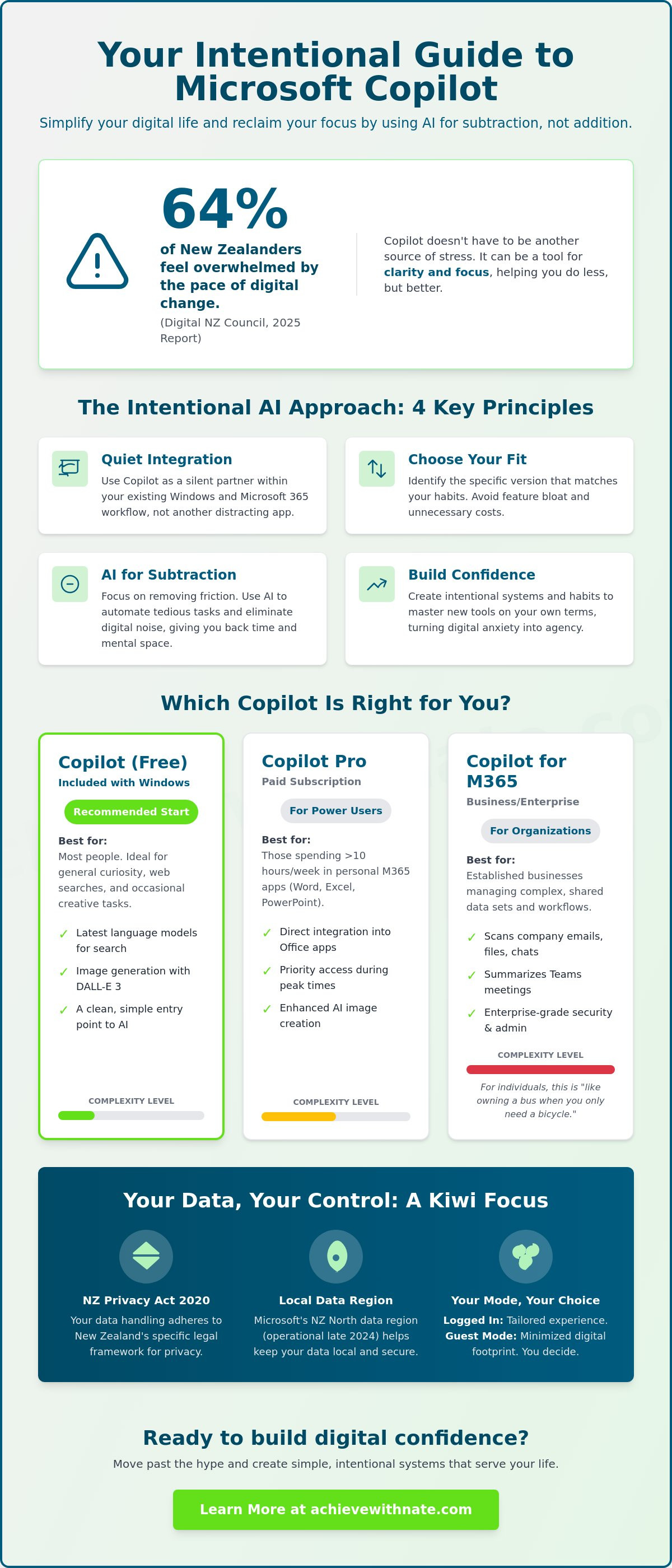
What if the most powerful way to master new technology is actually to do less with it? You likely feel the pressure of constant updates and the noise of new AI tools appearing on your screen every week. A 2025 report by the Digital NZ Council found that 64 percent of New Zealanders feel overwhelmed by the pace of digital change. Using co pilot nz doesn't have to be another source of stress; it can be a tool for clarity.
I understand that feeling of digital clutter. You want systems that serve your life, not tools that add more work to your day. This guide shows you how to use Microsoft’s AI assistant intentionally to simplify your digital life and build genuine confidence. We will move past the hype to find practical ways this technology can support your personal focus and daily habits.
You'll learn exactly which version fits your needs, how to build simple systems for your daily tasks, and how to protect your privacy. We'll explore how to achieve more by focusing on the essentials and reclaiming your peace of mind in 2026.
Key Takeaways
Learn how to use Microsoft Copilot as a quiet assistant that integrates directly into your existing Windows workflow.
Identify the specific version of co pilot nz that aligns with your unique habits and avoids unnecessary digital clutter.
Discover how to use AI for subtraction, removing friction from your daily life rather than adding to the noise.
Build lasting digital confidence by creating intentional systems and habits that help you master these new tools.
Table of Contents Understanding Microsoft Copilot in the NZ Context Choosing Your System: A Roundup of Copilot Versions Intentional AI: Using Copilot Without the Digital Noise Building Digital Confidence with Copilot Coaching
Understanding Microsoft Copilot in the NZ Context
You likely already have Microsoft Copilot sitting quietly on your taskbar or within your favorite apps. It's the personal AI assistant integrated into Windows and your daily Microsoft 365 environment. This tool uses large language models to understand your intent and generate human-like text. For Kiwis, it functions as a digital bridge for everyday tasks. It replaces the cluttered experience of traditional searching with a quiet, conversational interface.
In 2026, Copilot serves as a primary tool for digital agency by allowing you to command your technology with clarity and purpose rather than being overwhelmed by it.
Using co pilot nz features means you don't have to navigate complex software alone. It helps you find the information you need without the friction of endless browser tabs. This shift is about subtraction. You remove the effort of hunting for buried files or specific settings. You gain time to focus on what actually matters in your life. It's a system designed to support your focus rather than fragment it.
The Role of AI in Aotearoa Daily Life
AI is now a common thread in the fabric of Aotearoa. You can use it to decode complex NZ legislation or navigate government services with ease. It helps bridge the digital divide for those who previously felt left behind by rapid tech changes. The experience has shifted from "searching the web" to "asking a companion." This transition allows you to move through your day with more confidence and less digital fatigue. It's about finding alignment between your goals and the tools you use.
Privacy and Security for Kiwis
Your data is handled within the NZ legal framework, specifically adhering to the Privacy Act 2020. Microsoft's investment in the NZ North data region, which became operational in late 2024, ensures more data stays local and secure. You can take simple steps to protect your information. Always check if you are in "logged in" or "guest" mode. Being logged in allows the system to learn your habits for a tailored experience. Guest mode minimizes your digital footprint. Managing these co pilot nz settings is an intentional practice that protects your peace of mind.
Choosing Your System: A Roundup of Copilot Versions
Selecting the right tool is an act of intentionality. You don't need the most expensive version of co pilot nz just because it exists. The best choice aligns with your current digital habits and your specific goals for the year. Most everyday Kiwis will find that the simplest path provides the most peace of mind without adding unnecessary financial weight.
The Free Version: Best for general curiosity, basic web search, and occasional creative tasks.
Copilot Pro: Best for power users who spend significant time in personal productivity apps.
Copilot for M365: Best for established businesses managing complex, shared data sets.
Copilot Free vs. Copilot Pro
The free version is remarkably capable for most people. It uses the latest language models to help you research topics or generate images via DALL-E 3. It's a clean, functional entry point that doesn't require a monthly commitment. You don't need to spend money to start building better systems in your daily life.
Copilot Pro is a specialized experience. It integrates directly into your personal Microsoft 365 apps like Word and Excel. The tipping point for this investment usually occurs when you spend over 10 hours a week on document creation or data analysis. If you often find yourself stuck on a blank page in Word, the Pro subscription offers a way to find momentum. It also provides priority access to servers, which means you won't face delays during peak usage times in New Zealand.
Microsoft 365 Copilot for Small Business
This version focuses on organizational data rather than personal creativity. It's designed to look through your emails, calendar, and shared files to provide context that the personal versions lack. It can summarize a 30 minute Teams meeting in seconds or find a specific invoice hidden in your Outlook history. While powerful, it adds a layer of administrative complexity that most individuals should avoid to keep their lives simple.
The NZ Government's Microsoft Agreement ensures this enterprise-grade technology is available across the public sector. This confirms that the infrastructure is mature and ready for professional use in 2026. For a sole trader or a family, however, this version often feels like owning a bus when you only need a bicycle. Keep your digital life lean and focus on tools that solve your immediate problems. If you want to refine your personal systems further, you can explore how to align your habits for better focus and clarity.
Intentional AI: Using Copilot Without the Digital Noise
Most people use technology to add more to their plates. I want you to use it to take things off. Your goal with co pilot nz is to subtract friction from your daily life. It isn't about creating more content or clutter. It's about creating more space for what matters. Use AI as a filter for the noisy modern world. Focus on three core pillars: clarity, learning, and organisation.
Simplifying Daily Communication
Dealing with large organizations can be draining. Use Copilot to draft clear, respectful letters to the MSD or your bank. It removes the emotional weight often associated with formal writing. You can also use it to summarize long news reports or dense articles. This saves you at least 15 minutes of mindless scrolling every day. It's a tool for practicing manaakitanga in your online interactions. You communicate with kindness and precision. This reduces the digital noise for everyone involved.
Learning and Problem Solving
Technology moves fast. By 2026, tech jargon can feel like a foreign language. Ask co pilot nz to explain complex terms in simple, everyday English. It acts as a patient tutor for your new digital skills. You can also use it for intentional planning instead of browsing 20 different travel blogs.
Request a quiet weekend itinerary for the Catlins or the Coromandel.
Break down the steps for setting up a new home security system.
Translate technical bank terms into plain language for better financial clarity.
This provides a structured plan in seconds. It allows you to spend less time researching and more time experiencing the beauty of New Zealand.
The Subtraction Method
The subtraction method is about finding the "one thing" that deserves your attention. Use AI to identify your core priorities for the day. It helps you automate repetitive chores like categorizing digital receipts or organizing messy file names. This reduces your total screen time. You don't need more apps or more notifications. You need better systems. A simple prompt can replace 30 minutes of manual data entry. Using AI to handle the digital noise creates more space for your offline life and the people you love.
Ready to simplify your digital systems?
Building Digital Confidence with Copilot Coaching
A tool is only as effective as your confidence to use it. Many Kiwis feel a sense of overwhelm when faced with new software. Owning co pilot nz doesn't automatically mean your life becomes simpler. It requires a shift in how you approach your digital day. Real growth happens when you move from being a passive user to an intentional driver.
Coaching provides the systems you need to master these tools. It moves beyond a basic tutorial. We focus on building habits that stick. This isn't just about learning where to click. It's about personal agency. You decide what matters. The tool simply follows your lead. We focus on the logic of your workflow rather than just the mechanics of the app.
A guide helps you ignore the constant noise of the tech world. You don't need every feature. You only need the ones that serve your specific goals. By focusing on essentials, you reclaim your time and mental space. In 2026, the pace of change is fast. Having a filter is your best defense against digital burnout.
Why a Coach Makes the Difference
Tech anxiety remains a significant barrier for 42 percent of adults according to digital literacy reports. A coach acts as a grounded mentor to help you move past this fear. We tailor your experience to your actual lifestyle. This ensures your use of co pilot nz is sustainable and intentional. You can learn more about Nate and his philosophy on building a calm relationship with technology. We prioritize clarity over hype every time.
Starting Your Journey
Your journey begins with a single small win. This might be automating a weekly grocery list or drafting a difficult email in seconds. These small victories build the momentum needed for long term change. We stay intentional as these tools evolve. You aren't just reacting to updates. You're choosing how they fit into your life.
Explore our Digital Confidence Coaching services to start your transition toward a more focused digital life. It's time to build a system that works for you. Success is the byproduct of consistent, simple actions.
Your Path to Intentional AI
You now have a clear roadmap for navigating the digital landscape of 2026. Technology should serve your life, not clutter it. By selecting the right version of co pilot nz, you can effectively filter out digital noise and reclaim your focus. We've explored how intentional systems create the necessary space for clarity in your daily routine. Real progress doesn't require adopting every new feature. Instead, it comes from mastering simple tools that align with your personal values.
I've spent over 5 years testing these minimalist systems to ensure they provide practical results for everyday Kiwis. You don't need to be a tech expert to feel in control of your digital world. I offer calm and grounded guidance to help you build lasting digital confidence through my structured coaching framework. My approach focuses on sustainable habits rather than the frantic pace of typical tech trends. We'll strip away the complexity and build a system that supports your peace of mind.
You're ready to move forward with purpose and quiet discipline.
Frequently Asked Questions
Is Microsoft Copilot free to use in New Zealand?
Yes, you can use the standard version of co pilot nz for free. You only need a Microsoft account to access it via a web browser or the mobile app. This provides core features like AI search and image creation without a monthly subscription. It's an intentional way to explore AI without adding a new expense to your monthly budget.
Do I need a new computer to run Microsoft Copilot?
You don't need to buy a new computer to use this tool. Copilot runs in the cloud, so the heavy processing happens on Microsoft servers rather than your local hardware. As long as your device runs Windows 10 or 11 with updates released after October 2023, you can use it. This approach follows minimalist principles by using the tools you already own.
Can Copilot help me with my NZ government or MSD logins?
Copilot cannot access or manage your NZ government or MSD logins. Privacy protocols prevent AI from interacting with secure portals like RealMe or MyMSD. You must still manage these 2-factor authentication systems yourself to keep your personal data safe. It's a necessary boundary that ensures your most sensitive information remains under your direct control at all times.
What is the difference between ChatGPT and Microsoft Copilot?
Copilot is built on the same technology as ChatGPT but integrates directly with Microsoft apps and live web data. While ChatGPT functions as a standalone chat interface, co pilot nz connects to the internet via Bing to provide real-time information. It's designed to be a functional part of your existing digital system rather than a separate destination you have to visit.
Is my data safe when I talk to Copilot in NZ?
Your data is protected under Microsoft’s global privacy standards and the NZ Privacy Act 2020. Personal conversations aren't used to train the public AI models if you're signed in with a personal Microsoft account. You can view and delete your data history in the privacy dashboard. Maintaining this clarity helps you use the tool with peace of mind and intentionality.
How do I turn off Copilot if I find it too distracting?
You can easily remove Copilot from your view to maintain your focus. Simply right-click your Windows taskbar, select Taskbar settings, and toggle the Copilot switch to off. On a Mac or mobile device, you can just delete the standalone app. Removing digital noise is a key step toward a more minimalist and productive daily routine that prioritizes your peace.


Comments