


Navigating Government Websites in NZ: A Calm, Step-by-Step Guide

Imagine you're sitting at your kitchen table with a cup of tea, trying to update your details on an official portal. Suddenly, you're faced with three different login options and a wall of technical terms. It's enough to make any Kiwi want to close the laptop and walk away. If you've ever felt a bit "dumb" or anxious while navigating government websites nz, you aren't alone. It's completely normal to feel overwhelmed when the stakes feel high and the instructions feel like they're written in another language.
Even with ongoing improvements in online services, many of us still get a bit of "tech-shake" when we see a login screen. This guide from Achieve With Nate Movement is your calm, step-by-step map to the digital world. I'll show you how to find exactly what you need on New Zealand government portals without the stress or the confusing jargon.
We'll look at how to use your free RealMe identity, how to find the right forms quickly, and how to take things one small step at a time until you feel truly capable. You've got this, and I'm here to help you find your footing without any judgment.
Key Takeaways
Understand how Govt.nz works as a friendly "front door" to help you find exactly what you need in Aotearoa.
Learn why RealMe is the single key that unlocks major services like IRD and NZQA with just one secure login.
See how connecting your digital identity to the NZ Companies Office makes managing your business admin much simpler.
Build your confidence while navigating government websites nz by taking small, manageable steps that remove the fear of making mistakes.
Table of Contents
Why Navigating Government Websites in NZ Feels Overwhelming
Have you ever opened a government site and felt your heart sink? It's a common feeling. You aren't "bad at tech" just because a site feels like a maze. In fact, many Everyday Kiwis feel exactly the same way. When navigating government websites nz, the sheer number of departments and links can feel like a lot to take in. It's okay to feel a bit lost at first; it's a normal reaction to a complex system.
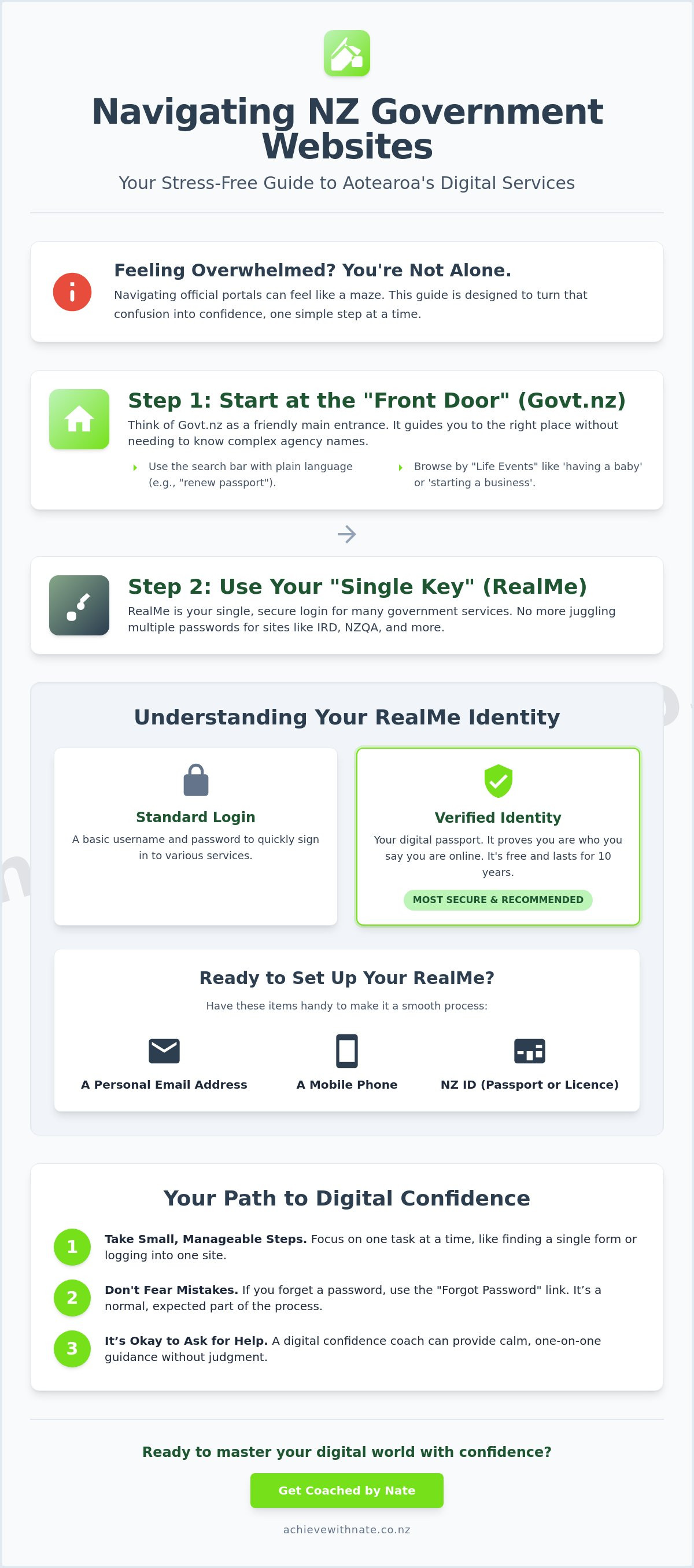
Think of the official website, Govt.nz, as the warm and welcoming "front door" to the entire digital house of Aotearoa. Instead of trying to guess which department handles what, this site acts as a helpful guide. It's designed to help you find answers using the same words you use every day. No legal degree or technical certificate is required to get your admin sorted.
To better understand how our digital systems support us, watch this helpful video:
One of the best changes in recent years is how information is grouped. You don't have to know that the New Zealand Companies Office is part of a larger ministry. Instead, you can look for "Life Events" like starting a business, having a baby, or retiring. This shift makes navigating government websites nz much more human and less about memorizing agency names. It's about finding what you need without the stress.
The "Front Door" Strategy
The search bar on Govt.nz is your best friend. You can type in simple phrases like "renew my passport" or "get a birth certificate." It works best when you use plain language. If you prefer a list, the "A-Z of agencies" is there too. This is perfect for when you know exactly who you need, like the IRD or Waka Kotahi, but aren't sure of their web address. Just remember to take things one small step at a time.
Mastering RealMe: Your Single Key to Aotearoa’s Digital Services
Think of RealMe as a single physical key that fits into multiple doors across town. Instead of having one key for the IRD, another for NZQA, and a third for your local council, you just carry one. This simple system is the most powerful tool you have when navigating government websites nz. It saves you from the headache of remembering dozens of different usernames and passwords. You don't need to be a tech expert to use it; you just need to know which door you're opening.
There are two levels to this digital key. A standard RealMe login is just a username and password used to sign in to various services. A "verified" identity is like having your passport checked and stamped by an official. It proves you are who you say you are online. As of May 2026, getting verified is a free service that stays valid for 10 years. You can find all the current details on the official RealMe website.
It's natural to feel a bit cautious about sharing your details online. RealMe is built with high-level security to protect your privacy, and it never shares your information without your permission. Understanding these security layers makes navigating government websites nz much smoother. If the setup process feels a bit daunting, working with a digital confidence coach NZ can help you get everything sorted in a calm, one-on-one environment. We can walk through it together at your own pace until you feel completely capable.
Setting Up Your RealMe Without the Stress
Setting up your account doesn't have to be a chore. Before you sit down to start, make sure you have these three things ready:
A personal email address that you can access easily.
A mobile phone to receive security codes.
A form of New Zealand ID, like your passport or driver’s licence.
If you ever get stuck or forget your password, don't worry. It happens to everyone, and it's not a sign that you're "bad at tech." The system has a clear "Forgot Password" link that walks you through a reset. Taking things one small step at a time makes the whole experience much more manageable for Everyday Kiwis.
How to Use the NZ Companies Office for Your Business
For many business owners, the thought of logging into a registry feels like a trip to the dentist. It doesn't have to be that way. The NZ Companies Office is a logical space once you find your way around. It is the essential hub for company registration and keeping your business legally healthy. If you are navigating government websites nz for business, this portal will likely be your most visited stop.
The first step is simple. Use the RealMe login we discussed earlier to sign in. Once you are in, you can use the search function to check if a business name is available. As of May 2026, it costs just NZ$11.50 (including GST) to reserve a name. This is a great low-stakes way to start your journey. From your main dashboard, you can also file your annual return. The fee for filing online is currently NZ$21 (plus GST). When navigating government websites nz for your business, you'll find that most tasks are just a few clicks away.
Taking control of your business admin is a huge part of building your digital confidence. If you want to clear the fog and get your systems running smoothly, book a free clarity call with Nate today. We can look at your specific needs and find a path that feels right for you.
Keeping Your Business Admin Calm
Admin doesn't have to be a source of anxiety for Everyday Kiwis. Our digital productivity audits help you see which of these tasks can be simplified or automated. For example, you can set up email reminders within the portal so you never worry about a late filing deadline. In 2026, late fees start at NZ$25; a simple reminder saves you money and stress.
Building Your Digital Confidence One Small Step at a Time
It's easy to see the word digital and feel like it's a wall you can't climb. But really, it's just a different way of getting things done. Instead of a paper form and a stamp, it's a screen and a click. It isn't a barrier to your success, and it certainly doesn't define how smart you are. Navigating government websites nz is a skill like any other. You didn't learn to drive in a day, and you don't have to master the internet in one afternoon either.
Try a low-pressure approach to build your familiarity. Spend just five minutes a day exploring a site like Govt.nz without a specific task in mind. Just look around. Click a few buttons. See where they lead. This small habit helps reduce the "fear of the unknown." When you do eventually have a real form to fill out, the layout will already feel familiar and much less intimidating.
For those who want to move a bit faster, I offer device and email basics training. This isn't a high-pressure classroom. It's a calm space where we make these tasks feel like second nature. We can practice navigating government websites nz together until the anxiety disappears. My goal is to help you feel steady and sure whenever you sit down at your computer.
When to Ask for a Helping Hand
How do you know when it's time to stop trying to "figure it out" alone? If you find yourself staring at the screen with a tight chest, or if you've reset your password three times in ten minutes, it's okay to reach out. DIY tech shouldn't cost you your peace of mind. A "no judgment" coaching session is about more than just clicking buttons. It's about giving you the tools to feel in control of your own life and admin.
You are far more capable than you give yourself credit for. Every small step you take builds that foundation of Digital Confidence. Take a deep breath. You've got this, and there's no rush to get it all perfect today.
Your Path to Stress-Free Digital Admin
You now have the map to start navigating government websites nz with a real sense of calm. By using Govt.nz as your front door and mastering the RealMe key, you've already simplified the most complex parts of the digital journey. These portals are just tools designed to help you get things done. You don't need to be a technical expert or a legal professional to manage your business or personal life effectively.
If you still feel a bit unsure about clicking the wrong button, you don't have to walk this path alone. I provide patient, one-on-one coaching for Everyday Kiwis, including specialized support for NZ seniors and small business owners. It is a strictly no jargon, no pressure environment where we move at your pace. To find out how we can help, Book a Free Clarity Call with Nate today. You are more capable than you think, and we'll get there together, one small step at a time.
Common Questions About NZ Government Portals
Is it safe to put my personal details on NZ government websites?
Yes, it is very safe. New Zealand government portals follow strict security standards set by the Digital Identity Services Trust Framework Act 2023. These sites use high level encryption similar to what major banks use to protect your private information. Your data is handled with care and is only used for the specific service you are accessing.
I forgot my RealMe password, what should I do?
You can reset your password easily by clicking the "Forgot Password" link on the RealMe login screen. The system will send a secure code to the email address or mobile phone you used when you first signed up. If you no longer have access to that email or phone, you can call the RealMe help desk for a bit of friendly assistance to get back into your account.
How do I find my IRD number if I don’t have a login?
The quickest way to find your IRD number is to check your payslip, KiwiSaver statement, or your online banking tax details. Most Kiwis will find it on any official letter from Inland Revenue. If you can't find it on any documents, you can call them on 0800 227 774; just make sure you have some ID ready so they can confirm it's you.
Can I still use paper forms instead of navigating government websites nz?
You can still request paper forms for most services, though the government is currently working through a 2025-2026 Service Modernisation Roadmap that prioritizes digital options. While navigating government websites nz is often faster, departments still provide physical forms if you prefer them. Just be aware that processing paper forms and waiting for the mail can add several weeks to the time it takes to get things sorted.
What is the easiest way to contact a government agency if the website is too confusing?
The best way to get help is to call the agency directly using their 0800 number. You can find a full list of contact details on the A-Z of agencies page at Govt.nz. If navigating government websites nz starts to feel overwhelming, talking to a real person can often clear up your confusion in just a few minutes. It's a great way to get the answers you need without the stress of staring at a screen.


Comments