


NZQA Login: A Stress-Free Guide for Everyday Kiwis

Last Tuesday, a learner named Sarah sat at her kitchen table in Hamilton, feeling her heart sink as she stared at a blank password field. Like many everyday Kiwis, she needed her nzqa login to apply for a new job, but her National Student Number was nowhere to be found. It's a common story. In fact, NZQA manages records for over 1.1 million learners across Aotearoa, and many of them feel exactly the same way when they try to access their data after a long break.
It's completely normal to feel a bit overwhelmed when you're faced with government portals and confusing jargon. You might feel like one wrong click could break something, or that you're the only one who doesn't have these numbers memorized. There's no judgment here. Accessing your records is a vital small step in building the digital confidence you need to thrive in modern Aotearoa, and it shouldn't be a source of anxiety.
I'm here to show you that accessing your learner portal is much simpler than it feels. This guide walks you through exactly how to find your NSN, master the nzqa login, and download your Record of Achievement. We'll take it one small step at a time to ensure you feel calm and capable from start to finish. No jargon, no pressure, just clear steps to help you get what you need.
Key Takeaways
Understand how the MyNZQA portal keeps your NCEA results and qualifications safe and easy to find in one place.
Master your nzqa login using a simple, pressure free process that works for every learner.
Get clear solutions for common tech hurdles like forgotten passwords so you never feel stuck or overwhelmed.
Learn how to use your National Student Number to activate your account and claim your Record of Achievement.
See how managing this portal helps you feel more capable when using other essential Kiwi services like MyIR or RealMe.
Table of Contents What is the MyNZQA Portal and Why Do You Need Access? A Simple Guide to Your NZQA Login: One Small Step at a Time Troubleshooting Common NZQA Login Hurdles Beyond the Login: Building Digital Confidence in NZ
What is the MyNZQA Portal and Why Do You Need Access?
Think of the MyNZQA portal as your personal, high security digital folder. It's where all your hard work is stored safely for whenever you need it. The New Zealand Qualifications Authority (NZQA) maintains this space to ensure every learner has a permanent record of their success. It's the official home for your educational journey in Aotearoa. Taking the time to explore this portal is one small step toward feeling more in control of your digital life.
Whether you left school in 1995 or are currently preparing for exams, this is your central hub. You'll need your nzqa login to check NCEA results, request official certificates, or view your full learning history. Having this access means you don't have to worry about losing old paper copies or calling around for transcripts. It's all there, waiting for you in a calm and organized space.
To help you feel more comfortable with your nzqa login, watch this helpful video walkthrough:
Understanding the National Student Number (NSN)
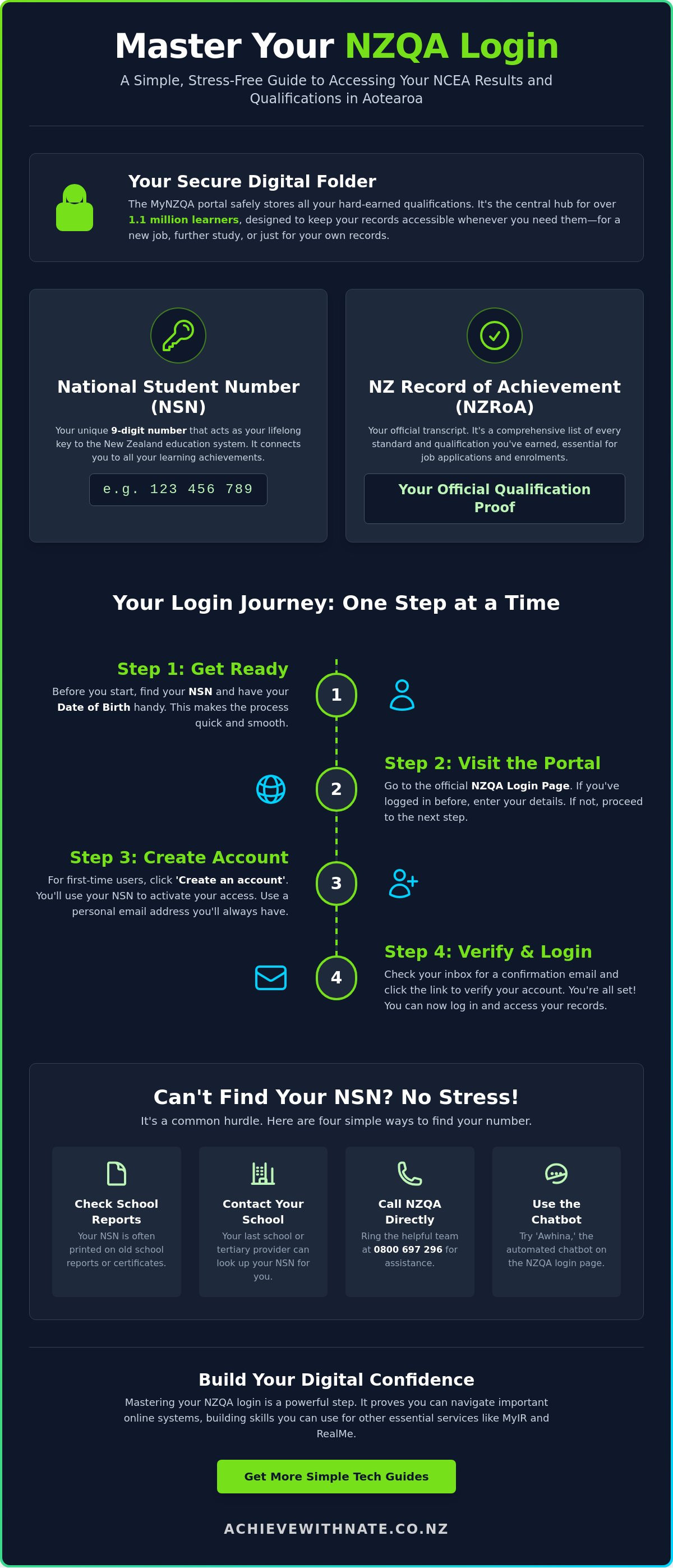
Every learner in New Zealand is assigned a National Student Number (NSN). This is a unique 9-digit number that stays with you for your entire life. Think of it as your digital key to the education system. There's no jargon and no pressure involved; it's simply a unique ID that connects your identity to your achievements. Most Kiwis find this number on old school reports or by contacting their previous school.
What is a New Zealand Record of Achievement (NZRoA)?
Your New Zealand Record of Achievement (NZRoA) is much more than just a list. It's an official transcript of every standard and qualification you have ever earned. This document is essential for job applications, starting a new course, or proving your skills to an employer. For everyday Kiwis, being able to download this yourself is a huge boost for your digital confidence. It's a comprehensive record that celebrates your personal growth and hard work.
A Simple Guide to Your NZQA Login: One Small Step at a Time
Setting up your access begins by visiting the NZQA Login page. This is the first small step toward viewing your qualifications and managing your records. Taking five minutes to set this up today saves hours of stress later. If you've used the system before, you can simply enter your email and password. If you're a first time user or haven't logged in for several years, you'll need to 'activate' your account using your NSN. Your nzqa login is designed to be accessible for everyone, regardless of your tech experience.
When you sign up, always use a secure, private email address that you'll have access to for many years. It's a good idea to avoid using school or work emails if you're planning on leaving those institutions soon. Using a personal account ensures you won't lose access to your records when your circumstances change. If you're supporting NZ seniors with their digital journey, helping them set up a permanent personal email is a great way to build long term digital confidence.
How to Find a Forgotten NSN Without the Stress
Don't worry if you've lost your unique 9-digit number. You can often find it by checking old school reports or contacting the last school you attended. Most educational institutions keep these records on file for a long time. If that feels a bit daunting, you can call the NZQA contact centre directly at 0800 697 296. The team is there to help everyday Kiwis find their footing. You can also try using 'Awhina,' the helpful chatbot found on the official NZQA login page, for a quick automated search.
Creating Your Account for the First Time
Once you have your NSN and birth date ready, follow the prompts to 'Create an account'. The process is straightforward and avoids confusing government jargon. Be sure to verify your email address immediately after you receive the confirmation link. This small action keeps your account active and ensures your personal data remains secure. By following these steps, you're taking a significant move toward mastering your digital identity in Aotearoa.
Troubleshooting Common NZQA Login Hurdles
Tech glitches happen to everyone, and it’s never a reflection of your ability. If you're struggling with your nzqa login, remember that even the most tech-savvy people hit walls. The most common hurdle is a forgotten password. If this happens, just use the 'Forgot Password' link and take a deep breath. Stay calm. It's a simple fix that only takes a moment to reset through your email.
If your account gets locked, don't panic. This usually happens after five failed attempts as a security measure to keep your data safe. You just need to wait 30 minutes before trying again. Sometimes, the portal might say your details don't match. In this case, double-check your 9-digit NSN against an official document or school report. Accuracy matters, but there's no rush to get it right on the first try.
Accessing Records for Qualifications Before 2002
If you did your studying before 2002, your records might not appear in the digital portal yet. This is a common gap for many older learners across Aotearoa. You haven't done anything wrong; the system just changed over time. Instead of using a standard nzqa login, you can apply for a 'Certified Statement of Results' through an online form on the NZQA site. This ensures your hard work is still recognized and official, even if it was recorded before the digital age began.
When to Ask for a Helping Hand
Sometimes, the frustration isn't about the portal itself but about feeling comfortable with the tools we use. Building digital inclusion and confidence is a journey we all take at our own pace. If you feel 'stuck' or overwhelmed by the process, it might be time for some device and email basics training. A quick one-on-one session can often clear up the confusion that a dense manual simply can't. If you're ready to stop feeling overwhelmed and start feeling capable, reach out for a friendly chat and let's tackle these tech challenges together one small step at a time.
Beyond the Login: Building Digital Confidence in NZ
Mastering your nzqa login is a powerful first step toward managing your life across Aotearoa's online spaces. Once you feel comfortable here, you'll find that other important portals like RealMe or MyIR become much less daunting. Recent data from the Department of Internal Affairs 2023 report shows that over 800,000 Kiwis now use RealMe to access essential government services. Learning these systems isn't just about paperwork. It's about ensuring you have the tools to participate fully in our modern society.
Digital productivity starts with these small wins. Successfully downloading your own transcript or finding your NSN is a significant achievement. These moments prove that you are capable of handling technology. This is especially vital for NZ seniors and workers who might feel left behind by rapid changes. A 2022 BNZ study showed that 20% of New Zealanders struggle with basic digital skills. The Achieve With Nate Movement helps you move from tech-stressed to tech-capable, one small step at a time.
Connecting Your Digital Life
Building a calm digital life means knowing exactly where your important documents are stored. Once you're comfortable with your records, you can tackle email management to keep your notifications tidy. A clean inbox makes it much easier to find confirmation links for your nzqa login or tax updates. When your digital space is organized, the sense of overwhelm starts to fade away. You deserve to feel in control of your online presence without the headache.
Book a Free Clarity Call
If all of this still feels like too much to handle alone, let's have a chat. I offer digital coaching specifically designed for everyday Kiwis who want to learn at their own pace. There's no jargon and absolutely no pressure; just a friendly Kiwi helping you find your way online. We can walk through the process together until you feel 100% confident. Whether it's logging into a portal or organizing your files, I'm here to be your supportive companion on this journey.
Claim Your Digital Confidence Today
You now have a clear path to managing your education records with ease. We've walked through the steps of identifying your NSN, resetting access when things go wrong, and why your nzqa login is such a helpful tool for your future. These skills aren't just about one website; they are about feeling more secure in every digital space you visit. Tech glitches happen to everyone, and they are never a reflection of your natural ability.
If the thought of doing this alone still feels like a heavy lift, I am here to support you. The Achieve With Nate Movement provides personalized coaching for everyday Kiwis who want to learn without the stress. My technology coaching comes with a "no jargon, no pressure" guarantee. We can sit down together and tackle your specific challenges at your own pace until you feel completely confident.
Ready to build your digital confidence? Book a free clarity call with Nate today.
You've already taken a great step by finishing this guide. Keep that momentum going. You are far more capable than you think, and we'll get there together, one small step at a time.
Frequently Asked Questions
How do I find my NZQA National Student Number (NSN)?
Find your 9-digit NSN by checking your old secondary school reports or contacting your last school. If you can't find these documents, call the NZQA contact centre at 0800 697 296 between 8:00 am and 5:00 pm on weekdays. The staff will ask a few security questions to verify your identity before giving you the number. It's a calm and straightforward process that takes about five minutes.
Can I log in to NZQA without an NSN?
No, you need your NSN to complete the initial activation of your nzqa login. This number is the only way the system can verify that the records belong to you. Once you have activated your account and set up a permanent email address, you won't need to keep your NSN on hand for every visit. It's just the starting key to unlock your digital learner folder.
What should I do if I've forgotten my NZQA password?
Click the 'Forgot Password' link on the login screen to receive a reset email within a few moments. If you don't see the email, check your junk folder or wait about ten minutes for it to arrive. If you no longer use the email address attached to your account, call the helpdesk at 0800 697 296. They can update your records manually so you can get back in without any stress.
How do I download my New Zealand Record of Achievement (NZRoA)?
Log into your learner portal and select the 'Record of Achievement' option from the main dashboard. You can then click a button to generate a PDF version of your official transcript. This document lists every standard you have achieved since the system began. Saving this file to your computer is a great way to keep your qualifications ready for job applications or further study enrollments.
Is the MyNZQA portal the same as a RealMe login?
No, the MyNZQA portal uses its own separate username and password system. While RealMe is used by more than 50 different government agencies in New Zealand, NZQA keeps its learner portal independent for now. Learning to manage this specific nzqa login is a wonderful way to build your digital confidence. It prepares you for using more complex government systems in Aotearoa without feeling rushed or overwhelmed by too many requirements at once.


Comments