


PAYE Calculator NZ: A Calm Guide to Understanding Your Take-Home Pay in 2026

With the ACC Earner Levy rising to 1.75% and minimum KiwiSaver contributions hitting 3.5% on April 1, 2026, your take-home pay might look a little different than it did last year. It's easy to feel a bit of a knot in your stomach when you think about tax codes or student loan deductions. You might worry about "getting it wrong" with the IRD or feel a little overwhelmed by online portals. That's a completely normal way to feel. We believe technology should be a friendly helper, not a source of stress.
This guide will show you how to use a paye calculator nz to clear away the fog and find your financial footing. You'll learn to see exactly how much money lands in your bank account, helping you feel capable and in control of your personal admin. We're going to walk through the 2026 tax brackets, explain those tricky codes, and help you master these digital tools one small step at a time. No jargon, no pressure; just the digital confidence you need to manage your money with a calm mind.
Key Takeaways
Understand exactly what PAYE is and why it's completely normal to feel a bit of tech overwhelm when dealing with the IRD.
Follow a gentle, five-step guide to using a paye calculator nz so you can see your actual take-home pay with total clarity.
Learn how to identify your tax code and organize your income details without any confusing jargon or pressure.
Discover how mastering one simple digital tool can help you build the confidence to manage your entire financial life online.
See how taking small steps with your personal admin today can lead to a more organized, stress-free digital budget for the future.
Table of Contents What is PAYE and Why Does it Feel So Overwhelming? How to Use a PAYE Calculator NZ: A Simple 5-Step Guide Beyond the Numbers: Organizing Your Digital Financial Life Building Digital Confidence One Small Step at a Time
What is PAYE and Why Does it Feel So Overwhelming?
For many Everyday Kiwis, opening a message from the IRD feels like a heavy weight in the chest. You aren't alone in that. The Pay-as-you-earn (PAYE) system is simply the way the government collects income tax and ACC earners' levies directly from your wages. PAYE is a pre-payment of tax that keeps your year-end admin simple. Even though it's designed to be helpful, the digital side of it can feel like a confusing maze. Understanding how your pay is calculated is a vital first step toward building your digital confidence.
To better understand this concept, watch this helpful video:
The 2026 Tax Landscape in Aotearoa
As of May 2026, New Zealand uses a progressive tax system. This means you only pay higher rates on the portion of your income that falls into higher brackets. For the 2026/2027 tax year, your first $15,600 is taxed at 10.5%, while income between $15,601 and $53,500 is taxed at 17.5%. Using a paye calculator nz helps you see these layers clearly. Your tax code, like "M" for your main job or "MS" for a secondary income, tells the system exactly which rules to apply to your specific situation so you don't overpay.
Moving from Confusion to Calm
In the past, managing money often meant keeping a shoebox of crumpled receipts and hoping for the best. Today, digital tools do the heavy lifting for us. Learning to use a paye calculator nz is a small, manageable way to start mastering your digital life. We focus on taking things one small step at a time. This approach turns tech anxiety into a sense of capability. If you feel like your personal admin is a mess, a digital productivity audit can help you find where things are getting stuck and clear the path toward a calmer financial future.
How to Use a PAYE Calculator NZ: A Simple 5-Step Guide
Using a paye calculator nz doesn't have to be a daunting task. It's simply a digital tool designed to give you clarity. By following a few small steps, you can move from guessing to knowing exactly what will land in your bank account. If you're feeling a bit stuck with the numbers, our one-on-one digital coaching can help you navigate these online tools at your own pace. Let's walk through the process together.
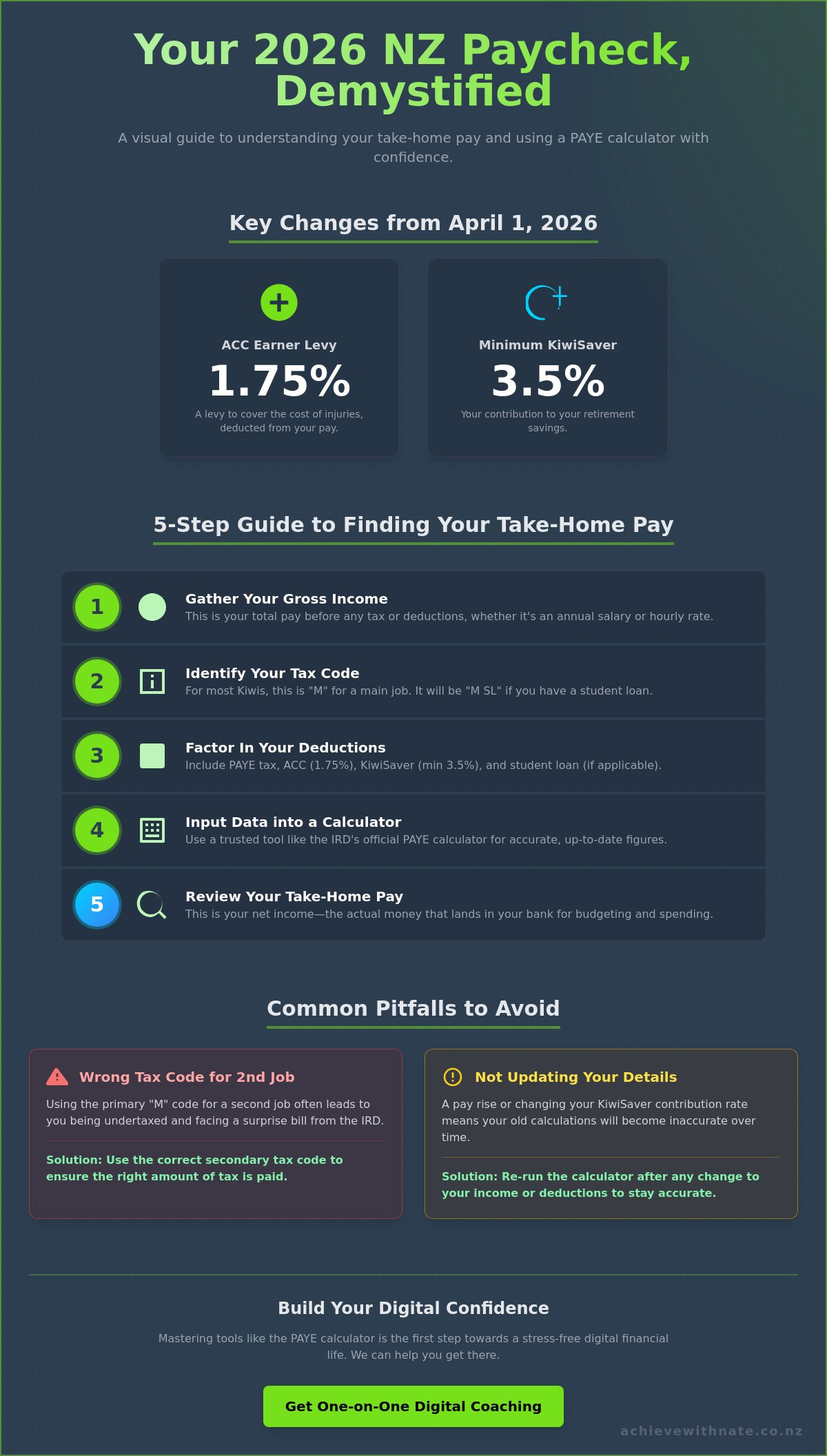
Step 1: Gather your gross income details. This is your total pay before any tax comes out, whether it's an hourly rate like the $23.95 adult minimum wage or an annual salary.
Step 2: Identify your tax code. For most Kiwis with one main job, this is "M." If you have a student loan, it will be "M SL."
Step 3: Factor in your deductions. As of April 1, 2026, the minimum KiwiSaver contribution rate is 3.5%. You also need to account for the 1.75% ACC Earner Levy.
Step 4: Input your data. Use a trusted tool like Inland Revenue's official PAYE calculator to ensure the math is spot on for the current tax year.
Step 5: Review your take-home pay. This is your net income. It is the actual money you have available for your rent, groceries, and life.
Jargon-Free Definitions for Your Calculator
We know the terms can be confusing. KiwiSaver is your future savings; it is a small percentage taken from your pay to help you later in life. If you have a student loan, 12% is deducted from every dollar you earn over the $24,128 annual threshold. The IETC, or Independent Earner Tax Credit, is a bit of extra help for people earning between $24,000 and $70,000 who don't receive other government credits like Working for Families.
Common Mistakes to Avoid
One common slip-up is using the "M" tax code for a second job. This can lead to a surprise tax bill later because you've been undertaxed. Another mistake is forgetting to update your paye calculator nz inputs when you get a pay rise or change your KiwiSaver rate. Taking five minutes to refresh your details ensures your budget stays accurate. No judgment if you've missed these before; we're all learning these digital steps together.
Beyond the Numbers: Organizing Your Digital Financial Life
Once you've used a paye calculator nz to find your take-home pay, you have a powerful piece of information. It's the foundation for a stress-free digital budget. Instead of feeling overwhelmed by where your money goes, you can use that clear figure to plan your month with confidence. You might find it helpful to look at Sorted's money management guides to see how your new numbers fit into a wider financial plan.
Many Everyday Kiwis find that their digital life feels a bit cluttered. If your payslips are scattered across your inbox and your tax summaries are buried in old mail, it's hard to feel in control. This is where a digital productivity audit can make a world of difference. It's a simple way to look at how you handle your personal admin and find better, calmer ways to stay organized. Consider these small steps to get started:
Create a dedicated "Finance 2026" folder in your email or cloud storage for all records.
Save a PDF copy of your latest tax code confirmation from your employer.
Keep your paye calculator nz results handy in a simple digital note for future budget reviews.
Setting Up Your myIR Login
Navigating the IRD website doesn't have to be a chore. Your myIR portal is a friendly space where you can track your tax and KiwiSaver in real-time. We recommend setting up two-factor authentication (2FA); it is just an extra layer of protection for your personal details. It gives you peace of mind knowing your data is safe while you check your contributions. Taking this step is a great way to protect your digital identity.
Automating Your Savings
The real magic happens when you use your numbers to automate your life. Once you know your net income, you can set up automatic transfers to a savings account or a "rainy day" fund. This "set and forget" system takes the pressure off your shoulders. You no longer have to remember to save; the digital tools do it for you. If you want to build your digital confidence and master these tools, reach out for a chat anytime. We're here to help you move forward one small step at a time.
Building Digital Confidence One Small Step at a Time
Mastering a paye calculator nz is about much more than just checking your bank balance. It is about proving to yourself that you can handle the digital world without the stress. Many Kiwis feel a "fear of the screen" when it comes to money, but empathy is the best way to overcome that hurdle. We provide a strictly "no judgment" zone for anyone who feels overwhelmed by rapid tech changes. When you gain control over your personal admin, you build the momentum needed to tackle even bigger digital challenges with a steady hand.
If you've ever felt like you're falling behind, remember that technology is just a tool meant to serve you. Working with a digital confidence coach NZ can help you bridge the gap between confusion and capability. We focus on the person behind the screen, ensuring you feel seen and supported rather than patronized. There's no such thing as a "silly" question when it comes to your financial well-being or how to use a paye calculator nz effectively.
Personalized Help for Everyday Kiwis
One-on-one coaching is designed to demystify the things that cause the most anxiety. Whether it's navigating the IRD portal or setting up a simple spreadsheet for your budget, we walk through it together at your own pace. It's perfectly okay to ask for help with the basics. In fact, mastering the basics is the only way to build a solid foundation. We take the jargon out of the equation so you can focus on feeling confident and capable in your everyday tech life.
Your Next Step Toward Tech Calm
You don't have to figure this out on your own. If the thought of tax codes or online portals still makes your heart race, let's have a chat. We offer a Free Clarity Call to discuss your tech anxiety and look at ways to simplify your digital workflows. This is a low-stakes way to start your journey toward a calmer, more organized life. You've got this, one small step at a time.
Take Control of Your Financial Future Today
Understanding your income is a huge win for your peace of mind. By walking through the 2026 tax brackets and the 3.5% KiwiSaver contribution rate, you've already started building your digital confidence. Using a paye calculator nz is a simple way to move from feeling overwhelmed to feeling capable. It's about more than just the numbers. It's about having a clear view of your life in Aotearoa and feeling in charge of your personal admin.
If you still feel a bit of a knot in your stomach when looking at online portals, we're here to help. The Achieve With Nate Movement offers no-judgment coaching with real Kiwi heart. We specialize in making technology accessible for seniors and small business owners who want to master the basics without the stress. You can Book a Free Clarity Call with Nate to master your digital tools today. We focus on your digital confidence, not just technical skills. There's no pressure to learn everything at once. We'll take it at your own pace, ensuring you feel supported every step of the way. You've got this, one small step at a time.
Common Questions About Your Take-Home Pay
What is the most accurate PAYE calculator for NZ?
The most accurate tool is the official Inland Revenue (IRD) website. It is always updated with the latest legislative changes, including the April 1, 2026, adjustments to tax thresholds and the 1.75% ACC levy. Using a trusted paye calculator nz from a government source ensures your math aligns perfectly with current laws. It provides peace of mind that you're seeing the same numbers your employer uses for their payroll software.
How do I know which tax code to use in the calculator?
For most Everyday Kiwis with one main job, the tax code is "M." If you earn between $24,000 and $70,000 and don't receive certain benefits, you might use "ME" to claim the Independent Earner Tax Credit (IETC). You can find your specific code on your latest payslip or by logging into your myIR account. Taking a small step to verify this ensures your calculations are accurate and helpful for your budget.
Does the PAYE calculator include the ACC levy?
Yes, most reputable calculators automatically include the ACC Earner Levy in their final results. For the 2026 tax year, this rate is 1.75% of your gross earnings. It's often bundled into the total "PAYE" deduction shown on your screen. Knowing this helps you see that your take-home pay already accounts for this essential insurance. It's one less thing for you to calculate manually, making your digital admin feel much simpler.
Can I use a PAYE calculator if I have a student loan?
You can definitely include student loan repayments in your paye calculator nz. The tool will apply the 12% repayment rate to every dollar you earn over the annual threshold of $24,128. Simply select the student loan option when entering your details into the tool. This gives you a realistic view of your net income, helping you plan your monthly spending without any hidden surprises. It's a great way to feel more in control.
Why is my take-home pay different from what the calculator says?
Small differences often happen due to variations in working hours or extra deductions like union fees and employer-specific insurance. Your employer might also use a different KiwiSaver contribution rate than the 3.5% minimum. If the gap feels large, it's a good idea to check that your tax code is correct with your payroll officer. We believe understanding these small details is the key to building your digital confidence and feeling capable with your money.


Comments