


RealMe Account Setup Help NZ: A Patient Guide to Getting Connected in 2026

You just want to check your MyIR or apply for a visa, but you're staring at a screen asking for a "Verified Identity" and feeling a bit stuck. It's a common moment of frustration for many of us here in Aotearoa. If you are looking for RealMe account setup help nz, you aren't alone in feeling those "tech-shivers" when faced with complex password rules or identity checks.
It's completely natural to worry about security or feel confused by the difference between a simple login and a full verification. We understand the fear of losing access to essential services or the worry that your data might not be safe. Technology should work for you, not make you feel inadequate. You deserve to feel confident and secure when you're managing your life online.
This guide will help you master the setup process with a calm, step-by-step approach designed for everyday Kiwis. We will look at exactly what documents you need, how to handle the photo requirements, and where to go if you need to verify your identity in person. By the end, you'll have the peace of mind that comes with being truly connected and independent.
Key Takeaways
See why RealMe acts as your secure digital passport for Aotearoa, replacing dozens of passwords with one safe key.
Learn how to gather your documents first so you can find RealMe account setup help nz without feeling rushed by the screen.
Master the setup process with a patient, step-by-step approach that focuses on simple checks and avoiding common typos.
Discover how to clear technical hurdles like browser errors or forgotten usernames so you always stay in control.
Gain the peace of mind that comes with using government services independently and keeping your personal data safe.
Table of Contents
What is RealMe and Why is it Essential for Kiwis Today?
The digital world can feel like it's moving at a hundred miles an hour. It's perfectly normal to feel a bit hesitant or even overwhelmed when you hear terms like "digital identity" or "online verification." You might worry about your privacy. You might feel frustrated that things aren't as simple as they used to be. RealMe is designed to be your secure digital passport for the New Zealand government. It's a way to prove who you are online without needing to visit an office in person every single time.
In 2026, more services than ever require a secure way to confirm your identity. It's the new standard for banking with institutions like BNZ and for interacting with Immigration New Zealand. Seeking out RealMe account setup help nz isn't about being "bad with tech." It's about making a smart choice to simplify your future. This one tool helps you stay connected to your community and your government services from the comfort of your own home. Instead of keeping a messy notebook full of dozens of different passwords, RealMe gives you one single, highly secure login to manage your life.
To better understand this concept, watch this helpful video:
The Difference Between a Login and a Verified Identity
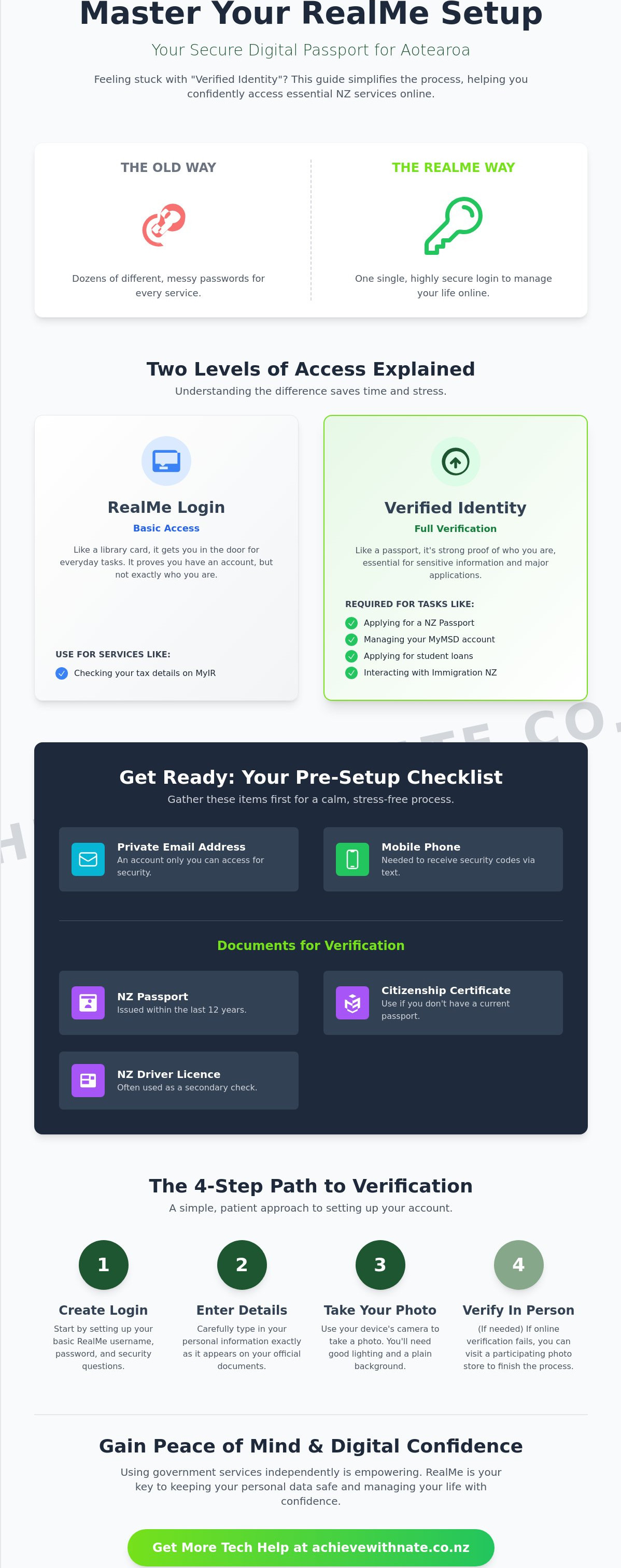
Understanding the two levels of RealMe can save you a lot of time and stress. Think of a basic RealMe login like a library card. It lets you through the door and allows you to use basic services. You can often use a simple login to check your tax details on MyIR. However, a Verified Identity is more like a passport. It's a much stronger proof of who you are. You'll need this higher level for bigger tasks, such as applying for a New Zealand passport or managing your MyMSD account. It's all about keeping your most important information safe from identity theft.
Common NZ Services That Require RealMe
Having this digital key opens up many doors for everyday Kiwis. You can access your tax records through MyIR to see if you're owed a refund. It's also the standard way to manage your health records or book appointments online through My Health Account. If you need to renew your New Zealand passport or apply for a replacement driver's license, RealMe makes the process much faster. It's even essential for students applying for loans or allowances. Whether you're enrolling to vote or applying for a visa, this account is the bridge that gets you there. Taking it one step at a time makes the whole process feel much more manageable.
Getting Ready: What You Need Before Starting Your Setup
Preparation is the secret to a stress-free setup experience. When you have everything sitting on the table in front of you, the process feels manageable rather than a source of panic. Many people feel a rush of anxiety when a website "times out" because they had to go looking for a document in another room. By gathering your physical items first, you can stay calm and move at your own pace. If you are looking for RealMe account setup help nz, starting with a clear desk is the best first step you can take.
You also need to ensure you have a reliable, private email address. This should be an account you can access easily on your current device. Avoid using a shared family email address for this. Since RealMe handles your private government data, having your own inbox ensures your information stays between you and the services you use. You will also need your mobile phone nearby. The system will send you a text message with a security code to make sure it's really you. It's a small step that provides a huge amount of protection for your identity.
Document Checklist for Verification
To get a verified identity, you need specific proof of who you are. The RealMe Identity Verification Service has grown to include more ways to verify your details, making it more accessible for everyone in Aotearoa. Before you begin, please have these items ready:
Your New Zealand Passport: This needs to have been issued within the last 12 years.
Your Citizenship Certificate: Use this if you don't have a current passport.
Your New Zealand Driver Licence: This is often used as a secondary check.
Having these documents right next to your computer prevents those annoying technical "time-outs." It keeps the momentum going and helps you feel in control of the technology. If you're feeling a bit unsure about organizing these details, a little one-on-one digital coaching can help you get sorted without the stress.
Choosing a Secure Username and Password
Choosing your login details is where many people feel stuck. Your username should be easy for you to remember, but it shouldn't be your full name or your birth date. Think of a simple phrase or a combination of words that means something to you. For your password, try creating a "passphrase" instead of a complex jumble of symbols. A passphrase is a string of four or five random, everyday words. It's much easier to type and far harder for others to guess. Nate recommends passphrases because they build digital confidence; you'll feel more capable when you can actually remember your own login without checking a notebook every time.
Step-by-Step: Setting Up Your RealMe Account Patiently
The journey begins at the official RealMe website. It is the only safe place to start your application. Once the page loads, look for the button that says "Create your RealMe login." It might feel a bit daunting to click, but remember that you are in control. Taking this first step is a wonderful way to build your digital independence. If you ever feel stuck, looking for RealMe account setup help nz is a great way to find the support you need.
When you begin entering your personal details, do it slowly. There is no prize for finishing fast. Check every name, date, and number for typos as you go. A single misplaced letter in your email address can stop the process in its tracks. Take a breath after each line you fill out. This unhurried approach ensures that the system accepts your information the first time. It saves you from the frustration of having to repeat steps later.
Setting up your security questions is a vital part of keeping your account safe. Choose questions with answers that will never change. Your first pet's name or the street you grew up on are excellent choices. Avoid things that might change over time, like your favorite movie or your current hobby. Once you finish this, the system will send a message to your inbox. Verifying your email address is the first big "win" in the process. It proves that the bridge between you and the service is working perfectly.
Creating Your Basic Login
Now you will enter the username and the passphrase we discussed earlier. Type them carefully. You might see a "Prove you are human" box with small image puzzles. These can be a bit tricky and even annoying. Don't worry if you don't get them right the first time; just try again. If that confirmation email doesn't show up after a few minutes, check your "Spam" or "Junk" folder. Sometimes our email accounts are a bit too protective and hide important messages there.
The Final Step: Visiting NZ Post for Verification
If you need a Verified Identity, the website will give you an application reference number. Write this down or take a photo of it with your phone. You then take this number and your ID to a local NZ Post branch. It is a very quick visit. The staff at the counter are helpful and used to this process. They will take your photo and check your documents. After that, you just wait for a final confirmation text message. Once that arrives, your identity is verified and you are fully connected. It is a great feeling to have this task completed and your RealMe account setup help nz journey finished.
Clearing the Hurdles: Common RealMe Problems and Fixes
Even with the best preparation, technology can sometimes act a bit grumpy. It isn't your fault when a screen freezes or an error message pops up. These moments can feel like a wall, but they are usually just small bumps in the road. If you find yourself needing RealMe account setup help nz during these times, remember to take a breath. Most technical issues have very simple solutions that don't require you to be a computer expert. You are doing a great job just by staying patient and giving it a go.
One common message you might see says "JavaScript is blocked." This sounds technical, but it usually just means your web browser is being a bit too protective. Often, simply refreshing the page or trying a different browser, like switching from Chrome to Edge, fixes the problem instantly. It's like trying a different door when the first one is stuck. If you forget your username or need to reset your password, don't panic. The system sometimes takes a moment to process these requests. There's a "15-minute rule" to keep in mind. If you've requested a reset, wait at least fifteen minutes before trying again. Clicking the button too many times can actually lock the account for security reasons. Just step away, make a cup of tea, and come back.
Managing Two-Factor Authentication (2FA) codes on your phone is another area where people feel a bit nervous. These codes are just extra locks on your digital door. When the text arrives, type the numbers in exactly as they appear. If the code doesn't arrive, check that your phone has a good signal and that you haven't accidentally blocked the sender. Taking these small, manageable steps keeps you moving forward without the stress.
Dealing with Technical Errors
If the website continues to act up, you might need to clear your browser "cookies." Think of this like giving your browser a quick spring clean to remove old, dusty information that might be causing a clog. If you've tried different browsers and still feel stuck, you can call the RealMe helpdesk at 0800 664 774. However, if the technical talk on the phone feels too stressful, book a digital coaching session to get things moving again in a way that feels supportive and kind.
Security Questions and Account Recovery
Your RealMe account is very private. You should never share your password with anyone, not even well-meaning family members. It's your digital signature, and keeping it to yourself is the best way to stay safe. If you happen to lose your phone and cannot get your 2FA code, you can use your security questions to regain access. Nate can help you set up a "Digital Safety Net" so you always have a way back into your important accounts if things go wrong. These simple habits build the confidence you need to use government websites independently and with total peace of mind.
Building Your Digital Confidence Beyond RealMe
Mastering your RealMe account is a significant achievement. It is often the very first step toward a much larger sense of digital independence. Once you have navigated the verification process, other websites suddenly feel far less intimidating. You've proven to yourself that you can handle secure logins and identity checks. This confidence is a tool you can carry with you into every other part of your online life. It is about realizing that you are more than capable of handling the digital world.
Seeking out RealMe account setup help nz is about more than just one website. It is about building a foundation for safer, better habits. From here, you might feel ready to explore online banking with more certainty. You might decide to clean up your email inbox or learn how to spot a scam before it causes any trouble. These are small, manageable actions that make your life in Aotearoa easier and more secure. You don't have to do it all at once. Taking things at your own pace is the best way to ensure you never feel overwhelmed again.
Having a patient guide by your side changes the entire experience of learning technology. It removes the pressure to "get it right" immediately. Instead, it creates a space where you can explore and learn without any fear of making a mistake. This supportive environment is what turns a confusing task into a moment of empowerment.
Why a Digital Confidence Coach Makes a Difference
Personalized help means we go at your own pace, not the computer's speed. If you need to stop and ask why a button looks a certain way, we stop. There are no "silly questions" here, only practical solutions for your digital life. When you join our community, you are choosing a path that prioritizes your well-being over the software itself. We focus on the person behind the screen. This ensures you feel seen and supported every step of the way as you build your skills.
Your Journey to Tech Confidence Starts Here
Take that first small step today. You have already done the hard work of reading this guide and understanding the process. If you want to keep learning, our Digital Confidence for NZ Seniors guide offers even more tips for staying connected in Aotearoa. Whether you need RealMe account setup help nz or help with your first email, we are here to walk beside you. Technology shouldn't be a source of stress. It should be a way to stay in touch with family and manage your affairs with ease. When you are ready, please book a low-pressure chat with Nate. We can talk about your goals and find a way forward that feels right for you.
Your Path to Digital Independence
You now have the tools to handle your RealMe account with confidence. Remember that this digital key is simply a way to make your life in Aotearoa easier. By gathering your documents early and choosing a memorable passphrase, you've already cleared the biggest hurdles. If you ever find yourself needing RealMe account setup help nz, know that it's okay to ask for a hand. Taking these small steps today ensures you can access your records and services whenever you need them without the stress.
You don't have to navigate these changes alone. I provide a 100% non-judgmental environment where we can work through these steps together. I specialize in tech help for NZ seniors and offer local Kiwi support that speaks your language. We always go at your pace, not the computer's speed. To get started, you can book a patient, one-on-one session with Nate today.
The digital world might move fast, but you are more than capable of finding your footing. Every small action you take builds your confidence for the future. You've got this.
Frequently Asked Questions
Is RealMe safe to use for my government details?
Yes, RealMe is a very secure service managed by the New Zealand Department of Internal Affairs. It uses high-level encryption to protect your personal details from identity theft. Think of it as a digital vault that only you can open with your unique login and security codes. It's designed to keep your private information safe while making it easier for you to access services online without worry.
Can I have more than one RealMe account?
No, you should only have one RealMe account because it's directly linked to your unique identity. Having multiple accounts can cause confusion when you try to access services like the IRD or your health records. If you think you already have an account from a few years ago, it's better to recover that one rather than starting fresh. This keeps all your important information in one secure place.
What happens if I forget my RealMe password?
You can easily reset your password by using the "Forgot Password" link on the official login page. The system will ask you to verify your identity using your email address or the security questions you set up earlier. If you find yourself needing RealMe account setup help nz during this process, remember to stay patient. It's a common situation and the recovery steps are there to help you get back in safely.
Do I have to pay to set up a RealMe account?
No, creating and using a RealMe account is completely free of charge. The New Zealand government provides this service to help Kiwis manage their official business online without any extra cost. You won't be asked for credit card details or payment at any stage of the setup process. It's a free tool designed to give you more independence and ease when dealing with government departments.
Can Nate help me set up my RealMe account in person?
Yes, Nate can certainly help you through the process with one-on-one digital coaching. While the setup happens on your own device, Nate provides the patient guidance you need to feel confident at every step. This support is offered in a calm, non-judgmental way so you don't feel rushed or overwhelmed. It's about having a supportive companion there to explain the tricky bits and ensure everything is sorted correctly.
How long does the RealMe verification process take at NZ Post?
The in-person part of the verification at a local NZ Post branch is very quick, usually taking only five to ten minutes. You just need to present your application reference number and your physical ID to the counter staff. They will take your photo and check your documents in an unhurried, friendly manner. Once they finish their part, you'll simply wait for a final confirmation text to arrive on your phone.
What should I do if my RealMe account is locked?
If your account is locked, the first thing to do is wait for at least thirty minutes before trying to log in again. This usually happens after too many incorrect password attempts and is a safety feature to protect you. After the waiting period, you can try logging in again or use the recovery options to reset your details. If you still feel stuck, the RealMe helpdesk is available to assist you over the phone.
Does RealMe work on my tablet or iPad?
Yes, RealMe works perfectly on tablets and iPads as long as you have a stable internet connection. You can use your preferred web browser, like Safari or Chrome, to access the site and manage your RealMe account setup help nz tasks. The website is designed to be clear and easy to read on mobile devices. This means you can handle your government business from the comfort of your favorite armchair.


Comments