


The Simple Guide to Business Workflows: A Checklist for Overwhelmed Kiwis

Last Tuesday, Sarah, a small business owner in Christchurch, spent 43 minutes searching for one single customer invoice. It was the third time that week she felt her chest tighten while staring at a desktop cluttered with unsorted files and endless notifications. If you have ever felt like you are simply bad with technology, you are definitely not alone in Aotearoa.
It is exhausting to spend more time on repetitive admin than on the actual work you love. You probably feel that the digital world is moving too fast, leaving you stuck in a cycle of overwhelm and anxiety. This guide is here to help you reclaim your day. You will discover how to transform your business workflows from a source of stress into a series of simple, repeatable steps. We are moving from digital chaos to a sense of calm with a practical, jargon-free checklist designed for everyday Kiwis. We will walk through the exact steps to organize your files and build your digital confidence using tools you already have, one small step at a time.
Key Takeaways
Learn how to turn digital chaos into a calm, repeatable sequence of steps using plain language every Kiwi can understand.
Identify the specific triggers and actions that drive your daily tasks so you can stop feeling overwhelmed by your inbox.
Follow a practical checklist to audit your current stress points and build business workflows that save you time and energy.
Discover why mapping your process on paper is the essential first step to mastering technology without the pressure of new software.
Find out how to shift from feeling "behind" to feeling capable by taking one small, supported step toward digital confidence.
Table of Contents What are Business Workflows? (The Jargon-Free Definition) The Anatomy of a Calm Business Process The Digital Order Checklist for Kiwi Small Businesses Moving from Chaos to Calm: Your Next Small Step
What are Business Workflows? (The Jargon-Free Definition)
Let's strip away the corporate talk. A workflow isn't a complex piece of software or something only big Auckland firms use. At its heart, a workflow is simply a repeatable sequence of steps you follow to finish a task. Think of it as orchestrated and repeatable patterns of activity that stop you from having to reinvent the wheel every Monday morning. It's the "how" of your business, written down so you don't have to hold it all in your head.
For many everyday Kiwis, running a business feels like sitting at a messy desk. You have physical papers, digital files, and mental "to-do" lists scattered everywhere. This clutter creates a constant hum of anxiety. A digital flow replaces that mess with a clear, calm path. It's important to remember that you don't need to be a "techie" to have great systems. Business workflows are about your process, not your programming skills. When your systems work, your mental health improves because the "overwhelm" finally starts to lift.
The Difference Between a Task and a Workflow
It's easy to get these two mixed up. A task is a one-off item, like sending a quick reply to a customer. A workflow is the "recipe" you follow every single time that situation pops up. If you're onboarding a new client, don't just send a random email. A proper workflow means you send the welcome pack, create their digital folder, and set a follow-up reminder for exactly three days later. It's about doing the same high-quality job every time without the stress of remembering the steps.
Why "Small Steps" Lead to Big Digital Productivity
A 2023 survey of New Zealand small businesses found that nearly 45% of owners feel consistently bogged down by administrative chores. This is where business workflows become your best friend. By making tiny, 1% improvements to how you handle your files or client notes, you can save hours every week.
We like to think of digital productivity as a calm state of mind rather than just a speed goal. It's about being in control of your tools so they serve you. You don't have to fix everything at once. We take it one small step at a time, building your digital confidence until the technology feels like a supportive companion rather than a burden.
The Anatomy of a Calm Business Process
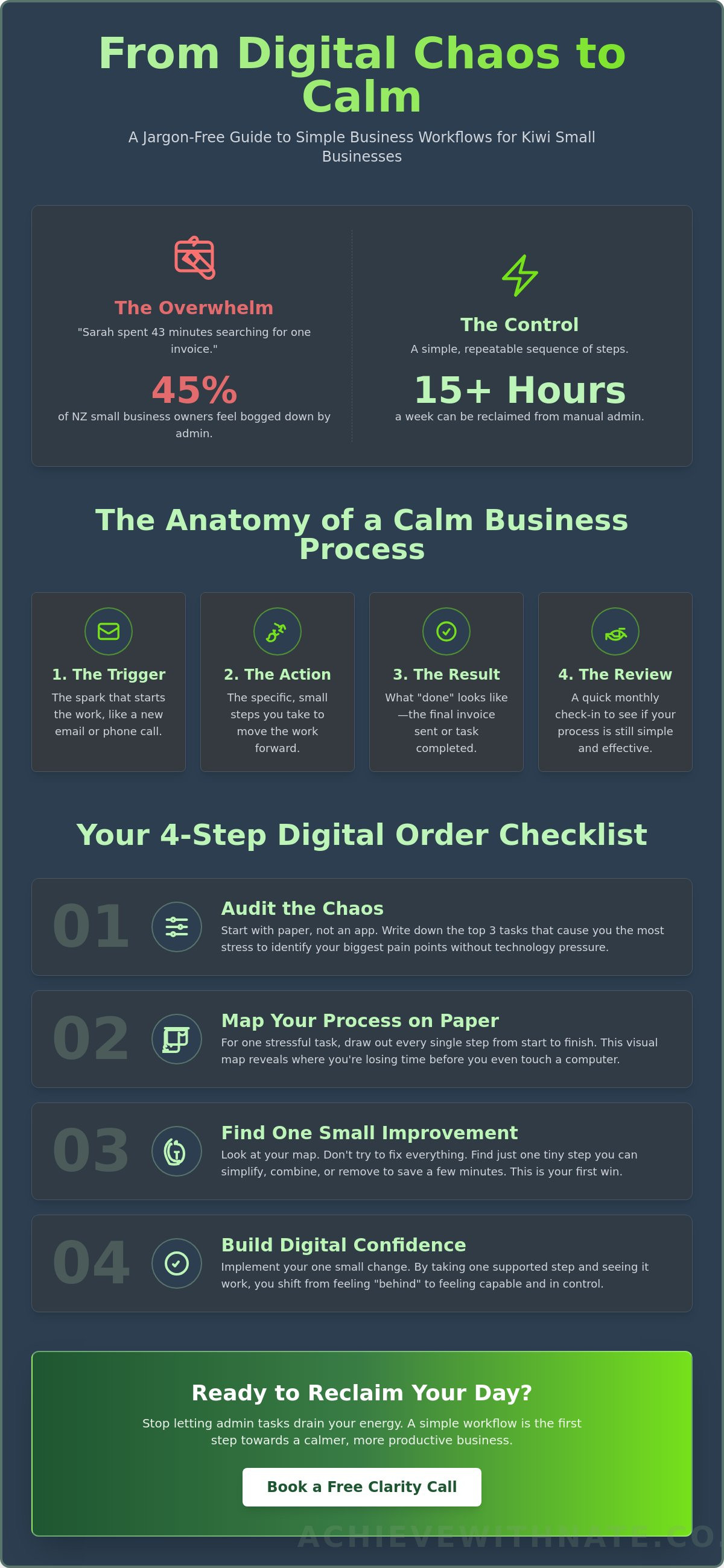
Everyday Kiwis often feel like their to-do list is a tangled ball of wool. A calm process helps you untangle it. You can think of business workflows as a simple map for your day. Every map has four main parts that keep things moving without the panic.
The Trigger: This is the spark that starts the work. It might be a new inquiry in your inbox or a phone call from a local lead.
The Action: These are the specific, small steps you take. Instead of one big task, you have a list of tiny wins that move the work forward.
The Result: This is what "done" looks like. It's the moment you send the final file, ship the order, or clear your desk for the evening.
The Review: This is a quick check-in. You look at your steps once a month to see if they still feel friendly and easy to follow.
Manual vs. Automated: When to Let Tech Help
It's tempting to buy new software the moment you feel busy. Instead, try starting manual. Use a notebook or a simple document to track your flow first. This helps you understand the steps before you add tech into the mix. A 2023 study by Xero showed that New Zealand small business owners spend about 15 hours a week on manual admin tasks. By identifying these energy-drainers, you can choose simple AI tools that actually help. If you want to see which tools fit your style, a Free Clarity Call is a great way to start.
Keeping it Human-First
Your workflow should serve you, not the other way around. In Aotearoa, we know that life happens. The kids might get home early, or a neighbor might pop in for a chat. Build buffer time into your business workflows to allow for these real-life moments. A human-first process doesn't demand perfection. It just gives you the digital confidence to handle your day, one small step at a time. No jargon, no pressure; just a plan that works for your life.
The Digital Order Checklist for Kiwi Small Businesses
Cleaning up your business workflows doesn't require a degree in computer science. It starts with a deep breath and a piece of paper. Most everyday Kiwis feel stuck because they try to learn a complex new app while they're already stressed. Let's slow things down and follow these four small steps to find some calm.
Step 1: Audit the chaos. Write down the three tasks that currently make your stomach churn. Maybe it's invoicing, chasing late payments, or following up on quotes. Focus only on these three for now.
Step 2: Map it on paper. Put the laptop away. Grab a pen and draw the steps from start to finish. Seeing it physically helps your brain process the logic without the distraction of screen notifications.
Step 3: Spot the bottlenecks. Look at your drawing. Where does the work sit for three days? Where do you always lose the login? That's your bottleneck.
Step 4: Pick one simple tool. Don't buy expensive software yet. Use a basic digital checklist or a saved email template to handle that one specific bottleneck.
Applying the Checklist to NZ Admin
In Aotearoa, our admin often follows a predictable rhythm. You can use these business workflows to tame the big ones. For your NZ Companies Office annual return, set a calendar reminder for the specific month your company is due to file. For GST, don't wait for the 28th of the month. Set a "pre-GST" workflow on the 20th to gather receipts and check your bank feed. This 8 day head start removes the end of quarter panic entirely.
Mastering the Inbox Workflow
Your inbox often feels like a never ending to-do list. To move from unread to actioned, try a simple "Three Folder System": To Do, Waiting, and Archive. When an email arrives, decide its home immediately. If you're struggling with the basics of your account, my device and email basics training can help you build that foundation first. Taking it one small step at a time makes the digital world feel much friendlier.
Ready to clear the clutter?
to see how we can simplify your tech together.
Moving from Chaos to Calm: Your Next Small Step
You've likely spent a long time feeling like you're constantly chasing your tail. It's a heavy weight to carry. Moving from that state of overwhelm to a place where you feel capable is closer than you think. Refining your business workflows isn't just a technical task; it's about reclaiming your evenings and your peace of mind. You don't need to fix every system at once. Just choose one small thing today. Maybe it's how you answer a new enquiry or how you file a digital receipt. That's enough for now.
Building Your Digital Confidence
Think of mastering your technology as a form of self-care. When your systems work, you stop worrying about what might be falling through the cracks. As a digital confidence coach NZ, Nate helps you bridge the gap between feeling stuck and saying "I've got this." We focus on the human side of the screen first. There's no jargon and no pressure here. We simply work at a pace that feels right for you.
A Final Note for NZ Seniors in Business
For our nz seniors running local ventures, please know that patience is at the heart of everything we do. You've built amazing businesses with hard work and grit. Modern business workflows should support that legacy, not complicate it. Every new system we set up is designed for accessibility and ease. This ensures you stay connected to your community and your customers without the tech-induced headaches that often come with new software.
Ready to find some breathing room? If you want a steady hand to help you navigate these changes, let's chat. You can book a Free Clarity Call to see how we can simplify your day. It's just a friendly conversation to help you find your footing. Let's take that first small step together, one piece of tech at a time.
Take Your First Step Toward a Calmer Workday
Running a small business in Aotearoa shouldn't feel like a constant uphill climb against technology. You've seen how simple business workflows can turn a messy inbox into a clear, repeatable plan. By breaking your daily tasks into a manageable checklist, you protect your time and your mental energy. According to the Ministry of Business, Innovation and Employment, 97% of New Zealand enterprises are small businesses. This means you aren't alone in feeling the weight of these everyday tech challenges.
You don't need to be a tech expert to feel in control. You just need a supportive companion to walk you through the process. If you're ready to move from chaos to calm, let's have a chat. My coaching is built for everyday Kiwis who want digital confidence without the stress. It is a one-on-one, no jargon, and no pressure environment where your peace of mind comes first.
Book a Free Clarity Call with Nate to start your journey toward a more peaceful workday. We will find your footing together, one small step at a time.
Frequently Asked Questions
What is the simplest way to start a business workflow?
The simplest way to start is to pick one task you do every day and write down every single step on a piece of paper. You don't need a computer for this part. Just focus on a routine job, like sending a quote to a local customer. By seeing the steps clearly, you can spot where you get stuck. It's about finding clarity before you even touch a keyboard.
Do I need to buy expensive software to manage my workflows?
No, you don't need to spend thousands of dollars on fancy systems. Many everyday Kiwis manage their business workflows using simple tools like Google Sheets or a basic Trello board, which has a free version for small teams. In New Zealand, 44% of small businesses surveyed by MYOB in 2023 reported that keeping costs low was a top priority. You can start for NZ$0 and only upgrade when you feel truly ready.
How do I know if my business workflows are actually working?
You'll know your business workflows are working when you stop feeling like you're constantly putting out fires. Watch your clock closely. If a task that used to take 60 minutes now takes 40, that's a clear win. You should also notice fewer mistakes in your paperwork. When things feel calm and predictable instead of rushed, you've found a rhythm that works for your unique business.
Can I use AI to help with my small business workflows?
Yes, AI can act like a helpful assistant for repetitive tasks like writing emails or summarizing meeting notes. Tools like ChatGPT can draft a first version of a client newsletter or help you organize a messy list of ideas in seconds. It's not about replacing your human touch. It's about using a bit of tech to save two hours a week so you can focus on the parts of your work you actually enjoy.
What if I am "not a tech person" and everything feels too fast?
It's perfectly normal to feel overwhelmed by how fast things change. You don't have to be a tech expert to succeed in Aotearoa today. We focus on digital confidence, which means learning just what you need and nothing more. Take one small step today, like organizing your desktop folders. There's no rush, no judgement, and no pressure to keep up with anyone else's speed.


Comments