


Xtra Mail: A Stress-Free Guide to Managing Your Spark Email in 2026

Last Tuesday, Margaret sat down to check her inbox and felt that familiar knot in her stomach. She just wanted to see a photo from her grandkids, but a prompt for a login ID stood in her way. If you have felt this same confusion while trying to open your xtra mail, you are certainly not alone. It's easy to feel like technology is moving faster than we can keep up with, especially when simple tasks start to feel like a test.
You probably agree that your email should be a helpful tool for connection, not a source of daily anxiety. It's frustrating when you're worried about losing years of memories or getting locked out because of a password update. My promise to you is that by the end of this guide, you'll know how to access and manage your account with total confidence and zero stress.
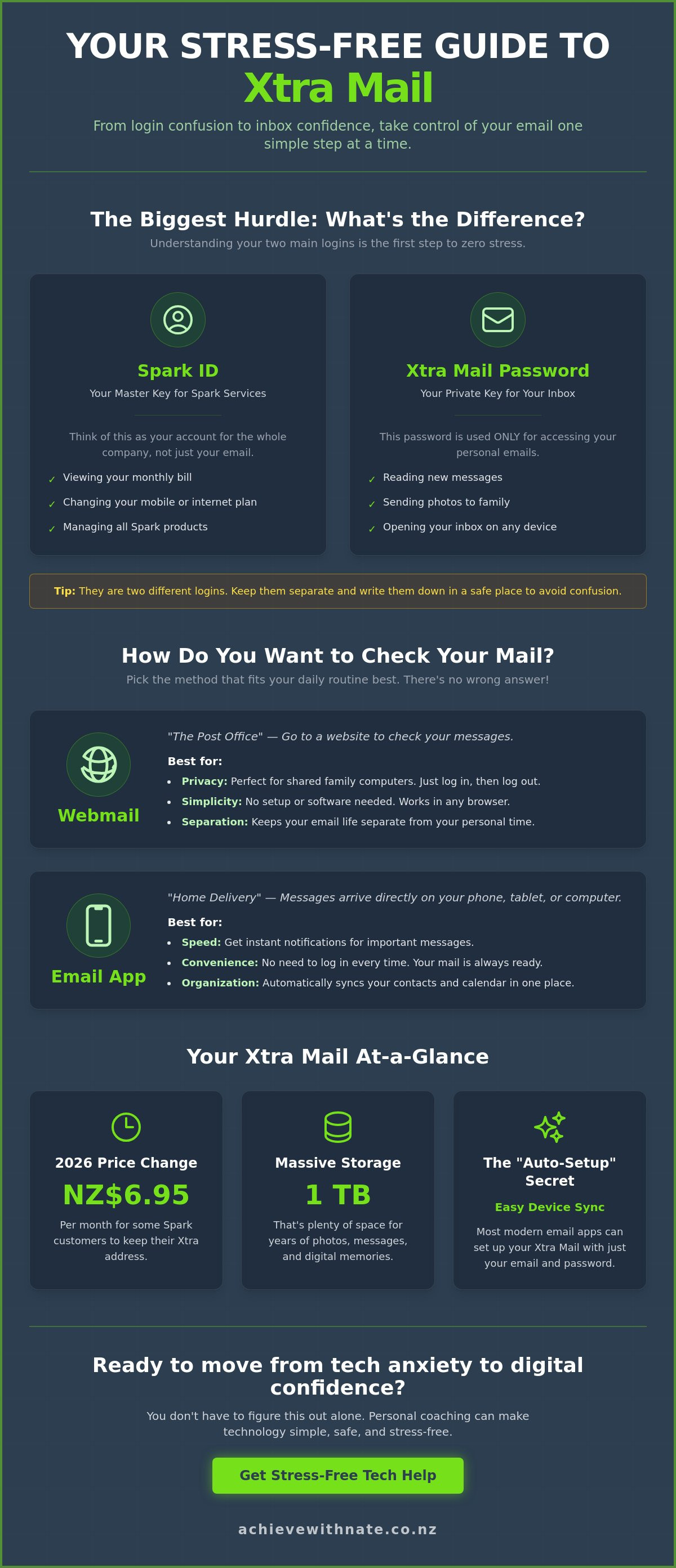
We will look at the simplest ways to get your messages flowing on every device you own. We'll also clear up the confusion around the 2026 price changes, such as the NZ$6.95 monthly fee that may apply to some xtra mail accounts. From understanding the difference between webmail and apps to securing your 1TB of storage, we will take it one gentle, manageable step at a time.
Key Takeaways
Understand why your email address is now connected to a Spark ID and how to navigate this change without the headache.
Discover if checking your mail through a web browser or a handy phone app is the best fit for your daily routine.
Learn the "Auto-Setup" secret to get your xtra mail working on your devices with just a few taps.
Gain the peace of mind that comes from knowing your digital memories are safe and your communication is fully under your control.
Table of Contents
What is Xtra Mail and Why Does it Feel So Different Now?
Xtra Mail is the long-standing email service provided by Spark New Zealand. Many of us remember the days of Telecom; it was a simpler time for our inboxes. Looking at the history of Xtra Mail shows just how much has changed over the decades. Today, it's a modern platform with new security rules and a fresh look.
It's completely normal to feel a bit of tech overwhelm when your login screen suddenly changes. You aren't doing anything wrong if you feel a bit stuck. Xtra Mail is a vital connection point for thousands of Kiwis who rely on it to keep their digital lives organized.
To better understand how to manage your account details, watch this helpful video:
The Spark ID vs. Xtra Mail Password Confusion
One of the biggest hurdles is the difference between your Spark ID and your email password. Your Spark ID is for your billing and overall account with Spark. Your xtra mail password is just for your inbox. It's common to need two different logins; keeping them separate is the best way to stay secure. Write them down in a safe place so you don't have to guess next time.
Keeping your logins straight is easier when you think of them like this:
Spark ID: Used for viewing your monthly bill or changing your mobile plan.
Xtra Password: Used only for opening your inbox to read and send emails.
Is Xtra Mail Still the Right Choice for You?
Many people stick with this service because it feels like home. It’s familiar and it works. While there is now a monthly fee of NZ$6.95 for Spark customers, many feel the cost is worth the peace of mind. If you find these updates a bit much, you might benefit from device and email basics training to help you feel more at ease. In 2026, keeping your existing address means you don't have to tell everyone in your life that you've moved. It’s about choosing what makes your life easier.
Webmail vs. Email Apps: Finding the Right Fit for You
Choosing how to view your xtra mail is a bit like choosing how you receive your physical letters. Webmail is like visiting the local post office to check a PO Box. You open a browser, type in a website, and look at your messages there. It's a great choice if you don't want your email following you around all day. On the other hand, using an email app is like having the mail delivered straight to your pocket. Whether you use Outlook or Apple Mail, the messages are simply there when you need them.
Every person has different needs. Building digital confidence with email starts with picking the method that feels most natural to you. Here is a quick way to see which might suit your lifestyle:
Webmail: Best for privacy on shared devices and keeping your digital life separate from your downtime.
Email Apps: Best for speed, staying organized, and having your calendar and contacts in one place.
There is no right or wrong answer here. It's all about what makes your day feel a little bit lighter and more in your control.
Using Xtra Webmail for Simplicity
Webmail is perfect if you share a computer with others in your household. You can go to the Spark website, check your messages, and then sign out. This keeps your personal notes private. Just remember to always click "Sign Out" when you are finished. It’s a simple, rhythmic habit that protects your information from prying eyes without requiring any complex software setup.
The Benefits of Setting Up an App
If you find yourself checking your messages several times a day, an app might be your best friend. Apps allow for better email management because they sync your contacts and calendar automatically. You won't have to keep typing in your password every time you want to see a photo from a friend. If you're feeling a bit unsure about which path to take, a quick chat with a digital coach can help you find your footing. Taking it one small step at a time is the secret to long-term success.
A Step-by-Step Guide to Setting Up Xtra Mail
Setting up your xtra mail doesn't have to feel like a chore. With a little preparation, you can get things moving in just a few minutes. Grab a cup of tea and have your Spark ID and password written down nearby. It's much easier to stay calm when you aren't hunting for scraps of paper mid-way through the process. Having these details ready is the first step toward feeling in control.
Most modern phones have an "Auto-Setup" feature. This means you just enter your email and password, and the phone does the heavy lifting for you. If the system asks you to choose between different settings, remember that IMAP is usually the best choice for modern devices. It keeps your messages in sync across your phone, tablet, and computer, so you never see the same unread email twice. SMTP is simply the part of the system that helps your outgoing mail reach its destination.
Setting Up Xtra Mail on an iPhone or Android
To add your account, go to your phone's settings and look for "Mail" or "Accounts." Choose "Add Account" and select "Other." Enter your details slowly and carefully. If you see a message saying "Account could not be verified," don't worry. This usually just means a small typo happened in the password. Take a deep breath, delete what you typed, and try once more with a steady hand.
Common Troubleshooting Without the Tears
If you've forgotten your password, the reset journey is a gentle process. You can follow the prompts on the Spark website to get a new one sent to your mobile phone via text. Sometimes you might see a "Spark ID" prompt when you just want your inbox. This is just Spark's way of keeping your account secure as technology changes. For those wanting a bit more help staying safe online, our digital confidence for NZ seniors guide offers extra security tips. If you'd like someone to walk through this with you in person, book a digital coaching session to make the whole process feel much lighter.
Moving from Tech Anxiety to Digital Confidence
It is perfectly okay to ask for help with the basics. Many of us feel that if we can't manage our xtra mail, we are somehow falling behind. This simply isn't true. Technology has changed rapidly. It's natural to want a steady hand to guide you through it. Learning to master your inbox is often the very first step toward a much broader sense of digital confidence.
When you feel in control of your messages, the rest of the digital world starts to look a lot less intimidating. You realize that these tools are here to serve you. They should make your life easier, not more complicated. Shifting from a place of worry to a place of empowerment happens one small click at a time. It's about finding your footing at your own pace without any pressure to be an expert overnight.
Why One-on-One Help Makes the Difference
Struggling with a distant help desk can often make you feel like just another account number. There is a better way. Having a patient guide sit with you on your own device makes all the difference. A digital confidence coach NZ provides a safe space where no question is too small. This kind of support turns frustration into ease because it focuses on the person, not just the software. It's about neighborly kindness and professional coaching combined.
Your Next Small Step
I encourage you to try just one thing you learned today. Perhaps you can check your password or try signing into webmail just once. You don't have to fix everything at once. If you still feel stuck or the knot in your stomach hasn't quite gone away, please feel free to reach out. Taking incremental, manageable actions is the best way to move forward. You have the strength to master this, and you don't have to do it alone.
Enjoying a Calmer Digital Life
Managing your xtra mail doesn't have to be a source of worry anymore. You now understand the shift from the old Telecom days and how to choose the best way to check your messages. Whether you prefer the simplicity of webmail or the convenience of a phone app, you have the knowledge to stay connected with confidence. Technology should be a bridge to your loved ones, not a barrier.
If you still feel a bit of a flutter in your chest when you look at your screen, remember that help is close by. You don't have to struggle alone with confusing manuals. I provide personalized one-on-one support right here in New Zealand. My coaching is entirely empathetic and happens in a no-judgment learning environment designed for your peace of mind.
Book a Stress-Free Digital Coaching Session with Nate to get support on your own device. We will take it one gentle step at a time until you feel fully in control. You have the strength to master these tools. Taking one small, manageable action today is the perfect way to start.
Common Questions About Xtra Mail
Why is my Xtra Mail password not working even though I am sure it is correct?
Your password might not work because you are using your Spark ID login instead of your specific email password. These two are often different, and it is a very common mix-up that causes a lot of initial frustration. Double-check that your caps lock is off and that you haven't recently updated one password while leaving the other as it was. Taking a moment to type slowly can often solve this little hurdle.
Can I still use Xtra Mail if I leave Spark for another provider?
Yes, you can absolutely keep your email address even if you move your broadband or mobile service to a different company. You will simply need to pay a monthly fee of NZ$11.95 to keep the service active as a "standalone" user. This is a great way to ensure you don't lose access to your old messages or the many online accounts linked to your address. It keeps your digital life stable during a move.
How do I change my Xtra Mail password if I have forgotten my Spark ID?
You can recover your Spark ID by visiting the Spark website and using the "Forgot Username" link. You'll usually need your account number or the mobile phone number associated with your Spark services to prove it's you. Once you have recovered your ID, you can then proceed to reset your xtra mail password with much less stress. It's a two-step process that ensures your account stays safe and secure.
Is Xtra Mail secure enough for my personal banking and private info?
Xtra Mail is a secure, ad-free platform that uses modern encryption to protect your private data. Spark invests in advanced spam filtering and multi-factor authentication to keep your personal banking details and private notes safe from prying eyes. While the digital world is always changing, this service provides a reliable and protected space for your most important communication. It's designed to give you peace of mind.
What is the difference between POP3 and IMAP for my Xtra account?
IMAP is the modern choice that keeps your inbox perfectly synchronized across your phone, tablet, and computer. If you delete a message on your phone, it disappears from your computer too, which keeps things tidy. POP3 is an older method that often downloads mail to just one device and removes it from the server. For most people, IMAP is the best choice because it makes your mail flow feel much more organized and predictable.


Comments