


A Calm Guide to Office 365: Understanding Microsoft 365 for Everyday Kiwis

What if your computer tools didn't feel like a monthly bill you're afraid to open, but a quiet, organized home for your digital life? Many Kiwis feel a bit stuck when they hear the term office365. You might wonder if it's just a way to check email, or if you're paying for things you don't actually need. It's completely normal to feel a bit overwhelmed by the constant name changes and the fear of losing your files in a "cloud" you can't see.
I agree that the tech world moves too fast sometimes. With New Zealand public cloud spending projected to reach NZ$5.1 billion by late 2026, it can feel like you're being pushed into a digital world without a map. This guide is your map. I promise to explain what Microsoft 365 actually is, help you decide if the NZ$29 Basic plan or the NZ$179 Personal plan fits your life, and show you how to stay organized without any technical jargon. We'll look at the different tools and how to set them up safely, one small step at a time, so you can finally feel in control of your digital world.
Key Takeaways
Understand why the name changed from office365 to Microsoft 365 and what this shift means for your peace of mind.
Explore how tools like Outlook and Word help you stay connected with family and manage your everyday tasks in Aotearoa.
Compare Personal and Business plans side-by-side so you can choose the right fit for your household or small business without the stress.
Learn how to take your first small step toward digital confidence by testing the waters with a free Microsoft account.
Find a sense of calm as you learn to organize your digital home and keep your precious files safe.
Table of Contents
What is Office 365? Clearing the Confusion for Kiwis
It can feel like the goalposts are always moving when you try to keep up with technology. You might remember buying a physical box from a shop, taking it home, and installing it on just one computer. Today, things look a little different. Microsoft 365 is a subscription service that ensures you always have the latest versions of your favorite tools. It's essentially a collection of apps you use for daily tasks, like writing letters or checking your schedule.
Think of it as your "Digital Home." Just like your physical home keeps your belongings safe and organized, this service is a single, secure place for your documents, emails, and family photos. It's designed to be a supportive companion for your life in Aotearoa, keeping everything you care about in one easy-to-find spot.
To better understand this concept, watch this helpful video:
The Difference Between Office 365 and Microsoft 365
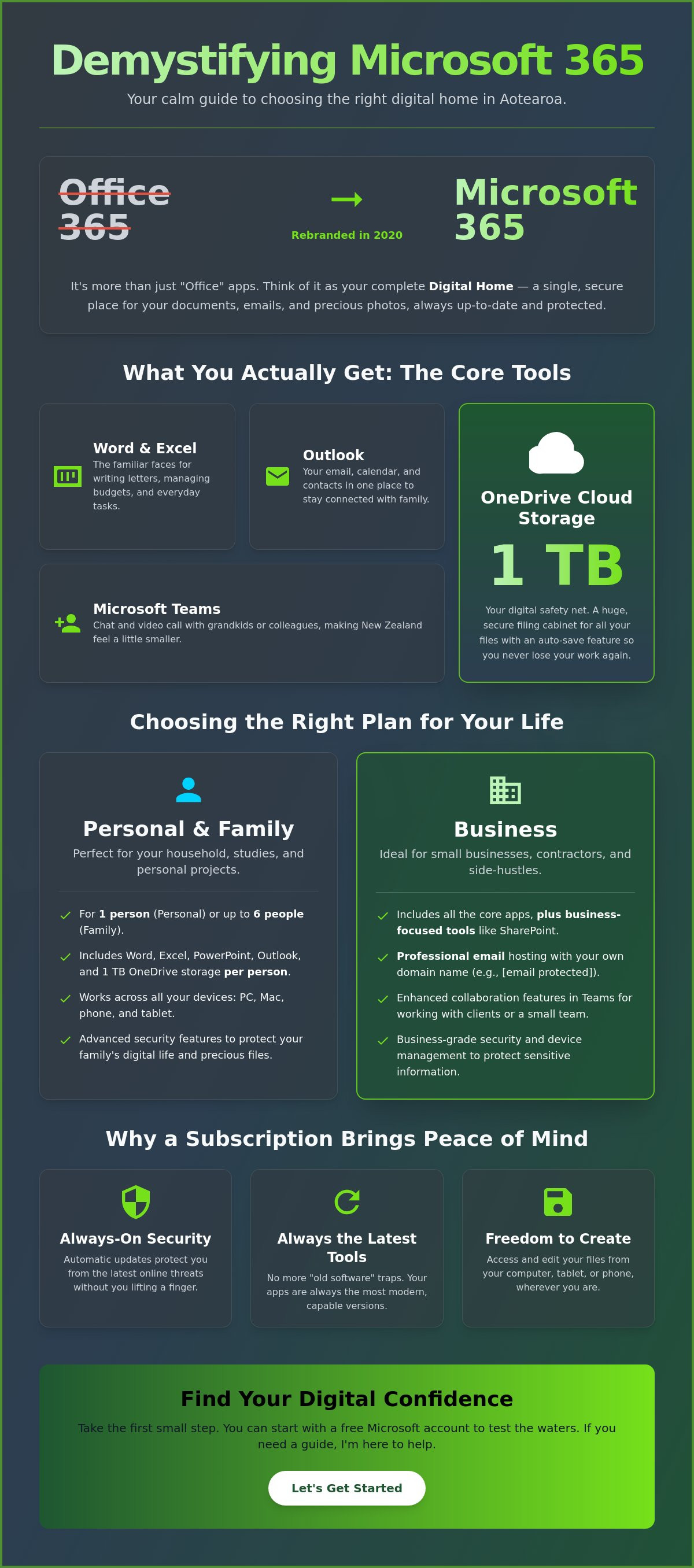
If you are searching for office365, you are in exactly the right place. In 2020, Microsoft rebranded the service to show that it offers much more than just "office" work. If you look into the Microsoft 365 history, you'll see it has grown into a complete support system for everyday people. The tools you already know, like Word and Excel, haven't disappeared. They've simply grown to be more helpful and connected.
Why a Subscription Model Matters in 2026
Staying updated is about more than just fancy new buttons. In 2026, staying safe online is a top priority for Kiwis, and a subscription ensures you receive "always-on" security updates automatically. This helps you avoid the "old software" trap where files eventually stop opening because the technology has moved on. It's a low-pressure way to ensure your digital tools stay modern and capable without you having to lift a finger. No jargon, no pressure; just software that works when you need it.
The Core Tools: What You Actually Get with a Subscription
When you look at the long list of apps in your new subscription, it can feel like looking at a crowded shelf. Most websites will list dozens of complex programs, but for most of us, only a few really matter. If you are asking What is Microsoft 365?, it's best to focus on the tools that help you every day. When you use office365, you get a set of reliable companions that make life in Aotearoa a little bit easier.
Outlook is much more than just a place for email. It is your calendar and your contact list, helping you stay connected with friends and family across the country. Word and Excel are the familiar faces you likely already know. You might use Word to write a letter to your local council. Perhaps you use Excel to manage a paye calculator nz to keep track of your take-home pay. These tools are built to handle your everyday tasks with ease.
Microsoft Teams is another helpful addition. It is a simple way to see the faces of your grandkids or chat with a small business team without the stress of travel. It removes the distance, making New Zealand feel a little smaller and more connected.
OneDrive: Your Safety Net in the Cloud
The "cloud" sounds mysterious, but it is really just a secure, professional computer where your files live. OneDrive acts as your digital filing cabinet, providing 1 TB of storage on most plans. Because it uses an auto-save feature, you never have to worry about losing a single word of your work again. If your laptop battery dies or you accidentally close a window, your progress is already safe. It is a wonderful way to find a sense of calm in your digital life.
Using Office on Your Phone or Tablet
Your work is no longer stuck at your desk. You have the freedom to check a document on your phone while you are out and about in New Zealand. Whether you are at a cafe or waiting for a bus, your files follow you seamlessly from your desktop to your mobile device. If you ever feel like these tools are a bit much to handle alone, walking you through something new is what I love to do. It is all about taking small steps toward digital confidence.
Choosing the Right Plan: Personal vs. Business
Picking a subscription shouldn't feel like a test you haven't studied for. Most people just want to know which version of office365 fits their life without paying for extras they won't use. Microsoft offers several paths, and the best one for you depends on whether you're managing a household or running a local business. For many nz seniors, the focus is simply on staying organized and keeping in touch with family, which makes the personal options a great starting point.
If you're just starting out, you can actually use a free version of the tools online. This lets you write documents in a web browser without spending a cent. However, it has limits on storage and doesn't include the desktop apps you might be used to. I always advise readers to start small; you can always upgrade your plan as your digital confidence grows.
The Family Plan: Sharing the Digital Love
For Kiwi households, the Microsoft 365 Family plan is often the most cost-effective choice at NZ$229.00 per year. This single subscription covers up to six people, and each person gets their own private 1 TB of cloud storage. It's a wonderful way to keep everyone's files separate and private while sharing the overall cost. If you're on your own, the Personal plan at NZ$179.00 per year offers the same great tools for one person.
Signs You Need a Business Account
You might consider a business plan if you want a professional email address, such as yourname@yourbusiness.co.nz, instead of a standard @outlook.com address. Business Basic starts at NZ$9.70 per user/month, but it only includes web versions of the apps. If you need the familiar programs installed on your computer, Business Standard is NZ$20.20 per user/month. Many small business owners find it helpful to look into digital productivity audits to see which tools will actually save them time each week.
Deciding between these options can be tricky when you're doing it alone. If you'd like a steady hand to help you choose, I offer one-on-one digital coaching to make sure you get exactly what you need.
Finding Your Digital Confidence: Taking the First Step
Feeling unsure about where to begin is the most common hurdle for Everyday Kiwis. With public cloud spending in New Zealand projected to hit NZ$5.1 billion by late 2026, these tools are becoming a bigger part of our daily lives. You don't need to be a tech expert to get started with office365. You just need a clear path forward that doesn't feel like a mountain to climb.
Step 1: Identify your goal. Whether it's writing a letter to a friend or organizing a community group, knowing your "why" makes the "how" much easier.
Step 2: Sign up for a free account. This lets you test the waters with basic versions of Word and Excel without any financial commitment.
Step 3: Ask for help. If the buttons and menus feel like a maze, having a guide can make all the difference to your peace of mind.
A digital confidence coach NZ can turn the mystery of these apps into mastery. It's about moving from feeling overwhelmed to feeling capable and in control of your own screen.
No Jargon, No Pressure Learning
It's completely fine if you don't have all the answers right now. The digital world is vast, but you only need to master the parts that serve you. My one-on-one sessions are designed to be a safe space where no question is too basic. We don't follow a generic manual that covers every single feature of office365. Instead, we focus on your specific needs, like sending an attachment or setting a reminder. This human-first approach ensures you feel seen and understood rather than patronized.
Moving Forward One Small Step at a Time
Confidence grows when you prove to yourself that you can do it. Try opening just one app this week, perhaps Outlook, and see how it feels. You aren't in a race to become a computer programmer. A gentle reminder: what 'digital' actually means is simply using modern tools to make your daily life in Aotearoa a bit smoother. Take it one small step at a time, and you'll be surprised at how capable you truly are.
Your Path to Digital Confidence Starts Today
You now have a clearer picture of how these tools can serve you in your daily life. We have cleared the confusion around the name change and looked at which plans actually fit your lifestyle. Understanding office365 isn't about memorizing a dense manual; it's about making your daily tasks feel lighter and more organized. Whether you are writing a letter or managing your family schedule, these tools are there to support you.
If the screen still feels a bit busy or confusing, you don't have to figure it all out alone. I am proud to be trusted by everyday Kiwis across Aotearoa to provide a psychological safe space for learning. My personalized one-on-one coaching offers a no jargon, no pressure environment where we focus entirely on your specific goals. You can Book a Free Clarity Call with Nate to find your digital confidence right now. There is no judgment here, just a steady hand to help you find your footing. You are more capable than you think, and we will get there together by taking things one small step at a time.
Frequently Asked Questions
Do I have to be connected to the internet to use Office 365?
You don't need an active internet connection to use the apps installed on your computer. Programs like Word and Excel work perfectly fine while you are offline. You only need to connect to the internet once every 30 days so the system can check that your subscription is still active. This gives you the freedom to work from a quiet bach or a plane without any stress. It's a simple way to keep working wherever you are.
What happens to my files if I stop paying for my subscription?
Your files remain yours even if you decide to stop your subscription. You can still open and print your documents, but you won't be able to edit them or create new ones until you renew. Any files stored in the cloud will stay safe for a period, allowing you to download them to your own computer. It's a low-pressure system designed to keep your precious memories and work safe while you decide your next step.
Can I still use the old version of Office that I bought years ago?
You can still use older versions, but it might not be the safest choice for your computer. Microsoft ended support for Office 2013 on April 11, 2023, which means it no longer receives vital security updates. Using very old software can also lead to errors where you can't open documents sent by friends. Moving to a modern office365 plan ensures your tools stay capable and secure as technology changes around us.
Is Office 365 safe from hackers and scams in New Zealand?
Yes, it is built with high-level security to protect you from scams. As of April 2026, 32 Government agencies in New Zealand trust this platform to keep their data safe. The system includes Brand Impersonation Protection to help spot fake emails before they reach your inbox. It is a protective shield for your digital life, giving you the confidence to check your mail without fear. You are never left to face these threats alone.
Can I use Office 365 on an Apple Mac or iPad?
You can absolutely use office365 tools on your Apple Mac, iPad, or even your iPhone. Microsoft 365 is designed to be flexible, so your subscription covers multiple devices at once. Whether you prefer a desktop computer or the portability of a tablet, your documents will look exactly the same on every screen. This seamless transition makes it easy to start a letter on your Mac and finish it while relaxing with your iPad.


Comments