


Basic Computer Skills for Seniors in NZ: A Guide to Digital Confidence

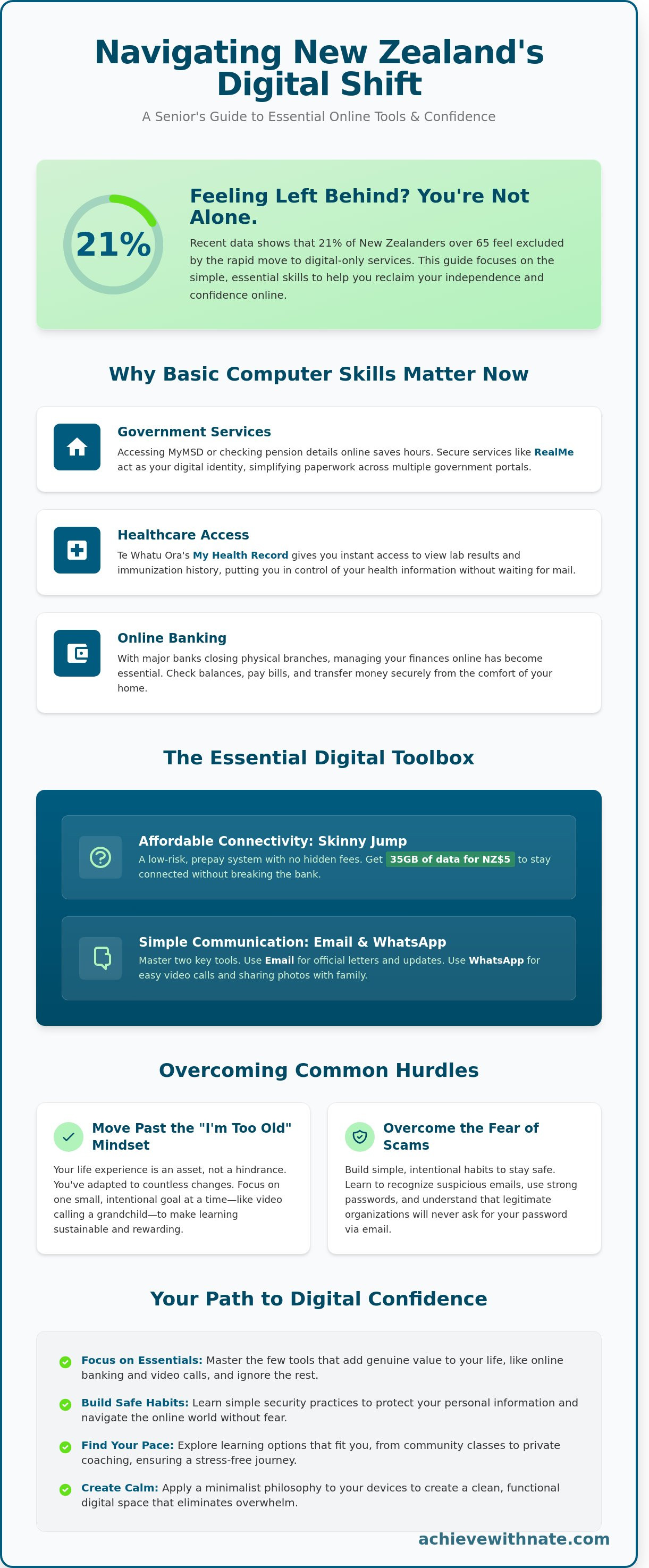
Last Tuesday, Margaret sat at her kitchen table in Christchurch, staring at a login screen for MyMSD with a knot of anxiety in her stomach. She didn't want to call her daughter for the third time this week, yet the fear of clicking the wrong button felt very real. You aren't alone in this. Recent data suggests that 21 percent of New Zealanders over 65 feel left behind by the rapid shift to digital-only services. Searching for basic computer skills for seniors nz is the first step toward reclaiming your agency in a world that often feels too fast.
You probably feel that technology should be a tool for freedom, not a source of stress. It's exhausting to navigate banking or government portals when the help menus feel like they're written in a different language. My promise is to help you navigate this space with intentionality and calm. We'll ignore the noise and focus only on the tools that bring you peace of mind and keep your finances secure.
This guide provides a clear path to mastering online banking, using MyMSD with confidence, and connecting with your family through video calls without ever feeling like a burden again.
Key Takeaways
Understand why New Zealand is shifting toward digital-first services and how to navigate this change with peace of mind.
Master basic computer skills for seniors nz by focusing only on the essential tools that add genuine value to your daily life.
Overcome the fear of online scams by building simple, intentional habits that keep your personal information secure.
Evaluate the best ways to learn digital skills, from community classes to private coaching, to find a path that fits your pace.
Apply a minimalist philosophy to your devices to create a clean, functional workspace that eliminates digital overwhelm.
Table of Contents Understanding Digital Literacy for Seniors in New Zealand The Essential Digital Toolbox for Everyday Kiwi Life Overcoming the Fear: Safety and Security Online How to Start Learning Without the Stress Building Digital Confidence with Achieve With Nate
Understanding Digital Literacy for Seniors in New Zealand
Digital literacy in 2026 New Zealand isn't about becoming a technical expert. It's about participation. For many seniors, the world feels like it's moving too fast. Services you once accessed in person are now hidden behind screens. Understanding what computer literacy means today is the first step toward reclaiming your independence. It's the ability to find, evaluate, and use information safely online.
The shift to digital-first services can feel overwhelming. It often feels like a barrier rather than a benefit. However, technology is simply a tool. When you use it intentionally, it creates more freedom, not less. You don't need to know everything. You only need the basic computer skills for seniors nz that align with your specific needs. This clarity allows you to ignore the noise and focus on what adds value to your life.
Why Basic Computer Skills Matter Now
The landscape of New Zealand has changed. Since 2019, major banks like Westpac and BNZ have closed dozens of physical branches across the country. In many small towns, the local branch is gone. Managing your finances now requires a digital connection. It's about more than just money; it's about essential health and government access.
Government Services: Accessing MyMSD or checking your pension details online saves hours of waiting on hold.
Healthcare: Te Whatu Ora now uses My Health Record to let you view lab results and immunization history instantly.
Connection: Video calls through platforms like WhatsApp or Zoom keep you present in the lives of family members who live overseas.
These systems provide a level of autonomy that was previously impossible. Instead of waiting for a paper statement in the mail, you have instant access to your records. This shift is about sustainability and personal agency. When you learn these systems, you're no longer dependent on others to manage your basic needs.
Moving Past the "I am Too Old" Mindset
The biggest hurdle isn't the software. It's the psychological barrier of age. You might tell yourself that you're too old to learn. This is a myth. Your decades of life experience have already made you an expert at problem-solving. You've adapted to countless changes before 2026. This is just another system to understand. Your perspective is an asset, not a hindrance.
Don't try to learn everything at once. That leads to burnout. Instead, start with a single, intentional goal. Perhaps you want to see photos of your grandchildren. Or maybe you want to check your bank balance without driving to the next town. When you focus on one outcome, the learning becomes sustainable. Developing basic computer skills for seniors nz is a journey of small, consistent steps. You have the discipline required to succeed. Focus on the progress, not the perfection.
The Essential Digital Toolbox for Everyday Kiwi Life
Building basic computer skills for seniors nz doesn't require learning every app on the market. Most digital noise is a distraction. You only need the "vital few" tools that add value to your daily life. A minimalist approach prevents overwhelm and creates clarity. When you limit your focus, you reduce the friction of learning.
Start by clearing your digital workspace. Delete the shortcuts you never click. A clean desktop leads to a calm mind. You also need a stable, affordable connection. Skinny Jump is a standout option in New Zealand, offering 35GB of data for NZ$5. It's a prepay system with no hidden fees, which makes it a low-risk way to stay connected.
If you feel stuck, the government has expanded digital skills courses for seniors to help you master these fundamentals. These programs are designed to meet you where you are. They focus on practical outcomes rather than technical jargon. Taking a course is a practical way to gain confidence without the stress of trial and error.
Communication Tools for Connection
Focus on mastering two specific tools. Email is your primary system for official letters and long updates. Master the basics: opening an attachment and hitting reply. For visual connection, choose one video platform. WhatsApp is often the best choice for family because it's simple and mobile-friendly. You can send photos of the grandkids with two taps. This keeps your digital world small and manageable.
Managing Life Online: Banking and Government
In New Zealand, RealMe acts as your secure digital identity. It's a single login that works across many government services. Setting this up once saves you hours of paperwork later. Use it to access MyMSD or check your records with ease. Online banking is equally vital for independence. Most NZ banks now have simplified apps. Logging in once a week to check your transactions is a healthy habit that builds basic computer skills for seniors nz while keeping your finances secure.
Simplifying your digital life is about reclaiming your time. You can find more tips on designing an intentional lifestyle that prioritizes peace over complexity. Focus on these core tools. The rest of the digital world will feel much less intimidating once your foundation is solid.
Overcoming the Fear: Safety and Security Online
Fear is the primary barrier for many people. You might worry about losing your savings or clicking the wrong button. These feelings are valid. However, fear can be transformed into a tool for safety. By being intentional, you remove the power from online threats. Most scams rely on making you feel rushed. When you slow down, you regain control.
Building a "Security First" mindset is about simple habits. It's not about complex technical knowledge. In New Zealand, we have excellent support systems. Netsafe is a key resource for staying safe online. They help thousands of Kiwis every year. Recent research on digital literacy for NZ seniors highlights that structured learning environments help build this confidence. Mastering basic computer skills for seniors nz begins with understanding how to protect your digital space.
Spotting Scams with Confidence
Scammers often pretend to be from trusted brands like NZ Post, Spark, or your bank. They use "phishing" messages to steal information. These messages usually contain a sense of false urgency. They might claim your account is suspended or a parcel is waiting. Look for red flags like generic greetings or strange email addresses. Official organizations will never ask for your password via a text or email link. If you think you've made a mistake, don't panic. Disconnect your device from the Wi-Fi and call your bank immediately using their official number.
Simple Password Systems
You don't need a complicated system to stay secure. The "Less is More" approach is often the most effective. Use long, unique phrases for your important accounts. A phrase like "BlueSkyOverAuckland2024" is much harder to crack than a short word with numbers. For many, keeping a physical password book is a practical solution. Keep this book in a safe, private place in your home. It's a reliable system that doesn't require extra software.
You should also embrace Two-Factor Authentication (2FA). This is just a second step to prove your identity. Usually, it's a code sent to your mobile phone. It takes an extra 20 seconds to type in, but it provides massive peace of mind. Developing basic computer skills for seniors nz means choosing these simple, sustainable habits over complex ones. Security is a byproduct of your consistent, intentional actions.
How to Start Learning Without the Stress
Learning a new skill is an intentional act. It requires a system that respects your time and your peace of mind. To gain basic computer skills for seniors nz, you must first choose an environment that matches your specific learning style.
You don't need to master everything at once. Focus on sustainability. Set a milestone to send one email to a grandchild this week. Next week, learn how to attach a photo. These small, consistent actions build a foundation of digital freedom without the weight of expectation.
The most effective way to learn is by doing. Find a safe space where mistakes have no consequences. This "sandbox" approach removes the fear of breaking the device. It allows you to explore with curiosity rather than caution. When you remove the fear of failure, clarity follows.
Community Resources and Groups
New Zealand has a robust network of peer-led learning. SeniorNet, which has operated since 1992, provides over 50 learning centres across the country. Local libraries, such as those managed by Auckland Council or Christchurch City Council, also offer free "Book a Librarian" sessions for those starting their journey.
The benefit of these groups is social connection. You realize you aren't alone in your frustrations. Learning alongside peers creates a sense of shared purpose. It turns a technical task into a social experience that can reduce the isolation often felt when tackling new technology.
However, group settings can be noisy. The pace is often set by the fastest learner in the room. If you find yourself feeling rushed or distracted, a classroom might not be the most intentional choice for your growth. Some people find the social pressure creates more anxiety than it solves.
The Value of 1-on-1 Digital Coaching
Private coaching offers a different path. It is a quiet, meditative way to build basic computer skills for seniors nz. You skip the curriculum that doesn't apply to your life. You focus only on the tools that bring you immediate value and joy.
Personalized coaching reduces tech anxiety by providing immediate, calm feedback. There is no pressure to keep up with others. You can ask the same question ten times until the logic feels natural. This method prioritizes your personal agency and comfort above all else.
This approach is about subtraction. You remove the fluff of a general course. You gain clarity by focusing on specific systems, like managing your NZ Superannuation login or using WhatsApp to see family. It is a direct route to digital independence.
If you want to build a life of focus and digital clarity, you can start your journey with intentional coaching today.
Building Digital Confidence with Achieve With Nate
Technology is a tool. It should serve you, not stress you. My minimalist philosophy focuses on removing the unnecessary. We strip away the jargon and the noise of modern tech. This allows you to gain basic computer skills for seniors nz at your own pace. I believe in clarity over hype. We build practical systems that work for your daily life. You learn to use your device with intention. This isn't about knowing everything; it's about knowing exactly what you need to achieve your goals.
The transition from feeling overwhelmed to feeling intentional is a shift in mindset. Many people feel they are falling behind. They see a complex screen and feel a sense of dread. My coaching changes that. We move away from reactive habits. We move toward a disciplined approach where you are the master of the machine. Success is a byproduct of consistent, simple actions. We focus on the long-term satisfaction of digital agency rather than short-term fixes.
A Calm Approach to Technology
Most tech education is loud. It's full of "hustle" and complex steps that don't stick. I remove that noise. My coaching sessions are quiet conversations. We look at your specific needs in a New Zealand context. You might want to manage your NZ Super online, use the MyIR service, or video call family in Christchurch. We build systems that sustain your confidence over time. You aren't just memorizing steps. You are understanding the logic behind the screen. This creates a sense of peace and self-reliance that lasts long after our session ends.
No-lecture zone: We talk through problems as partners.
Minimalist focus: We only learn what adds value to your life.
Practical systems: We set up your computer to stay organized and secure.
Take the First Step Toward Clarity
Think about one digital task you want to master today. It could be as simple as organizing your desktop or learning how to spot a scam email. We start there. I offer 60-minute coaching sessions designed to provide immediate relief from digital clutter. There is no pressure and no judgment. We simply look at where you are and where you want to be. My goal is to help you find freedom through simplicity. If you're ready to stop struggling with your devices, I'm here to help you find a better way forward.
You can reach out for a no-pressure chat about your goals. Let's clear the fog and build a digital life that feels sustainable and calm. Book a digital confidence session with Nate to begin your journey toward intentional technology use.
Embrace Your Digital Independence
Digital confidence starts with a single, intentional step. You don't need to master every complex system at once. Focus on the practical tools that matter for life in New Zealand. With over 80% of essential services now moved online, these tools are vital for your autonomy. Understanding basic computer skills for seniors nz allows you to navigate the modern world with clarity and independence.
Technology should serve your life, not complicate it. Many people feel a sense of friction or anxiety when facing new screens. My coaching provides a calm, grounded space to overcome these hurdles. We focus on 5 core areas of digital safety to ensure your peace of mind. This isn't about high-energy hype. It's about building sustainable habits through a quiet, disciplined approach that respects your time.
I offer personalized coaching tailored specifically for everyday Kiwis. We work through your specific needs at a pace that feels right for you. You have the agency to stay connected and secure in an increasingly digital landscape. Start your journey to digital confidence today. The path toward clarity and freedom is simpler than you think.
Frequently Asked Questions
Is it too late for a senior to start learning computer skills?
It's never too late to begin your digital journey. Learning is a lifelong practice that builds personal freedom and keeps your mind sharp. In 2023, data showed that New Zealanders over 65 are the fastest-growing group of new internet users. You have the capacity to learn these systems at any age, provided you move at your own pace.
What are the most important computer skills for seniors to have?
Focus on the systems that provide the most immediate value to your life. Mastering basic computer skills for seniors nz starts with email communication and safe web browsing. You should also learn how to manage files and use video calling tools like Zoom. These core skills allow you to maintain connections and manage your affairs with less friction.
How can I protect myself from online scams in New Zealand?
Protection comes from simple, disciplined habits rather than complex software. Always use unique passwords and enable two-factor authentication on your banking apps. Netsafe reported that New Zealanders lost NZ$6.6 million to scams in just the third quarter of 2023. If an offer feels too good to be true, it likely is. Trust your intuition and verify every source before sharing data.
What is RealMe and do I really need it?
RealMe is a secure login system created by the New Zealand government and NZ Post. You need it to access essential services like MyMSD or to renew your passport online. It simplifies your digital life by using one set of credentials for multiple government agencies. Think of it as a single, secure key that opens many important doors without the need for dozens of passwords.
Can I learn computer skills on a tablet or smartphone instead?
You can certainly build your digital literacy using a tablet or a smartphone. These devices often have simpler interfaces that reduce the feeling of overwhelm. Many basic computer skills for seniors nz are transferable between a laptop and a mobile device. Choose the tool that feels most comfortable for your daily routine and focus on mastering its specific layout first.
How long does it take to feel confident using a computer?
Most learners feel a sense of clarity after four to eight weeks of consistent, daily practice. Spend 15 to 20 minutes each day exploring one specific task rather than trying to learn everything at once. Confidence is a byproduct of repetition and steady habits. By the 60 day mark, the systems you use will start to feel like second nature.
Where can I find free digital literacy courses in NZ?
You can find free support at your local public library or through the Stepping UP program. SeniorNet has over 60 learning centres across New Zealand that offer affordable, peer-led coaching. Many of these community courses cost NZ$0 and provide a quiet space to learn without judgment. These local resources remove the financial barriers to your personal growth and digital independence.
What should I do if I feel overwhelmed while learning?
If you feel overwhelmed, stop and take a breath. Complexity is often the enemy of progress, so try to subtract one task from your list and focus only on the present step. Focus on just one button or one menu today. Remember that small, intentional actions lead to significant freedom over time. You don't need to master the entire machine to enjoy its benefits.


Comments