


Cell-Phone help for Elderly (Best cell) Users: A Stress-Free 2026 Guide

Updated: Sep 30
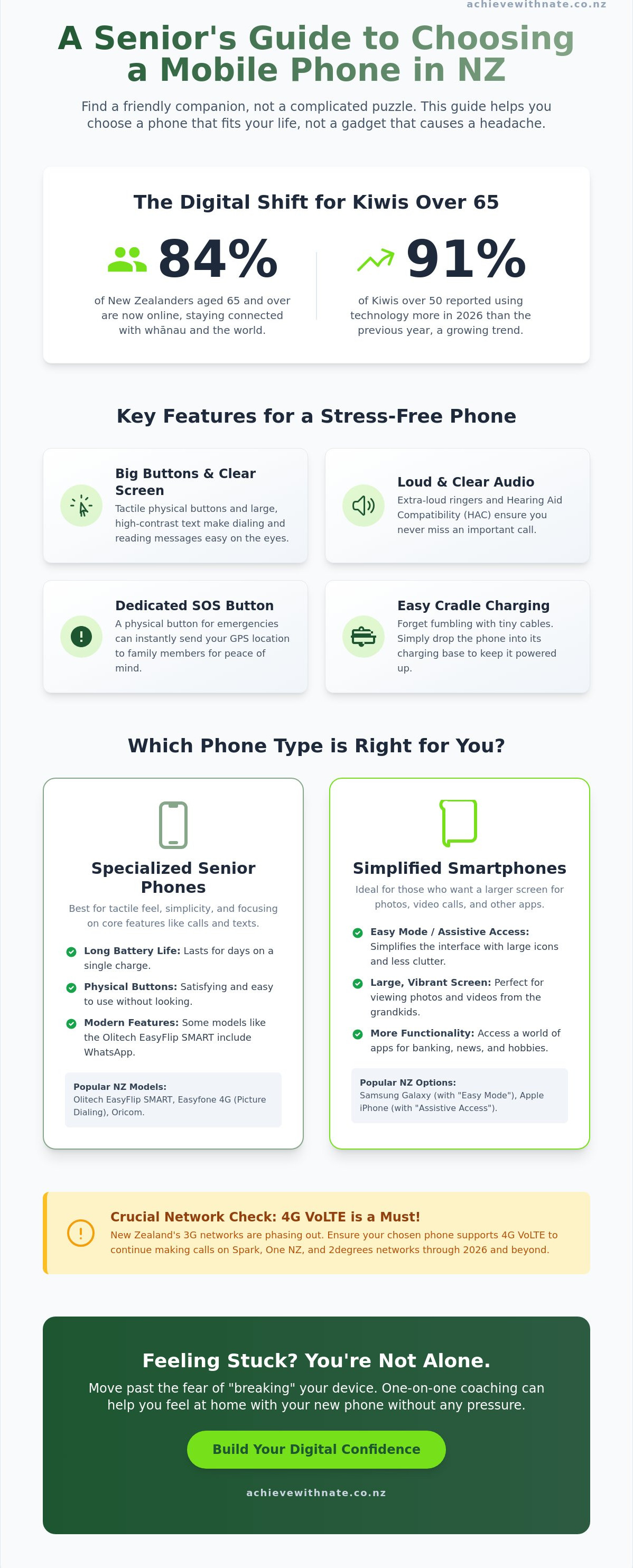
Did you know that 91% of New Zealanders over 50 reported using technology more in 2026 than they did just a year ago? While 84% of Kiwis aged 65 and over are now online, many still feel a sense of dread when faced with a new device. It's frustrating to stare at tiny text or confusing icons, worrying that one wrong tap might break everything. You shouldn't have to pay for a thousand features you'll never use just to stay in touch. Finding the right mobile phone for elderly nz users is about finding a tool that fits your life, not a gadget that causes a headache.
I understand that tech can feel like a lot to take in, but it doesn't have to be a struggle. This guide will show you how to find a phone that feels like a friendly companion rather than a complicated puzzle. We'll walk through the best options available in Aotearoa right now, from the $249 4G Big Button phone to simple $17 Skinny plans. You'll learn how to choose a device with loud, clear audio and a reliable SOS button for your peace of mind. Let's take this one small step at a time to get you feeling confident and connected.
Key Takeaways
Learn how to choose a device that works seamlessly on Spark, One NZ, and 2degrees networks while keeping physical buttons for ease.
Discover why the Olitech EasyFlip SMART is a top mobile phone for elderly nz users who want to use WhatsApp without a confusing touchscreen.
Master simple setup tricks to make your screen easier to read, including adjusting font sizes and contrast for immediate clarity.
Find out how to safely save passwords and set up your email so you can receive photos from the grandkids without the tech-induced headache.
Explore how one-on-one support can help you move past the fear of "breaking" your device and build lasting digital confidence.
Table of Contents What Makes a Mobile Phone "Senior-Friendly" in New Zealand? Top Mobile Phones for Elderly NZ Users in 2026 5 Steps to Setting Up Your New Phone Without the Stress Beyond the Device: Building Your Digital Confidence
What Makes a Mobile Phone "Senior-Friendly" in New Zealand?
When you're looking for a mobile phone for elderly nz users, the choices can feel like a bit of a maze. It's not just about finding a screen that's easy to read; it's about finding a phone that feels safe and familiar. While big buttons are a great start, true simplicity comes from how the phone works on the inside. You want a device that lets you focus on the conversation rather than the technology. It's about making sure you feel capable every time you pick it up.
A senior-friendly phone balances physical ease with smart accessibility features. This means the icons are clear, the menus aren't buried deep, and the phone doesn't nag you with constant digital updates. It's about giving you digital confidence without the clutter. We want to remove that fear of "breaking" the device so you can enjoy your day without tech-induced stress.
To better understand what to look for, watch this helpful video on top choices for seniors:
Audio clarity is another non-negotiable feature. Many modern phones now include Hearing Aid Compatibility (HAC) and extra-loud ringers that can reach high decibel levels. This ensures you never miss a call from a loved one, even if you're in another room. Safety is just as vital. A dedicated SOS button can send your GPS location to family members instantly if you ever feel uneasy. These features offer a safety net for everyday Kiwis living independently.
The Must-Have Features for Aotearoa Seniors
You need to ensure your mobile phone for elderly nz use works on 4G VoLTE. This is crucial because older 3G networks in New Zealand are being phased out throughout 2025 and 2026. If your phone doesn't support 4G calling, it might stop working on Spark, One NZ, or 2degrees. Another helpful feature is "Cradle Charging." Instead of fumbling with tiny USB cables, you simply drop the phone into a sturdy base. It's a calm, simple way to keep your battery full without any fuss.
Top Mobile Phones for Elderly NZ Users in 2026
Choosing a mobile phone for elderly nz users shouldn't feel like a chore. It's about finding that "sweet spot" where you feel in control of your device. Some people love the tactile feel of a flip phone, while others want to see clear photos of the whānau on a larger screen. There is no "wrong" choice, only the one that makes you feel most capable.
The Olitech EasyFlip SMART ($359.00) is a standout for those who want the best of both worlds. It has big, physical buttons but also runs WhatsApp, which is verified to connect on the One NZ network as of April 2026. This means you can get those lovely family group chat updates without fumbling with a touchscreen. If numbers and names are becoming a bit of a blur, the Easyfone 4G is a brilliant visual choice. It uses picture-dialling, so you just tap the photo of the person you want to call. It takes the guesswork out of staying connected with your loved ones.
If you're feeling a bit more adventurous, a mainstream smartphone might be the answer. Samsung Galaxy phones have a wonderful feature called "Easy Mode." For Apple fans, the iPhone offers "Assistive Access." This turns the screen into a simple, icon-based experience that removes much of the digital noise. These tools are vital for digital inclusion for seniors in Aotearoa, making sure everyone stays part of the conversation regardless of their tech skills.
Specialized Senior Phones vs. Simplified Smartphones
"Easy Mode" is a software setting that enlarges icons and reduces menu clutter. One big difference is how often you'll need to plug your device in. A traditional flip phone can often last for several days on a single charge. A smartphone usually needs to be charged every night. If you're worried about the transition, a friendly coaching session can help you feel at home with your new device without any pressure.
Which Confidence Level Are You?
It helps to think about what you actually want to achieve with your mobile phone for elderly nz use each day. We can break this down into two simple levels:
Level 1: You mainly want to make calls and send the occasional text. A flip phone like the Oricom ($369.00) is your best friend here.
Level 2: You want to see photos, join family group chats, and maybe use a map. A simplified smartphone is the way to go.
5 Steps to Setting Up Your New Phone Without the Stress
Setting up a new device can feel like a tall mountain to climb. You've finally chosen the right mobile phone for elderly nz use, but now you have to make it work for your specific needs. Don't worry. We can take this one small step at a time to ensure your new phone feels like a helpful friend rather than a source of stress. In 2026, having a device that works for you is the key to staying connected with your whānau.
First, let's fix the screen. Go straight to your settings and change the font size to "Large" or "Extra Large." Increasing the contrast makes a huge difference too. It's much easier to feel confident when you can see exactly what you're tapping. Second, it's time to connect. Whether you use Gmail or Xtra mail, saving your passwords now will save you a lot of fumbling later. This keeps you connected to those lovely photos from the grandkids without the tech-induced headache.
Third, set up your safety net. Program the SOS button with the phone numbers of your three most trusted family members. This gives you peace of mind when you're out and about in your community. Fourth, let's clear the clutter. Most phones come with "bloatware" or unused apps that just cause confusion. Hiding these icons stops the screen from looking messy. It creates a calm, clean space for you to use every day. We want every everyday Kiwi to feel capable with their technology.
Making it "Kiwi-Ready"
Living in Aotearoa means we have specific tools that make life easier. You might want to install your local banking app or the My Health Record app to manage your wellbeing. Doing this safely is the key to building your digital confidence. To keep things quiet, you can also look at email management tips to stop those constant pings from bothering you. These small adjustments make a world of difference. If you'd like someone to walk you through these steps in person, you can book a low-pressure coaching session today. We'll get everything sorted together.
Beyond the Device: Building Your Digital Confidence
Even the most expensive mobile phone for elderly nz users won't help if it stays tucked away in a drawer. Technology only becomes truly useful when you feel safe enough to explore it without fear. Many everyday Kiwis tell me they're worried about "clicking the wrong thing" or accidentally deleting something important. That fear is a heavy burden, but it shouldn't stop you from the joy of seeing your grandkids or checking the local news in Aotearoa. A survey from November 2022 showed that 57% of seniors believe technology helps them stay socially connected; we want to make sure you're part of that group.
Building your skills is best done in a "No Judgment" zone. It's perfectly okay to ask questions that might feel simple or "silly" to others. In fact, there's no such thing as a silly question when you're learning to navigate a new digital world. One-on-one coaching provides a psychological safe space where you can make mistakes without feeling patronized. Instead of a busy family member rushing through a tutorial, you get a patient mentor who walks you through things at your own pace. No jargon, no pressure.
The secret to success is taking small steps. Master one feature each week. You might spend the first week just learning how to take a clear photo of the garden. The next week, you could learn how to send that photo to a friend on WhatsApp. By focusing on one small win at a time, that scary gadget slowly transforms into a helpful companion. It's about progress, not perfection. This steady approach ensures you feel capable and in control of your own device.
Personalized Help for NZ Seniors
Achieving Digital Confidence for NZ Seniors is a vital pathway to independence. You shouldn't have to wait for a visitor to fix a setting or send an important email. If you're still unsure which mobile phone for elderly nz best fits your hands and your lifestyle, I'm here to help. We can start with a Free Clarity Call to discuss your specific needs and calm any tech-induced anxiety. Let's get you feeling confident and connected, one small step at a time.
Ready to Feel Confident With Your New Phone?
Choosing a mobile phone for elderly nz users is about more than just picking a gadget; it's about reclaiming your independence. You've learned how to spot essential features like 4G VoLTE and SOS buttons that keep you safe. You also have a simple roadmap for setting up your device to be calm and clear from day one. Whether you choose a traditional flip phone or a simplified smartphone, the goal is always the same: staying connected to the people you love without the stress.
Technology should serve you, not the other way around. If you still feel a bit overwhelmed by the choices, I'm here to help. I specialize in building digital confidence with a real Kiwi heart and patient support. There is no judgment here. My "no jargon, no pressure" guarantee means we'll work at your pace until you feel completely capable. You can Book a Free Clarity Call with Nate to find your perfect phone and start your journey today. Let's turn that scary gadget into a helpful companion, taking everything one small step at a time.
Frequently Asked Questions
Do I need a special SIM card for a senior mobile phone in NZ?
No, you do not need a special SIM card. Any standard Nano or Micro SIM from Spark, One NZ, or 2degrees will work in these devices. However, it is vital to ensure your SIM card is 4G compatible. Since older 3G networks are closing down by late 2025, a 4G SIM ensures you stay connected to your whānau without any unexpected service drops.
Can I keep my old Spark or One NZ phone number when I switch to a new senior phone?
You can absolutely keep your existing phone number when switching to a new mobile phone for elderly nz users. This process is called porting. When you get your new device, simply tell your provider you want to keep your current number. It usually takes just a few hours to switch over. This means your friends and family can still reach you on the same number they have used for years.
What is the "Easy Mode" on Samsung phones and how do I turn it on?
Easy Mode is a built-in setting that simplifies the screen by enlarging icons and removing digital clutter. To turn it on, open Settings, tap on Display, and then select Easy Mode. It also increases the touch and hold delay to help prevent accidental taps. This is a wonderful way for everyday Kiwis to make a modern smartphone feel much more friendly and less overwhelming.
Are there any mobile phones for the elderly that work with hearing aids?
Yes, many phones are specifically designed with Hearing Aid Compatibility, often shown as an HAC rating. Specialized devices like the Oricom Flip or Olitech EasyMate 2 are built to work seamlessly with hearing aids. These phones often include extra loud ringers and clear audio. This ensures you can hear every word during a call without any frustrating feedback or background noise.
How much does it cost to have someone help me set up my new phone in NZ?
The cost of setup help in Aotearoa depends on the type of support you choose. Community organizations like SeniorNet often provide low cost workshops for a small annual membership fee. For personalized, one on one coaching that focuses on your specific needs, prices can vary based on the session length. Many everyday Kiwis find that a single hour of patient, jargon free support is enough to build lasting digital confidence.


Comments