


Gaining Digital Independence in Retirement: A Gentle Guide to Tech Confidence

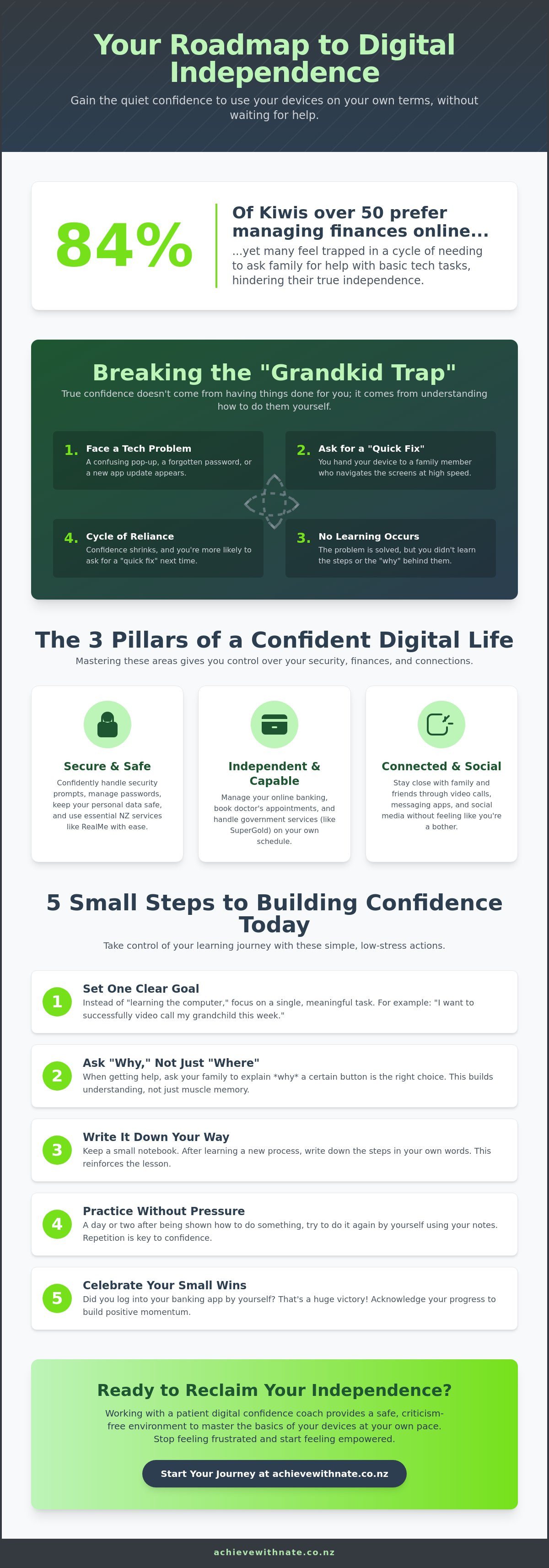
Last Tuesday, you might have waited for a family member to help you log into a banking app or fix a small settings error. It is a common story. A 2022 survey found that 84% of New Zealanders over 50 prefer to manage their finances online, yet many still feel trapped by the need to ask for help. Gaining digital independence in retirement isn't about becoming a computer expert overnight. It is about having the quiet confidence to use your own devices on your own terms.
We understand that the digital world can feel fast and sometimes a bit cold. You might worry about online security or feel overwhelmed by updates like the upcoming SuperGold Card identity changes. This guide is your gentle roadmap to feeling secure and capable. You will learn how to handle RealMe with ease, keep your personal information safe, and stay connected with family without feeling like a bother. We are going to break down the barriers to tech confidence, one small and manageable step at a time.
Key Takeaways
Understand why tech autonomy is just as vital as financial freedom for your peace of mind here in New Zealand.
Learn why relying on family to "just do it for you" might be holding you back from gaining digital independence in retirement.
Discover the three pillars of a secure digital life, from keeping your data safe to using video calls to stay close to loved ones.
Get five simple, low-stress steps to start building your tech confidence today using your own personal goals as a guide.
Explore how working with a patient coach can help you master the basics of your devices in a safe, criticism-free environment.
Table of Contents
What Does Digital Independence Actually Mean for Retirees?
Digital independence is about more than just knowing where to click. It is the quiet freedom to use your smartphone or tablet without feeling a knot of worry in your stomach. When we talk about what digital independence actually means, we are describing the ability to handle your own affairs safely and on your own schedule. It means making technology work for your lifestyle, rather than feeling like you are struggling to keep up with it.
For many Kiwis, this autonomy is now just as vital as having your physical health or finances in order. Whether you are checking a balance on a banking app or using RealMe to verify your identity for government services, these tools are the modern keys to a smooth retirement. Gaining digital independence in retirement allows you to stay connected with your local community and family without waiting for a busy relative to find a spare moment. It is about being the one in the driver's seat.
To better understand this concept, watch this helpful video:
The Shift from Dependence to Autonomy
It is very easy to fall into the habit of handing over your phone when a confusing pop-up appears. We have all been there. However, constantly relying on others can lead to a loss of privacy and a growing sense of frustration. You might feel like a burden, even when your family says they don't mind helping. When you learn to solve these small hurdles yourself, your confidence grows. You aren't just fixing a tech problem; you are reclaiming your right to a private digital life. Knowing you can handle a security prompt or a new app update provides a wonderful sense of relief.
Digital Literacy as a Modern Life Skill
In 2026, technology is woven into the fabric of New Zealand life. It is how we book doctor appointments, manage our SuperGold details, and see the faces of grandchildren living overseas. Learning these skills is about your lifestyle, not about mastering a machine. It is never too late to start your journey. We believe in taking small, incremental steps that turn "tech-anxiety" into a steady sense of calm. You don't need to be a computer expert to be successful. You just need a patient, supportive space to find your footing at your own pace. By focusing on these small wins, gaining digital independence in retirement becomes a rewarding part of your daily life rather than a source of stress.
Breaking the "Grandkid Trap": Why True Tech Autonomy Matters
We call it the "Grandkid Trap." It's that moment you ask a younger family member for help, and they zoom through the screens faster than you can blink. Before you can even ask a question, the task is finished. You feel relieved, but you also feel just as lost as you did before. Gaining digital independence in retirement means breaking this cycle of reliance. It is about moving from being a passive observer to an active participant in your own digital life. True confidence doesn't come from having things done for you; it comes from knowing you can do them yourself.
When a loved one takes the phone out of your hand, they are accidentally taking away a learning opportunity. It is like watching someone else drive to a new destination. You see the scenery, but you don't learn the turns. Data from the Pew Research Center shows that technology is becoming a central part of how we age, which is why true tech autonomy matters so much for your safety and social connection. Real independence happens when you are the one holding the device and making the choices.
The Problem with "Quick Fixes" from Family
Family members usually have the best intentions. They want to help you quickly so you can get back to your day. However, they often skip the explanation because they don't want you to feel overwhelmed. This makes the next time even harder. You might feel like you are bothering them if you have to ask for the same thing twice. To change this, try reframing the help as a teaching session. You can set gentle boundaries to ensure you are actually learning:
Ask your family to keep their hands off the device while they explain the steps.
Have them wait while you write down the process in your own words.
Request that they explain why a certain button is the right choice, not just where it is.
Building Confidence Through Self-Sufficiency
There is nothing quite like the feeling of the "Aha!" moment. That first successful video call or a correctly sorted email inbox feels like a major victory. This success builds a layer of protection against tech-anxiety. You start to realize that your tablet is a tool you can control, not a mystery to be feared. If you are looking for a patient environment to practice these skills, you can learn more about Nate’s gentle coaching approach. Taking these small steps toward gaining digital independence in retirement helps you reclaim your confidence. You can explore one-on-one support today to see how manageable and stress-free the journey can be.
The Three Pillars of a Confident Digital Life in NZ
Building a secure digital life in Aotearoa rests on three main foundations. These pillars aren't just about technical skills. They are about your peace of mind and your ability to live life without unnecessary stress. When you focus on these areas, gaining digital independence in retirement becomes a natural part of your routine. You stop feeling like technology is something happening to you and start seeing it as something you use for your own benefit. Each pillar supports a higher quality of life by removing the barriers between you and the things you love.
Safety and Security: This is the foundation. It is about knowing your data is protected and your identity is safe while you browse.
Connection: This pillar is about the heart. It involves using tools like video calls and social apps to stay close to family, no matter where they are.
Utility: This is the practical side. It covers the essential tasks like banking, health portals, and government services that keep your life running smoothly.
Staying Safe from Scams and Frauds
Staying safe online is often the biggest hurdle for new learners. It's perfectly normal to feel cautious. In New Zealand, we often see scam texts about unpaid tolls or suspicious emails from people pretending to be your bank. Recognizing these is a skill you can learn. Strong passwords and two-factor authentication might sound complicated, but they are just like putting a good deadbolt on your front door. It's about creating a layer of protection that lets you explore the internet with confidence. For more tips on this, you can read about Safe online habits for Kiwis.
Mastering Essential Services: RealMe and Banking
Managing your daily life now requires a few digital keys. A RealMe account is one of the most important tools for this. It lets you access government services securely and proves who you are without needing to visit an office in person. With the government's 2026 announcement about upgrading the SuperGold card to be a form of official identification, having these digital skills is more useful than ever. Online banking is another area where many feel hesitant. However, once you learn the safety features, it becomes a simple task that saves you a trip to the branch. You can also use health portals to book appointments or see your latest test results. This level of control is a huge part of gaining digital independence in retirement.
5 Small Steps to Building Your Digital Confidence Today
Gaining digital independence in retirement feels much more achievable when you break it down into bite-sized pieces. You don't need to learn every app on your phone by sunset. Instead, try focusing on one single task that brings you joy or makes your day easier. Maybe it's learning how to send a photo to your family or checking the weather for your weekend garden plans. By keeping your goals small and specific, you remove the pressure of needing to know everything. Success is built on these tiny, manageable moments.
It is also helpful to find a sandbox environment. This is just a safe space where you can press buttons without worrying about sending an accidental message or deleting something important. Open a blank note or a new document and just explore. See what happens when you swipe left or hold down an icon. This low-stakes practice is how you build the muscle memory needed for real-world tasks. It's about playing with the technology until it feels less like a stranger and more like a tool.
Creating Your Personalized Tech Cheat Sheet
Standard manuals are often written by people who forget what it's like to be a beginner. They use words that sound like a different language. We recommend writing your own instructions using your own words. If a button looks like a little house, call it the "Home Button." If an icon looks like a paperclip, call it the "Attachment Clip." These simple metaphors make much more sense than technical jargon. You can even combine these notes with tips on how to make your computer run faster to keep your system feeling fresh and responsive.
Finding the Right Learning Pace
Digital fatigue is real. If you find your eyes getting tired or your shoulders feeling tense, it's time to stop. We suggest limiting your learning to 20-minute bursts. This keeps your mind sharp and prevents that heavy feeling of being overwhelmed. Repetition is your best friend. Doing the same task three days in a row is much better than trying to learn ten things in one afternoon. It's perfectly okay to step away and try again tomorrow. Your tablet will still be there, and your progress won't disappear. Taking it slow is the fastest way to learn.
Remember to celebrate every small win. That first successful video call is a huge milestone on your journey of gaining digital independence in retirement. Each success builds the momentum you need to try the next thing. If you want someone to walk alongside you during these steps, you can book a one-on-one coaching session to get started in a safe, supportive way.
How a Digital Confidence Coach Helps You Reclaim Independence
There is a big difference between a "tech guy" and a digital confidence coach. A tech guy often grabs your phone, taps a few buttons, and hands it back fixed. You are left with a working device but no new skills. A coach does the opposite. We sit beside you and let you hold the device. Our Achieve With Nate philosophy is rooted in empathy, patience, and a total absence of technical jargon. We believe that not knowing the basics is never something to be ashamed of. It is simply a starting point.
One-on-one support removes the pressure of a classroom. Every session is tailored to your specific life goals and the exact devices you use at home. Gaining digital independence in retirement is much easier when the person helping you understands your pace. We are here to act as a supportive companion, not a high-tech authority. This personalized approach ensures you feel seen and understood rather than patronized.
What to Expect in a One-on-One Session
Our sessions take place in a calm, unhurried environment. You are always in control. We focus entirely on the questions that matter to you. If you want to spend the whole hour practicing how to attach a photo to an email, that is exactly what we will do. You get hands-on practice that builds real muscle memory. You can book a stress-free digital coaching session to start learning in a safe, criticism-free space.
Your Path to a Stress-Free Digital Future
Visualizing a future where you feel excited about new technology is possible. You can reach a point where a new update or a different app feels like an invitation rather than a threat. Staying digitally active is also wonderful for your cognitive health. It keeps your mind sharp and your social life vibrant. Gaining digital independence in retirement is the ultimate goal. You already possess a lifetime of wisdom and experience. We simply provide the gentle guidance and the tools you need to navigate this modern landscape with total autonomy. Remember, the best time to start is today, one small and manageable action at a time.
Take Your First Step Toward a Confident Digital Life
You now have a clear map to a more relaxed digital life. By stepping out of the "Grandkid Trap" and focusing on the three pillars of safety, connection, and utility, you can handle your own affairs with ease. Gaining digital independence in retirement isn't about knowing everything. It is about having the quiet confidence to use your devices on your own terms. Every small win you achieve builds the momentum you need to stay connected and secure in modern Aotearoa.
Nate provides patient, jargon-free coaching for Kiwis who want to feel safe and capable online. This one-on-one support is tailored entirely to your pace, ensuring you never feel rushed or overwhelmed. Whether you want to master your email basics or navigate government apps without fear, we are here to act as your supportive companion. You can reclaim your digital independence with a free, no-pressure chat with Nate today.
You don't have to navigate the fast-moving digital world alone. We are proud to help seniors across the country find their footing in a way that feels natural and stress-free. Take it one manageable action at a time. You have the wisdom; you just need the right tools to let it shine. You've got this.
Frequently Asked Questions
Is it really possible to learn technology if I have never used a computer before?
Yes, it is absolutely possible to start your tech journey from scratch at any age. Everyone begins as a beginner, and your life experience gives you the patience and logic needed to succeed. We focus only on the tasks that matter to you, so you don't get distracted by things you'll never use. You'll find that many digital patterns are quite simple once they are explained clearly.
How do I know if a website or email is a scam?
You can spot most scams by looking for urgent language, unusual sender addresses, or requests for your personal passwords. Real New Zealand organizations like your bank or Waka Kotahi will never ask for your PIN or password through a text message. If an email feels rushed or makes you feel panicked, it is always best to stop, close the screen, and ask for a second opinion.
What is the best device for a senior to start with: a tablet or a laptop?
A tablet is usually the best starting point because the touchscreen is very intuitive and easy to handle. You interact directly with the icons using your fingers, which removes the struggle of learning a mouse or a trackpad. Tablets are also lightweight and perfect for reading the news or video calling family. If you need to do heavy typing, we can always look at a laptop later.
Do I need to pay for expensive software to stay digitally independent?
No, you don't need to buy expensive programs to stay connected and capable. Most of the essential tools for gaining digital independence in retirement, such as email, video calling, and banking apps, are free. Your device usually comes with everything you need already installed. We focus on using these free, high quality tools so you can manage your digital life without any extra financial stress.
How can I remember all the passwords I need for different accounts?
You can use a dedicated physical notebook kept in a safe place or a secure digital tool to keep track of your logins. It is much better to have a reliable system than to try and memorize dozens of different codes. We can help you create a simple and secure method that works for your lifestyle. This ensures you always feel in control and never have to worry about being locked out.
What should I do if I feel overwhelmed or "stuck" while using my phone?
The best action is to put the phone down and take a short break away from the screen. Technology can be frustrating for everyone, and a ten minute walk or a cup of tea helps clear your mind. Remember that you won't break the device by pressing the wrong button. Once you feel calm, you can refer back to your personal notes or try again with a fresh perspective.
Can digital coaching help me with specific NZ apps like RealMe or MyMSD?
Yes, our one-on-one sessions are designed to help you master local services like RealMe, MyMSD, and online banking. These tools are the keys to managing your life in New Zealand, and we walk through them together step by step. We make sure you understand the security features so you can use these government and financial portals with total peace of mind and zero confusion.
How often should I practice my digital skills to stay confident?
Practicing for just fifteen to twenty minutes a day is the most effective way to build your confidence. Regular, short sessions help turn new movements into muscle memory without making you feel tired. Gaining digital independence in retirement is about consistent, small actions rather than trying to learn everything in one day. This steady pace ensures your new skills stay with you for the long term.


Comments