


Managing Digital Subscriptions NZ: A Gentle Guide to Reclaiming Your Budget

Imagine opening your banking app on a quiet Tuesday morning only to find three different charges for streaming services you haven't watched since last Christmas. It feels like a small leak in your bucket, slowly draining your hard-earned money while you're not looking. If you feel a bit of anxiety when thinking about navigating buried settings or hunting for a "cancel" button, you are certainly not alone. Many Kiwis find managing digital subscriptions nz to be a confusing task, especially when companies make it so difficult to say goodbye.
You deserve to feel in total control of your technology and your budget. We believe that tidying your digital life should be a gentle, stress-free process rather than a technical chore. In this guide, we will walk you through a simple, step-by-step approach to auditing your accounts and reclaiming your bank statement. You'll learn how to spot "subscription traps" and understand how the Fair Trading Amendment Bill of May 2026 is designed to protect you from unfair practices. By the end, you will have the confidence to manage your own accounts and the peace of mind that comes with a clean, waste-free budget.
Table of Contents
Taming the Subscription Creep: Why Digital Payments Feel Overwhelming
Where are they Hiding? How to Find Every Digital Subscription in NZ
The "Keep or Cancel" Audit: Deciding Which Services Earn Their Place
Step-by-Step Cancellation: Breaking Up with Unused Digital Services
Reclaiming Your Digital Confidence with Personalized Support
Taming the Subscription Creep: Why Digital Payments Feel Overwhelming
Have you ever looked at your bank statement and felt a sudden jolt of "bill shock"? It's that sinking feeling when you see a string of small charges that you don't quite remember authorizing. You aren't alone. Many Kiwis feel like their money is slowly leaking away through a dozen different digital holes. Managing digital subscriptions nz has become a task that feels heavier every month. It's perfectly okay to feel confused by the sheer number of services available today. This is a no-judgment zone where we can look at those numbers together and start reclaiming your digital space.
The truth is, the modern subscription business model is designed to be easy to start but difficult to track. Companies often count on the fact that we lead busy lives. They know that once a payment is automated, we're likely to forget it even exists. This isn't a personal failure of yours; it's a deliberate strategy used by global brands to keep revenue flowing without needing your constant attention.
To better understand why these payments feel so tricky to handle, watch this helpful video from Stuff:
The "Invisible" Cost of Modern Technology
Small charges feel harmless on their own. However, when you look at the current landscape in 2026, those costs add up fast. A standard Netflix plan at $17.99 or a Disney+ Premium sub at $25.99 might seem manageable. But when you add Prime Video, Apple TV+, and perhaps a news subscription, you could be spending hundreds of dollars every month. According to the Commerce Commission, the average Kiwi household uses 1.8 paid streaming services, but many of us carry far more than that. Every "free trial" is a double-edged sword. It starts as a way to explore a new service, but it often ends as another forgotten bill. Beyond the money, there's a real psychological weight to having "too many" active accounts cluttering your mind and your inbox.
Moving from Stress to Digital Confidence
We believe that technology should serve you, not the other way around. This is the heart of the Achieve With Nate Movement. We focus on building your digital confidence through simple, human-centered steps. You don't need to be a tech expert to get your budget back on track. A simple audit of your bank statement is the very first step toward feeling in control again. By taking small, incremental, and manageable actions, you can stop the "leak." We are here to help you find your footing without making you feel inadequate. Reclaiming your space is about more than just money; it is about the peace of mind that comes with knowing exactly where your resources are going.
Where are they Hiding? How to Find Every Digital Subscription in NZ
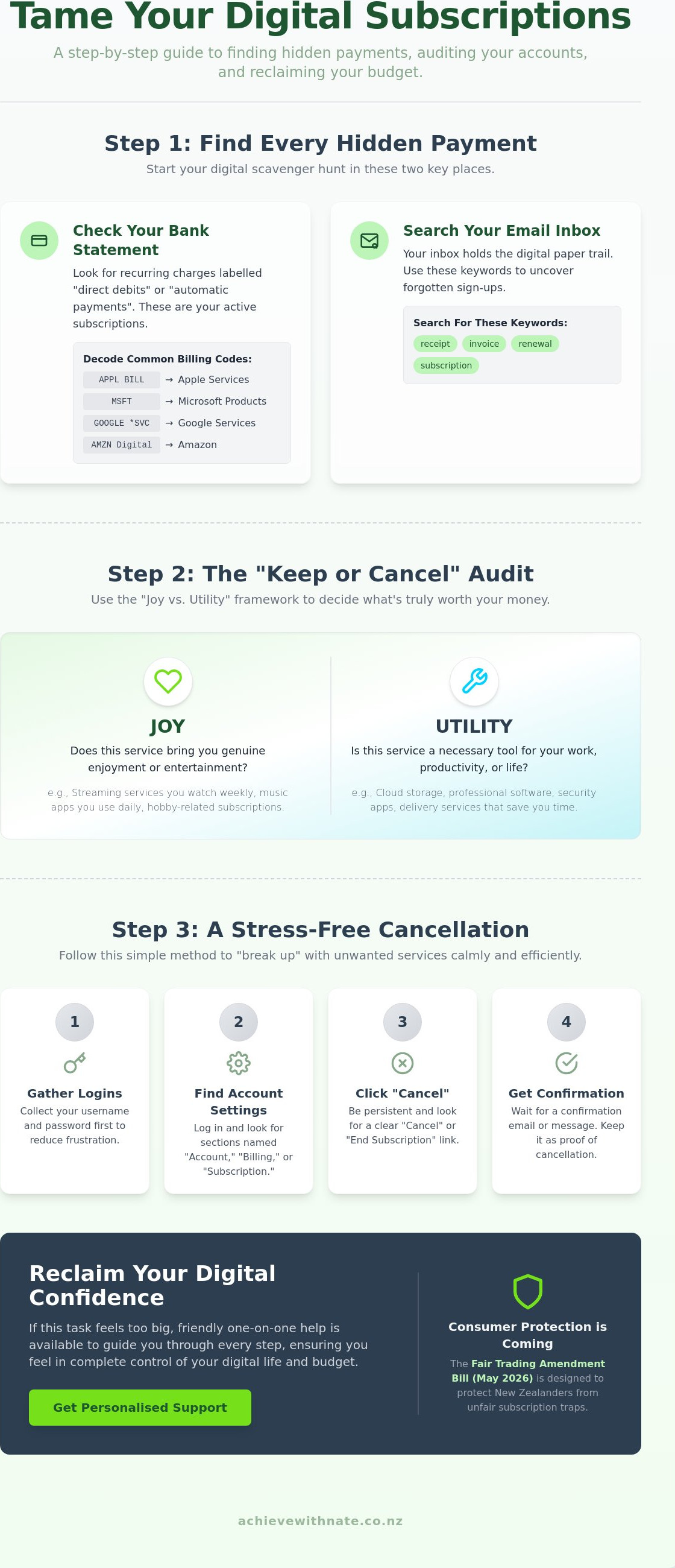
Finding every active payment can feel like a digital scavenger hunt. It's incredibly easy to lose track when charges are scattered across different platforms and accounts. The most reliable place to start your search is right inside your bank statement. Whether you bank with Kiwibank, ANZ, BNZ, or Westpac, you'll want to look specifically for "direct debits" and "automatic payments." These are the recurring commitments that quietly move money out of your account every month, often without a second thought.
Next, you can use your email inbox as a trail of breadcrumbs. Open your search bar and look for keywords like "receipt," "invoice," "renewal," or "subscription." You might be surprised at the services that pop up from months or even years ago. Often, we sign up for a service on a whim and forget to cut your digital subscriptions once the initial curiosity has faded. If the list starts to feel long and overwhelming, remember that a One-on-One Digital Coaching session can provide a patient, helping hand to sort through the noise.
Decoding Your Bank Statement
Big tech companies rarely use their full, friendly names on your bank statement. Instead, they use shorthand that can look like a secret code. You might see "APPL BILL" for Apple services or "MSFT" for Microsoft products. Keep an eye out for "GOOGLE *SVC" or "AMZN Digital." Identifying recurring dates is your best tool here. If you see the same amount leaving your account on the 15th of every month, that's a subscription. If you spot a charge you don't recognize at all, you can usually search the specific transaction code online to see which company it belongs to. It's a simple way to clear up the mystery without any stress.
Checking Your Mobile Device Subscriptions
Your smartphone is another common hiding place for these recurring costs. Many of us sign up for apps directly through our phones, which keeps those bills separate from our main website logins. Managing digital subscriptions nz effectively means checking your device settings too.
For iPhone users: Open your Settings app, tap your name at the very top (Apple ID), and then tap "Subscriptions." You'll see a clear list of everything currently active.
For Android users: Open the Google Play Store app, tap your profile icon in the top right, and select "Payments & subscriptions."
Keep in mind that some services, like Netflix or Spotify, might bill you directly through their own websites instead of the app store. This is why it's so helpful to check both your device settings and your bank records to get the full, honest picture of your spending. Taking these small, manageable steps is the best way to start feeling back in control of your technology.
The "Keep or Cancel" Audit: Deciding Which Services Earn Their Place
Once you have a clear list of your payments, it's time for the audit. This isn't about being strict or feeling guilty about your spending. It's a gentle way to make space for what truly matters in your life. We like to use a simple "Joy vs. Utility" framework. A service earns its place if it brings you genuine happiness or if it's a tool you absolutely need for your daily routine. If it does neither, it's likely just digital clutter that's weighing down your budget.
Ask yourself: "When was the last time I actually used this?" If you can't remember, you're essentially paying for a ghost. Be mindful of seasonal habits too. Many people in New Zealand pay for sports packages like Sky Sport Now all year round, even when their favorite rugby or cricket season has ended. You have the power to stop and start these services whenever you like. It's also worth checking for duplicates. Do you really need to pay for two different music apps? Streamlining these choices is a big part of managing digital subscriptions nz effectively.
The Entertainment Overlap
With Disney+ costing $18.99 a month and Netflix starting at $17.99 for an ad-free plan, having every app at once is expensive. You don't need Neon, Apple TV+, and Prime Video all running at the same time. Try the "Cancel and Re-subscribe" strategy. Watch everything you want on one platform for a month, then swap to the next. You can always come back later. It's helpful to know your NZ consumer rights for digital subscriptions if you ever run into trouble with a service that isn't working as promised.
Hidden Professional and Productivity Tools
Sometimes the biggest leaks are in our work tools. You might still be paying for an old Microsoft 365 or Adobe plan from a project you finished months ago. Check your cloud storage too. Many people pay for both iCloud and Google One without realizing they only need one for their backups. If you're feeling overwhelmed by your work setup, looking into Business workflow optimization can help you find a calmer, more efficient way to manage your digital life. Taking these small, incremental steps will help you feel much more in control of your technology.
Step-by-Step Cancellation: Breaking Up with Unused Digital Services
Now that you have decided which services are no longer earning their place, it's time for the actual breakup. This part can feel a little intimidating, but it is just a series of small, manageable clicks. Managing digital subscriptions nz is much easier when you go in prepared. Gather your login details before you start. There is nothing more frustrating than being ready to clear a bill only to get stuck on a forgotten password. Having your usernames and passwords handy keeps the momentum going and reduces any tech-related stress.
Once you are logged in, navigate to the "Account Settings" or "Billing" section. This is usually where the cancellation options live. As you click through, be prepared for "retention offers." Companies often try to keep you by offering a sudden discount or a few months of free service. If you truly don't use the app, remember that even a discounted price is still money leaving your pocket for no reason. Stay firm but calm. Once you hit that final button, always check your inbox for a confirmation email. This is your digital receipt and proof that the payment has officially stopped.
Dealing with "Difficult" Cancellations
Sometimes you might find a service where the "cancel" button seems to have vanished. This is a frustrating tactic often called a "subscription trap." If you can't find a clear way out, use the "Contact Support" chat or email. You don't need to give a long explanation; a simple "I would like to cancel my account immediately" is enough. If a company makes it impossible to leave, you can involve your bank. Most New Zealand banks allow you to stop a direct debit or block a specific merchant through their app or over the phone. It is a powerful way to protect your budget when a business isn't playing fair.
Organising Your "Keep" List
After you have cleared the clutter, take a moment to organise what remains. Create a simple list or a basic spreadsheet of the services you decided to keep. Include the monthly cost and the date the payment comes out. This transparency removes the "invisible" nature of digital spending. Finally, set a calendar reminder for six months from now to perform another quick check-in. If setting up these kinds of digital habits feels a bit foreign, our Device and email basics training is a wonderful, low-pressure way to build your confidence. You can also book One-on-One Digital Coaching if you would like a patient mentor to walk through this process with you.
Reclaiming Your Digital Confidence with Personalized Support
Finishing a digital audit brings a wonderful sense of relief. You see a cleaner bank statement. You feel lighter. You know exactly where your money is going. There is a deep peace of mind that comes from a clean digital life. However, we know that looking at a screen full of settings and billing cycles can still feel like a mountain to climb. If you are still feeling a little unsure, please know that it's perfectly okay to ask for help. Managing digital subscriptions nz doesn't have to be a solo journey.
Nate’s One-on-One Digital Coaching is designed for this exact moment. We don't just click the buttons for you. We sit with you and walk through the process together. Our promise is simple: no stress, no judgment, and just practical, human help. We act as a supportive companion to help you find your footing in a world that often moves too fast. You deserve to feel seen and understood rather than patronized by technical jargon.
Why a Digital Confidence Coach Makes a Difference
There is a big difference between having someone "fix" a problem and actually learning how it works. When someone just fixes it, the anxiety remains for the next time. A Digital Confidence Coach NZ helps you understand the "why" behind the settings. This is especially helpful for NZ seniors who want to stay connected with family or small business owners who need to keep their workflows secure and cost-effective. We focus on building your skills at your own pace. You aren't just a user; you are a learner who deserves patience and neighborly kindness.
Taking Your Next Incremental Step
You don't have to tackle every single bill today. We encourage you to start with just one subscription. Pick the one that frustrates you the most. Once that first "cancel" confirmation hits your inbox, you'll feel a surge of empowerment. If you find yourself stuck or if the screen feels a bit too crowded, we invite you to reach out for a gentle, low-pressure chat. There is no obligation, just a friendly ear to listen to your tech struggles.
The Achieve With Nate Movement is all about these small victories. We value the individual behind the screen more than the software itself. No matter how fast the digital world changes, you can find your footing. The most important thing is simply taking incremental, manageable actions.
Step Into a Simpler Digital Life
You've already taken the most important step by deciding to look at your budget with fresh eyes. By tracing your bank statements and using the "Joy vs. Utility" framework, you've turned a confusing pile of bills into a clear plan. You now have the tools to find hidden charges and the confidence to hit the cancel button on services that no longer serve you. It's a wonderful feeling to see your hard-earned money staying where it belongs.
Managing digital subscriptions nz is a gentle act of self-care that gives you back your time and your peace of mind. If you still feel a bit of hesitation or if the technical settings feel overwhelming, please remember that you don't have to do this alone. We provide personalized one-on-one technology training with specialist support for NZ seniors and small businesses. We are here to offer patient, non-judgmental guidance every step of the way. You can book a stress-free digital coaching session with Nate to get started. Be proud of the progress you've made today. Remember, the path to digital confidence is built through taking incremental, manageable actions.
Frequently Asked Questions
How do I find subscriptions on my NZ bank statement?
You can find these payments by looking for recurring entries in your transaction history. Look specifically for terms like "Direct Debit" or "AP" (Automatic Payment). Many companies use shortened names like "MSFT" or "AMZN". If you see the same amount leaving your account on the same day every month, it is likely a subscription. Checking your bank statement is the most reliable way to start managing digital subscriptions nz.
What is the easiest way to see all my iPhone subscriptions?
The simplest way is to open your Settings app and tap on your name at the very top. From there, tap "Subscriptions" to see a full list of everything billed through your Apple ID. This screen shows you exactly what is active and what has expired. It also gives you a clear button to cancel any service you no longer want with just one tap.
Can my bank cancel a digital subscription for me?
Yes, your bank can help you stop a payment if a company is making it difficult for you to leave. You can ask them to cancel a direct debit or block a specific merchant from charging your card again. This is a great safety net if you feel stuck. It gives you back the power to decide exactly where your money goes each month without the stress.
What happens if I cancel a subscription in the middle of the month?
You will usually keep access to the service until your current billing period ends. Most companies don't offer partial refunds for the remaining days, but they won't charge you again when the next month rolls around. This means you can cancel as soon as you decide you don't want the service anymore. You don't have to wait until the day before the next payment is due.
How do I know if a "subscription" is actually a scam?
Scams often use high pressure or "too good to be true" prices to trick you into giving your details. If you don't recognize the company name or if the website looks unprofessional, it's best to stay away. Under the Fair Trading Amendment Bill introduced in May 2026, New Zealand service providers now have more power to proactively take down suspected scams to help keep your personal information safe.
Is it safe to give my credit card details to streaming services?
Major streaming services use very high levels of security to protect your payment information. It is generally safe to use your card on well known platforms like Netflix or Disney+. For extra peace of mind, you can use a digital wallet like Apple Pay or Google Pay. These services don't share your actual card number with the company, which adds a helpful layer of digital protection.
How can I keep track of all my digital passwords and accounts?
Using a simple, dedicated notebook or a secure password manager app is the best way to stay organized. Managing digital subscriptions nz becomes much easier when you aren't hunting for login details every time you want to check an account. Having one central place for your information reduces frustration and helps you feel much more in control of your technology and your budget.
What should I do if a company keeps charging me after I cancelled?
First, find the confirmation email you received when you cancelled and send it to the company's support team. If they don't fix the mistake quickly, contact your bank to dispute the charge. You have strong protections under the Consumer Guarantees Act. You are entitled to a refund if a business charges you for a service you have already officially ended.


Comments