


How to Speed Up a Slow Laptop NZ: A Gentle, Stress-Free Guide for 2026

Last Tuesday, Sarah sat down to join a simple family video call, only to watch her screen freeze as the fan whirred like a jet engine taking off from Auckland Airport. It's incredibly draining when the tools meant to make our lives easier end up causing more stress than they solve. You probably feel that familiar flicker of anxiety when your laptop lags, worrying that one wrong click might break something or invite a nasty scam. You aren't alone in feeling frustrated when your computer just won't keep up with the pace of 2026.
This guide offers gentle tech efficiency tips for slow computers nz that anyone can follow, regardless of your experience level. We promise to keep things simple and stress-free. You'll learn how to refresh your laptop’s speed and reclaim your digital confidence without the typical tech-heavy jargon. We will explore easy ways to tidy your digital space, how to understand your rights under the Consumer Guarantees Act, and how to decide when to handle things yourself or when it's time to ask Nate for a bit of friendly, one-on-one support.
Table of Contents
Understanding Why Your Laptop is Feeling a Bit Tired
If your laptop has slowed to a crawl, please know that this isn't a personal failure. It is a very common digital hurdle that most of us face eventually. Think of your computer like a physical desk in your home office. When you first start, it's clean and clear. But over time, you add a few papers here, a coffee mug there, and a stack of mail in the corner. Soon, you don't have any room left to actually work. Computers get bogged down the same way. Finding the right tech efficiency tips for slow computers nz is often just about clearing that digital desk so you can breathe again.
A slow laptop is simply a device where the demands of the software exceed the resources currently available to do the job. It’s frustrating when you just want to check the morning headlines on Stuff or the NZ Herald and all you see is a spinning wheel. That delay isn't just annoying; it eats away at your productivity and your peace of mind.
To better understand why this happens and how to fix it quickly, watch this helpful video:
The Difference Between a 'Tired' Laptop and a 'Broken' One
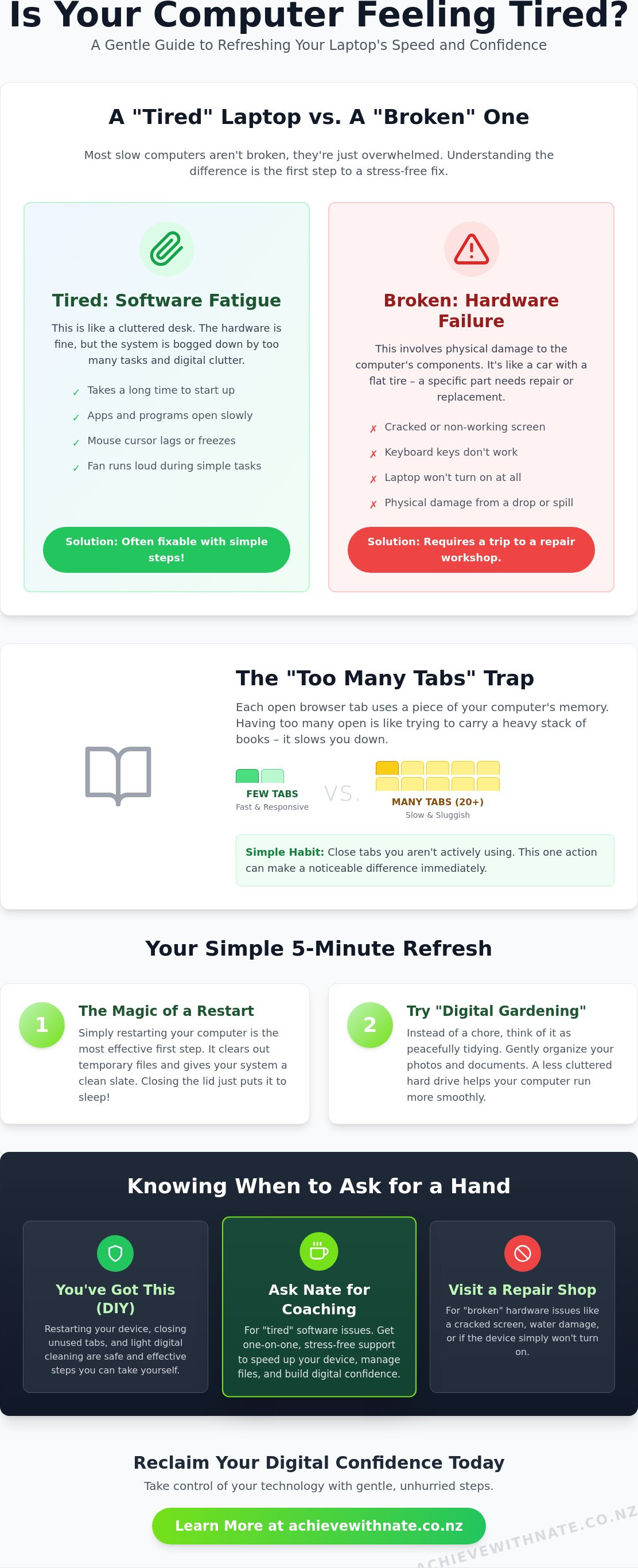
Many people worry that a slow computer means they need to spend hundreds of dollars on a new one. Most of the time, your laptop isn't actually broken; it's just "tired." A broken laptop usually involves physical damage like a cracked screen or a keyboard that won't type. A tired laptop is usually struggling with software fatigue. You might notice it takes ages to start up, or your mouse seems to lag behind your hand movements. These are signs that your system is overwhelmed, not that it is dying.
Understanding what computer performance means helps you see that efficiency is about how well your system handles its workload. If your apps are taking forever to open, it's likely a software issue that can be tidied up. My digital coaching focuses specifically on these "tired" software issues. We work together to find those hidden clogs without needing a trip to a hardware repair shop. It is about making what you already own work better for you.
The 'Too Many Tabs' Trap
We all do it. You open one tab to check the weather, another for a recipe, and three more for news articles you want to read later. Every single open tab is like a small physical weight your laptop has to carry around. If you have twenty tabs open, your computer is trying to juggle twenty different balls at once. It’s no wonder it feels exhausted. This is one of the most common reasons for a sluggish experience.
Try to build a gentle habit of closing tabs you aren't using right now. This simple act can immediately free up your computer’s brain and let it focus on the task at hand. It is one of the easiest tech efficiency tips for slow computers nz to implement. You will likely see a boost in speed without any technical stress. Taking these small, manageable actions makes a world of difference to how your device feels and how much you enjoy using it.
Simple Steps to Refresh Your Laptop Without the Stress
Refreshing your laptop doesn't have to be a scary, all-day project. I like to call this the Five-Minute Refresh. It is a low-stakes way to start seeing results without any risk to your precious family photos or important documents. You don't need to be a "techie" to do this. We are simply giving your computer a little room to breathe. These tech efficiency tips for slow computers nz are designed to be safe and steady. There is absolutely no need to rush. You can take these steps at your own pace, sitting comfortably with a cup of tea.
Many people feel a sense of dread when they think about "fixing" a computer. They worry about clicking the wrong button and losing everything. Please rest easy. The steps we are covering here are about maintenance, not surgery. If you ever feel like you want someone to walk through this with you, you might find my device and email basics training helpful. It is a supportive way to build your skills without the stress of doing it alone. You deserve to feel in control of your own device.
The Magic of a Simple Restart
We have all heard the advice to "turn it off and on again." While it sounds like a cliché, it is actually brilliant scientific advice for your device. Many of us just close the lid of our laptop when we are finished. This usually just puts the computer to "sleep" rather than giving it a true break. When your laptop stays on for days or weeks, it collects little bits of digital cobwebs in its temporary memory. A restart clears all of that out and stops any invisible errors that might be slowing things down. It gives the system a fresh start. Think of it like a good night's sleep for your computer. Following professional tips to speed up your computer often begins with this simple reset. Try making a weekly restart a gentle habit for your laptop’s long-term health.
Closing the Background Noise
Sometimes, your laptop is working hard on things you can't even see. There are hidden programs that often start up the moment you turn the computer on. Some of these programs "invite themselves" to run when you first install them. They run in the background, taking up energy and slowing down your internet connection. You can see what is running by looking at your system's list of active programs. If you see something you don't recognize or don't need right now, it is okay to "shush" it. Closing these unnecessary background tasks frees up your computer's brain to focus on what you actually want to do. It is a very effective way to apply tech efficiency tips for slow computers nz without needing to buy expensive new parts or talk to a genius.
Digital Decluttering: The Gentle Way to Clean Up
Think of your files as a digital garden. Over time, weeds grow and old leaves pile up. If you don't occasionally tidy things, the garden becomes a bit of a mess. Managing your files is just digital gardening; it is a way to make your space feel peaceful again. When your computer's storage is nearly full, it has to work much harder to find the information you need. It is like trying to find a specific pair of socks in a laundry basket that is overflowing. By clearing out the clutter, you give your laptop a clear path to follow.
If looking at your files feels overwhelming, you don't have to do it alone. I offer a supportive digital decluttering service for those who feel they have too much stuff and don't know where to start. We can go through it together, one step at a time. These tech efficiency tips for slow computers nz work best when you take them slowly. There is absolutely no pressure to finish everything today. Even tidying one single folder is a wonderful win for your digital confidence.
Taming the Downloads Folder
The Downloads folder is the ultimate digital junk drawer. Every time you open a PDF from an email or save a photo from the web, it lands here. Most of these files are things we use once and then forget. Clearing this out is a very effective way to free up space. Try this simple three-step guide to get started:
Sort your files by "Date" so the oldest ones are at the bottom.
Look for files ending in ".exe" or ".dmg"; these are often just installers you no longer need.
Move the photos or documents you want to keep into your "Pictures" or "Documents" folders.
Once you have deleted the files you don't need, remember the final step. Emptying your Recycle Bin or Trash is incredibly satisfying. It is the moment those files actually leave the building, giving your laptop the room it needs to run smoothly again.
Managing Your Desktop 'Icons'
It is tempting to save everything to your desktop so you can see it easily. However, having a hundred icons on your screen can actually slow down your laptop's startup time. Every time you turn the computer on, it has to work to "draw" each one of those icons. It is like trying to start a car with a boot full of heavy bricks. The more you have on the screen, the longer it takes for the computer to feel ready to work.
Try a one-folder system instead. Create a single folder on your desktop called "Current Projects" or "To Sort." Put your loose files in there. This keeps your screen tidy and makes it much easier for the computer to load. Beyond the speed boost, you will feel a sense of digital confidence. Knowing exactly where your files are hidden makes every session at your computer feel much more relaxed and productive.
Knowing When to Ask for a Hand (and When to Call Nate)
The biggest worry I hear from my learners is the fear of breaking something. You might feel that if you click the wrong setting or delete the wrong file, your computer will never start again. This anxiety is completely normal. It is exactly why I provide a safety net for Kiwis who want to learn at their own pace. You don't have to be a tech expert to enjoy a faster device. You just need a bit of guidance and the permission to try things in a safe, non-judgmental environment. Finding reliable tech efficiency tips for slow computers nz can sometimes feel like walking through a minefield, but it doesn't have to be that way.
It is helpful to know the difference between a hardware repair and digital coaching. If your laptop screen is cracked or your battery won't charge, you need a hardware repair shop. These are physical problems that require tools and spare parts. On the other hand, if your laptop is just feeling sluggish or confusing, that is where digital coaching comes in. I don't do hardware repairs; instead, I help you master the software you already have. We focus on the habits and settings that make your daily life easier. It is about empowering you to use your device with a sense of calm and control.
Avoiding the 'Speed Up' Scams
The internet can be a noisy place. You might see a pop-up ad flashing a warning that says "Your PC is infected!" or "Download this to speed up your computer." Please, take a deep breath and ignore them. These are almost always scams designed to cause the very anxiety I work to remove. They want to trick you into downloading software that often makes the problem worse. These programs can clutter your system even further or, in some cases, try to charge you for things you don't need. I have a very simple rule for my learners: If a website tells you your computer is slow, ignore it. Your laptop won't tell you it's slow through a random website; it will tell you through its actual performance in your hands.
Is it Time for a New Laptop or Just a New Approach?
Sometimes, a laptop really is just too old to keep up. If your device is over seven or eight years old, it might be reaching the end of its natural life. However, many people rush out to buy a brand-new machine when their current one just needs a bit of a tidy. A new laptop can be a significant expense. Often, a single one-on-one session can save you the cost of a new device by helping you clear the digital clogs. You can learn more about my patient, non-judgmental approach on my About page. We can look at your device together and decide if it's time for a change or just a fresh set of digital habits.
If you are feeling stuck and want a friendly hand to guide you through these tech efficiency tips for slow computers nz, I am here to help. You can reach out for a digital coaching session today and we can reclaim your digital confidence together.
Building Your Digital Confidence in Aotearoa
When we talk about a faster laptop, we aren't just chasing seconds. We are chasing a smooth, unhurried experience that lets you finish your tasks with a smile. My mission with the Achieve With Nate Movement is to make technology accessible for all Kiwis. I want to remove the barriers that make you feel left behind. Every time you use these tech efficiency tips for slow computers nz, you are taking a step toward a more sustainable future. New Zealanders discard about 97,000 tonnes of e-waste every year. By choosing to refresh your current device instead of throwing it away, you are helping our beautiful country while saving yourself the stress of a new purchase.
Taking action doesn't have to be a big event. You can start right now by simply restarting your laptop. It is a small, manageable win that clears the path for a better tomorrow. Many of my learners tell me they are tired of having to wait for their grandkids to visit just to fix a simple glitch. Personalised coaching is the ultimate way to gain your own independence. You deserve to feel like you are the one in charge of the screen. No one should ever feel inadequate because of a piece of software.
Personalised Coaching for NZ Seniors and Small Businesses
I create a completely criticism-free environment in every session. Whether you are a senior wanting to stay connected or a small business owner looking to optimize your workflow, I meet you exactly where you are. My support is available for people across New Zealand, from the quiet streets of Mosgiel to the busy hubs of Hamilton. You can learn more about how I work as a Digital Confidence Coach NZ. These tech efficiency tips for slow computers nz are much easier to master when you have a patient mentor by your side. We focus on your specific needs without any of the high-pressure sales talk you might find in a big retail store.
Taking the Next Step with Nate
Ready to Enjoy a Smoother Digital Life?
Your laptop doesn't have to be a source of constant frustration or anxiety. By embracing simple habits like a weekly restart and gentle digital gardening, you can transform how your device feels. We've explored how a tired computer is often just overwhelmed by software clutter rather than being physically broken. These tech efficiency tips for slow computers nz are designed to help you regain control without the stress of technical jargon or the fear of accidentally breaking your machine.
If you are ready to reclaim your digital peace of mind, I am here to walk alongside you. I offer patient, non-judgmental coaching that is 100% focused on Kiwi beginners and seniors. There is no confusing technical talk here; just practical help tailored to your specific pace and needs. Ready to reclaim your digital peace of mind?Book a gentle one-on-one session with Nate today.
Technology is a tool that should support your life in Aotearoa, not complicate it. Take one small, manageable action today and watch your digital confidence grow.
Frequently Asked Questions
Will I lose my photos if I try to speed up my laptop?
No, you won't lose your photos by following these gentle maintenance steps. We focus on software habits and clearing temporary files, which doesn't touch your personal memories or documents. It's always a good idea to have a backup for peace of mind, but the tips we discuss are safe and non-destructive. You can feel confident that your precious pictures remain exactly where you left them while we work together.
How often should I actually restart my computer to keep it fast?
Restarting your computer once a week is a great habit to maintain speed. This simple action clears out temporary memory and stops hidden errors from building up over time. It’s one of the easiest tech efficiency tips for slow computers nz to remember, giving your device a fresh start without any stress. You don't need to do it every day; a weekly rest is plenty to keep things tidy.
My internet is slow, but is it my laptop or my Wi-Fi?
You can tell by checking if other devices in your home are also struggling to load pages. If your phone and tablet are working fine but your laptop is lagging, the issue is likely with the computer's own performance. If every device in the house feels sluggish, it might be a Wi-Fi issue. In that case, a quick chat with your New Zealand internet provider might be the best next step.
Are those 'PC Booster' programs you see in ads safe to use?
Most 'PC Booster' or 'Cleaner' programs found in pop-up ads are not safe and should be avoided. These are often scams designed to make you feel anxious so you'll pay for services you don't actually need. You don't need to download fancy software to see a difference. Simple, manual habits are much more effective, safer, and completely free of charge for your digital peace of mind.
Is my laptop too old to bother speeding it up?
If your laptop is less than seven or eight years old, it is usually worth trying to refresh it. Many devices just need a bit of digital decluttering to feel responsive again. If your device is older than that, we can evaluate it together to see if it is time for an upgrade. Often, a gentle tidy-up can save you the cost of buying a brand-new machine prematurely.
Can Nate help me over the phone or does it have to be in person?
I offer flexible coaching that works for your lifestyle, whether that is in person or through a friendly video call. We can find a way that makes you feel most comfortable and supported in your own home. My goal is to help you build your digital skills in a space where you feel safe, heard, and never judged for what you don't know yet.
How many browser tabs are 'too many' for a standard laptop?
Most standard laptops start to feel the strain once you have more than five to ten tabs open at once. Each open window uses a bit of your computer's brain power to stay active. Keeping your tabs limited to what you need for your current task is one of the best tech efficiency tips for slow computers nz. It allows your device to focus its energy on exactly what you are doing.
What should I do if my laptop gets hot while I'm using it?
Ensure your laptop is sitting on a hard, flat surface like a table so air can flow freely underneath it. Using it on a bed or a cushion can block the vents and cause the laptop to get very hot. If it stays warm even on a desk, it might be working too hard on hidden background programs. We can gently close those together to help your laptop stay cool.

Comments