


Business Workflow Optimization: A Calm Guide for NZ Small Businesses

Last Monday, a boutique owner in Napier sat at her desk until 9:00 PM, manually responding to the same three questions in thirty different emails. A 2023 report by MYOB suggests this isn't an isolated case, as everyday Kiwis often spend over 12 hours every week on repetitive manual admin. It's draining to feel like you are a servant to your spreadsheets. You started your business to share your craft with Aotearoa, not to drown in business workflow optimization jargon or tech-induced anxiety.
I promise that your relationship with technology can be different. This guide is designed to help you move from feeling overwhelmed to feeling capable. You will discover how to simplify your processes through human-centered improvements so you can reclaim your evenings and find a sense of calm in your workday. We'll explore three practical, low-pressure steps to make your digital tools work for you, one small step at a time.
Key Takeaways
Learn how to reframe your daily tasks as a "smoother path" to reduce hidden stress and reclaim your valuable time.
Discover a judgment-free way to audit your daily habits and remove the "clutter" steps that aren't serving you or your customers.
See how simple business workflow optimization can help you integrate local tools like Xero and the NZ Companies Office into a seamless daily flow.
Find out how to use AI as a supportive companion that respects your "Kiwi heart" rather than a complicated replacement for your personal touch.
Build your digital confidence by following a "one small step" approach that turns tech overwhelm into a manageable, calm experience.
Table of Contents What is Business Workflow Optimization (And Why It Doesn’t Have to Be Scary)? The 4 Pillars of a Stress-Free Digital Workflow Practical Tools for Streamlining NZ Business Admin Moving from Tech Overwhelm to Digital Confidence
What is Business Workflow Optimization (And Why It Doesn’t Have to Be Scary)?
Business workflow optimization sounds like a heavy corporate term. In reality, it is just about finding a smoother path for your daily tasks. It means looking at how you get things done and removing the bumps in the road. Many Kiwis stick to the "if it ain’t broke, don’t fix it" mindset. While this feels safe, it often hides a lot of quiet stress. This approach is the secret to lasting digital productivity because it stops you from fighting your own systems.
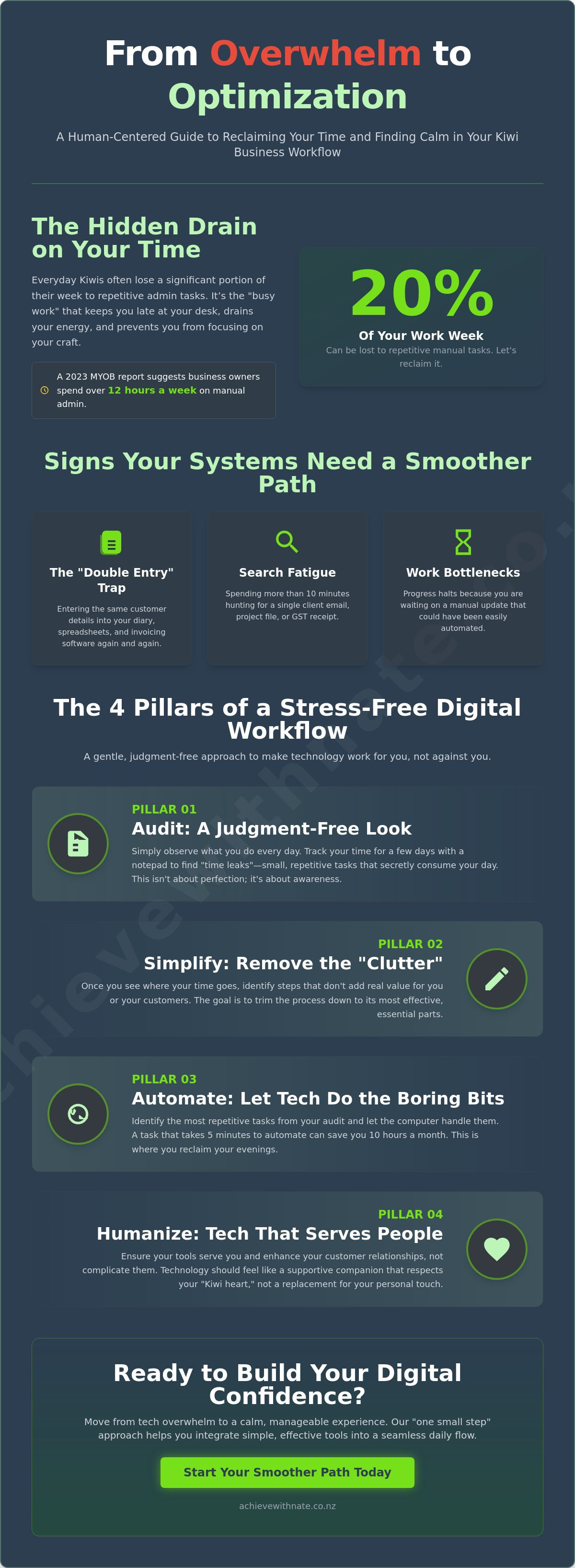
You might see this described in academic circles as Business Process Management, but for a local shop or service provider, it is much simpler. It is about making sure your energy goes into your craft, not your admin. Research from 2023 suggests that small business owners can lose up to 20% of their working week on repetitive manual tasks. Optimization helps you reclaim that time.
To better understand this concept, watch this helpful video:
For a Kiwi business owner, there is a big difference between "busy work" and "productive work." Busy work is spending 15 minutes searching for a GST receipt. Productive work is finishing a project for a client or planning your next big move. Business workflow optimization ensures you spend more time on the work that actually pays the bills.
Signs Your Current Systems are Costing You Peace of Mind
The "Double Entry" trap: You find yourself entering the same customer details into your diary, your spreadsheet, and your invoicing software.
Search fatigue: You spend more than 10 minutes looking for a single client email or a specific project file.
Bottlenecks: Work stops because you are waiting for a manual update that could have been automated.
Tech overwhelm is the gap between tool potential and user confidence.
The "No Jargon" Benefit: What Optimization Actually Looks Like
Imagine moving from paper invoices and manual bank checks to a simple, automated digital system. Instead of spending Sunday night tallying totals, the system does it for you. This is what business workflow optimization looks like in the real world. A calm workflow changes your relationship with your business. You stop feeling like you are constantly catching up. Instead, you feel in control, capable, and ready for a peaceful weekend.
The 4 Pillars of a Stress-Free Digital Workflow
Making business workflow optimization a reality starts with a gentle look at your daily habits. It isn't about being perfect or tech-obsessed. It's about being kind to yourself while finding better ways to work. For many everyday Kiwis, the goal is simply to get home on time without a heavy mental load. We achieve this by focusing on four simple pillars.
Audit: Look at what you actually do every day without any judgment.
Simplify: Remove the "clutter" steps that don't add real value to your customers.
Automate: Let the computer handle the boring, repetitive bits so you don't have to.
Humanize: Ensure your tech serves you and your clients, not the other way around.
By following these steps, you move from feeling scattered to feeling capable. Workflow optimization strategies show that even small changes in how we handle data can reduce administrative stress by up to 30% for small teams.
Step 1: The Digital Productivity Audit
You don't need a complex system to start. Track your time for just three days. Use a simple notepad or a basic app to see where your hours go. You'll likely find "time leaks" where small, manual tasks eat your afternoon. Look for the "Low Hanging Fruit." These are tasks that take 5 minutes to automate but save you 10 hours every month. It's about finding those quick wins that give you breathing room.
Step 2: Choosing Tools That Feel Like a Helping Hand
The most expensive tool is rarely the right one for a small business in Aotearoa. Complex software often leads to more "tech-headaches" rather than solutions. A friendly tool should have a clear layout and be easy to use from day one. Look for platforms that offer local support so you can talk to a real person if you get stuck. If you're feeling unsure about which software to trust, a gentle clarity call can help you find a tool that fits your unique rhythm without the pressure.
Practical Tools for Streamlining NZ Business Admin
Setting up your digital workspace in Aotearoa means choosing tools that understand our unique landscape. It's not just about software; it's about making your daily life feel lighter. Real business workflow optimization happens when your tools talk to each other, like connecting your NZ bank feeds directly to Xero. This simple step saves you from manual data entry and cuts down on those "where did I put that receipt" moments.
Your digital setup should reflect your Kiwi heart. It should be a supportive companion that helps you get the work done so you can head home on time. When you use local essentials correctly, the tech fades into the background, leaving you more space to focus on your customers.
Mastering the NZ Admin Loop
Managing IRD and PAYE filings doesn't have to be a monthly source of stress. Most modern accounting software allows you to file directly to the IRD, which removes the need for manual calculations. You can also set up automated reminders in your digital calendar for GST due dates. For the NZ Companies Office portal, use a secure password manager to store your RealMe login. This allows you to complete your annual return in about 10 minutes without the usual password-reset headache.
AI for the "Non-Techy" Owner
AI doesn't have to be scary or complicated. Think of it as a helpful assistant that's always ready to lend a hand. You can use simple prompts to draft client emails or summarize long meeting notes into three clear bullet points. It keeps your personal touch but does the heavy lifting. By 2026, AI-driven workflow tools are expected to save small business owners up to 10 hours of admin per week. That is a full day of work you get back every single month.
A strong foundation is the secret to a calm business. Our device and email basics training helps you master the fundamentals so your digital tools feel like second nature. When you feel confident with your mouse and your inbox, business workflow optimization becomes much easier to achieve. We take it one small step at a time, with no jargon and no pressure.
Ready to find your digital flow? Book a free clarity call to see how we can help you build digital confidence today.
Moving from Tech Overwhelm to Digital Confidence
The biggest roadblock to effective business workflow optimization isn't usually the software itself. It's the way we feel when we look at a screen full of icons we don't understand. For many everyday Kiwis, technology can feel like a foreign language. You might feel like you're falling behind while everyone else is racing ahead. That’s okay. You don't have to fix every broken process by tomorrow morning. We believe in the "One Small Step" philosophy. By focusing on one tiny improvement today, you build the momentum needed to transform your entire operation without the stress.
Often, the missing piece of the puzzle isn't a new app, but a supportive guide. Working with a digital confidence coach NZ helps you bridge the gap between where you are and where you want to be. It’s about turning that digital chaos into a calm, repeatable rhythm that works for you, not against you. This human-first approach ensures that your business workflow optimization stays permanent rather than being a temporary fix that fades when life gets busy.
Building a "No Judgement" Learning Zone
True learning only happens when you feel safe. In our sessions, there's no such thing as a silly question. If you don't know where a file goes or how to sync your calendar, we’ll walk through it together. To keep the chaos from creeping back, I recommend a routine that includes a weekly 15 minute system check. Use this time to clear your digital desktop, check your task lists, and ensure your tools are still serving you. This small habit prevents minor glitches from becoming major headaches.
Mastering Technology One Step at a Time
Generic YouTube tutorials often leave you more confused than when you started because they aren't tailored to the unique needs of small businesses in Aotearoa. Personalized coaching is different. It focuses on your specific hurdles and your specific goals. You can start this journey today by booking a Free Clarity Call. We'll have a quiet chat about your challenges and find a simple path forward. No jargon, no pressure; just real help for real people taking things one small step at a time.
Your Path to a Calmer Workday
Running a small business in Aotearoa shouldn't feel like a constant battle with your computer. You've seen how focusing on the four pillars of a stress-free digital workflow can turn admin chaos into a manageable routine. By choosing the right tools and simplifying your processes, you move away from tech overwhelm and toward true digital confidence. Business workflow optimization isn't about complex code or expensive systems. It's about making your daily life easier so you can focus on the work you actually love.
Nate has already helped hundreds of everyday Kiwis across the country find their footing with technology. This is professional coaching delivered with a real Kiwi heart and local NZ expertise. There's no jargon, no judgment, and a strict no pressure guarantee. You deserve a business that supports your life instead of draining your energy. Take that first small step today and see how simple your systems can become.
Ready to clear the digital fog? Book your Free Clarity Call with Nate today and start your journey toward a more relaxed, efficient business.
Frequently Asked Questions
What is the first step in business workflow optimization for a sole trader?
The first step is to spend seven days tracking every task you complete in a simple notebook or digital list. By recording exactly where your hours go, you can spot the repetitive admin tasks that keep you from doing what you love. Most sole traders find that 20% of their daily tasks are manual chores that could be simplified. This small step helps you build digital confidence without feeling overwhelmed by new software right away.
How much does it cost to optimize my business workflows in New Zealand?
You can start business workflow optimization for free by using the built-in features in tools like Google Workspace or Microsoft 365. If you choose to hire professional help, a 2023 survey of NZ business consultants shows hourly rates often range from NZ$150 to NZ$300 for specialized advice. Many automation platforms like Zapier offer free tiers for up to 100 tasks per month, so you don't need a huge budget to see real progress.
Do I need to be tech-savvy to use AI in my business workflows?
No, you don't need to be a tech expert to use AI tools that feel as simple as sending a text message. Many modern AI assistants are designed for everyday Kiwis and use plain language rather than complex code. A 2024 report found that 60% of small business owners using AI started with no prior technical training. We focus on making these tools feel like a friendly helping hand rather than a scary hurdle.
Can business workflow optimization help with my NZ tax and IRD compliance?
Yes, business workflow optimization ensures your records meet the Inland Revenue Department (IRD) requirement to keep business data for seven years. By automating the way you capture receipts through apps like Xero or Hubdoc, you reduce the risk of missing a claimable expense. Statistics show that businesses using automated bookkeeping save an average of 5.5 hours per week on tax-related admin, keeping your relationship with the IRD calm and organized.
How long does it take to see results from a digital productivity audit?
You will typically see your first time-saving results within 14 days of completing a digital productivity audit. Most small businesses identify at least three manual tasks that can be automated immediately during the initial review. By the end of the first month, these small changes often add up to a 15% increase in available time for the business owner. It's all about taking things one small step at a time to reach a more relaxed workday.


Comments