


Curriculum Vitae: A Simple Guide for Everyday Kiwis (2026)

What if your curriculum vitae didn't need to be a masterpiece of graphic design to land your next role? Most of us feel a sense of dread when opening a blank Word document. You might feel like your skills aren't "fancy" enough or that one wrong click in Google Docs will break your entire layout. It's a common frustration in a world that feels increasingly complex.
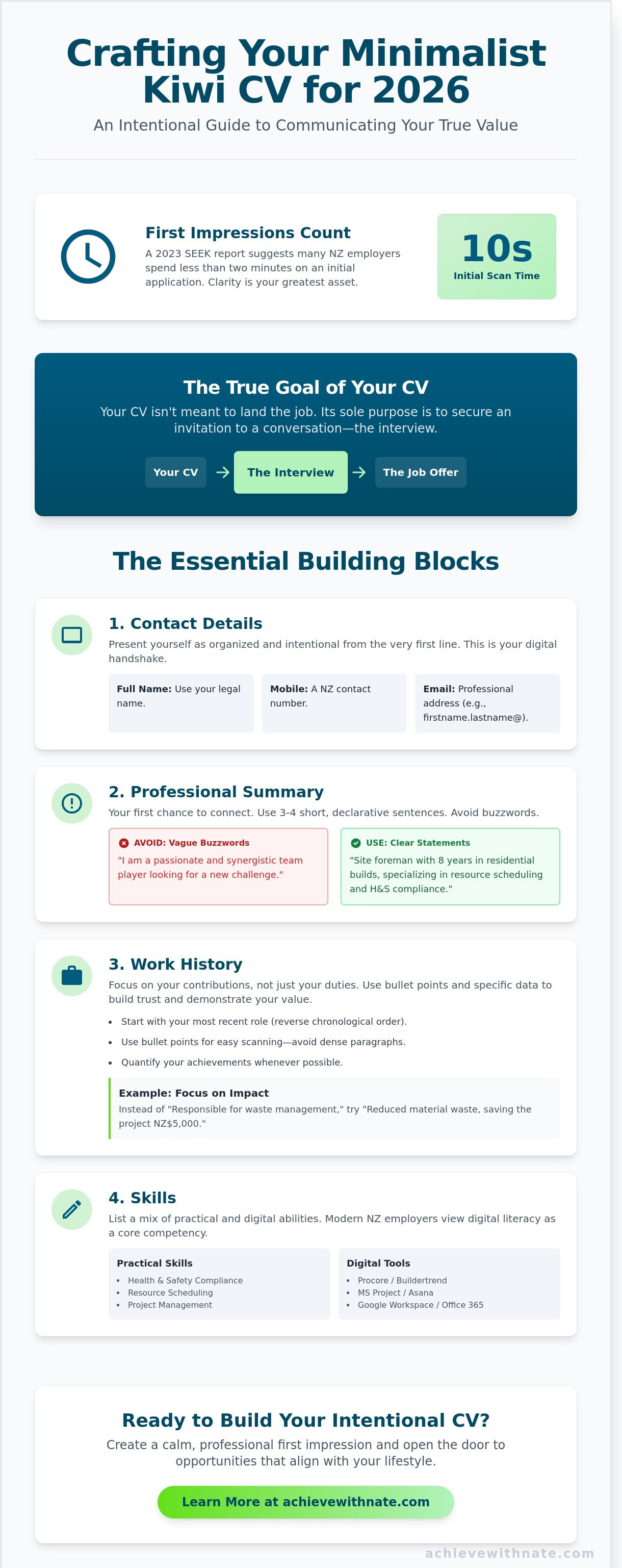
You already know that a job search is stressful enough without fighting your computer. A 2023 report from SEEK New Zealand suggests that many employers spend less than two minutes reviewing a candidate's initial application. This means clarity is more important than complex formatting. I want to show you a different way. This is a calm, step-by-step approach to creating an intentional document that reflects your true value. You don't need to be a tech expert to build something professional.
We will look at exactly what NZ employers want in 2026; we will use simple systems to get your document finished and ready to send. By the end, you'll have a CV you're proud of and the digital confidence to use it.
Key Takeaways
View your curriculum vitae as an intentional story of your life rather than a stressful list of tasks.
Identify the essential building blocks of a minimalist CV that clearly communicate your value to New Zealand employers.
Choose simple, stress-free digital tools that allow you to focus on your message instead of complex formatting.
Learn the final steps of refining and saving your document to ensure you make a calm, professional first impression.
Table of Contents What is a Curriculum Vitae? Understanding Your Intentional Story The Essential Building Blocks of a Minimalist Kiwi CV Creating Your CV: Choosing Your Digital Tools with Confidence Refining and Sending: Your Path to New Opportunities
What is a Curriculum Vitae? Understanding Your Intentional Story
The term curriculum vitae comes from Latin. It translates to "course of life." In the New Zealand job market, it's your primary tool for introducing yourself. You can view it as a quiet, professional conversation on paper. It allows you to share your story before you even enter the room. To understand the historical context and global definition, you can read more about What is a Curriculum Vitae on Wikipedia.
A curriculum vitae is more comprehensive than a standard resume. It provides a full view of your experience. However, it still requires focus. You aren't just listing every task you've ever done. You're curating a narrative that shows your value. In 2026, employers in Auckland and Wellington receive hundreds of digital applications. Your document needs to stand out through clarity and intentionality.
A healthy CV reflects:
Your professional habits and consistency.
The systems you've used to solve problems.
Your alignment with a company's mission.
CV vs. Resume: Does the Difference Matter in NZ?
In Aotearoa, employers often use these terms interchangeably. You don't need to worry about the technical label. Whether a job ad asks for a resume or a CV (tāhuhu tangata), the expectation is the same. They want a clear overview of your professional journey. Most New Zealand recruiters spend less than 10 seconds on their initial scan of your document. Focus on truth and readability. A well-structured layout matters more than the title at the top of the page.
The Goal of Your CV: Opening the Right Doors
Your CV has one specific purpose. It isn't meant to get you the job immediately. Its only goal is to secure an invitation to a conversation. This conversation is the interview. When you write with intention, you attract roles that fit your lifestyle. You're looking for alignment, not just a paycheck. A successful CV filters out the noise. It focuses on your systems and habits. This clarity helps you find work that is sustainable for the long term.
By being honest about your journey, you build trust early. You don't need to use flowery language or exaggerated claims. Simple, declarative sentences work best. They show that you're a practitioner who values results. This minimalist approach respects the employer's time. It also demonstrates your own discipline. When you treat your CV as a tool for lifestyle design, the process becomes much less stressful.
The Essential Building Blocks of a Minimalist Kiwi CV
A curriculum vitae doesn't need to be an exhaustive list of every task you've ever performed. It's a curated map of your professional journey. Start with your contact details at the top. Use your full name, a New Zealand mobile number, and a professional email address. Avoid nicknames or outdated email providers. This is the first system you present to an employer. It shows you're organized and intentional.
Your work history should follow in reverse chronological order. Start with your most recent role and move backward. Include your education and any qualifications that directly support your future goals. If a certificate from ten years ago isn't relevant to the job you want now, leave it out. Minimalism in a 2026 curriculum vitae is about removing the noise so your best attributes can shine.
Writing Your Professional Summary with Clarity
Your summary is your first chance to connect. Avoid buzzwords like "passionate" or "synergy." These words lack substance. Use short, declarative sentences instead. State who you are, what you do, and what you're looking for. Keep this section to three or four lines. A clear summary might say: "I am a site foreman with eight years of experience in Christchurch residential builds. I specialize in resource scheduling and health and safety compliance. I am seeking a project management role to implement more sustainable building practices."
Documenting Your Work History and Skills
Use bullet points for your work history. Dense paragraphs are difficult to read and often get ignored by recruiters. Focus on your contributions rather than just your daily duties. If you improved a process, mention it. If you saved your previous company NZ$5,000 through better waste management, include that figure. Specific data builds trust.
Your skills section should be a mix of practical and digital abilities. Modern Kiwi employers view digital literacy as a core competency. This involves more than just basic typing. It's about your ability to navigate new software and manage digital tools with purpose. List the specific platforms you use, such as project management tools or industry-specific software. If you're looking to align your career more closely with your personal values, you can explore my intentional living services to find more clarity.
Creating Your CV: Choosing Your Digital Tools with Confidence
The tools you use to build your curriculum vitae should be a silent partner. They shouldn't create new hurdles or cause unnecessary stress. A curriculum vitae is a functional document. Its purpose is to communicate your value clearly. You don't need expensive software or complex designs to achieve this.
Google Docs is a reliable, free option for most Kiwis. It saves your work automatically as you type. This removes the fear of losing your progress if your laptop battery dies or your internet flickers. It's a simple system that prioritizes your content over flashy distractions.
Microsoft Word remains the standard for many New Zealand recruiters. It offers deep functionality, but the interface can feel cluttered for beginners. If the ribbons and menus feel overwhelming, don't force yourself to use them. Choose the tool that allows you to focus on your words.
Beware of online "CV Builders" that promise a quick fix. These sites often offer "free" templates but charge hidden fees. You might spend an hour entering your data only to find a NZ$35 monthly subscription fee standing between you and your finished file. You can create a professional result for free by using intentional, simple tools.
Navigating Google Docs for Beginners
Begin with a completely blank document. Avoid the pre-made templates. They often contain rigid formatting that becomes difficult to adjust later. Starting from scratch gives you full control over the layout. This minimalist approach ensures your document remains clean and easy to read.
Stick to the essentials. Use bold text for your section headings and bullet points for your job responsibilities. Choose one professional font for the entire document. Arial or Roboto at a 10 or 11-point size provides excellent readability. Consistency is a hallmark of a disciplined professional.
Overcoming Tech Anxiety During the Process
If the screen feels overwhelming, step away from the computer. Write your key points on a physical notepad first. This removes the digital friction and allows your thoughts to flow without the pressure of a blinking cursor. Once your history is on paper, the task of typing it becomes a simple data entry exercise.
Take frequent breaks. Digital confidence is built through steady, rhythmic action. A simple, well-formatted document will always beat a flashy design that is hard to read or fails to open. Focus on clarity and alignment rather than visual noise.
If you want to refine your professional systems and find more freedom in your career, you can submit an expression of interest to work with me.
Refining and Sending: Your Path to New Opportunities
Your curriculum vitae is now a reflection of your professional story. The final step requires a quiet focus to ensure your message is clear and your systems are ready. Intentionality is your greatest asset during this phase. Start by reading your document aloud. This simple habit helps you catch awkward phrasing or missing commas that a silent screen check often misses. Research suggests that reading aloud can help you identify up to 90% of grammatical errors that your eyes would otherwise skip over.
Consistency is essential for a professional presentation. Save your document as a PDF before you hit send. Word documents often shift their layout when opened on different devices or operating systems; a PDF ensures your formatting stays exactly as you intended. This small act of discipline prevents technical friction for the hiring manager. It also shows that you value clarity and reliability in your digital work.
Avoid the habit of sending a generic file to every listing. Recruiters in New Zealand often spend fewer than 10 seconds on an initial scan of an application. To stand out, you must tailor your experiences to match the specific needs of the role. Identify the three most relevant skills mentioned in the job description and ensure they're prominent. Pair your document with a brief, purposeful email. A short note explaining your alignment with the company goals is far more effective than a long, automated template.
Applying for Jobs on Govt NZ and Local Platforms
Many New Zealand employers now use centralized systems to manage their recruitment. You can learn how to navigate Govt NZ to find public sector roles or use Seek for private opportunities. Before you start an upload, check your speed here to ensure your connection won't drop mid-application. Keep a dedicated folder on your computer to track every version of your curriculum vitae you send out. Use a naming system like "Date_Role_Company" so you can quickly reference the correct version if you receive a call for an interview.
Next Steps on Your Digital Journey
Building a professional document is a foundational step for your digital confidence. It's a tool that creates freedom and opens doors to new possibilities. If you feel you need personalized support to refine your career strategy, you can explore my coaching services. I focus on helping you build sustainable systems for growth. You can also submit an expression of interest for future workshops. Focus on the long term and continue moving forward with clarity and purpose.
Taking the Next Step Toward Your New Opportunity
A well-crafted curriculum vitae is more than just a document. It is your intentional story, designed to create alignment between your skills and your future goals. By focusing on minimalist building blocks and selecting the right digital tools, you remove the friction that often stops progress. Stats NZ data from 2023 indicates that digital literacy and clear communication are fundamental to navigating the modern New Zealand workforce.
Mastering these systems doesn't have to be overwhelming. You've learned how to refine your professional history into a clear, functional narrative. This process is about subtraction, not addition. When you remove the fluff, your true value becomes visible to those who matter. It's a steady path toward the freedom and clarity you deserve in your working life.
I provide digital coaching designed specifically for everyday Kiwis who want to master technology with confidence. This practical, minimalist guidance from Nate Marshall focuses on intentional living rather than high-pressure tactics. We focus on the habits that lead to sustainable growth and long-term satisfaction. Join Achieve With Nate to build your digital confidence and start moving toward your next chapter with peace of mind.
Frequently Asked Questions
How long should my CV be for a job in New Zealand?
You should aim for a length of two to three pages. In New Zealand, 85% of recruiters prefer this range because it provides enough detail without becoming cluttered. If you're a school leaver or have less than five years of experience, a single page is often sufficient. Focus on your most recent 10 years of work to keep the document intentional and relevant.
Do I need to include a photo of myself on my CV?
You don't need to include a photo on your curriculum vitae. Most New Zealand employers prefer to focus on your skills and experience to avoid unconscious bias during the hiring process. In a 2023 survey of NZ hiring managers, 92% stated they do not require or want a photo. Keep your layout clean and professional by removing unnecessary visual elements.
What should I do if I have gaps in my work history?
Be honest and brief about any gaps in your employment. You can list the dates and a simple reason, such as "Career Break" or "Family Commitments," to maintain transparency. Using only years for your employment dates can make gaps of three to six months appear less prominent. Focus the reader's attention on the skills you maintained or the personal growth you achieved during that time.
Should I include references on my CV or wait until I am asked?
You should wait until an employer asks for your references before providing them. Use the phrase "References available on request" at the end of your document to save space. This approach keeps your CV minimalist and protects the privacy of your former colleagues. Most NZ companies only perform reference checks after the first or second interview stage.
Is it okay to use an AI tool to help write my CV?
It's okay to use AI as a starting point for your curriculum vitae. These tools can help you build a logical system for your experience and suggest better word choices. However, you must edit the text to ensure it reflects your true voice and character. A 2025 study showed that 60% of recruiters can identify generic AI content, so personalizing your descriptions is essential for alignment.
What is the best file format to use when sending my CV?
Always send your CV as a PDF file. This format ensures your layout and formatting stay exactly as you intended, regardless of the device the recruiter uses. Microsoft Word files can often shift or appear messy when opened in different software versions. Name your file clearly using your full name and the job title to help the hiring manager stay organized.


Comments