


Digital Confidence: Why It Is Not About Tech Skills (And How to Find Yours)

Updated: Apr 27
On June 11, Sarah sat at her kitchen table in Christchurch, staring at a new banking app with a heavy knot of dread in her stomach. She was terrified that one wrong tap might accidentally delete her savings or break her expensive phone. This lack of digital confidence is a feeling many everyday Kiwis share, especially when it feels like the digital world is moving faster than we can keep up.
You probably agree that asking for help often feels worse than the problem itself. It's frustrating to be met with eye-rolls or jargon-heavy explanations that make you feel "tech-illiterate." But here's the secret: your digital confidence is actually a mindset, not a technical skill. It's about feeling calm and capable, even when you're faced with a screen you've never seen before. In this article, you'll discover how to overcome the myths that cause tech overwhelm and learn how to manage your digital life with independence. We'll walk through how to shift your perspective so you can take those small steps toward feeling truly in control.
Key Takeaways
Learn why feeling capable online is about your mindset and the "willingness to click" rather than how many apps you have mastered.
Discover why common worries—like being "too old" to learn or accidentally breaking your device—are just myths that shouldn't hold you back.
Explore simple, low-pressure techniques like the "Sandpit Method" to grow your digital confidence one small step at a time.
Find out where everyday Kiwis can access friendly, local support through New Zealand libraries and personalized coaching right here in Aotearoa.
Table of Contents What is Digital Confidence? (Hint: It Is Not About Coding) Myth-Busting: 4 Lies That Stop You From Feeling Confident 3 Small Steps to Build Your Digital Confidence Today Finding Support in New Zealand: You Are Not Alone
What is Digital Confidence? (Hint: It Is Not About Coding)
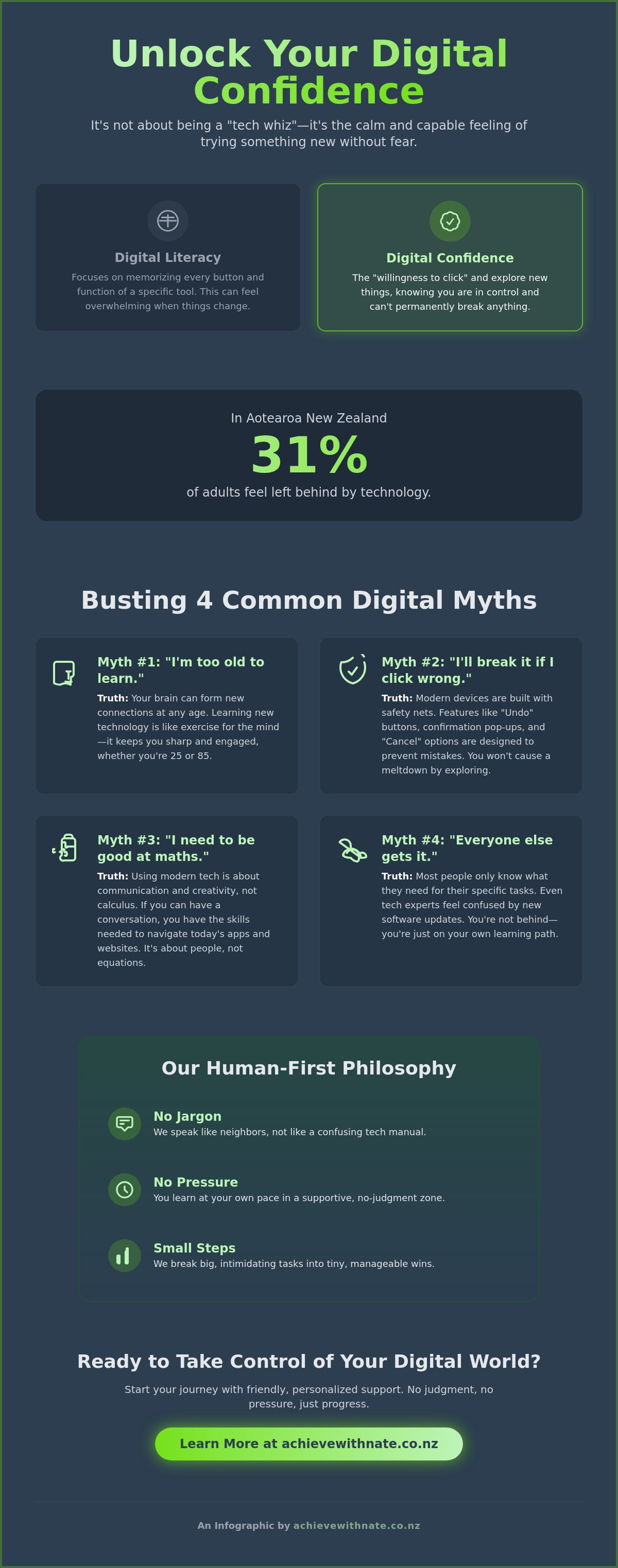
Many people believe they need to be a computer whiz to survive in a modern world. That’s a myth. Real digital confidence isn’t about memorizing every button or learning how to build a website. It’s simply the "willingness to click" without the nagging fear that you’ll break something. It’s a mindset of resilience. While digital literacy focuses on knowing how a specific tool works, confidence is about feeling capable enough to try something new without panic. This distinction is central to the Digital Intelligence (DQ) framework, which suggests that emotional intelligence and safety are just as vital as technical skills.
To better understand this concept, watch this helpful video:
At Achieve With Nate, we use a human-first philosophy. We don't care about fancy terminology. We care about you. Our approach is built on three simple pillars:
No jargon: We speak like neighbors, not tech manuals.
No pressure: You learn at your own pace in a no-judgment zone.
Small steps: We break big tasks into tiny, manageable wins.
The Difference Between Knowing and Doing
Knowing how to use an app is one thing; actually doing it when the screen suddenly changes after an update is another. Tech overwhelm is a universal experience. Even experts feel a sting of anxiety when a new software version arrives. In Aotearoa, we believe technology should serve the person, not the other way around. By focusing on the human side of the screen, we turn "I can't do this" into "I'll give it a go."
Why Digital Confidence Matters for Everyday Kiwis
For everyday Kiwis, building digital confidence is about staying connected to what matters. It’s the ability to see your whānau on a clear video call or share photos of the grandkids without stress. It’s also about life essentials. A 2023 report on digital skills in New Zealand found that 31% of adults feel they are being left behind by technology. Whether it’s managing your IRD login, using online banking safely, or booking a health appointment, these tasks shouldn't feel like a mountain to climb. If you're feeling stuck, a digital confidence coach NZ can help you find your footing one small step at a time.
Myth-Busting: 4 Lies That Stop You From Feeling Confident
We often tell ourselves stories that keep us stuck. These myths feel like facts, but they are just barriers holding you back from your potential. It is time to clear the air so you can build digital confidence without the heavy baggage of "not being techy enough."
Myth 1: "I'm too old to learn this." Your brain doesn't have an expiry date for new skills. Science shows the brain remains plastic at any age. You can form new neural pathways whether you are 25 or 85. Learning keeps your mind sharp.
Myth 2: "I'll break the computer if I click the wrong thing." Modern tech is built to be resilient. Developers know people make mistakes, so they build in safety nets like "Undo" buttons and "Cancel" options. You won't cause a digital meltdown by exploring.
Myth 3: "I need to be good at maths or science." This isn't the 1970s. You don't need to understand code or calculus to use a tablet. While elite technical preparation like 8200PRO exists for specialized roles, everyday digital confidence is about communication, connection, and creativity. It's about people, not equations.
Myth 4: "Everyone else already knows how to do this." Most people are just "faking it" until they find a guide. Even those who look confident often struggle when a new update changes their favorite app. You aren't behind; you're just at the start of your own path.
Why We Feel "Tech Shame"
Many everyday Kiwis feel "tech shame" because of well-meaning family members. A son or grandchild might "help" by grabbing the mouse and doing the task for you in five seconds. They move too fast, and you're left feeling more confused than before. This creates a cycle of anxiety. At Achieve With Nate, we remove this barrier with a "no judgement" zone. We slow things down so you stay in the driver's seat. No one will take the mouse out of your hand here.
The "Permanent Beta" Mindset
In the digital world, "mastery" is a moving target. Software updates every month, and new tools arrive every year. The goal isn't to know everything. Instead, we embrace a "permanent beta" mindset. This means shifting your focus from "knowing it all" to "learning what you need today." It's about being a lifelong learner who isn't afraid to ask questions. If you're ready to leave the overwhelm behind, you can book a Free Clarity Call to discuss your goals. We'll take it one small step at a time, ensuring you feel capable and calm as you grow your digital confidence.
3 Small Steps to Build Your Digital Confidence Today
Building your digital confidence doesn't require a university degree or a background in coding. It starts with small, intentional shifts in how you interact with your devices. These steps are designed to lower your stress levels and put you back in the driver's seat.
Step 1: Curate your environment. Those constant pings and red bubbles on your screen can trigger real anxiety. Go into your settings and turn off notifications that cause panic. If it isn't an urgent message from a friend or family member, it doesn't need to interrupt your day. Control the noise so the noise doesn't control you.
Step 2: Use the Sandpit Method. Give yourself permission to play with an app for just 10 minutes. Set a timer. Don't try to achieve a specific goal or finish a project. Just click buttons, look at menus, and see what happens. This low-pressure exploration removes the fear of making a mistake.
Step 3: Find a supportive translator. We all need someone who speaks plain English rather than IT-speak. Find a person who can explain things without using jargon or making you feel small. A good translator focuses on what you want to do, not how the software is built.
Remember to celebrate every small win you achieve. Whether it's sending your first attachment or finally clearing out a cluttered inbox, these moments matter. Each victory adds a brick to the foundation of your digital confidence.
Managing Tech Overwhelm
Try the One Tab rule. Many people feel stressed because they have dozens of windows open at once. Focus on one digital task at a time and close everything else. This creates a calm workflow and prevents your brain from switching gears too quickly. If you want to master the fundamentals, this device and email basics training is a great place for everyday Kiwis to start.
Creating a Digital Safety Net
Security habits provide the peace of mind you need to explore freely. Use simple tools like a password manager and learn the common signs of scams targeting New Zealanders. You don't have to be a security expert to stay safe in Aotearoa. Knowing exactly where to turn when things go wrong is the best way to reduce tech-related fear. When you have a safety net, you can move forward with digital confidence.
Ready to feel more capable with your tech?
Finding Support in New Zealand: You Are Not Alone
You aren't the only person feeling a bit lost with a phone or laptop. Across Aotearoa, help is much closer than you think. Local libraries in Auckland and Christchurch offer fantastic free resources for those starting out. Community hubs often host drop-in sessions where you can get a quick hand with a basic task. These public spaces are vital for staying connected. However, for many seniors and small business owners, a busy library isn't always the best place to learn complex new habits. This is why personalized coaching is so effective at building long-term digital confidence.
Personalized support focuses on your specific pace. It ensures that technology remains a tool for your life, rather than a master of it. Here are a few places Kiwis can find help:
Auckland Council Libraries: They offer regular "Book a Librarian" sessions for one-on-one help with specific devices.
Christchurch City Libraries: These hubs provide "Tech Help" drop-in sessions at various locations like Tūranga.
Community Houses: Many local suburbs have centers that run low-cost computer foundation courses for locals.
The Achieve With Nate Movement
Nate helps everyday Kiwis move from a place of "I can't" to a proud "I just did." While group classes have their place, they can often feel impersonal or move too fast for some people. Nate's approach prioritizes one-on-one time. This creates a safe space where no question is too small. You won't find any judgment here. Whether you're trying to manage digital invoices for your business or simply want to share photos with grandkids, the coaching is tailored to your unique needs. It's about human connection first, software second.
Your Next Small Step
Take a deep breath and try to do just one new thing today. It doesn't have to be big. Maybe you'll finally delete those old emails or try a new app you've been curious about. If you're feeling stuck, a Free Clarity Call is the perfect way to move forward. It's a calm, no-pressure chat designed to help you see what's possible. There's no commitment and absolutely no jargon involved. You deserve to feel capable in this digital world. Remember, we take things one small step at a time.
Ready to Feel Capable and Calm Online
Finding your digital confidence isn't about mastering complex code or memorizing every single setting on your smartphone. It's about letting go of the myths that say you're too old or too "non-techy" to learn. True progress happens when you break things down into small, manageable pieces. You deserve to use your devices without that nagging feeling of worry or frustration every time an update appears.
You don't need to struggle through these changes by yourself. In 2025 alone, over 100 Kiwis have already gained new skills through this human-first approach. Nate provides specialist, senior-friendly technology training right here in Aotearoa, focusing on what actually matters to your daily life. There's no judgment here, just patient support designed to help you feel at home in our digital world.
If you're ready to stop feeling overwhelmed, a simple conversation is the best place to start. It's a chance to talk about your specific challenges in plain English. Book your Free Clarity Call with Nate today; no jargon, no pressure.
You can do this, one small step at a time.
Frequently Asked Questions
Is it really possible to learn technology if I am over 70?
Yes, you can absolutely master technology at any age. Stats NZ reported in 2021 that 82 percent of Kiwis aged 65 to 74 are active online, proving that age isn't a barrier. It's about taking one small step at a time rather than trying to learn everything at once. We focus on what you need for your daily life, like video calls with whānau or online banking, with no jargon and no pressure.
What is the fastest way to get over the fear of breaking my device?
The fastest way to lose that fear is to realize that almost every digital mistake is easily reversible. You won't break your tablet or phone by clicking the wrong button because modern software includes safety prompts and "undo" features to keep you safe. Building your digital confidence starts with knowing you can always restart the device if things get messy. It's a tool for you to use, not something to be afraid of.
How do I know if I need a digital coach or just a YouTube tutorial?
You need a digital coach when a YouTube video leaves you feeling more frustrated or confused than when you started. Tutorials are fine for quick fixes, but they can't answer your specific questions or calm your unique anxieties. If you've spent 20 minutes or more struggling with a screen, a friendly human can help. A coach provides a safe, no-judgment space to walk through challenges at your own pace.
Can digital confidence help my small business, or is it just for personal use?
Boosting your digital confidence is a massive advantage for your small business. Since 97 percent of all firms in Aotearoa are small businesses, using tools like Xero or social media effectively is vital for staying competitive. Feeling capable behind the screen saves you hours of wasted time and reduces the stress of daily admin. It turns technology from a chore into a helpful partner for your business growth.
What should I do when I feel a panic attack coming on because of a tech glitch?
When a tech glitch feels overwhelming, the best thing you can do is walk away from the screen for five minutes. Take a slow breath and remember that a frozen computer isn't a reflection of your ability. Use a simple grounding technique like naming three things you can see in your room to feel more present. Once you feel calm, you can try again or reach out for a hand from someone you trust.


Comments