Digital Literacy in New Zealand: A Simple Guide to Feeling Confident Online
- kxnath
- Apr 12
- 13 min read
Updated: Apr 20
Last Tuesday, Margaret sat at her kitchen table in Christchurch, staring at a prompt to update her banking app. She felt a familiar pang of worry that one wrong click might lock her out of her own account. This feeling of being "left behind" by technology affects 20% of New Zealanders who struggle with basic online tasks. Improving your digital literacy isn't about becoming a tech expert overnight. It's about gaining the quiet confidence to manage your life with intention.
You probably feel like the digital world is a noisy, complicated place that moves too fast. It's exhausting to face constant software updates and headlines about online scams. I believe that technology should serve you, not cause you stress. This guide offers a calm, practical path to understanding the digital landscape at your own pace. You'll learn how to protect your information and use essential services with total clarity.
We will explore how to use government portals like MyIR securely, how to develop a reliable "BS detector" for online information, and how to stay connected with your family without the digital clutter.
Key Takeaways
Understand that digital literacy is more than just technical skill; it is a mindset of confidence that helps you navigate the online world with clarity.
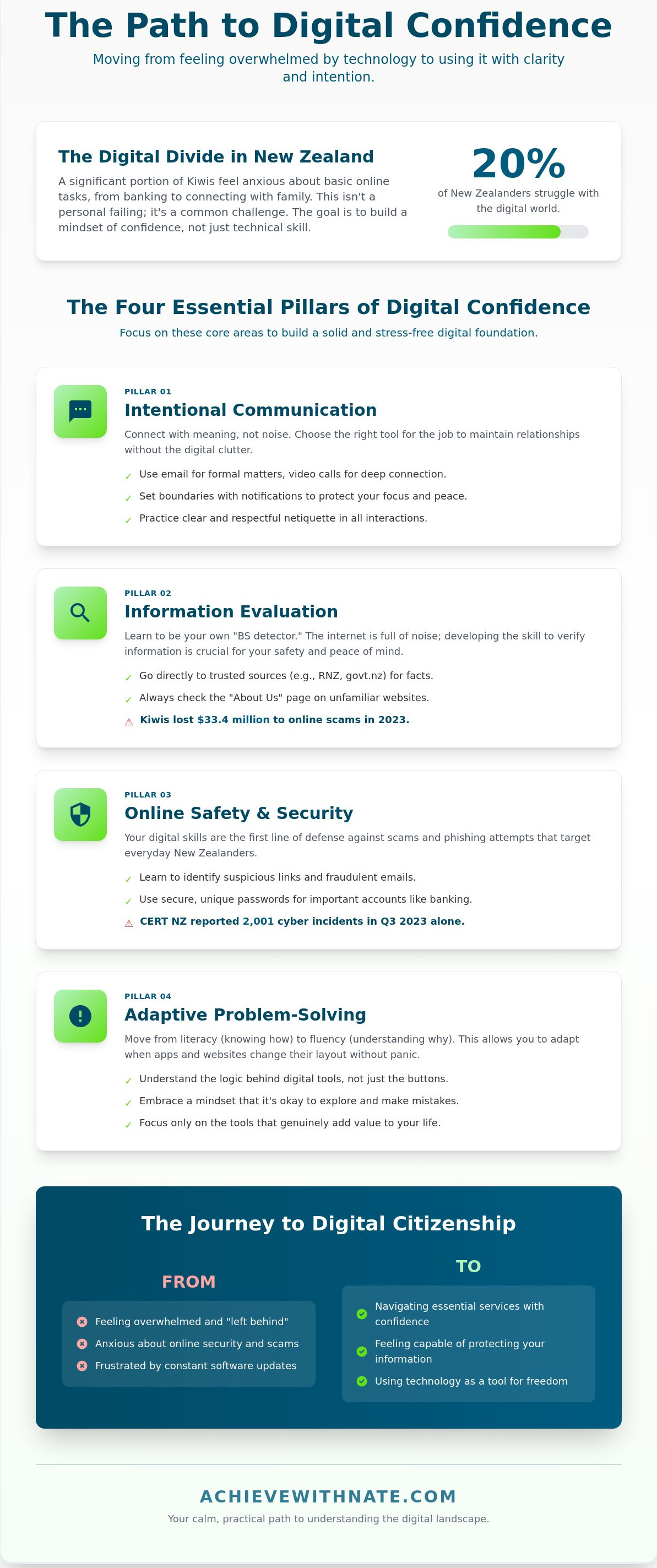
Learn the four essential pillars of digital confidence to communicate intentionally and verify information with ease.
Discover how to quiet tech anxiety by letting go of "hustle culture" and the fear of making mistakes.
Find practical ways to build your skills using trusted New Zealand resources like RealMe and Netsafe.
Explore how a calm, tailored coaching approach can help you move from feeling overwhelmed to feeling capable.
Table of Contents What is Digital Literacy? Moving Beyond Technical Skills The Four Essential Pillars of Digital Confidence Overcoming Tech Anxiety: Why It Feels Hard (and How to Simplify) Practical Steps to Build Your Skills in New Zealand Find Your Path with Digital Confidence Coaching
What is Digital Literacy? Moving Beyond Technical Skills
Digital literacy is your ability to find, evaluate, and communicate information through various digital platforms. It goes beyond the basic mechanical act of typing or clicking. True digital literacy is a mindset of confidence. It is the quiet assurance that you can navigate a new interface without feeling overwhelmed or defeated.
Many people feel left behind because they weren't born with a smartphone in their hand. We often call younger generations "digital natives," but this term can be misleading. It implies that digital skill is an innate trait rather than a learned habit. I prefer to focus on the concept of the "digital citizen."
A digital citizen is anyone who chooses to participate in the modern world with intention. You don't need to be a teenager to master these systems. You simply need a clear process. The ultimate goal for every Kiwi is digital confidence. This is the point where technology stops being a source of friction and starts being a tool for freedom.
The Difference Between Literacy and Fluency
Literacy is understanding the "how" of a system. You know how to log into your bank account or how to send a photo to a grandchild. Fluency is different. Fluency is the ability to adapt when the tools change. If your banking app updates its layout, a fluent user doesn't panic. They use their existing logic to find the new buttons.
You don't need to be a professional to be digitally literate. You don't need to understand coding or complex hardware. My approach focuses on the "why" behind the tools. If a piece of technology doesn't serve your purpose or simplify your life, it's okay to let it go. Minimalists understand that we only need to master the systems that add genuine value to our daily routines.
Why Digital Literacy Matters in New Zealand Today
Aotearoa has embraced an online-first model for almost every essential service. According to the 2022 Digital Strategy for Aotearoa, the government is pushing for more integrated digital identities. This means services like RealMe, MyIR for taxes, and My Health Record are becoming the primary ways we interact with the state. If you lack digital literacy, you risk losing access to these vital systems.
Digital skills also keep our social fabric intact. In a country where family members are often spread across two islands, video calls and messaging apps are essential for connection. These tools help maintain relationships without the need for constant travel. They provide a sense of presence that a standard phone call sometimes lacks.
Finally, these skills are your first line of defense. CERT NZ reported 2,001 cyber security incidents in the third quarter of 2023. Many of these involved local phishing scams targeting everyday New Zealanders. Understanding how to evaluate the legitimacy of a link or an email is no longer optional. It's a necessary habit for protecting your financial freedom and personal peace of mind.
The Four Essential Pillars of Digital Confidence
Building digital literacy isn't about mastering every new app or piece of hardware. It's about creating a simple system that serves your daily life. Most people feel overwhelmed because they try to learn everything at once. Instead, focus on four specific pillars: communication, information, safety, and problem solving. These pillars act as a foundation for your digital freedom. When you understand how to use these tools intentionally, the internet stops being a source of stress. It becomes a tool for clarity and connection.
Intentional Communication and Connection
Digital connection should feel meaningful rather than frantic. You don't need to be active on every social platform. Choose the right tool for the specific job. Use email for formal matters and video calls for deep connection with family in Auckland or London. Messaging apps work best for quick updates. Practice good netiquette by being respectful and clear in your replies. Set boundaries with your notifications to protect your focus. You might turn off all non-human alerts after 6:00 PM. If you want to refine your daily habits further, you can explore intentional lifestyle systems that create more space in your day.
Critical Thinking and Information Evaluation
The internet is full of noise, so you must learn to filter it. If an offer on social media looks too good to be true, it usually is. Netsafe New Zealand reported that Kiwis lost NZ$33.4 million to scams in 2023. This highlights why verifying sources is vital. Use simple search techniques to find the truth. Go directly to trusted sources like RNZ or official government websites for news. Check the "About Us" page on unfamiliar sites before trusting their content. Never share an article until you've confirmed it's accurate. This discipline prevents the spread of misinformation and keeps your digital environment clean.
Digital safety relies on simple, repeatable systems rather than complex software. Protecting your identity starts with unique passwords for every account. Cert NZ recorded 7,929 cyber security incidents in 2023. You can avoid being part of this statistic by following three basic steps:
Use a password manager to store unique credentials for every site.
Enable two-factor authentication on your banking and primary email apps.
Update your phone and computer software as soon as prompts appear to patch security gaps.
Problem solving is the final pillar. It requires the patience to troubleshoot basic issues without panic. When a screen freezes or an app fails, take a slow breath. Most issues are resolved by a simple restart or by typing the specific error message into a search engine. Developing this self-reliance is a core part of digital literacy. This habit transforms you from a passive user into a confident navigator of the digital world.
Overcoming Tech Anxiety: Why It Feels Hard (and How to Simplify)
Technology often feels like a treadmill that never stops. The constant stream of updates and new platforms creates a "hustle culture" in the digital world. You might feel like you're falling behind because you haven't mastered the latest AI tool or social media trend. This pressure is artificial. It's designed to keep you consuming, not to help you grow. True confidence comes from realizing that you don't need to know everything.
Many New Zealanders share this feeling of being overwhelmed. The 2023 BNZ Digital Skills Report found that 20% of adults in Aotearoa lack the foundational skills to participate fully in a digital world. This gap often leads to a fear of "breaking" the device or the internet. You should know that modern software is built with safety nets. Most mistakes are reversible with a simple click of a "back" or "undo" button. Your device is a tool, not a fragile artifact.
Effective digital literacy is not about chasing every new invention. It's about making technology serve your specific needs. If a tool doesn't add value to your life, you don't need to learn it. Use the "subtraction" method to find clarity. Look at your phone right now. If you haven't opened an app in 30 days, delete it. Removing the noise is the first step toward feeling in control.
The Myth of the Tech Guru
The people you think are "tech gurus" usually have one specific skill; they know how to search for answers. They don't have every menu memorized. They use search engines to solve problems in real time. Age is not a barrier here. A 2022 study by the University of Auckland highlighted that older adults who adopt a growth mindset can master new digital tools as effectively as younger generations. Stop saying you're "too old" to learn. You're just out of practice. Shift your focus from what you can't do to what you can find out.
Managing Digital Overwhelm
A cluttered digital space leads to a cluttered mind. Reduce daily friction by organizing your digital environment. Doing less online often leads to a higher quality of life. You gain freedom when you stop letting your devices dictate your schedule. Focus on the few tools that align with your goals and ignore the rest.
Silence the noise: Turn off all non-human notifications. If it's not a person contacting you, it can wait.
Limit your home screen: Keep only the five apps you use daily on your main screen to reduce decision fatigue.
Practice intentionality: Say no to new accounts. Each new app is a new liability for your data and your time.
When you simplify your digital world, you regain your agency. You aren't failing at technology; you're likely just trying to do too much of it. Mastery comes from digital literacy applied with purpose and discipline.
Practical Steps to Build Your Skills in New Zealand
Building your digital literacy doesn't require a computer science degree. You can start by choosing one task you do every week. Online banking is a practical choice for most people. Major New Zealand banks now provide step-by-step video tutorials for their mobile apps. Focus on mastering that one system before moving to the next. This approach creates a sustainable habit of learning without feeling overwhelmed.
Security is about simple systems rather than complex secrets. Set up a password manager to store your logins securely. Combine this with two-factor authentication, often called 2FA. This simple step blocks 99.9% of automated cyber attacks according to Microsoft security reports. It's a foundational habit that protects your personal data and your peace of mind.
Navigating NZ Government and Essential Services
RealMe is your primary tool for secure access to government services. It acts as a single login for over 50 different agencies. You can use it to check your tax details on MyIR or access MSD support services. Many Kiwis also use online patient portals like ManageMyHealth or Centric. These platforms allow you to book appointments and view lab results without a phone call. It saves time and keeps your records organized in one clear place.
Staying Safe in the Kiwi Digital Landscape
You have local allies if things go wrong. If you encounter a suspicious email or text, report it to Netsafe or Cert NZ immediately. In 2023, Cert NZ responded to 8,106 reported incidents, helping New Zealanders recover from scams. When you shop at local retailers like Trade Me or Mighty Ape, check for the padlock icon in your browser address bar. This icon confirms the connection is encrypted and your payment details are protected.
You don't have to learn alone. Organizations like Digital Inclusion Alliance Aotearoa offer "Stepping UP" workshops in local libraries across the country. These are free community resources designed for adult learners. Once you feel comfortable, refine your digital space. Delete apps you haven't opened in 90 days. Unsubscribe from marketing emails that clutter your inbox. Clarity comes from having fewer distractions to manage.
Improving your digital literacy is a long term investment in your personal freedom. It allows you to manage your life on your own terms. Take the first step by securing your accounts and exploring the tools already available to you.
Find Your Path with Digital Confidence Coaching
Learning new technology doesn't have to be a source of stress. You might feel like the world is moving too fast, but digital literacy is a skill you can master at your own speed. Coaching provides a bridge between where you are now and where you want to be. It transforms confusion into capability through a steady, intentional process. You don't need to be a tech expert to feel at home in the digital world.
Nate's approach is calm and grounded. He avoids the aggressive hype often found in tech circles. Every session is tailored to your specific needs and current skill level. This isn't about memorizing software menus or learning tools you'll never use. It's about your life goals. Whether you want to manage your household budget or connect with family overseas, technology should serve you. You'll learn to make tech a quiet, helpful part of your day rather than a loud distraction.
What to Expect from a Coaching Session
You can expect a judgment-free environment. We focus on practical, everyday tasks that have a direct impact on your life. There's no pressure to perform or "get it right" immediately. We move at your preferred pace. If a concept takes longer to click, we stay with it until you feel comfortable. This is about building a system that works for your unique lifestyle. We look at your current habits and find ways to simplify them. You'll learn how to strip away the digital clutter that causes anxiety and focus on what provides real value.
The Long-Term Benefits of Digital Agency
The 2023 BNZ Digital Skills Report found that 20 percent of New Zealanders lack the essential skills for modern life. Gaining digital agency changes this. It gives you the freedom to navigate the world without relying on others for help. You'll gain the peace of mind that comes from knowing your data is secure. You'll know how to spot a scam and how to keep your personal information private. This confidence allows you to participate fully in the New Zealand economy and community. It's about gaining clarity and taking control of your time. You can start this journey today.
Take Control of Your Digital World
Building your digital literacy is about more than just knowing which buttons to click. It's about finding clarity and peace in a world that often feels noisy and overwhelming. You can move past tech anxiety by focusing on intentional habits and the four essential pillars of confidence. Whether you're navigating online banking or connecting with family, your skill grows through consistent, small actions.
I provide expert guidance for everyday Kiwis through a calm, minimalist approach to technology. This national service is available to every region across New Zealand, helping you replace frustration with a sense of agency. We'll work together to strip away the complexity and build a system that serves your specific lifestyle needs. There's no need for jargon here; we focus on what's practical and sustainable for your daily life.
If you're ready to stop feeling left behind, it's time to take the first step. You can book a Digital Confidence Coaching session with Nate to start your journey toward online independence. Building these skills is a practical way to reclaim your time and your freedom. You have the power to master these tools on your own terms.
Frequently Asked Questions
What is the simplest definition of digital literacy?
Digital literacy is your ability to confidently find, use, and share information using digital tools. It's about having the right systems to navigate the internet and devices with clarity. In 2023, the BNZ Digital Skills Report found that 20 percent of New Zealanders struggle with these basic tasks. Mastering this skill gives you back your time and freedom in a connected world. You'll feel more intentional with every click.
Is it too late for me to learn digital skills as a senior?
It's never too late to start your journey toward digital confidence. Many New Zealanders over the age of 65 learn new skills through programs like SeniorNet every year. You don't need to learn everything at once. Focus on one small habit at a time to build your intentional online life. Consistency is more important than speed, and your age provides a unique perspective that younger users often lack.
How can I tell if a website is safe to use in New Zealand?
Check for a padlock icon next to the web address and look for "https" at the start of the link. Safe New Zealand sites often end in .nz or .govt.nz. CERT NZ reported 2,128 cyber security incidents in the third quarter of 2023, so staying alert is vital. If a deal looks too good to be true, it usually is. Trust your intuition and move through the digital world slowly.
What is the most important digital skill to learn first?
Learning to protect your personal information is the most critical step. Start by creating a strong, unique password for your email and turning on two-factor authentication. Microsoft research shows that this simple system blocks 99.9 percent of automated account attacks. When you feel safe, you gain the clarity needed to explore other parts of the internet. Digital literacy begins with a secure foundation and a quiet mind.
Do I need to buy expensive equipment to be digitally literate?
You don't need the latest high-end gadgets to become digitally literate. A simple, refurbished laptop can be found for under NZ$300 at local retailers like PB Tech. Minimalism teaches us that we need fewer tools, not more. Focus on mastering the equipment you already own before considering an upgrade. True freedom comes from how you use your tools, not how much they cost or how new they are.
How does a digital confidence coach differ from a computer class?
A digital confidence coach provides a personalized system tailored to your unique needs. Unlike a standard computer class with 15 other students, a coach focuses on your specific fears and goals. This one-on-one approach creates a quiet space for you to learn at your own pace. It's about building a sustainable lifestyle rather than just memorizing technical steps. You get the direct support required to move forward with purpose.
What should I do if I feel overwhelmed by my smartphone?
Start by deleting apps you haven't used in 30 days to reduce visual noise. Turn off all non-essential notifications so your phone stops demanding your attention. This subtraction makes your device a tool for your benefit rather than a source of stress. Take a 10 minute break away from all screens if you feel your heart rate rising. You're in control of the technology, and it's okay to step away.
How can I help a family member improve their digital literacy?
Guide them by letting them hold the mouse or tap the screen while you explain the steps. Research from 2022 shows that hands-on learning is 50 percent more effective than just watching a demonstration. Avoid taking over the device when they get stuck. Instead, offer calm encouragement and focus on one simple task per session. Improving digital literacy is a marathon, not a sprint, so keep your sessions short and focused.


Comments