


Digital Productivity Audits: A Buying Guide for Busy Kiwi Business Owners

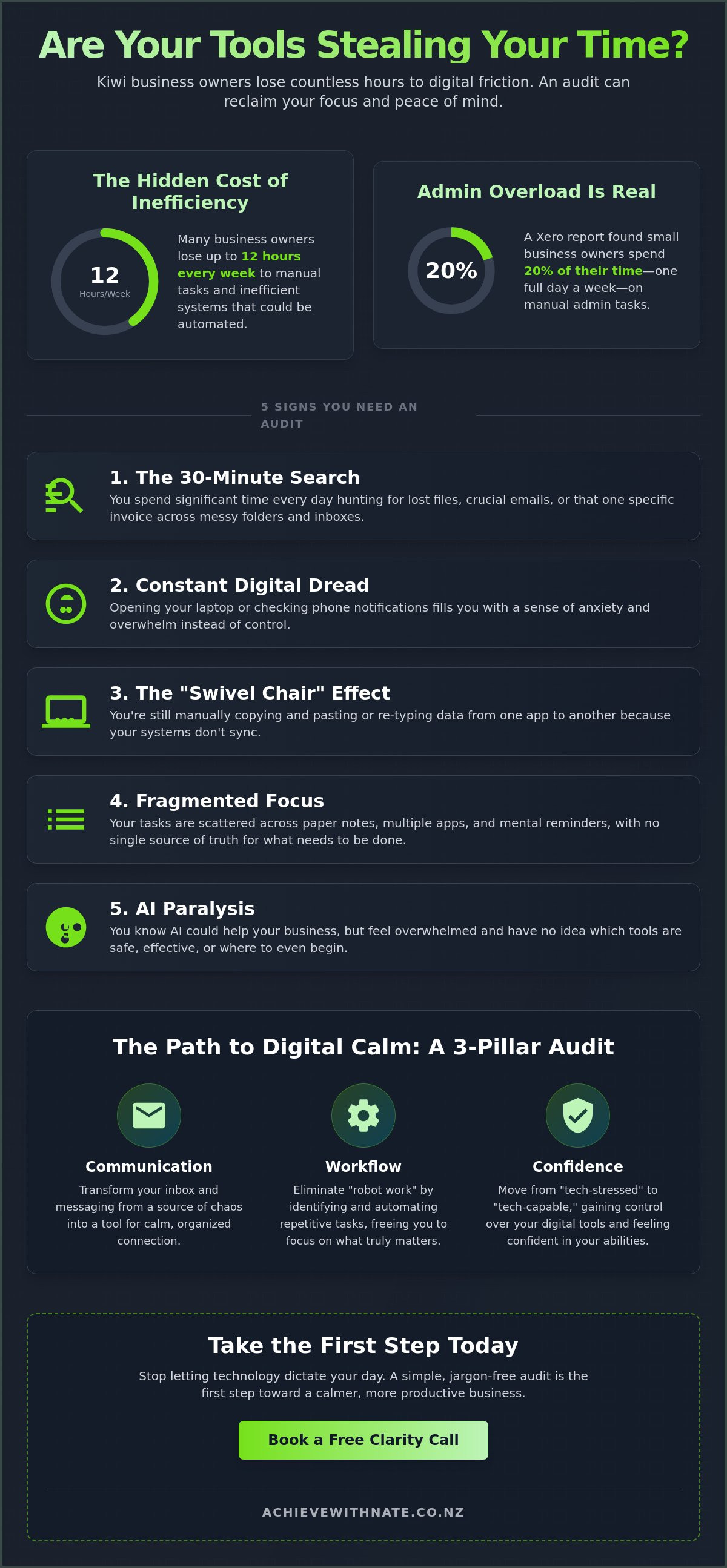
What if the tools you bought to save time are actually stealing 12 hours of your productivity every single week? According to a 2023 report by Xero, many Kiwi small business owners spend up to 20% of their time on manual admin tasks that could be automated. It's frustrating to feel "always on" while your to-do list only seems to grow longer. This is why more local leaders are turning to digital productivity audits to identify exactly where their systems are failing them. You likely feel the weight of tech overwhelm, juggling too many apps and wondering if you're already falling behind the AI revolution.
We understand that tech should support you, not stress you out. You deserve a digital workspace that feels calm and simple. This guide will show you how a professional audit can clear away the noise and help you reclaim hours for your family or your actual work. We'll walk you through what to look for in a service that offers digital confidence without the jargon, so you can finally feel capable and in control of your business again.
Key Takeaways
Identify the subtle signs that your digital tools are stealing your time instead of saving it.
Learn how digital productivity audits can clear the overwhelm and help you reclaim hours of your week.
Follow a simple, jargon-free framework to inventory your tech stack without the usual stress or confusion.
Decide if a DIY approach or personalized coaching is the best way for you to find your digital calm.
Discover how one small step today can lead to a more confident, tech-capable future for everyday Kiwis.
Table of Contents What is a Digital Productivity Audit (The Jargon-Free Version)? 5 Signs Your Business Needs a Digital Productivity Audit in 2026 The Stress-Free Framework for Your First Audit Choosing Your Path: DIY Audits vs. Personalized Coaching Taking the First Step Toward Digital Calm
What is a Digital Productivity Audit (The Jargon-Free Version)?
A digital productivity audit is a simple check-up for your tech. It’s about looking at the tools you use every day to see if they save your time or steal it. For many everyday Kiwis, technology feels like a heavy weight. You might feel "tech-stressed" by constant notifications or a messy desktop. These digital productivity audits are designed to move you toward feeling "tech-capable" instead. It's a no-judgment way to find out what's working and what isn't in your daily routine.
You might have heard of a time audit. That’s where you track every minute of your day to see where the hours go. A digital productivity audit is different. While a time audit shows you the "where," a digital audit looks at the "how." It examines the friction in your tools and the way you interact with them. It is a practical application of Business process management for the real world. We focus on your habits and your people, not just software and buttons. If a tool is too hard to use, it isn't the right tool for you.
The Three Pillars of a Healthy Digital Setup
Communication: Your inbox shouldn't feel like a monster. We look at whether your emails and messages are a source of calm or total chaos. For teams working in the field, you might also explore Handheld Radios (Walkie-Talkies) to simplify your real-time coordination.
Workflow: You shouldn't be doing "robot work." If you're manually copying data between spreadsheets, a simple tool could handle that for you.
Confidence: This is the most important part. Do you feel in control of your devices, or do you feel like they control you?
Why "More Apps" is Rarely the Answer
There's a common myth that a "magic app" will solve everything. Many New Zealand small business owners fall into this trap. They download a new planner or a fancy task manager, but the stress stays. This leads to "app fatigue." A 2021 study by RingCentral found that 68% of workers toggle between apps up to 10 times an hour. That constant switching actually slows you down and drains your energy.
We don't believe in a total digital overhaul that leaves you feeling more lost. We focus on one small step at a time. Often, the best solution is using the tools you already have, just in a better way. No jargon, no pressure. We want to help you find a steady hand in a fast-moving world. By focusing on your actual needs rather than the latest shiny software, you can reclaim your day and your peace of mind.
5 Signs Your Business Needs a Digital Productivity Audit in 2026
Running a business in Aotearoa should feel rewarding, not like a constant battle with your screen. As we move through 2026, the gap between "getting by" and "getting ahead" is growing. You might feel like you are working harder than ever, yet the to-do list never seems to shrink. If you recognize these five signs, digital productivity audits could be the key to reclaiming your time and your peace of mind.
The 30-Minute Search: You spend more than half an hour every day hunting for files, lost emails, or that one specific invoice.
Digital Dread: You feel a heavy sense of anxiety the moment you open your laptop or check your phone notifications.
The "Swivel Chair" Effect: You are still manually typing data from one system into another because your apps don't talk to each other.
Fragmented Focus: Your tasks are scattered across paper notebooks, various mobile apps, and mental reminders you hope you won't forget.
AI Paralysis: You know AI could help your business, but you have no idea which tools are safe or where to even begin.
The Cost of "Making Do" with Messy Systems
Small delays are sneaky. A five-minute struggle to find a client's folder might seem minor in the moment. However, if this happens six times a day, you lose 125 hours a year. That is over three weeks of full-time work simply vanishing. Digital friction is the silent killer of Kiwi business growth. Beyond the clock, there is an emotional toll. When your tech feels messy, that "always-on" feeling follows you into your evenings and weekends. You deserve a home life that isn't clouded by thoughts of a cluttered inbox.
Identifying the "Digital Bottlenecks" in Your Day
Many everyday Kiwis get stuck in admin hurdles that shouldn't exist. This often shows up during client onboarding or when preparing monthly IRD filings. We often mistake being "busy" for being "productive," but they aren't the same thing. A simple audit helps you look at your workflow with fresh eyes. It identifies the 20% of your technology that is causing 80% of your daily stress. By clearing these bottlenecks, you can move from surviving to thriving. If you feel stuck, a quick clarity call can help you see the path forward. We take things one small step at a time. No jargon, no pressure. Just a clear way to build your digital confidence and get back to the work you actually love doing.
The Stress-Free Framework for Your First Audit
Taking the first step toward better digital productivity audits doesn't have to feel like a chore. Think of it as a spring clean for your business soul. We want to clear out the digital "junk drawer" so you can breathe again. This simple five-step framework helps you see exactly where your time and money go each month.
Step 1: Inventory. Grab a cuppa and list every digital tool you pay for. Check your bank statements for those NZ$15 or NZ$30 monthly subscriptions. Include everything from Xero and Outlook to that random photo editor you downloaded last year.
Step 2: Utility Check. Look at each tool and ask, "Does this make my life easier or harder?" If a piece of software makes you feel frustrated every time you open it, it's failing you.
Step 3: Workflow Mapping. Trace the path of a project. How does a client go from a first inquiry to a final payment in your bank account? Note every app that touches that process.
Step 4: The "Delete or Deepen" Decision. This is where you get brave. If you don't use a tool, cancel the subscription. If you do need it but feel "clunky" using it, commit to learning one new shortcut this week.
Step 5: AI Readiness. Look for the gaps. Identify the tasks that feel like "busy work," such as data entry or scheduling. These are the perfect spots for a little bit of automation.
How to Track Your Tech Usage Without Going Mad
You don't need fancy software to see where your time goes. For the next three days, keep a simple notebook by your keyboard. Every time you switch tasks, jot it down. It only takes five seconds. The most important part is the "No Judgment" rule. If you spent thirty minutes scrolling through social media when you meant to be invoicing, write it down anyway. We aren't looking for perfection; we're looking for the truth. Being honest about these distractions is the only way to reclaim your focus. You might find that a simple pen and paper is more effective than a high-tech tracking app because it doesn't add more digital noise to your day.
Evaluating Your AI Opportunities
When you perform digital productivity audits, look for repetitive tasks that feel like a slog. These are your AI opportunities. You don't need to be a tech genius to use these tools. Simple AI prompts or tools like Microsoft Copilot can act as a digital assistant, drafting your first email replies or summarizing long meeting notes. The goal is to create a "Human-AI" partnership. You keep the "real Kiwi heart" and the big-picture decision making, while the AI handles the boring bits. It's about finding small steps to let technology carry the heavy lifting so you can get back to the work you actually enjoy.
Choosing Your Path: DIY Audits vs. Personalized Coaching
Deciding how to tackle your digital productivity audits depends on your goals and your schedule. If you're the type of person who loves tinkering with settings and has 15 to 20 hours of spare time this month, the DIY route is a viable option. You can find free checklists online that cover the basics of file organization and email management. It's a path for the tech-curious who don't mind a bit of trial and error.
However, there's a hidden trap in the DIY approach. Many Kiwi business owners find themselves stuck in a loop of endless research. You might spend three hours watching tutorials for a "perfect" task manager but never actually clear your to-do list. This is a common hurdle; industry observations suggest that without external accountability, 70% of self-led organizational changes fail within the first 90 days. You end up with more "productivity" apps but less actual work done.
Personalized coaching is the shortcut. It's designed for the business owner who wants the benefits of a streamlined system without the steep learning curve. A "Kiwi Heart" approach beats a generic global software template every time. While a template might suggest tools that don't integrate with NZ banks or local time zones, a personal coach understands the specific rhythm of Aotearoa businesses. You get results without the stress of teaching yourself.
What to Look for in a Productivity Partner
Your productivity partner should be someone who walks beside you, not someone who talks down to you from a high-tech pedestal. Look for these three essentials:
Patience and empathy: They should create a "no judgment" zone where you feel safe asking any question.
Local knowledge: They need to understand the NZ business landscape and how we work here.
No jargon promise: If they can't explain the "why" behind a tool in plain English, they'll only add to your overwhelm.
The "Achieve With Nate" Difference
We help you move from feeling "overwhelmed" to having true digital confidence in one-on-one sessions. Our focus is on business workflow optimization to simplify your daily life. We don't believe in high-pressure tactics or complex overhauls that leave you more confused than when you started.
Our "No Pressure" guarantee means we go at your pace. We take things one small step at a time, ensuring you feel capable and in control of your tools. A 2023 survey showed that NZ small business owners work an average of 47 hours per week; our goal is to give some of that time back to you through simple, human-first solutions.
Ready to stop the tech-stress and start feeling in control? Book a free clarity call with Nate today.
Taking the First Step Toward Digital Calm
Thinking of digital productivity audits as just another task on your to-do list is a mistake. It's actually a vital investment in your mental health. For many Kiwi business owners, tech stress acts as a silent drain on daily energy. When you choose to look closely at your systems, you aren't just fixing software. You're giving yourself permission to breathe again. A single session can often uncover three to five hours of reclaimed time every single week. That is time you can put back into your family, your hobbies, or growing your business in Aotearoa.
The transition from feeling tech-stressed to tech-savvy doesn't require a computer science degree. It starts with a single conversation. You don't have to be a "tech person" to enjoy a streamlined, productive digital life. Most of the hurdles you face today aren't because you lack skill. They exist because your tools haven't been set up to work for you. Once that friction is removed, the sense of relief is immediate.
Your Digital Confidence Checklist
You don't need to overhaul your entire business by next Monday. Digital confidence is built through small, manageable wins that add up over time. Here is how you can start today:
Identify the friction: Pick the one app or process that makes you sigh every time you open it.
Embrace the "One Small Step" philosophy: Focus on fixing that one thing rather than the whole system.
Book a Free Clarity Call: This is the simplest way to get a professional perspective without any commitment.
Taking these steps helps shift your mindset from being overwhelmed to being in control. A quick call can provide more clarity than weeks of trying to "figure it out" on your own. It's about finding the shortest path to a calmer workday.
Mastering Technology with a Steady Hand
Technology should serve you, not the other way around. Nate provides a "No Jargon, No Pressure" environment where everyday Kiwis can feel safe asking any question. There is no judgment here, only support. He acts as a steady hand to help you bridge the digital divide, ensuring you feel capable and confident with the tools you use every day.
Whether you are struggling with a cluttered inbox or a calendar that feels like a battlefield, there is a way through. By focusing on human-first solutions, Nate ensures that your tech setup feels natural and easy to maintain. You deserve a business that runs smoothly and a mind that feels clear. Ready to clear the clutter? Let’s chat about your digital audit today.
Your Path to Digital Calm Starts Here
Running a business in Aotearoa shouldn't feel like a constant battle with your inbox or your apps. Digital productivity audits provide the clarity you need to stop tech-related stress before it starts. By identifying software overlaps and broken workflows, you can reclaim hours of your week. Since 2026 is already proving to be a year of rapid technological change for New Zealand small businesses, getting your systems sorted now is a smart move for any busy owner.
You don't have to navigate these changes alone. Nate provides a personalized, one-on-one approach designed specifically for everyday Kiwis. This is a no jargon, no pressure, and no judgment environment. You'll get the support you need to build lasting digital confidence without feeling patronized. Nate has a proven track record of helping people across New Zealand find their footing in the digital world through simple, human-first coaching.
While focusing on your personal digital habits is a great start, professional development for your whole organization is the next step. To explore how coaching can transform team performance, you can discover YOU Company and their approach to growth and development.
Taking control of your tools is the first step toward a more balanced life. It's time to move away from the noise and toward a simpler way of working. Book your Free Digital Clarity Call with Nate today and start your journey toward a more focused business. You've got this, one small step at a time.
Frequently Asked Questions
What exactly happens during a digital productivity audit?
A digital productivity audit is a gentle review of your current tech habits to find where you're losing time. We look at your everyday apps, like Xero or Outlook, and spot the spots where things feel clunky. You'll receive a clear, simple plan to fix those frustrations. It's a "no judgement" zone designed to help you feel more in control of your business.
How long does a typical audit take for a small business?
A standard audit for a Kiwi small business usually takes between 2 and 4 hours of your time. We often split this into two sessions so it doesn't feel overwhelming. This allows us to dive deep into your workflows without disrupting your whole workday. Most owners find they can fit these sessions into a single week without any stress.
Do I need to be "good with computers" to benefit from an audit?
You don't need any special tech skills because these digital productivity audits are designed for everyday Kiwis. If you can send an email or use a smartphone, you're ready to start. The goal isn't to turn you into a coder. It's about making the tools you already have work better for you. We take things one small step at a time.
Will I have to buy expensive new software after the audit?
Most businesses find they can save money by using the tools they already pay for more effectively. We focus on "lean tech" solutions, often using free features within Microsoft 365 or Google Workspace. If a new tool is suggested, it's only because it replaces a more expensive, manual process. Our priority is keeping your costs low and your systems simple.
How much time can I actually save with better digital workflows?
You can save a significant amount of time by streamlining your digital habits. According to the 2023 Anatomy of Work report, employees lose 5.5 hours each week to repetitive tasks. By refining your digital workflows, many owners reclaim 20% of their work week. This means gaining back nearly 8 hours every month to focus on what really matters in your business.
Can an audit help me understand how to use AI in my business?
Yes, we look at how simple AI tools like ChatGPT or Microsoft Copilot can handle your repetitive tasks. We don't use scary jargon; we just show you how to automate things like drafting emails or summarizing meeting notes. It's about finding practical ways for AI to support you. You'll feel more capable as you learn to use these new tools safely.
Is my data safe during a one-on-one digital coaching session?
Your privacy is our top priority, and we follow the New Zealand Privacy Act 2020 strictly. We never ask for your passwords or store your sensitive business data on our own devices. Sessions are conducted via secure screen sharing where you remain in control at all times. It's a safe, private space designed to build your digital confidence without any risk.
What is the difference between an IT audit and a productivity audit?
An IT audit focuses on your hardware and security, while digital productivity audits focus on how you actually work. Think of an IT audit as checking the engine of a car. A productivity audit is like a driving lesson that shows you the fastest, easiest route to your destination. We care about your human experience with the software, not just the technical specs.


Comments