


Finding a Computer Tutor for Seniors in Wellington: A Stress-Free Guide (2026)

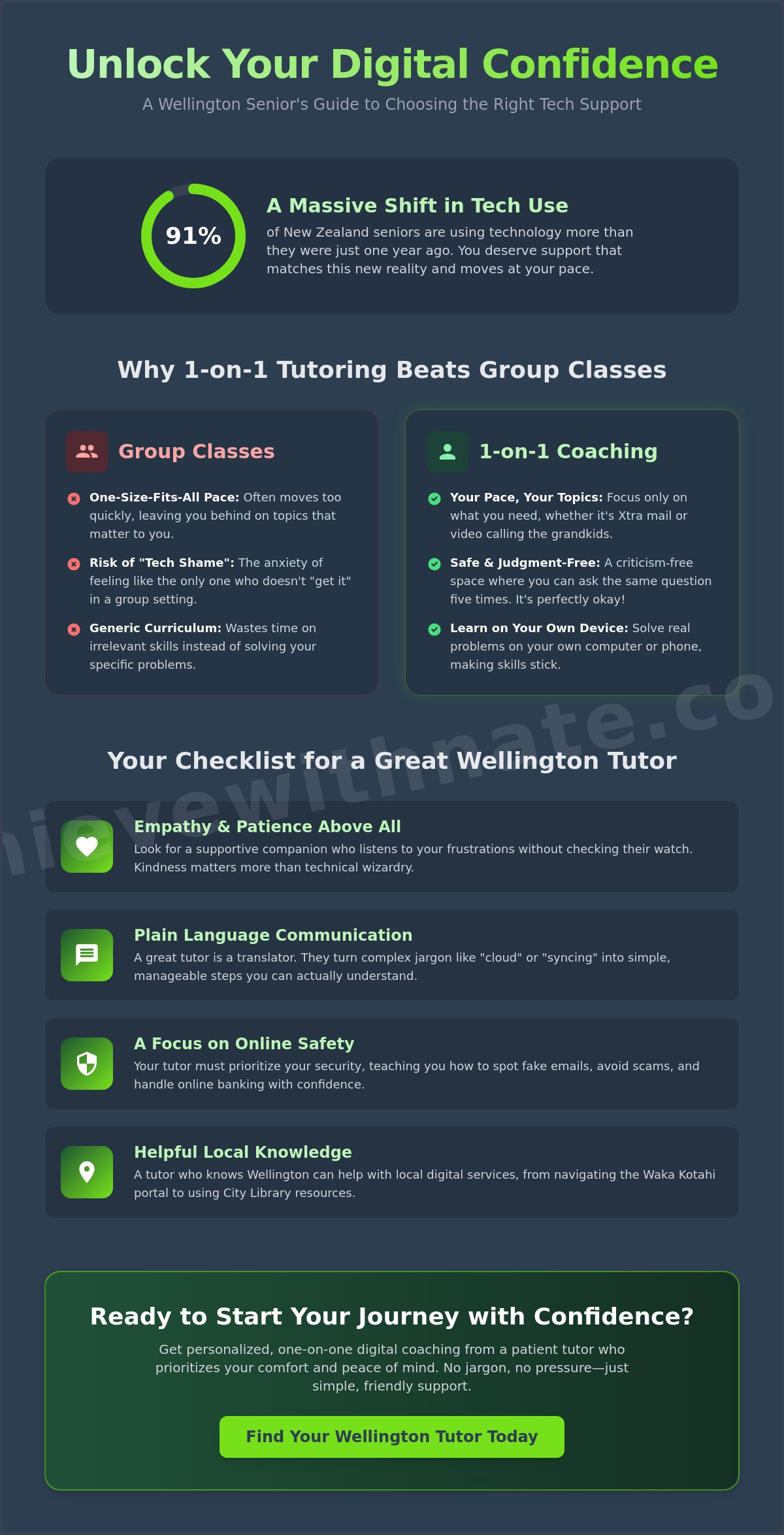
Did you know that 91% of New Zealand seniors are using technology more than they were just a year ago? It is a massive shift, yet many of us still feel like we are speaking a foreign language when we open a laptop. Finding a patient computer tutor for seniors Wellington shouldn't feel like another stressful chore on your to-do list.
It's exhausting to feel left behind by fast-paced updates or to worry about clicking the wrong link. You might have tried group classes that moved too quickly. Perhaps your family members are just a bit too busy to explain things without getting impatient. You deserve to feel safe and capable when you go online. We promise to show you how to find one-on-one technology support that moves at your speed, completely free of confusing jargon. You can learn to manage your Xtra mail, handle online banking safely, and finally feel confident video calling the grandkids. This guide explores the best local options for personalized digital coaching and community support right here in our city.
Key Takeaways
Learn why one-on-one coaching creates a safe, criticism-free space that helps you avoid the "tech shame" often felt in fast-paced group classes.
Discover how to choose a computer tutor for seniors wellington who prioritizes empathy and plain language over confusing technical jargon.
Get practical tips on preparing for your first session, including how to identify your top digital frustrations so you can learn at your own pace.
Understand how personalized device and email basics training can empower you to stay connected with your whānau and manage your online life safely.
Table of Contents
Why 1-on-1 Tutoring Beats Group Technology Classes for Seniors
Learning technology should feel like a quiet conversation over a cup of tea, not a stressful exam in a crowded room. A computer tutor for seniors wellington offers a personalized, unhurried journey toward digital confidence. Instead of following a rigid plan made for a dozen other people, you focus only on what matters to you. It's about moving at your own pace without any pressure to keep up with the person sitting next to you. You don't have to worry about "slowing down the class" because you are the only student.
Many people find that group environments can accidentally trigger "tech shame." It's that sinking feeling when you think you're the only one who doesn't "get it" yet. Private sessions remove that anxiety entirely. You can ask the same question five times and it's perfectly okay. This approach aligns with research on technology and aging, which suggests that a supportive, low-stress environment is essential for mastering new digital skills. When you feel safe, you learn faster.
To better understand how these devices work at a basic level, watch this helpful video:
The Problem with "One-Size-Fits-All" Learning
Following a generic curriculum often feels like a chore. You might spend an hour learning about spreadsheets when all you really want to do is see photos of your grandkids on Facebook. Working on your own device in your own space makes a huge difference. It's your screen, your buttons, and your familiar home setup. This "just-in-time" learning solves the exact problem you have right now, rather than teaching you things you'll never use.
Personalized Support vs. Volunteer Workshops
While volunteer workshops are well-meaning, they can sometimes feel rushed or inconsistent. A professional digital coach is different. They build a long-term relationship with you based on trust and incredible patience. For nz seniors, having a dedicated companion means you always have someone to turn to when things get confusing. It's not just about fixing a glitch; it's about feeling seen and empowered in a digital world that often moves too fast.
What to Look for in a Wellington Computer Tutor
Choosing the right person to help you is more about personality than it is about a wall full of certificates. When you look for a computer tutor for seniors wellington, technical wizardry matters far less than kindness. You need someone who listens to your frustrations without checking their watch. A great tutor acts as a supportive companion, ensuring you feel seen and heard during every step of the process. Finding a computer tutor for seniors wellington means finding a person you can trust with your questions.
Security should always be at the top of their list. With scams becoming more clever, you need a guide who shows you how to spot a fake email or a suspicious link before you click. They should also understand our local Wellington life. Whether you need to navigate the Waka Kotahi portal for your car registration or use the digital services at Wellington City Libraries, your tutor should know the local landscape. This local connection builds a bridge of trust that makes learning feel much more grounded.
The Importance of Plain Language Communication
Tech-speak is a barrier that keeps many of us from feeling capable. A quality tutor will never use words like "cloud" or "syncing" without explaining exactly what they mean in plain English. A Digital Confidence Coach is a translator for the modern world, turning complex digital tasks into simple, manageable steps. If you find yourself more confused after an explanation, that tutor isn't the right fit for your needs. Simplicity is the ultimate goal.
Checking for a Low-Pressure Approach
Always look for a "no-judgment" guarantee before you book. You shouldn't feel embarrassed about what you don't know yet. Many organizations, such as Wellington SeniorNet, offer a supportive environment for learning, but a private tutor can offer even more focused attention. Before committing, see if they offer a short chat to see if you get along. If you want to start your journey with someone who values your peace of mind, consider exploring one-on-one digital coaching that prioritizes your comfort above all else.
Preparing for Your First Technology Training Session
Walking into your first lesson with a computer tutor for seniors wellington should feel like a weight lifting off your shoulders. It is the start of a much easier relationship with your devices. To get the most value out of your time, a few simple steps can help keep the experience calm and productive. Preparation isn't about studying; it's about making sure you feel ready to talk about what you need.
Step 1: Write down your "Top 3 Frustrations." Perhaps you can’t find your photos or your email is constantly full. Having these ready helps your tutor focus on the things that actually bother you.
Step 2: Ensure your devices are fully charged and plugged in. If you have your passwords handy, keep them nearby so you don't have to hunt for them mid-lesson.
Step 3: Choose a quiet, comfortable spot. A familiar chair where you feel relaxed and ready to learn makes a world of difference for your focus.
Step 4: Remind yourself that there are no "silly questions" in a one-on-one digital coaching environment. Every expert started exactly where you are now.
Setting Manageable Goals for Your Learning
Mastering one small task is far better than trying to learn everything in a single afternoon. If you successfully learn how to send a photo to your whānau, that is a massive win. You can use a "Digital To-Do List" to track your progress. Ticking off a specific skill helps you see how far you've come and keeps the momentum going without the stress of a big curriculum.
Practical Tips for a Stress-Free Session
Don't be afraid to keep a pen and paper beside your computer. Writing down steps in your own words helps bridge the gap between the screen and your memory. You should also ask your computer tutor for seniors wellington for a "cheat sheet" at the end of the lesson. These simple, written reminders act as a safety net for when you are practicing on your own later. If you are ready to turn your tech frustrations into confidence, you can book your one-on-one digital coaching session today and start at your own pace.
How Achieve With Nate Supports Wellington Seniors
Achieve With Nate is more than just a coaching service. It's a movement built on the idea that every person in Aotearoa deserves to feel confident with their devices. If you've been searching for a computer tutor for seniors wellington, you'll find that Nate acts as a supportive companion on your digital journey. There's no judgment here. There's only patience and a shared goal of making technology work for you, not against you. We believe that learning should be a gentle, positive experience.
The heart of our support is device and email basics training tailored specifically for your unique needs. Whether you're struggling with a new tablet or an overflowing inbox, the sessions happen in a criticism-free, unhurried environment. You never have to worry about complex contracts or long-term commitments. The simple hourly billing model means you get help exactly when you need it; you only pay for the time spent learning and growing.
A Neighborly Approach to Technology
Being local to New Zealand makes a real difference. A computer tutor for seniors wellington should understand the specific platforms we use every day, such as Xtra mail or NZQA logins for family members. Nate’s philosophy is simple. The person behind the screen is more important than the software. We prioritize your emotional well-being and peace of mind over technical jargon. It's about neighborly kindness and professional coaching coming together to create a safe space for you to explore.
Take the First Step Toward Digital Confidence
We invite you to have a low-stakes introductory conversation. It's a gentle way to see if this style of coaching is a good fit for you without any pressure. Technology is just a tool to help you stay connected and informed. You deserve to feel comfortable using it every single day. By taking small, manageable actions today, you can replace tech anxiety with a sense of quiet empowerment. Let's find your footing together.
Your Path to Digital Confidence Starts Here
Finding the right computer tutor for seniors wellington is about more than just fixing a setting on your phone. It is about regaining your independence and staying connected with the people you love. We have explored why unhurried, private coaching beats the stress of a crowded classroom. You now know how a focus on plain language and empathy makes all the difference for your learning journey. By focusing on your specific frustrations, you can turn technology from a source of anxiety into a useful tool.
Nate is here to act as your supportive companion through every click and scroll. With a strict no-judgment guarantee and a commitment to patient, jargon-free coaching, you can finally explore technology without the fear of making a mistake. We are proud to serve the Wellington community and all of New Zealand with neighborly kindness. You don't have to feel left behind any longer.
If you are ready to move from frustration to empowerment, we invite you to take one small, manageable step today. Book a free, unhurried 15-minute chat with Nate today to see if our coaching is the right fit for you. Technology is just a tool, and you deserve to feel comfortable using it at your own pace.
Frequently Asked Questions
How much does a computer tutor for seniors cost in Wellington?
Costs for technology support in our city depend on the type of help you need. Some community groups have small annual fees for their members, while professional coaching is usually billed by the hour. It is best to look for a provider who offers clear, simple billing without any hidden contracts. This ensures you only pay for the help you actually use while you build your digital skills.
Do I need to go to a classroom, or can you help me at home?
You have the choice to learn wherever you feel most at ease. While some group classes meet in community halls, personalized coaching often happens right in your own home. Learning on your own device in your familiar environment helps reduce tech anxiety. It ensures that the steps you practice during the lesson are exactly the same ones you will use when you are on your own.
Can you help me with my specific tablet or iPhone brand?
Yes, a computer tutor for seniors wellington can help you master the specific device you already use. Whether you have an iPhone, a Samsung tablet, or a Windows laptop, the training is tailored to your screen and buttons. You don't have to learn on a different machine and then try to figure it out later. This hands-on approach makes every lesson much more practical and useful.
Is it too late for me to start learning how to use a computer?
It is absolutely never too late to start learning. Most seniors in Aotearoa are using technology more than ever before to keep in touch with family. Even if you have never touched a computer, you can learn the basics with a patient guide who respects your pace. Technology is just a tool to help you live a better life, and you deserve to feel comfortable using it.
Will you help me stay safe from online scams and hackers?
Security is a primary focus of digital coaching. You will learn how to identify fake messages and keep your personal information private. Protecting yourself from scams is about building a few simple, safe habits that give you peace of mind. Instead of feeling worried every time you open your email, you will feel empowered to navigate the internet safely and securely.


Comments