


Google Earth NZ: A Simple Guide for Everyday Kiwis (2026)

Updated: May 2
Imagine standing outside your childhood home in Dunedin or a quiet street in Napier without leaving your living room chair. On October 12, 2025, a grandmother in Christchurch used google earth nz to do exactly that, finding the same lemon tree she planted back in 1984.
It's common to feel like modern technology is a wall of complicated buttons and confusing jargon. You might worry about clicking the wrong thing or breaking a digital system that feels far too complex. Many Kiwis feel this friction when trying to use new tools.
This guide shows you how to use this tool with intention. We will strip away the noise so you can focus on the places that hold your history. You will gain the clarity to explore the globe with confidence and reconnect with your New Zealand roots. Success with technology isn't about knowing every secret; it's about simple, consistent actions.
We are going to walk through the simple steps to move through streets, find your family's history, and share these views with your loved ones. It's time to replace tech anxiety with the peace of discovery.
Key Takeaways
Understand how this digital globe offers a clear, detailed perspective of our local landscapes and communities.
Learn the simple, intentional steps to access the system on your computer or phone without any unnecessary friction.
Reconnect with your roots by using google earth nz to revisit your childhood home or find your local marae.
Build your digital confidence through small, consistent actions that create a foundation for learning new skills.
Table of Contents What is Google Earth and Why Should You Use It? How to Access Google Earth on Your Computer or Phone Practical Ways to Explore New Zealand with Google Earth Moving from Curiosity to Digital Confidence
What is Google Earth and Why Should You Use It?
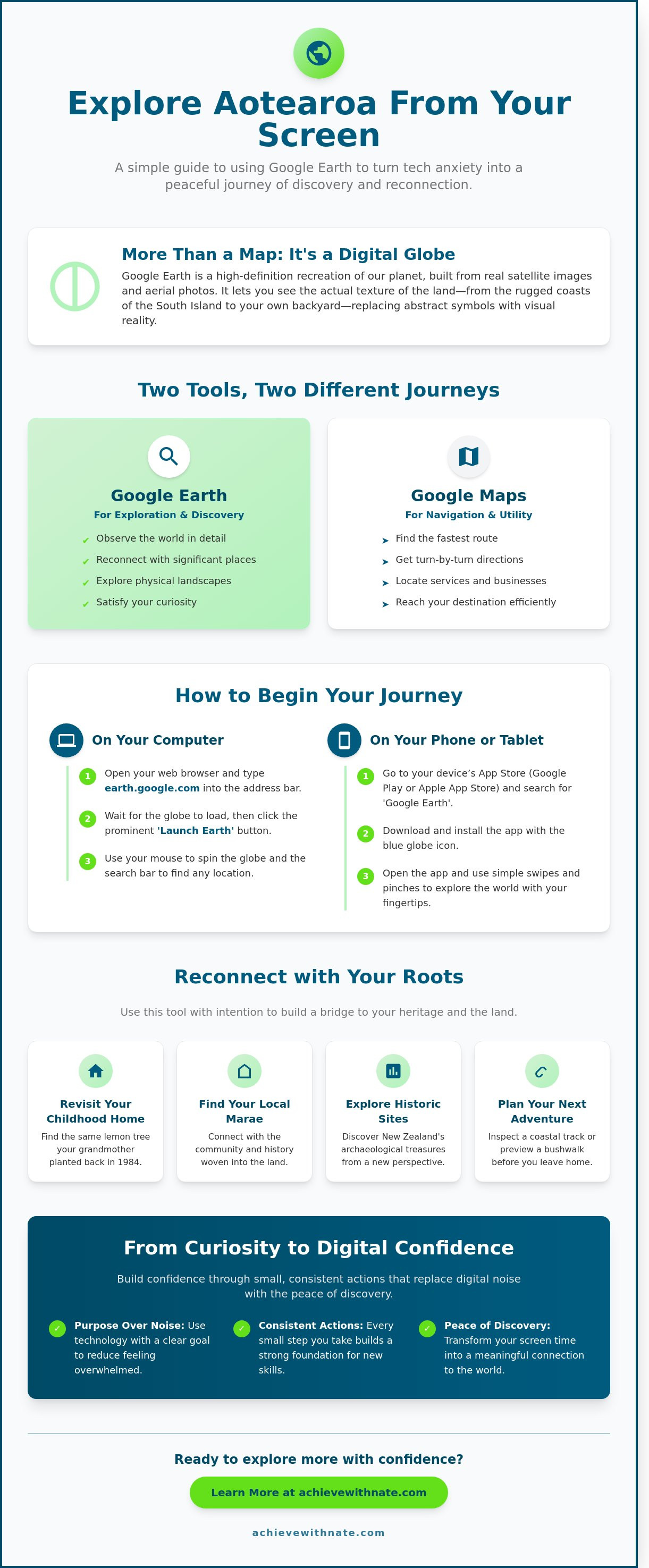
Google Earth is a digital globe that lets you see the world from a bird's eye view. It isn't a simple navigation tool. It's a high-definition recreation of our planet built from satellite imagery and aerial photography. You can use it to see your own house, local parks, or the rugged coastlines of the South Island. While a standard map uses symbols to represent reality, this platform shows you the actual texture of the land. You can find a detailed overview of the technology by reading What is Google Earth? on Wikipedia.
Using google earth nz allows you to reconnect with the physical world from your screen. It focuses on visual reality rather than just data points. It's a tool for curiosity. You might use it to revisit a childhood home or to see how a local forest has changed over the last decade. It encourages you to look closer at the world around you without the pressure of needing to be somewhere else. It's about seeing the world as it truly exists.
The Difference Between Google Maps and Google Earth
Google Maps is a system designed for navigation. It helps you find the nearest chemist or the fastest route to work. It's built for speed and utility. Google Earth serves a different purpose. It's a platform for exploration and seeing the physical world as it is. Maps helps you drive; Earth helps you discover and remember. One is about the destination, while the other is about the landscape itself. When you use google earth nz, you're choosing to observe rather than just move.
How Intentional Exploration Benefits Your Digital Wellbeing
Technology often feels like a source of noise. Using digital tools with a specific purpose helps reduce that sense of being overwhelmed. Exploring familiar places or natural wonders can bring a sense of peace and clarity to your day. It's a slow form of digital engagement that prioritizes your focus. This practice is a core part of maintaining your digital wellbeing. By choosing to explore intentionally, you replace mindless scrolling with a meaningful connection to the environment. It's a simple habit that supports a more disciplined and thoughtful digital life.
How to Access Google Earth on Your Computer or Phone
Accessing the world from your home in Aotearoa is a simple, intentional process. You don't need expensive hardware or complex setups to begin. Most modern devices handle the high-resolution imagery of google earth nz with ease. It is about creating a quiet space to explore and observe.
Start by opening your preferred web browser on your computer. Type the Google Earth address into the search bar. You will see a prominent "Launch Earth" button on the main page. Click this to start the system on your screen. It is a moment of transition where the digital world begins to take shape.
Wait for the globe to load completely. This may take a moment depending on your internet speed. Patience here ensures the satellite data renders with clarity. Once the blue marble appears, use your mouse or trackpad to gently spin the world. Move the cursor toward the South Pacific until the familiar shape of New Zealand comes into focus.
Using Google Earth in Your Web Browser
You don't need to download any heavy software to start your journey. The browser version is a minimalist's tool, keeping your computer's storage clean and uncluttered. Simply let the imagery load slowly and stay present as the details emerge. If you want to find a specific location, focus on the search bar located in the top left corner. It is the simplest way to navigate directly to your destination.
Many Kiwis use this tool for more than just finding their own rooftops. You can use the search function to explore New Zealand's archaeological sites and connect with the history of the land. This practice turns a digital tool into a bridge to our heritage. If you appreciate this level of intentionality in your daily systems, you might enjoy learning more about the philosophy behind simplified living.
Getting Started with the Mobile App
If you prefer using a tablet or a smartphone, the mobile app offers a tactile experience. Download the app from your device's store. Look for the blue icon that resembles a simplified globe. It is a clean design that fits well on a focused home screen.
Open the app and follow the on-screen prompts.
Grant permission for the app to access your location.
This allows google earth nz to center itself on your current position instantly.
Use your finger to swipe and zoom, keeping your movements slow and deliberate.
The mobile experience is highly functional for those who value freedom of movement. It allows you to plan a bushwalk or inspect a coastal track while you are away from your desk. By using these systems effectively, you gain clarity and a better understanding of the environment around you.
Practical Ways to Explore New Zealand with Google Earth
Google earth nz is a tool for perspective. It allows you to see your world with a sense of detachment and clarity. You can start by searching for your childhood home. It’s often a grounding experience to see how the neighborhood has changed since you were young. Trees grow taller; new houses appear. This visual history helps you document the evolution of your own life and the places that shaped you.
You can also find your local marae or community hall. Seeing these landmarks from a bird's-eye view offers a new appreciation for their place in the landscape. If you're planning a trip, you can visit the Great Walks virtually. Exploring the Milford Track or the Routeburn from your living room helps you understand the terrain before you set foot on the trail. It's about being prepared and intentional with your time. Many users in 2024 use these views to plan logistics and safety for outdoor adventures.
How to Search for a Specific Address in NZ
Type your full address into the search bar. Include the town and "New Zealand" to ensure the system finds the right spot. The camera will fly across the digital globe to your destination. It’s a smooth, deliberate movement. You can learn more about how to use Google Earth to refine your search skills. Use the plus and minus buttons to zoom in. This gives you the detail you need without unnecessary clutter.
Using Street View for a Ground-Level Look
Find the small yellow "Pegman" icon in the bottom right corner. Drag and drop this icon onto any road highlighted in blue. You'll land right on the street. Click the arrows on the ground to move forward or backward. This is a practical way to check a new route or see the front of a building. It removes the friction of arriving at an unfamiliar place. Many Kiwis used this feature to check coastal changes after the storms in early 2023.
Measuring Distances and Landmarks
Select the ruler tool to measure the distance between two points. This tool is useful for planning a daily walk or understanding the size of a local park. You can even use it to see the dimensions of your own property or a local paddock. It provides raw data that helps you make better decisions about your space. Knowing the scale of your environment brings a sense of order and sustainability to your planning. Using google earth nz in this way turns a simple map into a functional system for living.
If you want to bring this same level of focus to your personal growth, you can
today.
Moving from Curiosity to Digital Confidence
Mastering a tool like google earth nz is more than a fun hobby. It is the foundation for building broader digital skills. You don't need to be a tech expert to feel in control of your devices. Confidence comes from consistent, small actions. It doesn't come from knowing every complex secret or shortcut.
It's okay to feel uncertain when you first open the app. Every expert started as a beginner. In 2024, research into habit formation showed that consistent 10-minute daily practices are 40 percent more effective for learning than occasional long sessions. You're building a system for your life. Practical guidance is always available when you're ready to move deeper into these systems.
Why Digital Confidence Coaching Matters
Technology often feels noisy and demanding. A coach provides a quiet, intentional space for you to ask questions. You can learn more about Nate and his minimalist coaching philosophy. We focus on clarity over hype.
The real goal is lifestyle design. We want you to have personal agency through technology. This means your phone and computer become tools for freedom. They shouldn't be sources of stress or distraction. We help you align your digital habits with your long-term goals. This approach prioritizes peace of mind over traditional markers of status.
Taking Your Next Simple Step
Progress starts with a single, manageable habit. Try spending ten minutes every day exploring a new location on google earth nz. This small window of time reduces the friction of learning something new. It builds the muscle memory needed for digital fluency without the dopamine hits of social media.
You can view our services to see how we help everyday Kiwis simplify their digital lives. We focus on the satisfaction of a well-lived, intentional life. Success is a byproduct of these simple, sustainable actions. You deserve a digital life that feels calm, productive, and entirely within your control.
Build Your Digital Confidence Today
Google Earth is more than a digital map; it's a tool for clarity and intentional living. You've seen how google earth nz can help you explore 15,000 kilometers of New Zealand coastline or plan a visit to one of our 13 national parks from your living room. Technology should simplify your life, not complicate it. By spending just 10 minutes practicing these steps, you replace curiosity with genuine competence.
My approach to digital coaching focuses on the needs of everyday Kiwis. I don't use jargon or promote high-pressure systems. Instead, I offer a mentor-led path toward intentional living and simplicity. We focus on building habits that create long-term freedom rather than chasing short-term distractions. You deserve to feel at peace with the tools you use every day.
If you're ready to move beyond the basics and master your digital environment, I invite you to take the next step. Join our community to build your digital confidence. We provide the support you need to navigate the modern world with discipline and ease. You're capable of more than you think, and the journey starts with a single, intentional choice.
Frequently Asked Questions
Is Google Earth free to use in New Zealand?
Yes, Google Earth is completely free for all Kiwis to use. You can access the web version, the mobile app, or the desktop version without paying any subscription fees. This tool allows you to explore our landscape from your home at no cost. It's a simple way to gain a new perspective on your local environment without adding a financial burden to your monthly budget.
Can I see my own house in real-time on Google Earth?
No, you cannot see your house in real-time. The images you see are a compilation of satellite and aerial photography taken over several years. Google Earth is a historical archive rather than a live feed. Most imagery of New Zealand residential areas is between 1 and 3 years old. This delay ensures privacy and allows the system to process high-quality visuals for your viewing.
What is the difference between the free version and Google Earth Pro?
Google Earth Pro used to require a paid license, but it's now free for everyone to download. The standard version works in your web browser for quick searches. The Pro version is a desktop application that includes advanced features like high-resolution printing and measuring area perimeters. If you want to map out a specific project or track land changes over time, the Pro version provides the necessary tools for deeper clarity.
How often is the satellite imagery of New Zealand updated?
Google updates the satellite imagery for New Zealand every 12 to 36 months. Major cities like Auckland or Christchurch often see more frequent updates than rural parts of the West Coast. You can check the "Image Date" at the bottom of your screen to see exactly when the photo was captured. This transparency helps you understand the context of the data you're viewing on google earth nz.
Why is my house blurry when I zoom in on Google Earth?
Your house might look blurry because of the resolution limits of the satellite or aircraft that took the photo. Most residential areas are captured at a resolution where one pixel equals 15 centimeters of ground space. If you zoom in past this point, the image loses its crispness. Occasionally, Google blurs specific properties if a privacy request was submitted through their reporting system. It's a matter of technical balance and personal privacy.
Can I use Google Earth without an internet connection?
You generally need an active internet connection to use google earth nz because the data is too large to store on a single device. However, the mobile app allows you to save small areas for offline viewing by caching the data while you're online. This is helpful if you're traveling to remote parts of the Southern Alps where signal is weak. For full functionality and clear exploration, a steady connection is the most reliable system.

Comments