


How to Access Auckland Library Digitally: A Stress-Free Guide for Kiwis

Last Tuesday, 68-year-old Margaret sat down with her morning tea, ready to start a new mystery novel on her tablet. Instead of a story, she found a cold login screen asking for a library PIN she hadn't used in 3 years. It's a frustratingly common story. Many Everyday Kiwis feel like they need a computer science degree just to borrow a digital book from the auckland library collection. You aren't alone if the choice between apps like Libby and BorrowBox feels more like a chore than a hobby. It's completely normal to feel a bit overwhelmed when simple apps start asking for updates or passwords you've long forgotten.
I'm here to show you that you are more than capable of mastering these tools. This guide will help you unlock thousands of free eBooks and movies without the technical headache. We'll turn that digital anxiety into Digital Confidence by walking through the process together, one small step at a time. No jargon, no pressure. We'll cover how to reset your PIN, which app you actually need for your device, and how to start your first movie stream in just five minutes.
Key Takeaways
Discover how to unlock a 24/7 digital hub of books and movies that is completely free for every Auckland resident.
Get a simple, no-jargon breakdown of the best apps to use so you can read and watch on your favorite device.
Follow a calm, step-by-step guide to setting up your auckland library account using the simple details on the back of your card.
Learn how mastering these library tools helps everyday Kiwis feel more capable and steady with other digital services in Aotearoa.
Find out why the digital library is the perfect safe space to practice your tech skills one small step at a time.
Table of Contents Unlocking the Digital Treasures of Auckland Council Libraries Mastering the Library Apps: Libby, BorrowBox, and Beyond Step-by-Step: Setting Up Your Digital Library Account Building Your Digital Confidence Beyond the Library
Unlocking the Digital Treasures of Auckland Council Libraries
Most of us think of Auckland Libraries as physical buildings with quiet corners and rows of paper books. While those spaces are lovely, your local auckland library is actually a massive digital hub that stays open 24 hours a day. It is a free benefit for every Auckland resident or ratepayer, meaning you already have a ticket to a world of entertainment and learning. A Digital Library is a collection of online books, audio, and film accessible via any smart device.
To better understand how these modern services work, watch this helpful video about managing your library items:
Learning to use these tools is a fantastic way to build your overall digital confidence. It gives you a safe, low-pressure environment to practice using your tablet or smartphone. You aren't just reading; you're becoming more tech-savvy with every page you turn.
What can you actually do online?
The online portal for the auckland library is packed with features that make life easier. You can borrow eBooks and eAudiobooks without leaving your couch, which is perfect for rainy days. If you're a movie fan, you can stream award-winning films and documentaries for free through dedicated library apps. You also get instant access to digital newspapers and magazines from around the globe, keeping you informed without the clutter of paper.
The benefits of going digital
Going digital removes many of the common stresses of library use. There are no more late fees to worry about because digital items return themselves automatically when the loan period ends. You can also use adjustable text sizes, which is a game-changer if you find standard book print too small for your eyes. If you feel overwhelmed by the setup process, a digital confidence coach NZ can provide extra support to get you started. It's all about taking one small step at a time to master these helpful tools.
Mastering the Library Apps: Libby, BorrowBox, and Beyond
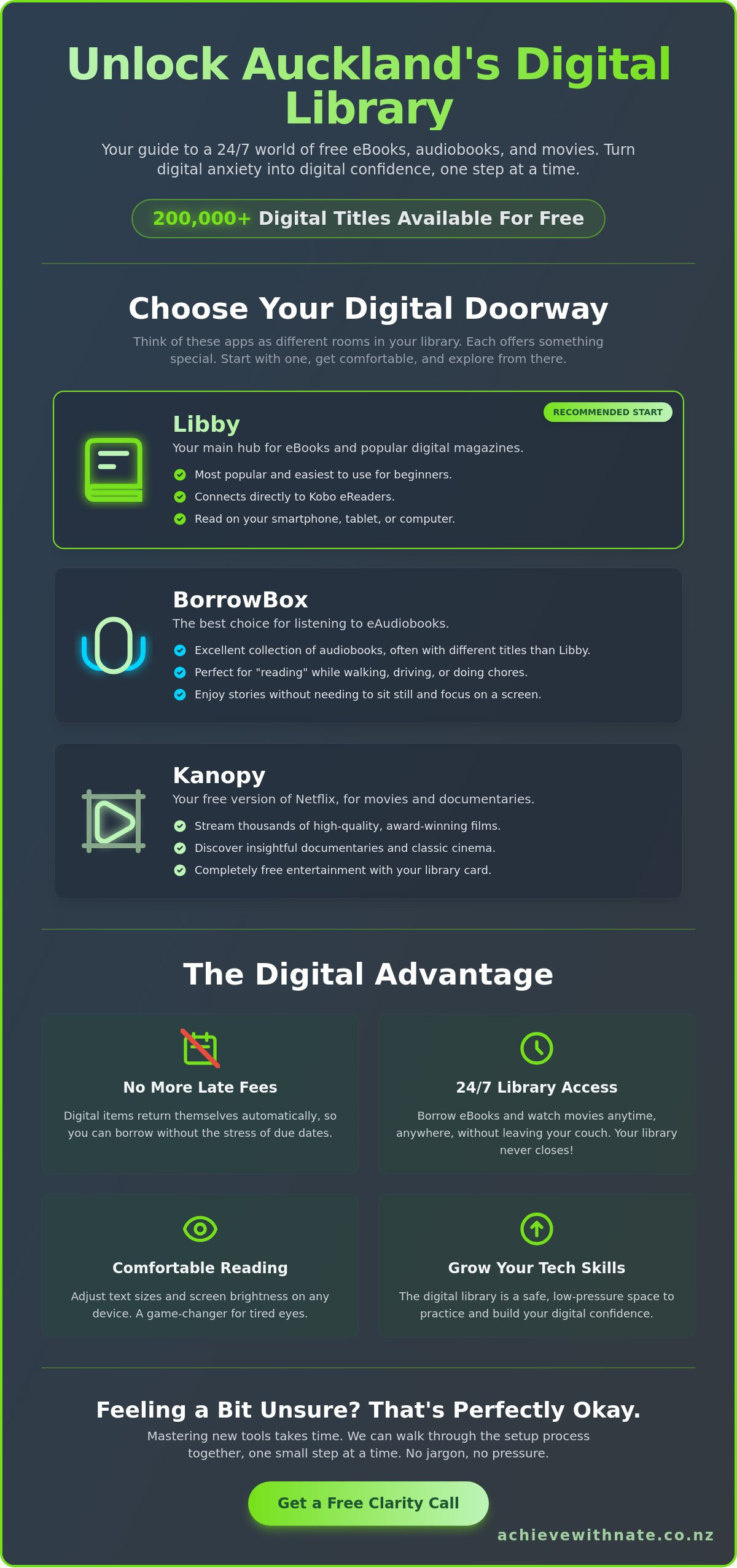
Accessing the auckland library from your living room doesn't require a degree in computer science. Think of these apps as digital doorways to different rooms in a building. Each one offers something a bit different, but they all share the same goal: making your life easier. No jargon, no pressure. Just simple tools for everyday Kiwis. As of 2024, the library provides access to over 200,000 digital titles through these platforms.
Libby: This is your main hub. It's the most popular choice for eBooks and digital magazines.
BorrowBox: This app often carries different titles than Libby. It's particularly famous for its excellent collection of eAudiobooks.
Kanopy: Think of this as a version of Netflix that's completely free. It features thousands of high-quality films and documentaries.
Which app should you start with?
I recommend Libby for anyone feeling a bit unsure. The design is clean and very easy to follow. You can read on your smartphone while waiting for an appointment, or use a tablet for a larger screen at home. If you own a Kobo eReader, Libby connects directly to it. My "one small step" rule applies here. Don't worry about the others yet. Just download Libby today and see how it feels. If you need a hand getting set up, a Free Clarity Call can help you find your feet.
Understanding eAudiobooks
eAudiobooks are a total game-changer for staying mobile. You can "read" while you're busy with other things. Many people find they finish more books this way because it fits into a busy lifestyle. It's a low-pressure way to enjoy stories while doing housework or taking a stroll. Simply plug in your headphones, open BorrowBox or Libby, and hit play. It's a simple way to stay connected to the auckland library without needing to sit still for hours. It turns chores into a calm, enjoyable experience.
Step-by-Step: Setting Up Your Digital Library Account
Setting up your account is a simple process that shouldn't feel like a chore. First, grab your physical card. You'll need the 14-digit barcode printed on the back to identify yourself. You also need your PIN. If you don't remember setting one, try your birth date or the 4-digit code you chose at the branch. It's usually something familiar and easy to remember.
Next, head to the Apple App Store or Google Play Store on your device. Search for "Libby" or "BorrowBox." These are the primary apps used by the auckland library to deliver books directly to your screen. Once the app finishes downloading, open it and follow the friendly prompts. It will ask for your library name; just type "Auckland" and select the Council Libraries option from the list.
Searching for your first title is the best part. Use the magnifying glass icon to type in an author or book title you love. When you find a result you like, simply hit "Borrow." The book will download to your device instantly. This means you can read it even without an internet connection later on.
What if you don't have a card?
You can join the auckland library online in about 3 minutes. Visit their website and fill out the registration form to get a temporary membership immediately. To unlock full digital access, you'll eventually need to verify your Auckland residency with a rates bill or utility notice. If you find the app store or email part a bit tricky, check out my device and email basics training for some extra support.
Troubleshooting common "hiccups"
If your PIN doesn't work, stay calm. There is no judgment here; it's a very common hurdle for many people. You can reset it on the library website using your email address. You might also see a "Place Hold" button instead of "Borrow." This happens when all digital copies are currently in use by other readers. Tap it to join the queue. You'll get a friendly notification when it's your turn to read.
Ready to build your digital confidence? Book a free clarity call today and let's get you sorted one small step at a time.
Building Your Digital Confidence Beyond the Library
Learning to use the auckland library digital collection is more than just a way to find a good mystery novel. It's a safe, low-stakes practice ground for your brain. When you learn how to navigate an app like Libby, you're building a foundation for every other digital tool in Aotearoa. Technology should serve you, not cause a headache. That's the core of our approach. We want you to feel capable, taking things one small step at a time.
From library apps to digital independence
The skills you pick up while exploring the auckland library website transfer directly to other essential tasks. Logging in with a library card and PIN uses the same logic as signing into online banking or checking your details on MyMSD. Navigating a menu to find a specific eBook is very similar to booking a flight or ordering a grocery delivery. This environment is perfect for learning because there's no pressure. If you click the wrong button, nothing breaks. You just try again. For more advice on staying safe while you explore these new skills, check out our guide for NZ seniors.
Get a helping hand from Nate
Sometimes, a group class feels like a race you didn't sign up for. If you miss one instruction, the teacher is already three steps ahead. It's frustrating and it's overwhelming. We do things differently. Our coaching comes with a real Kiwi heart and zero judgment. We focus on one-on-one support that moves at your pace, not the pace of a classroom. Whether you want to master your smartphone or finally feel secure with email, we walk through it together.
No jargon: We use plain language you actually understand.
No pressure: We stop and restart as many times as you need.
Personalized: We focus only on the tech you actually want to use.
You can book a free clarity call today to talk about your tech goals. No jargon. No pressure. Just clear, friendly help to build your digital confidence and keep you connected with the people and stories you love.
Take Your Next Step Toward Digital Confidence
Exploring the auckland library from your own living room opens up a world of stories. You now know how to navigate apps like Libby and BorrowBox with ease. These tools put thousands of books right at your fingertips. It's about making technology work for you, not the other way around. Setting up your account is the first small hurdle. Once it's done, those digital shelves are yours to browse forever.
If the apps still feel a bit tricky, you don't have to figure it out alone. Since 2024, I've been helping everyday Kiwis navigate these exact challenges with a real Kiwi heart. I offer one-on-one support that's tailored to your specific pace. There's no jargon and a strict no pressure guarantee. We can sit down together and walk through everything until you feel completely capable. It's a no judgment zone where we focus on your goals.
Book a Free Clarity Call with Nate to master your library apps and let's get you started. You're more than ready to enjoy your digital library, one small step at a time.
Frequently Asked Questions
Is it really free to use the Auckland Library digital services?
Yes, accessing digital collections at the auckland library is 100% free for all members. There are no hidden fees or subscription costs for borrowing eBooks, eAudiobooks, or streaming films through apps like Libby or Kanopy. It's a wonderful way for everyday Kiwis to enjoy thousands of titles without spending a cent. No jargon, no pressure, just free reading at your fingertips.
How do I find my Auckland Library PIN if I have forgotten it?
You can reset your PIN online through the auckland library website by clicking the "Forgot PIN" link on the login page. You will need to enter your library card number or registered email address to receive a reset link. If you're feeling stuck, you can also visit one of the 56 local branches across the region. The friendly staff will help you update it in person with a valid ID.
Can I read Auckland Library eBooks on my Kindle in New Zealand?
No, standard Kindle devices like the Paperwhite do not support the Libby app used by libraries in New Zealand. This is because Kindle's library lending system is currently only available in the United States. However, you can easily read on a Kobo eReader, a tablet, or your smartphone. Using a Kobo is a simple way to build your digital confidence one small step at a time.
What happens if I forget to return a digital book?
Digital books return themselves automatically on their due date, so you never have to worry about late fees. Most loans last for 21 days before the file simply expires and disappears from your device. This takes the stress out of borrowing. You don't need to remember a return date or rush to a physical drop-off bin. It's a calm, human-first way to manage your reading.
Do I need to be a resident of Auckland to use these services?
Yes, free digital memberships are reserved for people who live, work, or study within the Auckland Council boundaries. If you live elsewhere in Aotearoa, you can still join as a non-resident for an annual fee of $150. For those living in the city, signing up is a simple process that helps you feel more capable in our digital world. We'll walk you through it at your own pace.


Comments