


How to Feel More Confident with Technology: A Calm Guide for Kiwis

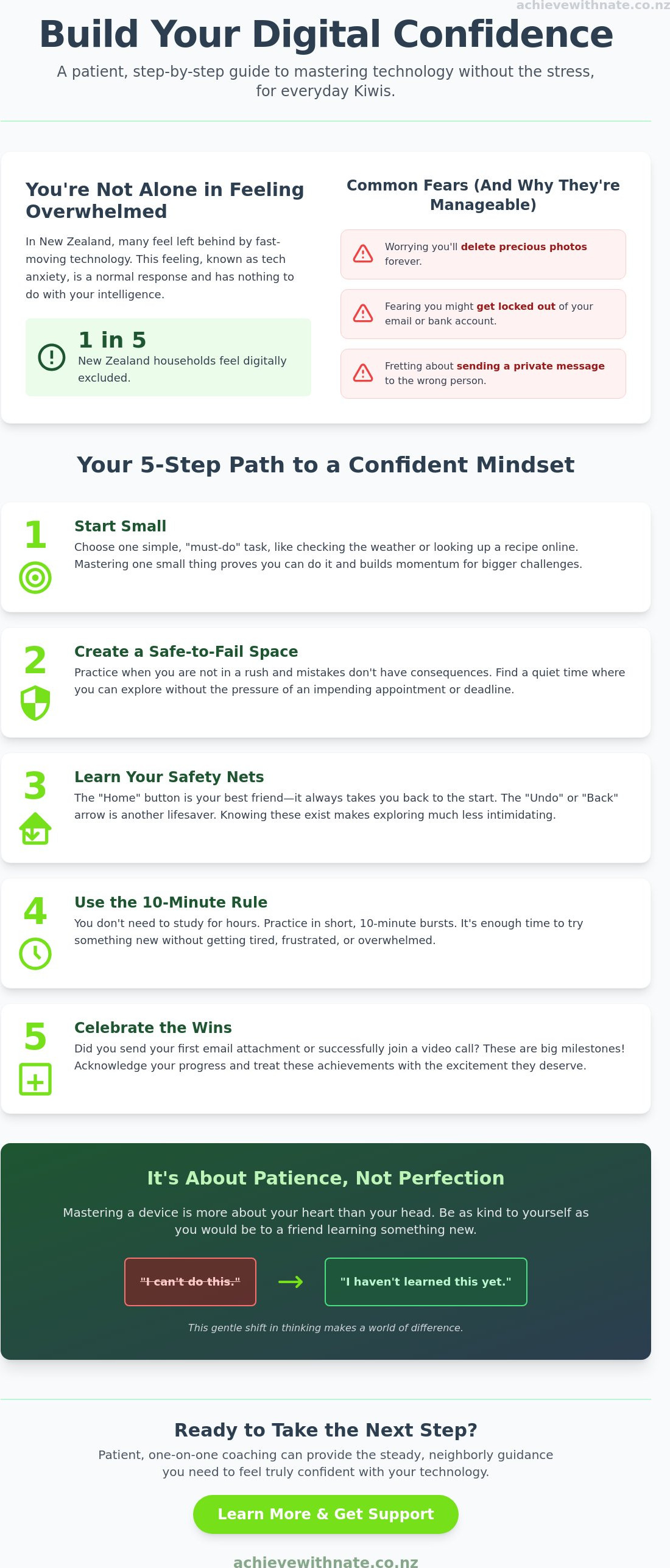
You are sitting at the kitchen table, staring at a flashing screen while your heart starts to race. You want to see your family on a video call, but you are terrified that one wrong click will break your device forever. It is common to feel left behind by constant updates and confusing jargon. Understanding how to feel more confident with technology should not feel like an impossible mountain to climb. With one in five New Zealand households currently feeling digitally excluded, you are certainly not alone in this struggle.
We know that the digital world moves fast, and it is okay to feel overwhelmed. This guide offers a patient, step-by-step approach to building your digital skills in Aotearoa without the stress or judgment. You will discover how to move past the fear of making mistakes and learn to use your devices with a steady hand. We will explore simple ways to manage your daily life independently, from mastering email basics to finding the right one-on-one coaching, all at a pace that feels right for you.
Key Takeaways
Understand that tech anxiety is a natural response to rapid change and has nothing to do with your intelligence.
Discover how to feel more confident with technology by creating a safe space where you can practice without the fear of breaking anything.
Learn how to master local essentials like Xtra mail and online tools to stay connected with your family across Aotearoa.
Explore the benefits of a patient, one-on-one coaching approach that focuses on your specific needs at your own pace.
Table of Contents
Understanding Tech Overwhelm: Why It Is Normal to Feel Stressed
Technology moves at a breakneck speed. One day you've mastered your phone, and the next day an update changes everything. If your heart sinks when you see a "New Version Available" notification, please know that your reaction is completely normal. Feeling overwhelmed isn't a sign that you're falling behind; it's a natural response to a world that rarely slows down for us.
Many of our neighbors across Aotearoa experience tech anxiety. It's a common emotional barrier that has nothing to do with your intelligence. If you've ever felt a deep sense of dread when a device asks for a password, you might be experiencing what technophobia is in its mildest form. Learning how to feel more confident with technology starts with realizing that these feelings are shared by many.
To better understand how these feelings of uncertainty can affect us, watch this helpful video:
For most learners, the biggest hurdle isn't the software itself. It's the "fear of breaking it." You might worry that one wrong tap will:
Delete your precious family photos forever.
Accidentally send a private message to the wrong person.
Lock you out of your own email or bank account.
These worries are heavy, but they are also manageable. Digital confidence is the quiet ability to explore new tools and try new digital tasks without the fear of making a mistake.
The Myth of the 'Tech Person'
We often talk about people having a "tech gene," as if they were born knowing how to code. This is a total myth. No one is born knowing how to sync a calendar or set up a secure password. Even the most tech-savvy experts had to start at the very beginning. They learned through trial, error, and often through structured device and email basics training. Confidence isn't a gift; it's a skill you build one small step at a time as you learn how to feel more confident with technology.
Building Your Digital Confidence Mindset in 5 Simple Steps
Building a new mindset isn't about being "smart" with computers. It's about being patient with yourself while you learn. Here is a simple path to help you understand how to feel more confident with technology without the stress.
Step 1: Start small. Choose one "must-do" task. Maybe it's checking the local weather or looking up a recipe. Mastering one small thing creates a quick win and proves you can do it.
Step 2: Create a safe-to-fail space. Practice when you aren't in a rush. Don't try to learn a new app five minutes before an appointment. Find a quiet time when mistakes don't have consequences.
Step 3: Learn your safety nets. The "Home" button is your best friend. It always takes you back to the start. The "Undo" arrow is another lifesaver. Knowing these exist makes exploring much safer.
Step 4: Use the 10-minute rule. You don't need to study for hours. Practice in short, unhurried bursts. Ten minutes is plenty of time to try something new without getting tired or frustrated.
Step 5: Celebrate the wins. Did you send your first attachment? Did you join a video call? These are big milestones. Treat them with the excitement they deserve.
Global experts agree that these abilities are more than just hobbies. Organizations like UNESCO explain why digital skills are critical for staying included in our modern world. When you feel stuck, remember that even a small step forward is a victory for your independence. If you ever feel like you need a supportive companion on this journey, one-on-one digital coaching can provide that extra bit of steady, neighborly guidance.
Embracing a 'Growth Mindset' Without the Jargon
Mastering a device is often more about your heart than your head. We believe that empathy is the key to mastering new technology because it helps you lower your self-criticism. Try to replace the phrase "I can't do this" with "I haven't learned this yet." It's a gentle shift that makes a world of difference. When you stop judging your progress, you find the space to actually enjoy what your device can do for you. You are learning a new language, and that takes time. Be as kind to yourself as you would be to a friend.
Practical Ways to Use Tech for Daily Life in New Zealand
Technology in Aotearoa isn't just about fancy gadgets. It's about checking the frost on MetService before you head out or managing your Xtra mail to keep up with the grandkids. When you focus on these practical, daily tasks, you naturally discover how to feel more confident with technology. It stops being a scary concept and becomes a helpful tool for your everyday life.
For NZ seniors, staying connected is often the most rewarding part of going digital. Whether you are browsing realestate.co.nz to see what the house next door sold for or using video calls to see family in London or Invercargill, these tools keep your world large and vibrant. Technology helps you maintain your independence and stay involved in the community without needing to rely on others for every small task.
We know that safety is a major concern for many people. Learning to spot common scams targeting Kiwis is a vital part of your journey. Once you know how to identify a suspicious link or an unusual email, that racing heart starts to settle. You can browse with peace of mind, knowing your personal information is secure and that you have the skills to protect yourself online.
Even modern tools like AI training for small business New Zealand are designed to make things easier, not harder. These new helpers can save you hours of frustration by assisting with writing tasks or organizing your daily schedule. If you are ready to move past the frustration and start enjoying these benefits, our one-on-one digital coaching provides the patient, neighborly support you need to succeed.
Mastering the Apps and Sites Kiwis Use Most
Navigating the NZ Companies Office or checking local library resources in Auckland and Christchurch doesn't have to be a chore. Many public libraries offer fantastic digital archives and resources you can explore right from your lounge. Learning how to feel more confident with technology means you can access these services whenever you like. Focus on one site at a time, like your local news portal, and you will soon find that the digital world feels much more like home.
Finding the Right Support: Why One-on-One Help Matters
Trying to teach yourself new digital skills often feels like being lost in a thick fog. You might search for a solution online, only to end up in a "YouTube rabbit hole" that leaves you more confused than when you started. While free videos have their place, they cannot see your screen or hear the frustration in your voice. A patient, human guide makes all the difference when you are learning how to feel more confident with technology.
The most important part of any learning journey is having a criticism-free environment. Many Kiwis feel embarrassed to ask what they think are "basic" questions. In a one-on-one setting, no question is too small or too simple. You can ask the same thing five times until it finally clicks. This psychological safety is the foundation of lasting progress. It allows you to breathe, relax, and actually enjoy the process of discovery.
Personalized coaching also protects you from information overload. Group classes often move too fast because they have to follow a strict curriculum. If you miss one step, you spend the rest of the hour feeling left behind. One-on-one support moves at your specific pace. We focus only on what you need to know, whether that is mastering email or managing your digital files. This targeted approach ensures that every minute you spend learning is useful and relevant to your life.
The Achieve With Nate Approach
Nate isn't just a teacher; he is a supportive companion on your digital journey. Every session with a digital confidence coach NZ is designed to be unhurried and empathetic. We prioritize the person behind the screen over the software itself. This neighborly kindness creates a space where you feel seen and understood rather than patronized. Our goal is to help you find your footing in the digital world with a steady, calm hand.
You don't have to master everything by tomorrow. The best way to move forward is to take one incremental, manageable action today. Perhaps that is simply deciding which task you want to learn first. When you are ready for a little extra help, we are here to walk beside you. Discovering how to feel more confident with technology is much easier when you don't have to do it alone.
Start Your Journey Toward Digital Peace of Mind
You now understand that tech anxiety is not a reflection of your intelligence. It is simply a natural reaction to a fast-moving world. By focusing on small wins and using digital safety nets, you have already begun to shift your mindset. These tools exist to serve you, whether you are checking the local weather or video calling family across the country. You deserve to feel safe and capable every time you pick up your phone or sit at your computer.
Learning how to feel more confident with technology is a journey that is much easier with a supportive companion. Nate offers patient, non-judgmental support that is tailored entirely to your own pace. This is trusted guidance for Kiwis who want to master practical skills for everyday life without the pressure of a crowded classroom or confusing jargon. We focus on what matters most to you, ensuring you feel seen and understood throughout the process.
If you are ready to use your devices with a steady heart, book a calm, one-on-one digital coaching session with Nate today. The digital world is full of opportunities to stay connected and independent. The most important thing is to take one incremental, manageable action today. You have everything you need to succeed.
Common Questions About Building Digital Confidence
Is it really possible to learn technology if I've never been good at it?
Yes, you can absolutely learn new digital skills regardless of your past experiences. Many people believe they lack a "tech gene," but technology is just a set of tools that anyone can master with the right approach. By focusing on how to feel more confident with technology through small, patient steps, you can overcome years of feeling stuck. It is never too late to start your journey.
What is the best way to avoid being scammed while I'm still learning?
The best way to stay safe is to pause before you click. If you receive an unexpected email or text asking for money or personal details, it is likely a scam. Always check the sender's address carefully. You can also call the organization directly using a number you find on their official website. Taking a moment to breathe and verify information is your strongest defense against online threats.
Do I need to buy the latest expensive gadgets to be 'tech-savvy'?
You don't need to spend thousands of dollars on the newest devices to stay connected. Most everyday tasks like checking news or emailing family work perfectly well on older or more affordable models. Being tech-savvy is about how you use your tools, not how much they cost. It's better to have a device you feel comfortable with than a complex one that causes you unnecessary stress.
How can I stop feeling so frustrated when something doesn't work immediately?
When you feel your frustration rising, the best thing you can do is step away for a few minutes. Technology can be temperamental, and a racing heart makes it harder to think clearly. Take a deep breath and remind yourself that even experts face glitches. Returning to the task with a calm mind often reveals a simple solution that you might have missed while feeling stressed.
What should I do if I feel like I'm going to 'break' my computer or phone?
It is very difficult to actually "break" a modern computer or phone just by clicking the wrong thing. Most mistakes are easily fixed with the "Undo" button or by simply restarting your device. Learning how to feel more confident with technology involves realizing that these safety nets exist to protect you. If you feel stuck, just press the "Home" button to return to a familiar starting point.


Comments