


How to Make My Computer Run Faster NZ: A Gentle 2026 Guide

Last Tuesday, Mary in Napier finally sat down for a long-awaited video call with her grandkids, only for her laptop to freeze before the first hello. It’s a heartbreaking moment that many of us have faced. It feels like the digital world is moving at light speed while your trusted device is stuck in the slow lane. You aren't alone in feeling frustrated or worried about breaking something in the settings. If you've been searching for how to make my computer run faster nz, you deserve a guide that speaks your language rather than hiding behind jargon.
We believe that looking after your technology is a gentle act of digital self-care that should never feel overwhelming. We agree that you shouldn't need a degree in computing just to enjoy a smooth connection with your loved ones. This guide promises to show you how to breathe new life into your device using simple, stress-free steps. We'll explore how the latest May 2026 updates like Windows 11 build 26200.8457 or macOS Tahoe 26.5 can help, explain your protections under the Consumer Guarantees Act, and help you decide when a simple hardware boost is the right choice for your peace of mind.
Key Takeaways
Learn why your laptop feels like a busy kitchen and how a simple digital tidy-up can clear the clutter.
Discover easy, stress-free methods for how to make my computer run faster nz without needing to be a technical expert.
Find out why most performance issues are software-related and how you can fix them yourself before considering a new purchase.
Understand the vital link between a clean device and staying secure during your online banking and family video calls.
Explore how a gentle tech mentor can help you replace digital anxiety with the confidence to handle your own basic maintenance.
Table of Contents
Why does my computer feel slower lately?
Think of your computer like a busy kitchen during a big family Sunday roast. If you don't tidy up the prep area as you go, the benches quickly get covered in flour, vegetable scraps, and empty bowls. Soon, there is no room left to plate the meal. Computers slow down because they get "cluttered" with invisible digital leftovers from every website you visit and every app you open over the months. Fundamentally, a slow computer is a system overwhelmed by unnecessary background tasks and files that are competing for your machine's limited attention.
If you've been searching for how to make my computer run faster nz, please understand that this frustration isn't your fault. Modern technology is built to move at a breakneck pace, and it’s very easy for our devices to collect "junk" without us ever realizing it. Gaining a basic understanding of what computer performance means can help you see that your laptop isn't necessarily failing. It might just be out of breath and in need of a little bit of room to move.
To better understand this concept, watch this helpful video:
The "Warrant of Fitness" for your digital life
We wouldn't dream of driving a car for years without a service or a Warrant of Fitness. Your digital life deserves that same level of care and attention. Regular maintenance helps you spot the difference between a "tired" computer and one that actually has a hardware fault. A tired machine is often just bogged down by old files and temporary data, while a broken one might have a physical issue like a failing drive. When your laptop is sluggish, it doesn't just waste your time. It drains your energy and makes your evening tasks feel far more difficult than they should be.
Common "Speed Thieves" in New Zealand homes
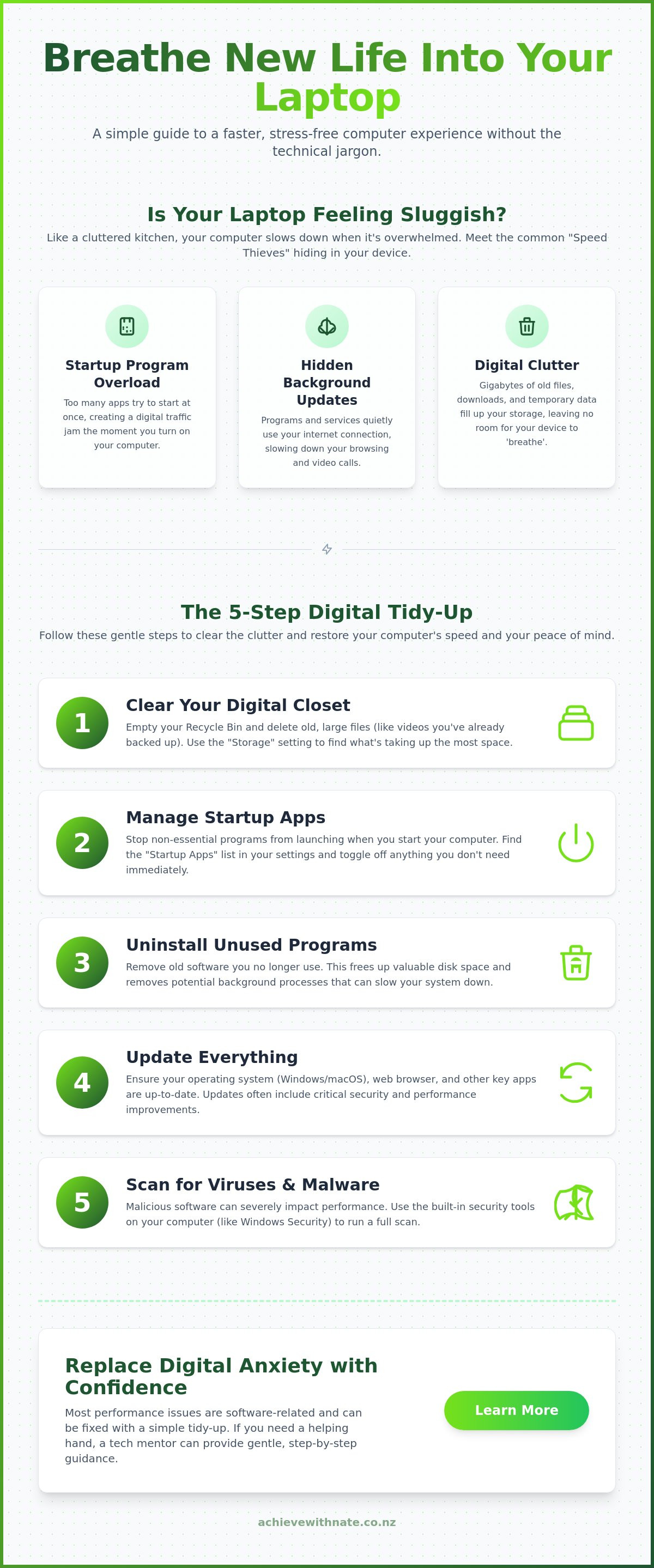
Many Kiwi homes are currently being slowed down by "speed thieves" hiding in plain sight. One common thief is the group of programs that insist on starting the very second you turn the machine on. This creates a digital traffic jam that lasts long after you've reached the desktop. Another culprit is hidden background updates. These can hog your internet connection, even though New Zealand’s median fixed download speed reached a healthy 214.49 Mbps by late 2025. If you are looking for how to make my computer run faster nz, checking which apps are using your bandwidth in the background is a great place to start.
There is a significant emotional cost to all this waiting. That little spinning wheel can trigger a sense of anxiety, especially when you are just trying to connect with family or finish a quick task before bed. Recognizing these thieves is the first step toward a smoother, faster, and much calmer experience at your desk. You don't need to be a genius to fix this; you just need a gentle plan to clear the way.
The 5-step digital tidy-up for a faster laptop
Taking care of your computer shouldn't feel like a chore. It is more like a gentle spring clean for your home. When you are looking for how to make my computer run faster nz, the best place to start is with a few simple, manageable actions. These five steps are designed to clear the path so your technology can work with you, not against you. We'll start with the digital spaces you use every day and move toward the physical health of your machine.
Step-by-step: Clearing your digital closet
Most of us have a "junk drawer" in our house, and our computers are no different. To find your storage settings without feeling lost, simply type the word "Storage" into your search bar at the bottom of the screen. This will show you exactly what is taking up space. You might be surprised to find that your Recycle Bin is holding onto gigabytes of old data. Emptying it is the simplest speed boost you can give yourself. Look for large files, especially old videos or photos you have already backed up elsewhere, as these are often what is weighing down your drive and making everything feel sluggish.
Managing your computer’s morning routine
Imagine trying to start your day with ten different people all shouting tasks at you the moment you wake up. That is exactly what happens to your computer when too many "Startup Apps" are active. These are programs that decide to open themselves the second you press the power button. You can gently guide your computer to a calmer start by looking at your "Startup Apps" list in settings. Turning off things you don't need immediately, like music players or chat apps you only use occasionally, allows your laptop to focus its energy on getting ready for you. It makes the whole experience feel much more peaceful from the moment you turn it on.
Beyond these internal settings, your laptop appreciates a bit of physical care too. Step three is a simple "Dust Off." Use a soft cloth or a gentle puff of air to clear the vents on the side of your machine. When dust blocks these vents, your computer gets too hot and slows down to protect itself. Step four is the "Refresh," which just means letting those essential Windows or Mac updates run. For example, the May 2026 Windows 11 update (build 26200.8457) includes vital performance tweaks that keep things moving. Finally, a "Security Sweep" ensures there are no unwanted digital hitchhikers. Staying secure in Aotearoa is about more than just safety; it's about keeping your system light and responsive by removing software that shouldn't be there.
If these steps still feel a bit daunting, you might find that a little bit of one-on-one digital coaching is just what you need to build your confidence and get your machine back up to speed.
Hardware vs. Software: When to fix and when to upgrade
If you are wondering how to make my computer run faster nz, it helps to know what is actually happening inside that plastic case. Think of your computer’s processor as its "brain" and the storage as a "closet." When the closet is messy, the brain takes longer to find what it needs. For about 80% of everyday Kiwis, the solution isn't buying a new computer. It is simply about tidying that digital closet. We often feel pressured to upgrade when our devices show signs of "old age," but most of the time, the machine is just tired, not broken.
We also have the "Grandkid Test." Sometimes asking a tech-savvy family member for help feels more stressful than the slow computer itself. They move so fast. They use words you don't know. It can leave you feeling more confused than when you started. You shouldn't have to feel inadequate just because you want to use your own device. You deserve to understand your technology at your own pace, without any judgment.
Is it a glitch or a hardware problem?
Recognizing red flags is the first step to peace of mind. If your laptop makes strange clicking noises or the base feels hot enough to fry an egg, these are physical signs of trouble. In these cases, a repair shop is the right call. However, if the screen just takes a long time to load your emails, the issue is likely software-based. This is where Digital Confidence Coach NZ can help you master the settings yourself. Learning how to manage your own device is often more empowering than just handing it over to a technician.
Simple hardware wins that don’t cost a fortune
If you do decide to spend a little, the magic of an SSD is the best place to start. Think of an old hard drive as a slow, deep drawer where you have to dig for everything. An SSD is like a fast, shallow drawer where everything is right at your fingertips. It is the single biggest physical change you can make. While a 16GB module of DDR5 RAM can cost between $339 and $479 at New Zealand retailers like PB Tech, simply adding more memory isn't always the answer.
Before you open your wallet, try working with what you already have. Following Microsoft's guide to PC performance can often resolve speed issues without costing a cent. It is about making your current tech work for you. We believe in helping you find your footing in the digital world, one manageable step at a time.
Staying secure in Aotearoa: Speed and safety
A clean computer is a safer computer. This is especially true when you are sitting down to do your online banking or check your retirement savings. When your laptop is cluttered with "junk" software, it isn't just slow. It is also more vulnerable. Unwanted programs often run in the background, using up your machine's energy and potentially opening doors for security risks. If you are looking for how to make my computer run faster nz, focusing on safety is a brilliant way to improve performance and peace of mind at the same time.
In 2022, CERT NZ received 8,160 incident reports from everyday Kiwis. The total financial loss from those reports was $20.0 million. While that sounds a bit daunting, most of these issues can be avoided with a few gentle habits. Your computer already has built-in tools like Windows Defender or Apple Security that work quietly to protect you. You don't need to buy expensive, flashy antivirus software. Often, those extra programs are the very things that slow your machine down the most.
Your NZ security check-up
Staying safe in New Zealand means knowing which local resources are there to help you. CERT NZ is a fantastic place to start for advice that actually makes sense for our corner of the world. It’s also a good time to check your "keys" to the digital world. Ensuring your RealMe or MyMSD access is secure with a strong, unique password is a vital step in your digital tidy-up. While you are at it, try clearing your browser cookies. These are tiny bits of data that websites leave behind. Over time, they can pile up and make your internet experience feel heavy and sluggish. Clearing them out is like wiping a foggy window; suddenly, everything is clear and fast again.
Backup basics: Peace of mind for your photos
We all have precious photos and documents we would hate to lose. Setting up a "Set and Forget" backup method is the best way to protect those memories without the headache. Using cloud storage like OneDrive or iCloud is much simpler than it used to be. It allows your files to be tucked away safely in the digital clouds, even if something happens to your physical laptop. When you know your files are backed up, any future "health checks" or updates feel much less scary. You can explore how to make my computer run faster nz with the confidence that your data is always safe.
If you want to feel more confident with your online safety and device settings, our One-on-One Digital Coaching provides a safe, non-judgmental space to ask any question and find your footing at your own pace.
Finding your digital confidence with a tech mentor
You have spent enough time waiting for that spinning wheel to stop. It is a drain on your day and a source of unnecessary stress. Mastering your technology is about more than just clicking the right buttons; it is about feeling in control of the tools you use to connect with the world. The Achieve With Nate Movement philosophy is simple: no judgment, no jargon, and just steady progress. We don't believe in using automated tools that hide the process from you. Instead, we focus on building your long-term digital confidence so you never have to feel overwhelmed by your own laptop again.
When you look for how to make my computer run faster nz, you might feel like you are being pushed toward a sales counter or a complex repair shop. We take a different path. One-on-one coaching helps you understand the "why" behind the speed. It ensures your tech stays stable and fast because you have the skills to keep it that way. It is about taking that first manageable step toward a digital life that feels light and stress-free.
Personalized help for everyday Kiwis
Group classes can often feel a bit like a race where everyone else already knows the track. It is easy to feel left behind or embarrassed to ask a question that feels too basic. One-on-one coaching is different. It is a conversation, not a lecture. You get to learn at your own pace in the comfort of your own home, using your own familiar device. This tailored approach is especially helpful for those looking for Digital Confidence for NZ Seniors, where staying connected safely is the top priority.
Join the movement for digital confidence
You don't need to spend hours at your desk to see a difference. A simple 15-minute digital tidy-up can completely change the rhythm of your week. If you are still searching for how to make my computer run faster nz, consider these small, incremental actions:
Choosing just three apps to remove from your startup list to ease the morning routine.
Emptying your recycle bin to clear physical space and mental clutter.
Identifying and moving one large folder of old photos to the cloud for safekeeping.
These manageable actions add up. They move you away from the anxiety of "breaking something" and toward the joy of a machine that just works. We believe that every Kiwi deserves to feel empowered by their technology, not limited by it. It is about finding your footing and realizing that you are more than capable of mastering the digital world.
If you are ready to stop fighting with your screen and start enjoying your time online, we are here to walk beside you. You can book a gentle coaching session today to start your journey toward digital peace of mind. No stress. No pressure. Just clear, friendly help for everyday Kiwis.
Take control of your digital day
Reclaiming your computer’s speed doesn't have to be a source of stress or confusion. By clearing out digital clutter and managing your startup apps, you have already learned the most important steps for how to make my computer run faster nz. Remember that your machine is often just tired rather than broken. Whether it is a simple software refresh or a gentle security check-up, these small actions build the foundation for a much more peaceful experience at your desk.
You don't have to navigate these changes alone. We provide patient, jargon-free coaching designed specifically for NZ seniors and small businesses. Our goal is to empower you to master your own tech without the anxiety of "breaking something" in the settings. If you are ready to move from frustration to confidence, we are here to act as your supportive companion through every step.
Book a Stress-Free Digital Confidence Session today and start enjoying a faster, safer laptop. Taking incremental, manageable actions is the best way to find your footing in the digital world. You've got this.
Frequently Asked Questions
How often should I do a computer health check in NZ?
A gentle digital tidy-up every three months is usually enough to keep things running smoothly. This regular rhythm prevents "digital leftovers" from piling up and slowing down your day. It is like a seasonal spring clean for your home. By spending just fifteen minutes every quarter on your storage and startup settings, you can maintain a steady pace without any stress or technical headaches.
Will speeding up my laptop delete my personal photos or files?
No, following a guide on how to make my computer run faster nz will not delete your precious photos or personal documents. The steps focus on clearing out invisible temporary files and managing background programs that you don't use. Your memories are safe. For extra peace of mind, we always recommend having a simple backup on a service like OneDrive or iCloud before making any changes.
Can I make an old laptop run fast again, or is it too late?
It is almost never too late to breathe new life into an older machine. While a laptop from several years ago might not match a brand-new one, a software tidy-up can still make it feel significantly more responsive. Many people find that their "old" computer was simply bogged down by years of accumulated clutter. You might be surprised at how much faster it feels once those invisible weights are removed.
What is the best free tool to check my computer speed in NZ?
You don't need to download extra software to check your speed. The best tools are already built into your computer. On a Windows PC, you can use the "Task Manager" to see what is using your energy. On a Mac, the "Activity Monitor" does the same thing. These tools are free, safe, and provide a clear picture of what is happening inside your device without adding more clutter.
My laptop fan is very loud; is that a sign it is slowing down?
A loud fan is often a sign that your computer is working too hard and getting too hot. When the internal temperature rises, your system automatically slows down to protect itself from damage. This is why keeping your air vents clear of dust is so important. A quiet fan usually means a happy, cool, and much faster computer that isn't struggling to keep up with your daily tasks.
Do I need to be a "techie" to follow these speed-up steps?
You definitely don't need to be a technical expert to follow these steps. Our whole philosophy is built around making technology accessible for everyday Kiwis. If you can open a menu and click a mouse, you have all the skills you need. We use plain language and gentle metaphors to ensure you feel confident and in control of your machine every single step of the way.
Why is my internet slow even if my computer is fast?
Your computer speed and your internet connection are like your car and the road it drives on. Even if you have a fast car, a bumpy road will slow you down. If your computer feels snappy but websites take forever to load, the issue might be your Wi-Fi or your provider. If you are looking for how to make my computer run faster nz, checking your router is a great next step.
Does Nate offer in-person help for slow computers in my area?
Nate provides personalized one-on-one digital coaching to help you find your footing with technology. This coaching is tailored to your specific needs, whether you want to learn device basics or optimize your workflow. Because service areas can vary, the best way to see what is available for you is to visit our website. You can fill out a simple form to express your interest and start your journey toward digital confidence.

Comments