


How to Manage Notifications and Reclaim Your Digital Peace

Imagine sitting down for a quiet coffee on a Saturday morning. Your phone vibrates five times before you've even taken a sip. Recent reports indicate that constant digital interruptions contribute to a measurable rise in daily anxiety for many New Zealanders. You deserve to own your time without a device demanding your attention every few minutes. When you learn to manage notifications with intention, you reclaim the mental space needed for a well-lived life.
You likely feel like you're on call 24/7. It's an exhausting way to live, and it's a common burden in our hyper-connected world. This simple, intentional guide from Achieve With Nate will show you how to quiet the digital noise and take back control of your devices for good. We'll walk through the specific settings menus on your phone to ensure it only alerts you for the things that truly matter. It's time to turn your phone back into a tool instead of a master.
Key Takeaways
Understand the hidden cost of notification fatigue and how it impacts your mental clarity.
Follow a simple, intentional system to manage notifications and silence unnecessary digital noise.
Learn to use Focus Modes as a tool for creating dedicated space for deep work and rest.
Overcome the fear of missing out by prioritizing long-term peace over short-term alerts.
Discover how small, deliberate changes to your tech habits lead to greater personal freedom.
Table of Contents Understanding Notification Fatigue and Why It Matters A Simple Guide to Manage Notifications on Your Devices How to Use Focus Modes for Intentional Living Taking the Next Step Toward Digital Confidence
Understanding Notification Fatigue and Why It Matters
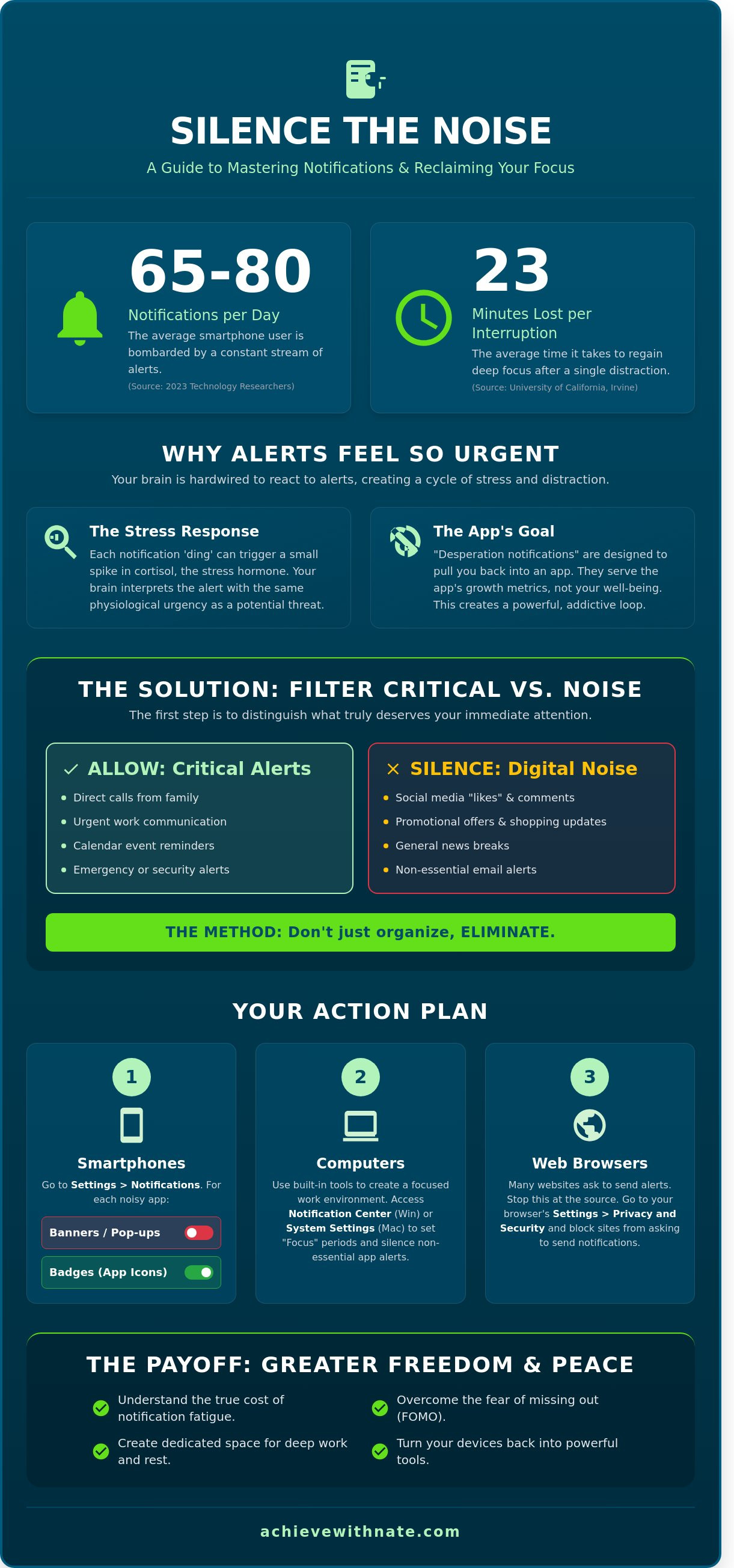
Your phone buzzes. You look. This cycle repeats dozens of times every day. According to 2023 data from technology researchers, the average smartphone user receives between 65 and 80 notifications daily. This constant stream of alerts leads to Ping fatigue. It is a state of mental exhaustion caused by the relentless demand for your attention. You don't just see these alerts; you feel them.
The "ding" culture of modern devices creates a persistent loop of distraction. Each sound triggers a small spike in cortisol, the stress hormone. You feel a frantic need to check your device. This isn't an accident. Many apps now employ "desperation notifications." These are alerts designed to pull you back into an app you haven't used in 48 hours. They serve the app's growth metrics, not your well-being. Choosing to manage notifications is a primary step toward reclaiming your time.
Silencing these alerts is an act of intentional living. It is a choice to be the master of your tools rather than their servant. When you reduce the noise, you create space for deep work and genuine rest. You move from a reactive state to a proactive one.
The Psychology of the Alert
Our brains are wired for survival. For thousands of years, a sudden noise signified a potential threat. Today, your brain reacts to a social media tag with the same physiological urgency as a predator in the bush. This creates a cycle of intermittent rewards. You check your phone hoping for a "win," like a message from a friend. Most of the time, you find an ad or a generic update. This keeps you hooked on the "maybe." For Kiwis, digital peace is the freedom to enjoy a quiet afternoon at the bach without the tether of a vibrating pocket.
Identifying Which Alerts Deserve Your Time
To effectively manage notifications, you must learn to distinguish between "Critical" and "Noise." Critical alerts are rare. They include direct calls from family or urgent work communications during business hours. Noise includes everything else: "likes," promotional offers, and news breaks.
Perform a mental audit of your lock screen right now. If an alert doesn't add immediate value to your life, it is a distraction. We use the "subtraction" method. You don't need to organize your alerts into complex folders. You need to remove them. A 2021 study from the University of California, Irvine, found it takes an average of 23 minutes to return to deep focus after a single interruption. By subtracting the noise, you protect your most valuable asset: your focus.
A Simple Guide to Manage Notifications on Your Devices
Digital noise often feels like a constant weight. You don't have to live with a phone that buzzes every few minutes. Reclaiming your focus starts with a deliberate audit of your device settings. Follow this quick checklist to begin your transition to a quieter lifestyle.
Open your device Settings menu.
Locate the Notifications or Apps section.
Identify the apps that interrupt you most frequently.
Toggle off alerts for any app that doesn't require an immediate response.
You can choose between a global silence and app-by-app management. Global settings, like Do Not Disturb, provide temporary relief during deep work. However, true clarity comes from individual management. To manage notifications effectively, you should start with your loudest apps. These are usually social media, news alerts, and non-essential emails. If these menus feel overwhelming, Achieve With Nate can help you build systems that stick.
Silencing Your Smartphone (iPhone & Android)
Your phone is the primary source of digital friction. On an iPhone, go to Settings, then Notifications, and select a specific app. On Android, navigate to Settings, then Apps & notifications, and finally Notifications. You have several options for how an app communicates with you.
I recommend turning off Banners. These are the pop-ups that slide across your screen and break your concentration. You can keep Badges active instead. These are the small red numbers on the app icon. They allow you to see missed updates when you choose to look at your phone, rather than the phone choosing for you.
Quietening Your Computer (Windows & Mac)
Desktop interruptions are equally damaging to your productivity. In Windows 11, you can access the Notification Center by clicking the date and time or the bell icon. This area allows you to clear old alerts and set "Focus" periods. For macOS users, open System Settings and select Notifications to stop desktop pop-ups from interrupting your workflow.
Don't forget your web browser. Many websites now ask to send notifications. You can disable these in your browser settings under Privacy and Security. This simple step prevents random news or shopping alerts from appearing while you work. Taking ten minutes to manage notifications on your computer creates a far more intentional work environment. It is a small investment that pays dividends in daily peace.
How to Use Focus Modes for Intentional Living
Focus Modes are sophisticated tools for creating quiet windows in your schedule. They are fundamentally different from just turning the volume down. Muting your phone only stops the sound; the screen still lights up and the temptation to check remains. Focus Modes filter the noise at the source. This helps you manage notifications by deciding exactly who and what can interrupt your flow. It is a shift from being reactive to being intentional with your time.
Using "Do Not Disturb" or specific Focus profiles allows you to reclaim your presence. When you are at dinner or playing with your kids, you don't need a LinkedIn alert. These modes ensure that only the most critical information reaches you. It creates a mental container for your day, protecting your focus from the constant pull of the digital world.
Setting Up Your First Focus Mode
Open your phone settings and locate the Focus or Do Not Disturb section. It's best to start with one simple profile. First, choose which people can reach you. You might allow calls from your immediate family while silencing all other contacts. Second, select the apps that are truly urgent. For most people, this list is very short. Finally, automate the process. Set a schedule for "Quiet Evenings" starting at 7 PM. This system ensures your phone serves your lifestyle rather than dictating it.
Scheduling Quiet Time in Your Routine
A "Digital Sunset" is essential for our well-being here in New Zealand. Research into digital habits suggests that a large majority of Kiwis check their devices within 30 minutes of sleep. This habit disrupts our natural circadian rhythms. Using Bedtime modes to manage notifications and silence alerts at 9 PM can significantly improve your rest. It turns quiet time into a non-negotiable habit that prioritizes your recovery.
This practice restores your personal agency. You aren't just avoiding noise; you are choosing presence. When you decide that 8 PM to 7 AM is a quiet window, you create space for reflection and deep sleep. It is a simple system that leads to long term sustainability in a high tech world.
If you want to refine your digital habits and find more clarity, join my community for more simple tech tips.
Taking the Next Step Toward Digital Confidence
Learning how to manage notifications is about more than just silence. It is about freedom. Every alert you disable gives you back a piece of your focus. This isn't a technical chore; it is an act of intentional living.
You might feel a slight anxiety about missing out. This is a common hurdle. We've been conditioned to react to every buzz. Remember that most "urgent" pings are actually just interruptions. If a matter is truly pressing, people will find a way to reach you. By silencing the noise, you create space for what actually matters.
Digital confidence is a journey, not a destination. Your needs will change. Your apps will update. The goal is to build a system that remains sustainable over the long term. It's okay if you don't get every setting perfect on the first day.
Moving from Overwhelmed to Intentional
You are the master of your device. It should serve your goals, not the other way around. A minimalist approach is often the most effective way to manage notifications and protect your mental energy. Start by questioning every app on your home screen. Does it need to interrupt your day?
Conduct a 10-minute digital audit every Sunday night.
Review your screen time report to see which apps are the loudest.
Delete apps that no longer serve a clear purpose in your life.
Switch off all non-human notifications to ensure only real people can reach you.
How Digital Coaching Bridges the Gap
Sometimes, the technical settings feel like a barrier to peace. This is where personalized coaching makes a difference. I provide a hands-on approach designed specifically for everyday Kiwis who want to reclaim their time without the stress of complex jargon or "tech-speak."
We work together to simplify your digital environment. I help you set up systems that stick so you don't have to keep fighting your phone. If you're ready to move from distraction to clarity, I invite you to fill out an expression of interest. Let's build a calmer, more intentional daily routine together.
Take Control of Your Digital Environment Today
Your attention is your most valuable resource. When you actively manage notifications, you stop reacting to every buzz and start living with more intention. We've explored how notification fatigue impacts your focus and how simple tools like Focus Modes create healthy boundaries. These aren't just technical settings; they're essential habits for a peaceful life.
Industry data from 2023 shows the average smartphone user receives over 60 notifications every day. That's 60 separate interruptions to your work, your family time, or your rest. You don't have to let your devices dictate your schedule. By applying these practical skills, you can reclaim hours of lost focus each week and reduce daily stress.
If you're ready to move beyond the basics, I'm here to help. I offer calm, jargon-free guidance designed specifically for everyday Kiwis. We'll work together to build systems that fit your unique lifestyle and personal goals. It's about gaining practical skills that make a real difference in your day-to-day life.
Book a Digital Confidence Session with Nate to master your devices and find your digital peace. You've already taken the first step toward a more focused life; now it's time to make that clarity permanent.
Frequently Asked Questions
How do I turn off notifications for just one specific app?
You can disable a specific app by opening your phone Settings and selecting Notifications. Scroll to the chosen app and toggle the "Allow Notifications" switch to off. This simple act helps you manage notifications with purpose. By removing the noise from one distracting source, you regain control over your attention. It’s a small step toward a more intentional day. A 2023 digital usage report found that New Zealanders receive an average of 65 notifications daily. Reducing this by even one app creates more space for clarity.
Will "Do Not Disturb" mode block emergency calls from my family?
You can ensure family calls get through by adjusting your Focus settings to allow "Emergency Bypass" or "Allowed People." In your settings, add specific family members to your whitelist so their calls always ring. Most modern systems also have a "Repeated Calls" feature. If someone calls twice within 180 seconds, the second call will break through the silence. This ensures you stay reachable for what truly matters. It takes less than 60 seconds to set up this system of protection.
What is the difference between muting a phone and using Focus Mode?
Muting your phone silences all sounds, while Focus Mode allows you to create specific rules for different parts of your day. Focus Mode can hide entire home screens or block specific apps while leaving others active. A 2022 study on workplace productivity showed that tailored focus settings can reduce digital stress by 25 percent compared to simple muting. It is a system for alignment rather than just a temporary fix. You choose what enters your mental space.
How can I stop my computer from making a noise every time I get an email?
You stop email sounds by going into your email application settings and unchecking the "Play a sound" box. In Outlook or Apple Mail, this process takes exactly three clicks. Turning off these pings reduces the constant urge to check your inbox. When you manage notifications at the source, you stop reacting to every incoming digital request. The average office worker checks their email 11 times every hour. Reclaiming this time allows for deeper focus and better results.
Is it possible to schedule my phone to go silent automatically at night?
You can set an automatic schedule by going to Settings, selecting Focus, and choosing Sleep or Do Not Disturb. Set your start time for 9:30 PM and end time for 6:30 AM to ensure your rest remains undisturbed. This creates a consistent boundary for your digital life. Automating this system means you don't have to remember to be intentional. It becomes a permanent habit that protects your peace every single night without any extra effort from you.
Why do I still get notifications even after I swiped them away?
Swiping only removes the visual alert from your screen; it doesn't stop the app from sending more triggers. To stop them permanently, you must change the alert style to "None" or disable "Background App Refresh" in your settings. Some apps are programmed to send up to 3 reminders if you don't open the original message. This is why a system of subtraction is better than just managing the surface level. You must address the root cause to find true quiet.

Comments