


How to Run an Internet Speed Test: A Simple Guide for Kiwis

Updated: Jun 30
You are halfway through an important video call when your screen freezes. Your colleagues in Wellington are left staring at a pixelated image of your face. It's a moment of frustration that disrupts your focus and your rhythm. Most of us simply wait for the router to behave, but there's a more intentional way to handle these digital hiccups. Running a simple speed test is the first step toward regaining control over your home office environment.
It's exhausting to pay for a high-speed fiber plan only to deal with constant buffering. You deserve clarity about what you're actually receiving from your provider. The Commerce Commission's 2023 Measuring Broadband New Zealand report shows that actual speeds can vary significantly based on your hardware and the time of day. I'll help you accurately measure your connection and explain what those confusing Mbps numbers mean for your actual life.
We'll explore three simple steps to optimize your setup today. This guide will give you the data you need to talk to your provider with confidence and fix minor issues yourself.
Key Takeaways
Use a speed test to verify if your provider is delivering the service you pay for. It brings clarity to your digital system.
Understand the difference between download and upload speeds. This knowledge helps you optimize everything from video calls to streaming.
Learn five simple steps to ensure your results are accurate. Small adjustments, like moving closer to your router, remove unnecessary friction.
Build your digital confidence by viewing data as information. A slow connection is a system issue, not a reflection of your ability.
Table of Contents Understanding Your Internet Speed Test and Why It Matters Decoding the Numbers: Download, Upload, and Ping Explained How to Get an Accurate Speed Test Result in 5 Steps Beyond the Test: Building Your Digital Confidence
Understanding Your Internet Speed Test and Why It Matters
A speed test is a simple diagnostic tool. It measures the connection between your device and a remote test server. Think of it as a pulse check for your home network. When your connection feels sluggish, this test provides immediate clarity. It moves you from a state of frustration to one of informed action. Many Kiwis use services like Speedtest.net by Ookla to verify their connection health. This data helps you determine if a problem exists within your walls or further down the line.
Running a speed test regularly helps you spot patterns in your home environment. You might notice your connection drops every Tuesday at 4:00 PM when the neighborhood gets home from school. Or perhaps your Wi-Fi struggles in a specific room. This information allows you to fix the underlying system rather than just complaining about the result. It is about taking agency over your digital life. You deserve to know if you are getting the service you pay for each month.
Why "Fast" is Relative to Your Daily Life
Speed is not a universal goal. A solo professional working from home has different requirements than a family of five streaming 4K video. You should aim for intentional use. This means matching your internet plan to your actual habits. More speed isn't always the solution for tech anxiety. Sometimes, a simpler, more stable connection provides more peace than a high-priced plan you don't fully utilize. Focus on what you need to sustain your lifestyle without unnecessary waste.
The Role of Your Internet Service Provider (ISP)
New Zealand providers like Spark, 2degrees, or Skinny deliver data through various infrastructures. Your experience changes depending on whether you use Fibre or an older Copper connection. Fibre remains the gold standard for stability in NZ. A speed test is your first step in holding these providers accountable. If you pay for a 300 Mbps plan but consistently receive 50 Mbps, you have the evidence needed to start a conversation. It ensures your monthly spending aligns with the value you receive.
Decoding the Numbers: Download, Upload, and Ping Explained
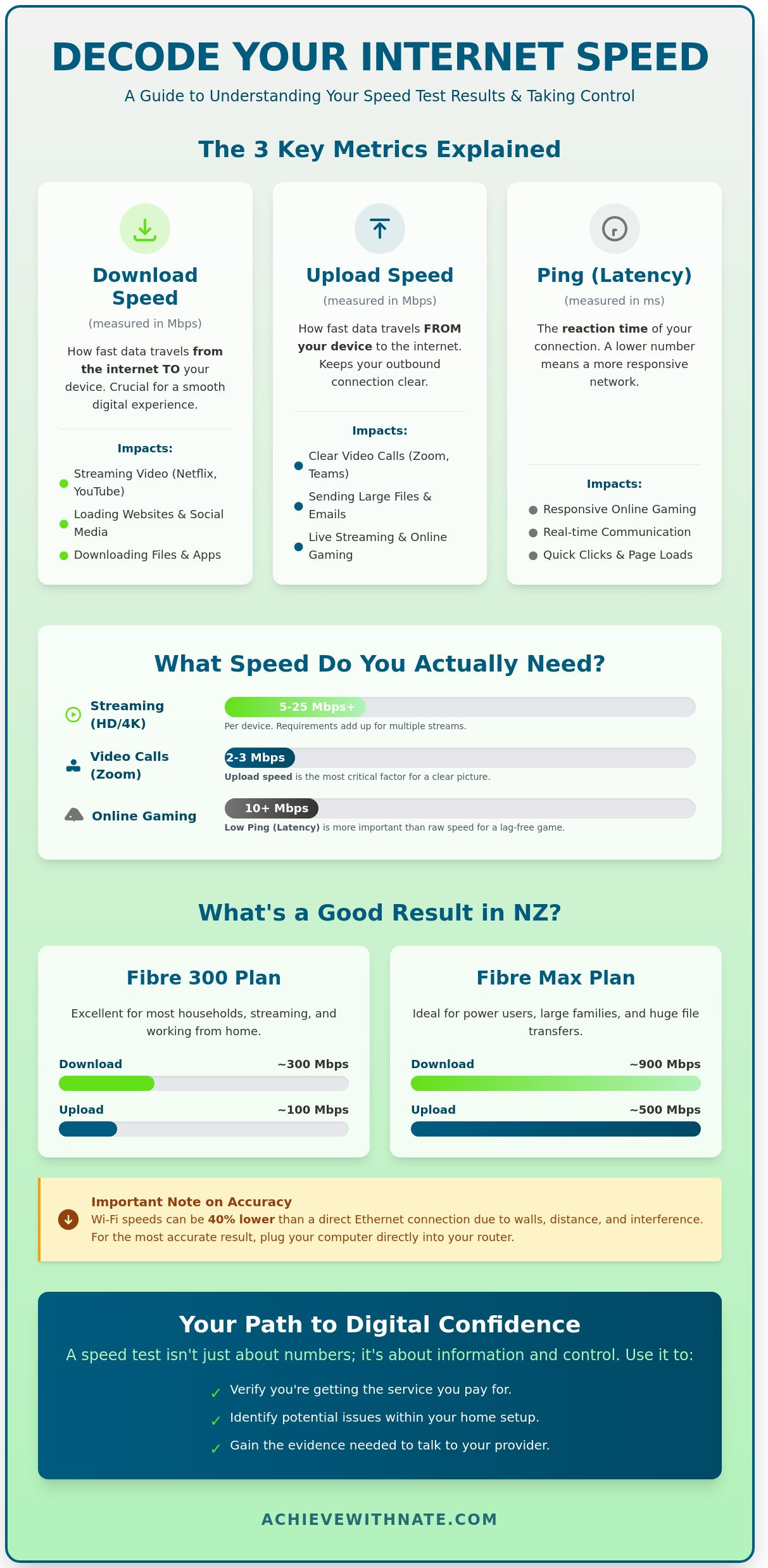
When you finish a speed test, you see three primary metrics. These numbers represent the health of your digital infrastructure. Understanding what they mean allows you to manage your home systems with more clarity. Understanding Broadband Speed Tests provides a helpful foundation for interpreting these results accurately.
Internet speed in New Zealand is measured in Megabits per second (Mbps). This is the standard unit for all local providers. Here is how the three main components function:
Download speed: This tracks how fast data travels from the internet to your device. It dictates how quickly web pages load and how smoothly videos stream.
Upload speed: This measures how fast you send data to others. It is the metric that keeps your video clear during a work call or allows you to send large files to a colleague.
Ping (Latency): This is the reaction time of your connection. It measures the delay in communication in milliseconds (ms). A lower ping is always better because it means your connection is more responsive.
What These Numbers Mean for Your Activities
Your digital habits determine how much speed you actually need. Streaming Netflix in High Definition typically requires a download speed between 5 and 25 Mbps. If you have three people streaming at once, your requirements triple. For professional tasks, a standard Zoom or Teams call needs at least 2 to 3 Mbps of upload speed to avoid lag. General browsing and online banking are very efficient. These tasks work well even on the lowest speed tiers available in New Zealand.
Identifying a "Good" Result for New Zealanders
A good result is one that aligns with what you pay for each month. Most Kiwis are on a Fibre 300 plan. This plan should deliver results close to 300 Mbps download and 100 Mbps upload. If you are on a Fibre Max plan, your speed test might show results as high as 900 Mbps.
Find your latest internet bill to see your promised speed. It is a simple way to ensure your provider is delivering the service you bought. Remember that Wi-Fi results are often lower than a "plugged-in" Ethernet connection. Interference from walls or other devices can reduce speeds by 40% or more. Monitoring these numbers helps you maintain an intentional and functional home office. If you want to refine your daily systems further, you can learn more about intentional lifestyle design to find more focus.
How to Get an Accurate Speed Test Result in 5 Steps
Achieving clarity in your digital life requires accurate data. To get a true speed test result, you must remove the variables that cause interference. Follow these five intentional steps to ensure your data is reliable.
Minimize distance. Move your device as close to the router as possible. A clear line of sight reduces signal degradation. Wi-Fi signals weaken significantly when they travel through furniture or walls.
Clear your device. Close all unnecessary tabs, apps, and background downloads. System updates or cloud syncing can consume bandwidth silently. You want your device to focus entirely on the connection test.
Pause household activity. Ensure no one else in your home is streaming 4K video or gaming during the test. A shared connection divides the total bandwidth. According to the 2023 Measuring Broadband New Zealand report, household congestion is a primary factor in reduced individual device speeds.
Select a local server. Use a server based in New Zealand, such as one in Auckland or Wellington. Testing against a server in the United States adds artificial latency. Local servers provide a realistic view of your daily performance.
Test at different times. Run your speed test during off-peak hours and again during the peak period of 6:00 PM to 11:00 PM. This comparison shows how your provider manages high traffic volumes in your neighborhood.
Where to Run Your Test
Choose tools that value simplicity and transparency. Speedtest.net is the industry standard for detailed data, including ping and jitter. If you prefer a minimalist approach, Fast.com offers a quick check powered by Netflix. For Kiwis, the Chorus speed test tool is a reliable local option that understands our specific infrastructure. Avoid unknown third-party tools. These sites often clutter your screen with ads that can slow your browser and skew your results.
Troubleshooting a Poor Result
The power cycle is your most effective system for a quick fix. Turn your router off for 60 seconds before restarting it. This process clears the device's temporary memory and resets the connection to the exchange. Check for physical obstructions. Metal cabinets and thick concrete walls are common signal killers in New Zealand homes. If your results consistently stay below 70 percent of your plan's advertised speed after these checks, it's time to call your provider. Document your results to provide them with clear evidence of the issue.
Learn how to build better digital
.
Beyond the Test: Building Your Digital Confidence
A speed test provides you with a set of numbers. These figures are just raw data. They don't define your technical ability or your value. Real digital confidence grows when you understand how to use this information to create a more intentional life. It's about moving from a state of reactive frustration to one of proactive agency.
If your results are lower than expected, it doesn't mean you're "bad with tech." It simply means a part of your system is lagging. Systems are logical. They can be diagnosed and improved. You gain clarity when you stop viewing slow internet as a personal failing and start seeing it as a puzzle to solve. Often, the solution isn't adding a more expensive NZ$110 monthly plan. It's about subtraction. Removing digital clutter, such as background apps or "vampire" devices that drain your bandwidth, can improve your experience more than a faster connection ever could.
Managing Tech Overwhelm
Slow internet is a common trigger for digital anxiety. It disrupts your flow and makes simple tasks feel heavy. You can break this cycle by focusing on one small fix at a time. Start by restarting your hardware or moving your laptop closer to the router. These small wins build the momentum you need to handle larger issues. Clarity replaces confusion when you follow a repeatable system. You deserve a digital environment that supports your focus rather than draining your energy.
How Digital Coaching Bridges the Gap
Sometimes a speed test isn't enough to solve the problem. You might have the technical speed you pay for, yet your digital life still feels cluttered and slow. This is where coaching provides the "why" behind the numbers. I help you look at your setup through the lens of intentionality and minimalism. We identify the friction points that hold you back from doing your best work.
Coaching isn't just about fixing a router. It's about building the internal systems you need to handle tech hurdles independently. You can book a session with Nate to move from feeling overwhelmed to feeling capable. Together, we can align your technology with your lifestyle goals, ensuring your tools serve your purpose rather than the other way around. You have the power to create a digital space that feels calm, organized, and sustainable for the long term.
Take Control of Your Digital Environment
Running a speed test is the first step toward understanding your home's digital health. You now have the tools to decode download, upload, and ping rates with ease. By following the five steps for accuracy, you ensure your results reflect the true performance of your New Zealand connection. This clarity allows you to make intentional choices about the services you pay for each month.
Knowledge removes the mystery from your technology. You don't need to be a technical expert. You just need a reliable system. I provide practical guidance for everyday Kiwis that focuses on intentionality rather than confusing jargon. My goal is to help you build sustainable habits that bring a sense of peace to your digital life.
I offer national support across New Zealand to help you navigate these systems with confidence. We focus on what truly matters. This way, you spend less time troubleshooting and more time living. You're now ready to manage your connection with purpose and clarity. It is time to move forward with a sense of calm and agency.
Frequently Asked Questions
What is a good internet speed for a household in New Zealand?
A download speed of 100 Mbps is a reliable baseline for most New Zealand households of four people. This capacity allows for multiple 4K streams and video calls without any friction. If your household has 6 or more heavy users, a 920 Mbps fibre plan offers the clarity and freedom to work without worrying about bandwidth limits.
Why is my speed test result different every time I run it?
Your speed test results fluctuate because network demand and background processes change every minute. Even if you aren't actively using a device, it might be running silent updates or cloud backups. Testing your connection at 8:00 PM during the national peak will produce different data than a test at 6:00 AM.
Does the weather affect my internet speed test results?
Weather typically only affects your connection if you use Fixed Wireless, 5G, or satellite services like Starlink. Heavy rain can cause rain fade, where water droplets scatter the signal and reduce speeds by 10 to 20 percent. If you have a Fibre connection, your data travels through glass strands underground and remains stable regardless of the storm outside.
Why is my Wi-Fi much slower than the speed my provider promised?
Wi-Fi speeds are often lower because radio frequencies struggle to penetrate physical obstacles like internal walls or furniture. A standard router might lose 40 percent of its signal strength if it's placed behind a television or inside a wooden cabinet. For the most intentional and stable connection, use a Cat6 ethernet cable for high-demand tasks like gaming.
Can a speed test tell me if someone is stealing my Wi-Fi?
A speed test cannot identify specific users, but it can show unexplained drops in your network's capacity. If your results are 30 percent lower than usual when your own devices are disconnected, someone else might be using your system. Use your router's mobile app to view the list of 12-digit MAC addresses currently drawing data from your home network.
What should I do if my speed test result is much lower than my plan?
Start by power-cycling your hardware and testing with a wired connection to remove Wi-Fi interference from the equation. If your results remain 25 percent below your plan's advertised speed, it's time to call your provider to check for external line faults. Keeping your setup simple and using high-quality cables ensures your digital systems stay in alignment with your needs.

Comments