How to Use Your Skinny Jump Login: A Simple Guide for Kiwis
- kxnath
- Apr 24
- 9 min read
Last Tuesday, a resident in South Auckland sat at her kitchen table, staring at her modem and feeling a familiar sense of dread because she couldn't find her skinny jump login details. Digital systems often promise ease, but they can feel like a barrier when you just want to stay connected with your community. It's frustrating when technology feels more like a chore than a tool for personal agency.
You shouldn't have to feel anxious every time you need to check your balance or top up your data. With over 25,000 households across Aotearoa using this service, you're part of a massive community seeking affordable connection. This guide provides a calm, step by step path to accessing your account with complete confidence.
I will show you exactly how to navigate the portal, distinguish between the mobile app and the dashboard, and manage your data independently. By the time you finish reading, you'll have a simple system to keep your home online without any unnecessary friction or confusion.
Key Takeaways
Understand how to manage your monthly data allocations to maintain a quiet, intentional connection.
Follow a clear, step-by-step process for using your skinny jump login to keep your digital systems running smoothly.
Learn simple, logical fixes for common technical hurdles to remove any anxiety about being locked out.
Discover how to use your low-cost broadband as a tool for personal agency and building new skills.
Table of Contents Understanding Your Skinny Jump Account and Login A Step-by-Step Guide to Logging In and Topping Up Solving Common Skinny Jump Login Issues Making the Most of Your Digital Connection
Understanding Your Skinny Jump Account and Login
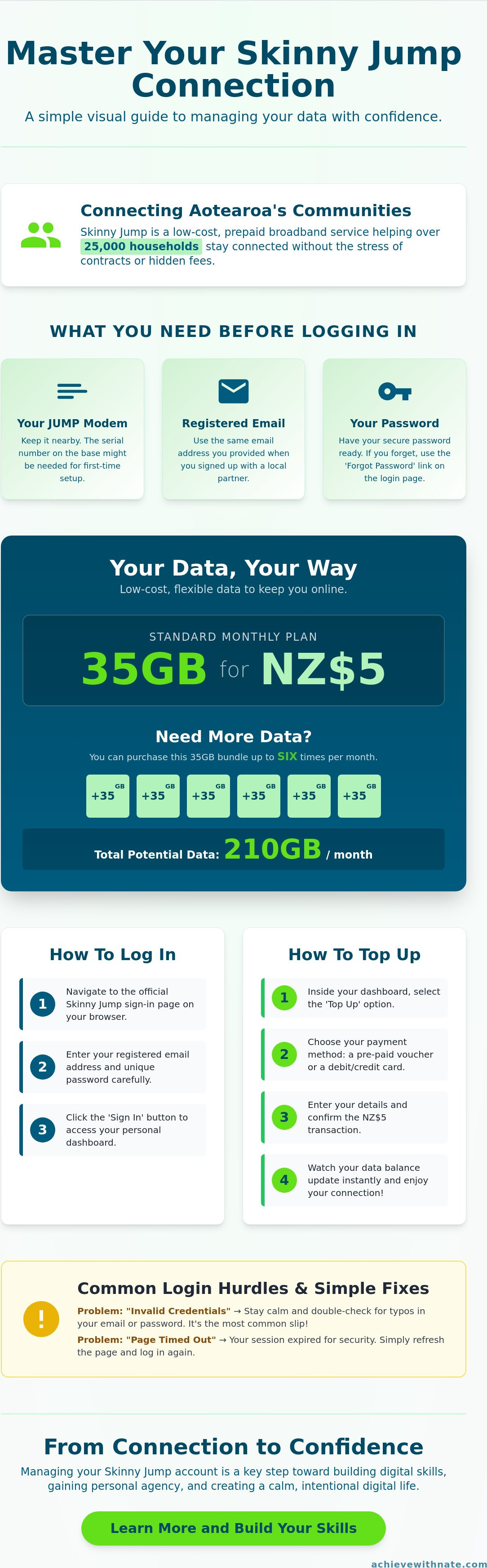
Skinny Jump is a low-cost, prepaid broadband service designed for eligible households across Aotearoa. It helps bridge the gap for those who need reliable connectivity without the burden of high monthly contracts. This initiative is a vital part of improving Internet access in New Zealand, especially for families, seniors, and job seekers.
Your skinny jump login is the tool you use to manage this resource. It gives you access to your monthly 35GB data allocations. Instead of worrying about hidden fees or complex billing cycles, you interact with a system that prioritizes clarity and personal agency. It is a straightforward way to stay connected on your own terms.
You only need an email address and your Jump modem to get started. The process is designed to be minimalist and accessible. By logging in, you take the first step toward a more intentional relationship with your home technology.
Why the Dashboard Matters
The dashboard is where you practice intentional digital management. It offers total oversight of your spending and data usage. You can see exactly when your next NZ$5 top-up is required. This transparency removes the anxiety often found in traditional telecommunications.
Managing this yourself fosters a sense of digital independence. You aren't just a passive consumer. You are actively monitoring your usage and aligning it with your daily needs. This simple habit builds confidence in navigating other online systems. It is about creating a sustainable routine that supports your lifestyle.
What You Need Before Logging In
Preparation creates a frictionless experience. Before you attempt your skinny jump login, have your modem nearby. You might need the serial number located on the base of the device if you are setting up for the first time. This ensures your account is correctly linked to your hardware.
Use the email address you provided during your initial sign-up at a local Jump partner. If you struggle to remember passwords, write it down. Keep this physical record in a safe, private place. Having these details ready prevents frustration and keeps your digital life organized. Success in these small tasks leads to greater peace of mind in your daily routine.
A Step-by-Step Guide to Logging In and Topping Up
Managing your home internet should be a quiet, intentional process. To start, navigate to the official Skinny Jump sign-in page on your phone or computer. Enter your registered email address. Type your unique password with care to avoid errors. Click the sign-in button and wait for the dashboard to load completely. This simple skinny jump login process is the first step toward maintaining a reliable connection.
Once you are inside, locate the balance section. This area displays your remaining data and current credit. Monitoring these numbers helps you stay in control of your digital life. If you notice your data is low before the month ends, select the top-up option. This system is built for transparency and ease of use. It removes the stress of hidden fees or complex contracts.
Accessing the Dashboard for the First Time
Look through your email for an activation link. This was sent when you first joined the program. Follow the prompts to set a password that feels secure yet easy for you to recall. Your dashboard is your digital control centre. Setting this up correctly ensures you have the freedom to manage your account whenever you need. If you are looking to build more intentional systems in your life, you might find our lifestyle design services helpful for creating long-term clarity.
How to Top Up Your Data
The Skinny Jump system offers excellent value for New Zealand households. You can purchase 35GB of data for just NZ$5. This option is available up to six times each calendar month. This allows for a maximum of 210GB of additional data if your needs change. You can choose to use a pre-paid voucher or a registered debit card for the transaction.
Follow these steps to complete your top-up:
Select your preferred payment method in the dashboard.
Enter the voucher code or confirm your card details.
Review the NZ$5 charge.
Confirm the transaction.
Watch your data balance update in real-time. This immediate feedback provides peace of mind. You can get back to your work or study without the friction of a complicated interface. By using your skinny jump login to stay ahead of your data needs, you ensure your household stays connected without unnecessary urgency.
Solving Common Skinny Jump Login Issues
Tech anxiety often stems from a fear of being locked out. You might worry that one wrong click will disconnect you from your digital life. Most hurdles with your skinny jump login are actually quite small. They are usually the result of a simple typo or a session that has expired after a period of inactivity.
You don't need to be a computer expert to fix these things. Digital systems are designed to be resilient. When you face a login error, your first step is to breathe. Staying calm allows you to look at the problem with clarity. Most solutions are right in front of you, waiting for a steady hand and a bit of patience.
What to Do if You Forget Your Password
Forgetting a password is a common part of modern life. It isn't a failure of your memory; it is just a moment that requires a system reset. Click the "Forgot Password" link on the main login screen. You will need to enter the email address you used during your initial setup.
A secure reset link will arrive in your inbox almost immediately. Follow the instructions to create a new password. Choose something intentional and secure that you haven't used elsewhere. This simple process ensures you maintain personal agency over your connection without needing to wait for a technician to call you back.
Browser and Connection Problems
Sometimes the login page fails to load properly. This often happens because of "cache" issues, which is just old data stored in your browser that creates friction. Clear your browser cache in the settings menu to give the page a fresh start. It is a quick way to remove unnecessary digital clutter that slows you down.
Check your Jump modem to ensure it is plugged into a wall socket.
Look for the solid green lights that signal a healthy connection.
Try your skinny jump login on a different device, like a smartphone or tablet.
Switching devices helps you identify if the problem is with your hardware or the service itself. Most Kiwis find that a simple restart of the modem solves about 92 percent of connection drops. Focus on these small, consistent actions to restore your internet and your peace of mind. Taking control of these minor technical tasks is a great way to build confidence in your digital habits.
Building reliable systems in your life starts with the right tools and a clear mindset. If you want to learn more about creating a life of freedom and clarity, explore our approach to intentional living.
Making the Most of Your Digital Connection
Your internet connection is a tool for personal agency. It helps you design a lifestyle that reflects your values rather than just reacting to the world. Once you have sorted your skinny jump login, focus on how this tool serves you. Use it to build new skills that improve your career or hobbies. Use it to stay connected to people who matter. Intentional use of technology leads to more freedom and less overwhelm. It's about making the system work for your life.
Beyond the Login: Intentional Browsing
Most people browse the web reactively. They follow every link and notification. This often leads to digital clutter and wasted time. You can choose a different path. Set specific times for checking news or social media to stay focused. This keeps your mind clear for more important tasks. Use your connection to explore digital wellbeing practices that promote balance. Treat your internet as a system. It's there to help you reach your life goals, not to distract you from them.
Building Your Digital Confidence
Confidence is a byproduct of consistent action. Don't be afraid to click buttons or explore your account settings. You won't break the system by looking at your data usage or updating your profile. This exploration is how you learn. If you feel stuck or overwhelmed, help is available. I provide digital confidence coaching for Kiwis who want to master their online tools.
You can also learn more about Nate and the mission to bridge the digital divide in New Zealand. Digital confidence grows through small actions every single day. Mastering your skinny jump login is just the first step toward a more intentional digital life. Focus on clarity and simplicity. When you control your tools, you create more space for the things that truly matter.
Take Control of Your Digital Connection
Managing your internet shouldn't feel like a chore. By understanding your skinny jump login, you've taken a practical step toward a more intentional life. You now have the tools to top up your account, monitor your data, and solve common connection issues independently. These simple systems ensure your focus stays on what truly matters rather than technical hurdles. Digital literacy is a form of freedom that allows you to navigate the modern world with quiet confidence.
Sometimes, a little personalized guidance makes all the difference. I'm Nate Marshall, and I provide coaching for everyday Kiwis who want to master their devices without the confusing jargon. My business is 100% owned and operated in New Zealand, focusing on practical skills that stick. We work together to strip away the noise and build sustainable habits that serve your unique lifestyle goals. It's about making technology work for you, not the other way around.
If you're ready to stop feeling overwhelmed by technology, book a Digital Confidence Session with Nate today. We'll simplify your digital world so you can reclaim your time and peace of mind. You're capable of mastering these tools, and I'm here to help you find that clarity.
Frequently Asked Questions
How do I find my Skinny Jump username?
Your username is the email address you provided during your initial sign-up process. You can find this by searching your inbox for your original welcome message. Keeping this information in a secure place creates a system that prevents future stress. This simple habit ensures you always have the access you need for your skinny jump login without searching through old paperwork.
Can I use the Skinny app for my Jump account?
You cannot use the standard Skinny mobile app to manage your Jump account. These two services operate on different systems to keep their purposes clear. You must use the specific Skinny Jump web portal for your skinny jump login and all data management. This intentional separation helps you focus on your home internet needs without the distraction of mobile plan settings.
What happens if I forget my Skinny Jump login details?
You can reset your password by clicking the "Forgot Password" link on the login page. The system will send a recovery link to your registered email address within minutes. If you no longer have access to that email, you must contact support to verify your identity. Regaining access allows you to return to your disciplined routine with minimal friction and total clarity.
How much does it cost to top up Skinny Jump in 2026?
Skinny Jump currently provides 15GB of data for NZ$5 per top-up. While specific pricing for 2026 hasn't been announced yet, the program's mission is to offer sustainable and affordable internet for Kiwis. This predictable cost structure helps you maintain financial clarity. You can plan your budget knowing there are no long term contracts or hidden surprises in the system as it stands today.
Is there a limit to how many times I can top up my Jump data?
You can top up your account a maximum of 6 times every 30 days. This provides you with up to 90GB of total data for your household. This limit encourages an intentional approach to your digital habits. If you use all your allocations before the month ends, you'll need to wait until your next monthly cycle begins for the system to reset your limit.
Who can I contact if I cannot get into my account?
You should call the Skinny Jump support team at 0800 475 466 if you're unable to access your account. You can also visit the local partner or library where you originally collected your modem for face-to-face assistance. These guides are there to help you restore your connection and ensure your system is running smoothly. They provide the support you need to regain your freedom.


Comments