


In-Home Computer Training for Seniors NZ: Build Digital Confidence Your Way

It is a common feeling. You want to check your Xtra mail or see the grandkids on a video call, but you're worried about clicking the wrong thing. You don't want to bother your family for the tenth time this week. Learning new tech shouldn't feel like a chore or a risk. If you have been looking for in-home computer training for seniors nz, you aren't just looking for a teacher. You are looking for a patient companion to help you find your footing.
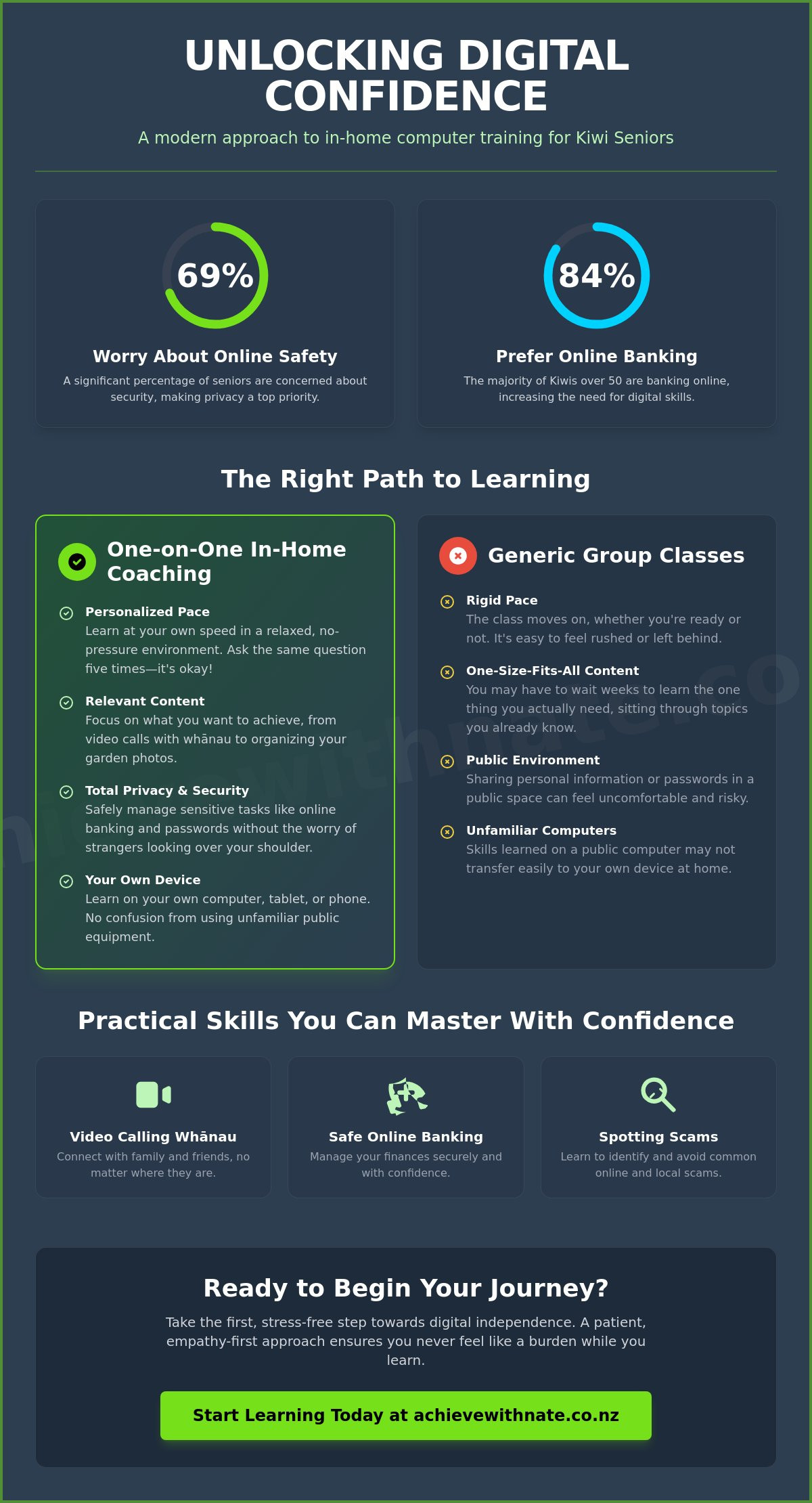
We agree that the digital world moves far too fast. It is normal to feel like tech jargon is a foreign language, especially when 69 percent of seniors worry about online safety. With 84 percent of Kiwis over 50 now preferring to bank online according to 2022 research, the pressure to keep up is real. We promise to show you how personalized coaching in your own home can help you stay connected and secure in modern New Zealand.
In this article, we will explore how one-on-one digital coaching removes the stress of learning. We will look at the benefits of private sessions. You will see how to master everything from online banking to staying safe from scams at your own pace.
Key Takeaways
See why learning in the comfort of your own lounge helps you relax and absorb new skills at your own pace.
Understand why one-on-one coaching is the safest way to manage private tasks like banking and passwords.
Master the basics of video calling your whānau and spotting local scams with in-home computer training for seniors nz.
Discover how a patient, empathy-first approach ensures you never feel like a burden while you learn.
Table of Contents
Why In-Home Computer Training is the Best Way to Learn
In-home training is a simple, personal way to learn. It is a one-on-one session where a coach helps you on your own computer, phone, or tablet. You don't have to pack up your gear or go to a busy office. By choosing in-home computer training for seniors nz, you get to stay in your favorite chair with a cup of tea. It makes the whole process feel less like a school lesson and more like a helpful chat with a neighbor. This familiar environment helps your brain relax, which actually makes it easier to remember what you learn.
Using your own equipment is a huge plus. Many people find that learning on a community centre computer is confusing because the buttons are in different places. When you practice on your own device, everything stays exactly where you need it for next time. Plus, there is zero travel required. This is a major relief if driving is a bit of a hassle or if mobility issues make getting to a local hall difficult. You save your energy for the learning itself.
To better understand how this personalized approach works, watch this helpful video:
The Psychological Safety of Private Coaching
In a group class, it is easy to feel like you are falling behind. You might worry that your questions are "silly" or that you are holding others up. In a private session, those worries vanish. There is no one to judge you. You can ask the same thing five times if you need to. We focus on building your digital literacy in a space where you feel completely safe and respected.
Tailoring the Pace to Your Needs
Finding the right in-home computer training for seniors nz means you never have to worry about a curriculum that doesn't fit your life. We don't follow a rigid plan. We talk about what you actually want to do. Maybe you want to organize your garden photos or send an email to a friend. We move as slowly or as quickly as you like. Digital confidence is the ability to explore technology without fear of breaking it. It is about taking small, manageable steps until the screen feels like a tool you control.
One-on-One Support vs. Group Tech Classes
Group classes follow a set path. Everyone learns the same thing at the same time. If you already know how to use a mouse but want to learn how to attach a file to an email, you might have to wait weeks for that lesson. One-on-one coaching flips this around. By using in-home computer training for seniors nz, we start with your specific questions. We solve your printer issues or email glitches right then and there. This personal connection helps us bridge the 'digital divide' that often leaves Kiwis feeling left behind.
Privacy is another big factor. Since 69 percent of seniors worry about online safety and security, learning in a public hall can feel risky. You might not feel comfortable opening your online banking or typing in a password in front of strangers. At home, it's just you and your coach. We can look at your real-world tasks in a secure, private setting. Building a relationship with a single mentor who understands your learning style makes a world of difference. You don't have to explain your history with technology every time; we just pick up where we left off.
Addressing the "Family Help" Hurdle
Asking family for help can be stressful. Children and grandkids often move at lightning speed. They might say, "Just click here," and do it for you before you've seen what happened. It's well-meaning, but it doesn't help you learn. A professional mentor has the patience to let you hold the mouse. We take the time to ensure you feel independent. You deserve to feel like you can handle your own tech without being a burden to anyone.
Is In-Home Training Right for You?
You might wonder if in-home computer training for seniors nz is worth it compared to a multi-week generic course. Think about the value of your time. A generic course can take months to cover what we can do in a few targeted hours. If you want a solid start, our device and email basics training is a great way to begin. It's about getting exactly what you need, when you need it. If you're ready to feel more capable, one-on-one digital coaching offers a calm path forward. Taking one manageable step at a time is the best way to grow your digital confidence.
Practical Skills for Kiwi Seniors: What You Can Master
Learning tech isn't just about clicking buttons. It's about the joy of seeing your whānau on a Sunday morning. Through in-home computer training for seniors nz, you can master video calls on WhatsApp, Zoom, or FaceTime without needing a grandchild to set it up for you. We also focus on making your digital space a calm and tidy one. This means organizing your family photos and cleaning up your desktop so you can find what you need without a headache. It's about making the computer work for you, not the other way around.
Safety is at the heart of every lesson. Digital inclusion for older people depends on having the trust and skills to use the internet safely. We show you how to browse with peace of mind. You will learn to navigate practical NZ tools like the NZQA portal or your local library app effortlessly. These tools are designed to make life easier, and we make sure they stay that way for you.
Email Management and Security
Many Kiwis still rely on Xtra mail or Gmail for their daily communication. We offer step-by-step help to clean up your inbox and keep it organized so important messages don't get lost. More importantly, we teach you how to spot a fake "NZ Post" or "Inland Revenue" email. Scammers are clever, but we give you the tools to identify them before you ever click a link. Staying secure is a manageable, daily habit we build together.
Accessing Local Services Digitally
You don't always have to visit the physical library to get a new book. We can show you how to use Auckland or Christchurch library apps to borrow e-books right from your lounge. This is a key part of building digital confidence for NZ seniors. It's about making your life easier and staying connected to the things you love at your own pace. If you're ready to master these skills in a stress-free way, book a one-on-one coaching session today and let's get started.
Your Journey to Digital Confidence with Nate
Choosing to learn something new is a brave step. Our philosophy at the Achieve With Nate Movement is simple: we put empathy first and technology second. When you book in-home computer training for seniors nz, you aren't just getting a set of instructions. You are gaining a supportive companion who understands that the screen can sometimes feel overwhelming. We focus entirely on what you want to achieve. No stress. No judgment. Just a calm, unhurried visit tailored to your life and your home.
A simple chat can lead to a lifetime of digital freedom. You deserve to feel like you belong in this modern world. We make sure you never feel like a burden or a nuisance. Instead, we work together until the tools in your hands feel like second nature. It's about moving at your own pace until the frustration turns into a sense of accomplishment.
A Local Coach Who Understands
As a digital confidence coach NZ, Nate provides a professional and steady approach. While volunteer groups are wonderful, a dedicated coach offers a consistent level of patience and expertise. We stay current with the latest local digital trends and security updates. This means you always get the most relevant advice for our local environment. You get a mentor who values the person behind the screen more than the software itself.
Booking Your Stress-Free Session
Getting started with in-home computer training for seniors nz is easy and low-pressure. You can reach out through our contact page to begin your personalized training. We will talk about your goals and find a time that works for you in the comfort of your own lounge. It is about taking that first incremental action toward feeling empowered. It is never too late to feel capable and secure in the digital world. By taking small, manageable steps today, you can enjoy a more connected and confident tomorrow.
Take Control of Your Digital World
You don't have to navigate the screen alone. We have explored how a familiar environment and personalized guidance can turn tech stress into a sense of calm. By focusing on your specific goals, you gain the skills to stay connected with whānau and manage your banking with complete peace of mind. It's about more than just software; it's about your independence and security in modern Aotearoa.
Choosing in-home computer training for seniors nz means you get professional, non-judgmental support that respects your pace. We are proud to serve the New Zealand community with an empathy-led approach that makes every lesson feel like a supportive conversation. You can stop feeling like a burden and start feeling like a master of your own devices. Every expert was once a beginner, and we are here to walk beside you.
If you're ready to build your digital confidence without the pressure, book your stress-free in-home coaching session today. Let's work together to make technology a helpful tool rather than a source of worry. Remember that the best time to start is now. Every manageable action you take brings you closer to digital freedom.
Frequently Asked Questions
Is in-home computer training safe for seniors?
Yes, in-home training is one of the safest ways to learn because you stay in your own familiar environment. You don't have to share your screen or personal details in a public space with strangers. Our sessions are private and focused entirely on your comfort. You can learn to manage sensitive tasks like banking without worrying about who might be watching or listening.
What if I am a complete beginner and have never used a computer?
It's never too late to start, even if you have never touched a computer before. We specialize in helping absolute beginners find their footing with zero judgment. We start with the very basics, like how to turn the device on or use a mouse. Every lesson moves at your pace to ensure you feel capable rather than rushed or overwhelmed by the screen.
Do I need to have a specific type of computer or tablet for the training?
No, you don't need any specific brand or model to begin. Whether you have an iPad, a Windows laptop, or an Android phone, we can help you master it. The goal of in-home computer training for seniors nz is to make you comfortable with the equipment you already own. We focus on making your current technology work better for your specific daily life.
How much does in-home technology coaching cost in New Zealand?
Prices for technology coaching can vary depending on your location and the level of support you need. Some community organizations offer subsidized group sessions, while private one-on-one coaching is priced differently to reflect the personal attention you receive. It's best to check with local providers in your specific region of New Zealand to see what options fit your budget and your learning goals.
Can you help me set up my printer or home Wi-Fi during the session?
Yes, we can certainly help with basic tasks like connecting your printer or joining your home Wi-Fi. These practical hurdles are often what stop people from using their tech, so we prioritize solving them during our time together. We make sure your devices are ready to use so you can focus on the fun parts of being online without the technical headaches.


Comments