


Mastering Digital Skills for Older Adults in NZ: A Stress-Free Guide

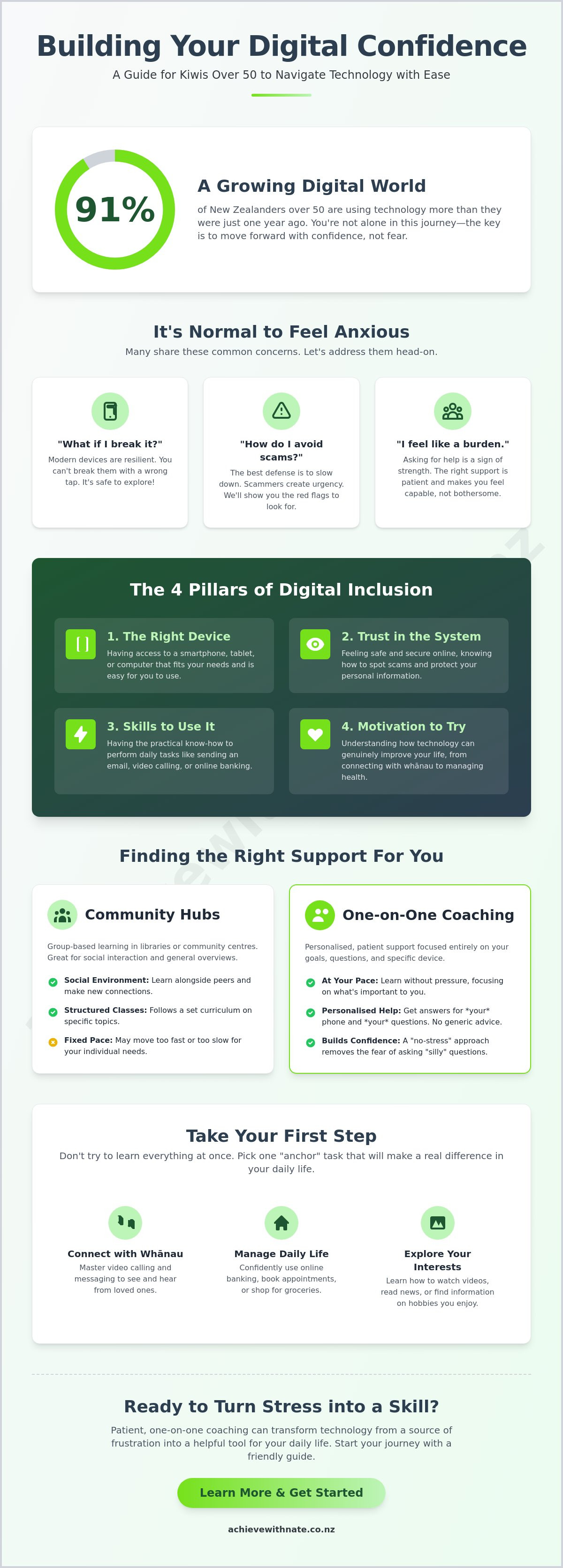
Imagine sitting down with your new smartphone, wanting to see your grandchild's face on a video call, but stopping because you're worried one wrong tap might "break" the whole thing. You aren't alone in that feeling. Recent data shows that 91% of New Zealanders over 50 are using technology more than they were just a year ago. Yet, many still feel like they're walking a tightrope between staying connected and making a costly mistake. Finding the right path to learn digital skills for older adults nz is about more than just buttons; it's about reclaiming your independence.
It's completely normal to feel anxious about online scams or feel like a burden when asking busy family members for help. You want to manage your banking safely and chat with whānau without the underlying stress of "doing it wrong." We promise that building your digital confidence can be a gentle, low-pressure experience. This guide will show you how to grow your skills at your own pace using accessible, local resources designed specifically for your needs and comfort level.
We'll explore how to handle your device with ease, stay secure from digital threats, and find the right one-on-one digital coaching to make technology work for you. From mastering email basics to confident video calling, you'll see how simple steps can lead to big results. Let's take those first manageable actions together.
Key Takeaways
Learn how to build your digital confidence through a patient, step-by-step approach that removes the fear of making mistakes.
Discover the best ways to master digital skills for older adults nz while staying connected to your whānau and community.
Find out how to spot common local scams and manage your online banking with total peace of mind.
Compare community learning hubs with the benefits of one-on-one digital coaching to find the right fit for your learning style.
Identify your first "anchor" task to turn technology from a source of stress into a helpful tool for daily life.
Table of Contents
Understanding Digital Skills for Older Adults in NZ
You might feel like the world is moving at a speed that's hard to follow. That's okay. When we talk about What is Digital Literacy?, we aren't talking about becoming a computer expert. It's about having the tools to live your life your way. In Aotearoa today, building digital skills for older adults nz means being able to book a doctor's appointment or see a photo of your grandkid in London without needing to ask for help.
Using digital tools isn't just about the screen; it's about your independence. True digital inclusion rests on four pillars: having the right device, trusting the system, having the skills to use it, and feeling motivated to try. If you're missing one, the others can feel a bit shaky. We focus on building all four so you feel steady on your feet.
To help you feel more secure about your first steps, watch this helpful video on staying safe while you explore:
Why Digital Literacy Matters for Kiwis Today
Many essential services in New Zealand have moved online. You might need to use RealMe to verify your identity or access your health records through Health NZ portals. Using these tools helps you stay in control of your own life. It also keeps your wallet happy. You can avoid "paper statement" fees from banks and find online-only discounts that aren't available in the shop. It's about making life in retirement a little bit easier and a lot more connected.
The Emotional Side of Learning
It's common to feel left behind by new technology. Please know this isn't a personal failing; it's just a result of how fast things change. We want to help you move from feeling overwhelmed to feeling capable. Digital confidence is the ability to explore technology without fear. Building digital skills for older adults nz is a journey we can take together, one step at a time. By taking small, manageable actions, you'll find that your smartphone becomes a helpful companion rather than a source of stress.
Overcoming Common Tech Challenges and Scams
The biggest hurdle for many isn't the technology itself. It's the fear of making a mistake. "What if I press the wrong button and break it?" is a question we hear every day. Modern devices are much tougher than you think. You won't break your phone by tapping the wrong icon. If you get lost, you can always go back to the start. Learning digital skills for older adults nz begins with giving yourself permission to explore without worry. We are here to make sure you never feel like a burden for asking how.
Trust is the other side of the coin. You might see headlines about scams and feel like it's safer to stay offline. Scammers often use high-pressure tactics, like fake text messages about a Waka Kotahi toll or a "frozen" banking account. They want you to rush. Our best defense is to simply slow down. If an email feels urgent or strange, it's okay to ignore it. Building trust with official tools like RealMe is a great way to stay secure while accessing government services. You can also look into government-funded digital skills courses that offer extra layers of community support.
The "No-Stress" Approach to Online Security
Staying safe doesn't have to be complicated. Whether you use an Xtra or Gmail account, look for the sender's full email address. If it looks like a jumble of random letters, it's likely a scam. Never click a link that asks for your password or bank details. By focusing on device and email basics, you can clear out the digital clutter and focus on what matters. A clean inbox is a safer inbox.
Dealing with Tech Overwhelm
When everything feels like too much, we focus on "micro-wins." Don't try to learn everything in one afternoon. Master sending one photo to a friend before you worry about video calls. These small steps build the foundation for digital skills for older adults nz. If you ever feel stuck, a digital confidence coach NZ can act as your safety net. We offer a calm, criticism-free space to practice at your own pace. If you're ready to clear the fog, our one-on-one digital coaching is a gentle way to find your footing.
Where to Find Digital Literacy Support in New Zealand
Finding help shouldn't be another source of stress. In Aotearoa, we're lucky to have several community options. Local libraries in Auckland and Christchurch often host drop-in sessions where you can ask basic questions. These public spaces are wonderful for getting started with digital skills for older adults nz in a friendly, low-stakes environment. We believe the best learning happens when you feel completely seen and understood, without any pressure to keep up with anyone else.
The Achieve With Nate Movement was created to offer a different kind of support. While community hubs are great for general tips, we focus on an unhurried, person-centered approach. Your pace is the only pace that matters. Whether you want to master a specific app or just feel safer online, having a dedicated guide makes the journey much smoother and far more enjoyable.
Group Classes vs. One-on-One Coaching
Group classes offer social interaction and a chance to learn with peers. They are perfect if you enjoy a classroom feel. However, if you have a specific "pain," like a stubborn printer or a lost email password, a group setting can sometimes feel overwhelming. Private sessions offer a psychological safe space where you can practice the same task until it feels like second nature. It's about solving your unique problems in a way that actually sticks.
Free vs. Paid Digital Training in NZ
There are several ways to get started without spending a cent. Many local councils and community centers run workshops aligned with NZ's digital inclusion framework. These government-backed initiatives are excellent for general troubleshooting and meeting others in your area who are also learning. These programs are designed to ensure every Kiwi has the chance to get online safely.
When you need more tailored, consistent support, a professional coach can be a valuable investment in your independence. If you're tired of feeling like a burden to your whānau, our one-on-one digital coaching provides the patient, neighborly guidance you deserve. Let's turn that tech anxiety into confidence together.
Taking Your First Steps Toward Digital Confidence
You don't need to climb the whole mountain at once. We believe in taking small, steady steps that make sense for your specific life. Building digital skills for older adults nz is much easier when you have a clear starting point. Instead of trying to "learn the internet," we suggest focusing on one specific task that brings you joy or makes your day easier. This approach keeps things simple and keeps the stress away.
Identify your anchor task: Choose one thing you really want to do. It might be sending a photo to your daughter on WhatsApp or learning how to order your groceries online for the first time.
Audit your device: Take a look at your phone or tablet. Is it easy to hold? Is the text large enough for you to read comfortably? Sometimes a simple setting change can make a world of difference to your progress.
Create a safe space: Find a quiet spot in your home where you won't be interrupted. Learning is much harder when the TV is loud or people are rushing around you.
Reach out for a chat: You don't have to do this alone. A quick, low-pressure conversation can help you map out what you want to achieve without any pressure to commit.
Practical Tips for Daily Practice
Your local library is a treasure trove of resources. If you live near the Auckland or Christchurch city centers, you can access their digital collections to practice reading news or magazines online. It's a low-stakes way to get used to how screens work and how information flows. Be patient with yourself during this time. If you get frustrated, it's okay to put the device down and come back to it tomorrow. Progress is progress, no matter how small it feels.
How the Achieve With Nate Movement Helps NZ Seniors Master Tech
We provide a unique "Move at Your Pace" promise. There is no jargon here. We don't use confusing technical terms that make you feel inadequate. Instead, we offer humble, neighborly guidance that respects your experience and your time. Every session is designed to leave you feeling more capable than when you started. If you're ready to move forward without the anxiety, the Achieve With Nate Movement is here to support you every step of the way. Let's take that first manageable action together.
Your Path to Digital Confidence Starts Here
Building digital skills for older adults nz is about more than just understanding a screen. It's about the freedom to see your grandkids on a video call and the peace of mind that comes with safe online banking. You've seen that technology is a tool for your independence, and it doesn't have to be scary. By starting with one small task and finding a supportive environment, you can move from feeling overwhelmed to feeling truly capable.
We're here to help you bridge that gap without any stress. Our approach is built on neighborly kindness and a deep respect for your pace. We proudly serve Kiwis across Aotearoa with jargon-free, patient support that puts your well-being first. You don't have to struggle with confusing manuals or feel like a burden to your family any longer. We offer patient, one-on-one coaching tailored exactly to where you are right now.
Book a free, no-pressure chat with Nate to start your digital journey today. Every step you take is a win, and we'd be honored to walk beside you. You've got this.
Frequently Asked Questions
Where can I find free computer classes for seniors in NZ?
Local libraries across Aotearoa are your best bet for free, in-person workshops. Many community centers also host sessions funded by government initiatives to help build digital skills for older adults nz. These are usually held in small, friendly groups where you can ask basic questions without any pressure. It's a great way to meet others in your neighborhood who are also starting their journey.
Is it safe for older adults to use online banking in New Zealand?
Online banking is highly secure because New Zealand banks use advanced encryption to protect your accounts. You can add extra protection by using two-factor authentication, which is just a code sent to your phone. If you ever see something suspicious, you can report it to CERT NZ at 0800 237 869. Staying safe is about taking your time and never sharing your PIN or password with anyone.
What is the best tablet or smartphone for a beginner senior user?
The best device is one that feels easy to use and has a screen you can see clearly. Big Buttons NZ offers specialized mobile phones starting from $299.00 that are designed for simplicity. If you prefer a tablet, the Kitcal model is available for $690 and features a very straightforward interface. We can help you decide which tool fits your lifestyle best during a private session.
How can I get help with technology if I live in a rural part of NZ?
You can receive expert help no matter where you live through remote coaching and phone support. Many services offer assistance over a video call, so you don't have to travel to a city center. For immediate safety concerns or scam reporting, you can text Netsafe at 4282 from any location. We make sure that distance is never a barrier to gaining confidence and staying connected.
Do I need to be "tech-savvy" to start digital coaching with Nate?
You don't need any prior experience to start with the Achieve With Nate Movement. Our coaching is specifically designed for those who feel "not tech-savvy" or are worried about making mistakes. We lead with empathy and use plain language to ensure you feel empowered rather than confused. Every lesson is customized to your specific needs, ensuring you master digital skills for older adults nz at a pace that feels comfortable for you.


Comments