


Mastering Your Daily Digital Skills: A Guide for Everyday Kiwis

Updated: Apr 20
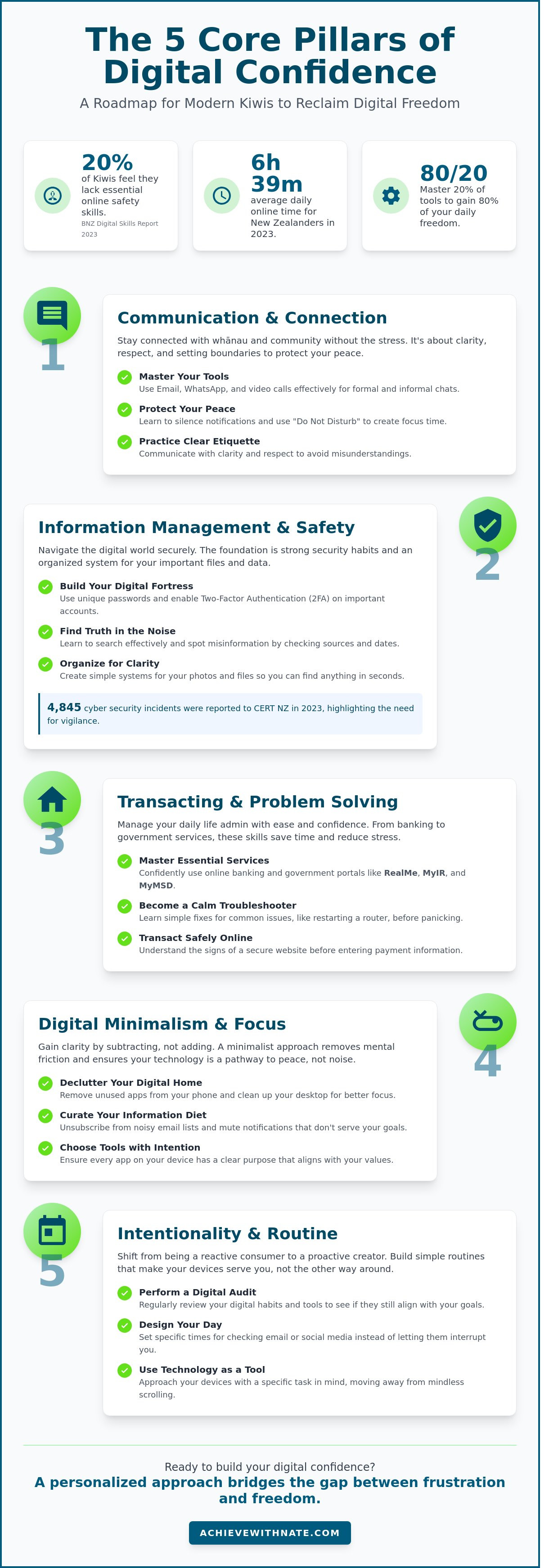
What if your smartphone was a source of clarity rather than a constant source of noise? It's easy to feel like the digital world is moving too fast for you to keep up. You might worry about making a costly mistake or falling for a scam while trying to manage your daily digital skills. It's a common feeling. A 2023 BNZ Digital Skills Report found that 20% of New Zealanders feel they lack the essential skills to stay safe online. You aren't alone in feeling this way.
You don't have to feel like a stranger in your own device. I want to help you navigate these tools with a sense of intentionality and peace. You can learn how to use online banking and government services like RealMe with total confidence. This guide provides a simple roadmap to staying connected with your family without the usual stress. We'll cover the specific systems you need to reclaim your digital freedom and move through the online world with ease.
Key Takeaways
Understand how mastering your daily digital skills creates a foundation for independence and agency in modern New Zealand.
Shift your mindset from tech anxiety to intentionality by viewing digital tools as systems designed to serve you.
Identify the five core pillars every Kiwi needs to navigate the modern world with confidence and calm.
Learn how to perform a simple digital audit to remove friction and align your habits with your personal values.
Discover why a personalized approach bridges the gap between frustration and true digital confidence.
Table of Contents What Are Daily Digital Skills for the Modern Kiwi? The Five Core Pillars of Digital Confidence Overcoming Tech Anxiety Through Intentionality Building a Simple Daily Digital Routine How Digital Confidence Coaching Bridges the Gap
What Are Daily Digital Skills for the Modern Kiwi?
Daily digital skills are the practical habits and tools you use to navigate life safely and efficiently. They aren't about writing code or understanding complex hardware. Instead, they represent the essential ability to manage your life in an increasingly connected world. In New Zealand, these skills have become the new literacy. You need them to access MyIR for tax purposes, manage your RealMe identity, or book health appointments through portals like ManageMyHealth. What is digital literacy? It's the foundational requirement for full participation in modern Kiwi society.
The focus has shifted from "learning computers" to "managing your digital lifestyle." In 2023, the average New Zealander spent roughly 6 hours and 39 minutes online every day. This time can either be a source of stress or a path to freedom. When you approach your laptop or smartphone with intentionality, the device stops being a master and starts being a servant. You move away from reactive scrolling and toward proactive systems that support your personal goals.
The Difference Between Tech-Savvy and Digitally Confident
You don't need to be a pro to be effective. Digital confidence is about mastering the 20% of tools that provide 80% of your daily freedom. This includes things like using a password manager or setting up two-factor authentication on your banking apps. These simple daily digital skills remove the constant low-level anxiety of being "hacked." When you understand the basic logic of your systems, you lose the fear of breaking something. You can then approach new software with a quiet curiosity rather than hesitation.
Why Minimalism Matters in Your Digital Life
Better skills often come from subtraction rather than addition. If your home screen is cluttered with 60 different apps, you're creating unnecessary mental friction every time you unlock your phone. A bloated inbox or a desktop full of random files acts as a visual tax on your focus. By removing the tools you don't use, you gain clarity over the ones you do. This minimalist approach ensures that your technology remains a pathway to peace rather than a source of noise.
Digital minimalism is the intentional practice of stripping away digital noise to ensure your tools serve your life's purpose.
The Five Core Pillars of Digital Confidence
Mastering your daily digital skills isn't about becoming a tech expert. It's about reclaiming your time and personal agency. Most people use their devices as passive consumers, reacting to every notification that appears. You can choose a different path. By building intentional systems, you ensure that your phone and laptop serve your goals rather than the agendas of software companies. This shift from reaction to action is where true confidence begins.
In 2023, research from the BNZ Digital Skills Report found that 11% of New Zealanders still lack the basic capabilities to fully participate in our digital society. This gap often leads to a loss of independence. When you understand the core digital skills required for modern life, you stop relying on others to perform basic tasks. You move from a place of hesitation to a place of quiet competence.
Communication and Connection
Staying connected with whānau across the country shouldn't be a source of stress. Whether you use email for formal matters or WhatsApp for the family group chat, etiquette matters. It's about clarity and respect. Video calling is a powerful tool for reducing isolation, but it requires boundaries. You don't have to be available 24/7. Learning to silence notifications or set "Do Not Disturb" hours allows you to protect your peace while remaining present for the people who matter most.
Information Management and Safety
The digital world is crowded with noise. Effective searching helps you find truth amidst the clutter. You need to identify misinformation by checking sources and dates. Security is the foundation of this pillar. CERT NZ reported 4,845 cyber security incidents in 2023, which highlights why you must use unique passwords and two-factor authentication. Beyond safety, focus on organization. A simple system for your photos and files ensures you can find what you need in seconds, reducing daily friction.
Transacting and Problem Solving
Life admin becomes effortless when you master essential services. Navigating online banking or using government portals like RealMe and MyMSD saves hours of waiting on hold. When "the internet isn't working," don't panic. Most issues are solved by a simple router restart or checking your connection settings. By taking an intentional approach to these daily digital skills, you simplify your life. If you want to refine these systems further, you can explore how to design a more intentional lifestyle through better habits.
Overcoming Tech Anxiety Through Intentionality
You might tell yourself you aren't a "tech person." This is the most common barrier to building daily digital skills. It's also a myth. Most software is designed to be complex or even addictive. When you struggle with an app, it's often a failure of design, not your intelligence. Understanding this shifts the blame from you to the tool.
Anxiety disappears when you move slowly. The 2022 BNZ Digital Skills Report found that 20% of New Zealanders lack the confidence to use basic online tools. You can solve this by using systems. Instead of trying to learn everything at once, focus on the specific task in front of you. A slow and steady approach creates a sense of control that high-speed "hustle" learning never provides.
Reframing Your Relationship with Technology
Think of your smartphone like a hammer. A hammer is a tool you pick up to drive a nail. You don't let the hammer tell you when to work. Technology should serve you, not the other way around. This perspective is the core of digital minimalism. It allows you to use devices with purpose rather than out of habit.
You don't need to master every update or new platform. If a new feature doesn't add value to your life in New Zealand, ignore it. There is peace in saying, "I don't need to know that." This subtraction creates space for foundational digital skills that actually matter for your career and home life. Focus on what is essential and let the rest go.
The Role of Radical Honesty in Learning
Digital freedom begins when you admit what you don't know. There is no shame in asking for help. Look for a mentor or a community class in your local town that avoids "tech-speak." You need someone who uses plain English and understands your specific goals. Honesty removes the pressure to perform and replaces it with the freedom to grow.
When technology fails, stay calm. It's just a machine. Resilience comes from knowing that a glitch isn't a reflection of your worth. Build a simple checklist for when things go wrong. Restart the device. Check the Wi-Fi. These small steps replace panic with logic. Consistent practice with daily digital skills turns these moments into minor speed bumps rather than roadblocks. You're building a sustainable habit, not just fixing a problem.
Building a Simple Daily Digital Routine
Confidence is a byproduct of competence. When you master your daily digital skills, you move from a state of reaction to a state of intention. A simple system removes the friction from your day and gives you back your time. Follow these five steps to build a sustainable routine.
Step 1: Perform a digital audit. Use your phone's built-in screen time tracker to see where your energy goes. If you spend 120 minutes on mindless scrolling, you have found your time for growth.
Step 2: Clean your environment. Delete any application you haven't opened in 30 days. Subtraction is often more powerful than addition.
Step 3: Schedule check-ins. Check your ANZ or Kiwibank accounts and your email at 9:00 AM and 4:00 PM only. This prevents constant task-switching.
Step 4: Practice for 10 minutes. Spend 10 minutes learning one specific task, like mastering keyboard shortcuts or organizing cloud storage.
Step 5: Set a digital sunset. Disconnect all devices 60 minutes before you sleep to reclaim your evening peace.
Managing Your Morning and Evening Inputs
Checking your phone the moment you wake up kills intentionality. You're letting the world's priorities dictate your mood before you've even stood up. Develop a startup routine for your computer instead. Open only the specific tools you need for your first task. Create a physical charging station in your kitchen or lounge. Keeping devices out of the bedroom ensures they don't intrude on your rest.
The Weekly Digital Review
Dedicate 15 minutes every Sunday to maintenance. Clear your downloads folder and install pending software updates. These updates are vital for security and staying aligned with the NZ Privacy Act 2020 standards. Review your bank statements for any NZ$15 or NZ$20 subscriptions you no longer use. Reflect on your digital week. If a certain platform left you feeling drained, adjust your limits for the week ahead. Consistency in these daily digital skills creates lasting clarity and freedom.
Start your journey toward a more intentional life at
.
How Digital Confidence Coaching Bridges the Gap
Trying to learn technology alone often feels like walking through a maze. You might spend 40 minutes watching a generic tutorial only to realize the software has changed since the video was filmed. This cycle of trial and error creates unnecessary friction. It prevents you from mastering the daily digital skills you need to move through your day with ease. Self-teaching frequently leads to dead ends because it lacks the context of your specific life and goals.
A personalized approach changes this dynamic. Instead of following a rigid curriculum, you get solutions that fit your hardware and your habits. Nate focuses on building systems that remain effective long after your session ends. This isn't about memorizing buttons; it's about creating a sustainable relationship with your tools. You can move from a state of constant reaction to a life of digital intention. Taking this first step reduces the mental load that technology often imposes on us.
What to Expect from a Coaching Session
Every session happens in a calm, judgment-free environment. There's no such thing as a question that is too basic. You'll work with your own laptop or smartphone to solve real-world problems. Whether you're struggling with file organization or secure password management, the help is hands-on and immediate. You'll leave with a clear roadmap for your digital growth. This plan is designed for your pace, ensuring you feel capable rather than overwhelmed.
The Long-Term Value of Digital Agency
True digital agency leads to more freedom, not more screen time. When you understand how your devices work, you spend less time troubleshooting and more time living. In New Zealand, where 93% of essential services are now accessed online, these daily digital skills are a matter of practical necessity. Developing these habits ensures you remain relevant and connected in our local landscape. This confidence allows you to focus your energy on what truly matters.
Take the First Step Toward Digital Clarity
Mastering your daily digital skills isn't about becoming a tech expert overnight. It's about building simple, intentional systems that serve your life rather than clutter it. The 2021 BNZ Digital Skills Report found that 20% of New Zealanders lack the confidence to use basic online tools. You don't have to be part of that statistic. By focusing on the five core pillars and adopting a minimalist routine, you regain control over your time and your peace of mind.
I offer personalized coaching for everyday Kiwis in a calm, judgment-free environment. We won't focus on complex jargon or high-pressure tactics. Instead, we work on practical daily systems that create lasting clarity. You deserve a digital life that feels sustainable and organized. Let's build that foundation together so you can focus on what truly matters.
You have the agency to change how you interact with the digital world. It's a quiet, steady process, and you're ready to begin.
Frequently Asked Questions
What are the most important digital skills for seniors in New Zealand?
Video calling via WhatsApp and managing your MyMSD account are the most practical daily digital skills for seniors in New Zealand. These tools help you maintain independence and stay in touch with loved ones. According to the 2023 World Internet Project NZ report, 93% of Kiwis use the internet, but many struggle with complex tasks. Mastering RealMe is now essential for accessing 50 plus government services securely from your home.
How can I improve my digital skills if I feel overwhelmed?
Start with one single task and master it before moving on. Complexity is the enemy of progress. You might choose to learn how to send a photo on your phone this week. Spend 10 minutes each morning practicing just that. By focusing on one system at a time, you build clarity and reduce the anxiety that comes from trying to learn everything at once. Small steps lead to sustainable growth.
Is it safe to use online banking and RealMe?
Online banking and RealMe are secure when you use two factor authentication. Most NZ banks, like ANZ or ASB, use 128-bit encryption to protect your data. RealMe is a verified identity service managed by the Department of Internal Affairs. It's safer than carrying physical documents. Always ensure you log out after each session and never share your password with anyone who calls you, even if they claim to be from the bank.
How much time does it take to learn basic digital skills?
You can gain basic confidence in about 20 hours of focused practice. If you dedicate 20 minutes a day, you'll feel a shift in your abilities within 60 days. Learning daily digital skills isn't about a marathon session. It's about small, intentional habits that build over time. This slow and steady approach ensures the information sticks and becomes a natural part of your daily routine without causing unnecessary stress.
What should I do if I think I have been scammed online?
Contact your bank immediately and report the incident to CERT NZ. If you've lost money or shared personal details, your bank can freeze your accounts to prevent further loss. You should also change your passwords for your email and RealMe accounts. Reporting these events helps authorities track the 2,129 cyber incidents reported in New Zealand during the third quarter of 2023 alone. Quick action is the best way to protect your digital freedom.
Can digital coaching help me with my specific smartphone or laptop?
Digital coaching provides tailored instructions for your exact iPhone, Android, or Windows laptop. Generic tutorials often fail because every device has different settings. A coach helps you set up a system that works for your specific hardware. This removes the friction of trying to follow a guide that doesn't match what you see on your screen. It's a direct path to clarity and confidence that respects your unique needs.
What is the "digital divide" and how does it affect everyday Kiwis?
The digital divide is the gap between people who have easy access to the internet and those who don't. In New Zealand, research from the Citizens Advice Bureau in 2023 shows that roughly 20% of the population faces barriers to digital participation. This affects everyday Kiwis by limiting their access to cheaper online deals and essential government services. Closing this gap requires intentional effort and better community support to ensure no one is left behind.
How do I start using AI tools like ChatGPT in my daily life?
Start by asking ChatGPT to help with a simple, repetitive task like drafting an email or planning a weekly meal schedule. It's a tool for subtraction. It takes the heavy lifting out of thinking through a blank page. Go to the OpenAI website, create a free account, and type a simple request. You'll find it's a helpful partner for organizing your thoughts and creating more freedom in your daily life through better systems.


Comments