


Password Help for Everyday Kiwis: A Calm Guide to Getting Back Online

It’s 7:00 PM on a Tuesday, and you’re staring at a blinking cursor on your RealMe login screen. You’ve tried your three usual variations, but the "Incorrect Password" message appears again. That familiar sinking feeling in your chest isn’t just about the login; it’s the fear of being locked out of your own life. You might even feel a bit "stupid" for forgetting, but that’s a lie you should stop telling yourself.
We all agree that the modern digital world is cluttered. With the average person now managing over 80 different accounts, your brain simply wasn’t designed to hold that much data. You deserve a sense of peace when you sit down at your computer. This guide offers the practical password help you need to get back into your accounts right now without the technical overwhelm.
I’ll show you a minimalist, step by step approach to regaining control and setting up a sustainable system for the future. We’re going to move from digital chaos to a place of quiet clarity in just three simple stages.
Key Takeaways
Release the stress of being locked out by using the "Forgot Password" link as a simple, intentional tool for immediate relief.
Understand that tech anxiety is a natural response to modern complexity rather than a reflection of your own digital ability.
Discover how to simplify your life and find reliable password help by using a secure digital vault instead of memorizing dozens of complex keys.
Learn the three essential steps to securing your most important Kiwi accounts, including RealMe and banking, with one unique Master Key.
Gain the confidence to navigate the digital world by working with a guide who prioritizes your long-term peace of mind over technical jargon.
Table of Contents Feeling Locked Out? Here is Your Immediate Password Help Why We Struggle with Passwords (It is Not Your Fault) The Minimalist Approach to Digital Security Three Steps to a Stress-Free Password System Finding Your Digital Confidence with a Personal Coach
Feeling Locked Out? Here is Your Immediate Password Help
Take a deep breath. Tech frustration is a common hurdle, but it's not a reflection of your intelligence or your ability to manage your digital life. When a login screen rejects your credentials, the immediate reaction is often a spike in cortisol. This stress clouds your clarity and leads to rushed decisions. Step back from the keyboard for a moment. Most systems are designed with these human moments in mind, offering paths to return to your work without panic.
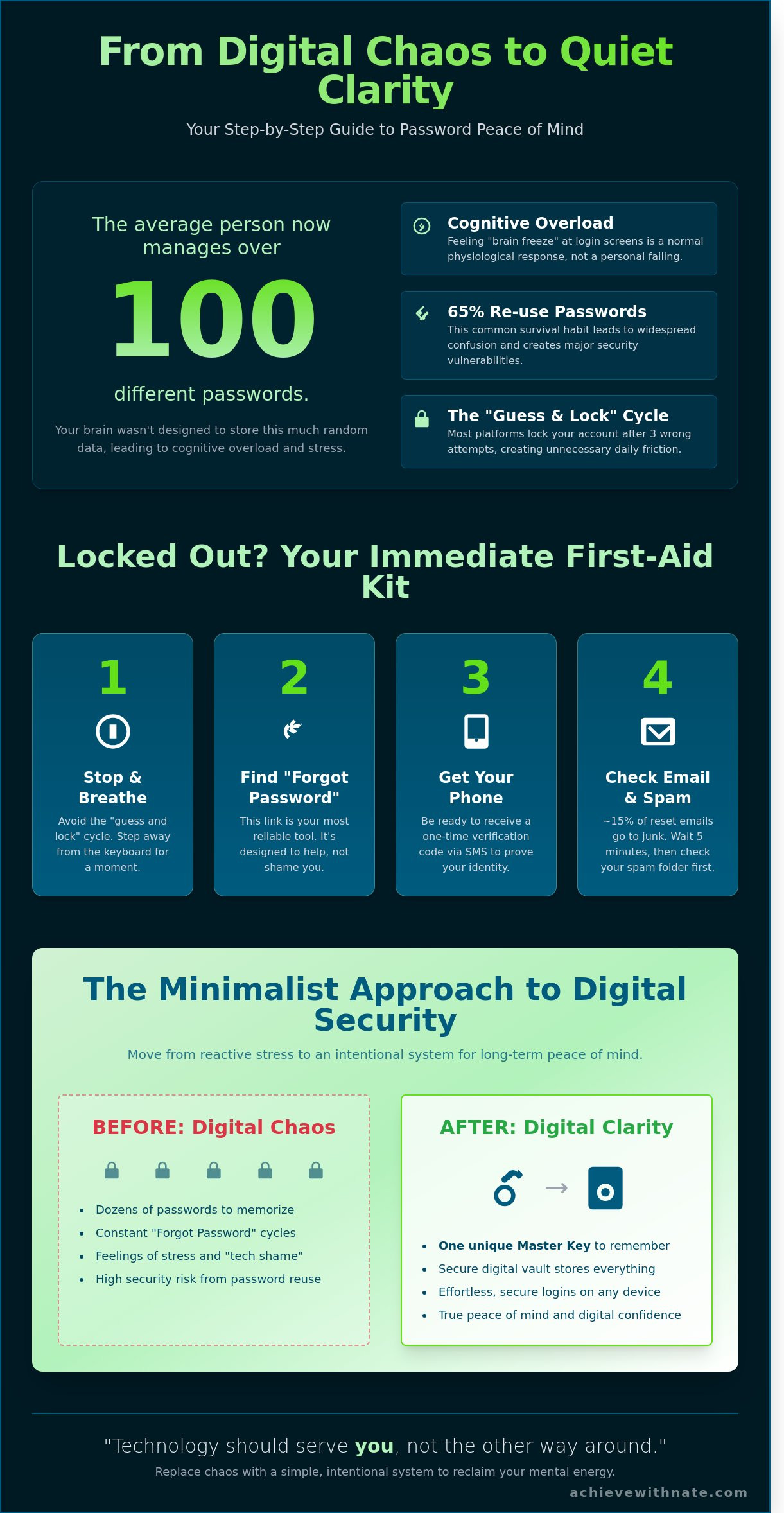
Before you try a fourth variation of your old pet's name, stop. Avoid the "guess and lock" cycle at all costs. Data shows that 65% of people reuse passwords across multiple sites, which often leads to confusion during the login process. Most major platforms will trigger a temporary lockout after three wrong attempts. This security measure protects you from external threats, but it also creates unnecessary friction for your day. Instead of guessing, look for the "Forgot Password" link. It exists to provide password help and a structured way to regain access. Gaining a better understanding what a password is helps you realize that these systems are just logical locks waiting for the right key.
The First Steps to Recovery
Search for the small blue or underlined text located near the login box. This link is your most reliable tool for password help. Before you click it, ensure your mobile phone is nearby and charged. You'll likely need it to receive a one-time verification code via SMS. A recovery code is a digital spare key designed to unlock your account when all other methods fail. Keep your backup email account open in a separate tab to make the transition as smooth as possible.
When the Reset Email Does Not Arrive
Patience is a vital part of your digital system. Digital traffic can be slow in New Zealand, especially when connecting to servers based in the United States or Europe. Wait at least five minutes before you click the "resend" button. Check your "Spam" or "Junk" folder first. Statistics suggest that roughly 15% of automated reset emails are flagged by filters incorrectly. Verify that you're checking the exact email address linked to the account. Even a single character difference or a misplaced period will prevent the system from finding your profile and sending the necessary link.
Why We Struggle with Passwords (It is Not Your Fault)
The modern world requires you to manage dozens of complex keys. In 2023, research indicated the average person managed roughly 100 passwords across their personal and professional accounts. Your brain wasn't designed to store a hundred unique strings of random characters. When you feel that familiar brain freeze at a login screen, it's a physiological response to cognitive overload. Intentional living means acknowledging these human limits. If you've been looking for password help, start by forgiving your frustration. You aren't failing. The system is simply asking for more than your biology can provide.
Recognising this problem is the first step toward digital confidence. We often treat digital security as a chore to be avoided. Instead, we should view it as a system to be designed. When you understand why you struggle, you can stop blaming your memory and start building a better framework. This isn't about being "tech-savvy." It's about being intentional with your mental energy.
The Burden of Digital Clutter
Every new account you create adds a piece of mental furniture to your digital home. Most people use "password123" because it's a survival habit, not a lack of effort. It's a reactive response to a stressful demand. To find peace, we must move from reactive stress to intentional systems. Following established password best practices allows you to replace chaos with a repeatable method. This shift reduces the friction in your daily life. It clears the mental fog that accumulates when you try to remember too much.
Reactive habits lead to security vulnerabilities.
Intentional systems create long-term mental freedom.
Simplification is the ultimate form of digital security.
Overcoming the "Tech Shame"
You aren't behind. Technology evolved at a pace that outran the instructions provided to us. In New Zealand, many of us transitioned from physical ledgers to digital clouds in less than two decades. The shift happened quickly, and it's natural to feel overwhelmed. Nate’s philosophy is simple: technology should serve you, not the other way around. If your current setup causes anxiety, it's time for a change. Recognising the need for password help is a sign of digital maturity, not a lack of skill. If you feel consistently overwhelmed by these digital demands, you might find clarity by exploring these 5 Signs You Need a Digital Coach to help you regain your focus.
The Minimalist Approach to Digital Security
Subtraction is the path to digital peace. You don't need to remember 50 different passwords to stay safe. Trying to memorize every login creates mental clutter and leads to poor habits. Most people use the same weak password for everything just to avoid the frustration of forgetting. This puts your entire life at risk if a single service is compromised.
In 2023, CERT NZ reported 7,904 cyber security incidents. Many of these involved unauthorized access that could have been prevented with better systems. If you need password help, the first step is letting go of the need to memorize everything. You should aim for a system where you only ever remember one master key.
A password manager acts as your secure digital vault. It stores your login details and generates complex, unique strings for every site you visit. This subtracts the daily friction of logging in. You stop worrying about "forgetting" because the system handles the heavy lifting for you. It's a simple way to gain clarity and reclaim your focus.
Choosing Your Digital Vault
You have several simple options to start your journey toward digital minimalism. Apple Keychain and Google Password Manager are built into your devices already. These are excellent starting points for most New Zealanders because they require zero extra setup. They sync across your phone and laptop automatically.
Built-in options: Apple Keychain or Google Password Manager for seamless integration.
Independent managers: Apps like Bitwarden or 1Password offer more control across different platforms.
Browser tools: Firefox and Chrome have reliable vaults built into their settings.
These systems remove the need for sticky notes or insecure spreadsheets. By using a vault, you ensure that a breach at one retailer won't give a hacker access to your bank account or email. It's a logical way to build a sustainable security habit.
The Power of Two-Factor Authentication (2FA)
Think of Two-Factor Authentication (2FA) as a second lock on your front door. Even if someone steals your physical key, they still can't get inside without the second code. This is usually a six-digit number sent to your phone via text or generated in an app. It's a vital piece of password help that adds a layer of intentional protection to your most sensitive data.
2FA protects you even if your password is stolen. Most NZ banks and government services now require this by default. It takes an extra five seconds to enter the code, but the peace of mind it provides is worth the minimal effort. You're no longer relying on a single point of failure. You're building a resilient system that respects your time and your security.
Three Steps to a Stress-Free Password System
Security doesn't have to be complicated. By applying a minimalist approach to your digital life, you create a system that protects your assets and your peace of mind. Start by auditing your most vital Kiwi accounts. Your banking, your RealMe identity, and your primary email are the three pillars of your online presence. If these are secure, the rest of your digital life becomes much easier to manage.
Applying This to New Zealand Services
Managing your ASB login or Kiwibank access safely is a priority for your financial health. These platforms house your NZD and personal data. Your email password is the most important one you own. It acts as the gateway to your entire identity. If you use older services, look into Staying Safe When Using Yahoo Mail to ensure your recovery options are current. Protecting the inbox is the first step toward true digital sustainability.
Building Your Master Key
Create a Master Key that is long and unique. Use a phrase that resonates with you personally. A sequence like "TheDogLovesWalkingOnTheBeach!" is far more secure than a complex string of random characters. Avoid using birthdays, names, or locations that a stranger could find on your social media profiles. If you need password help, remember that length beats complexity every time. Write this key down on a physical piece of paper and keep it in a secure location at home. This simple backup ensures you are never locked out of your own life.
Audit your banking and RealMe accounts for unique credentials.
Set up a recovery plan with a backup phone number today.
Practice intentional logging by slowing down during the sign-in process.
Intentionality is about making conscious choices. When you log in, do it with focus. Don't rush the process. This habit reduces errors and keeps you grounded in your digital environment. A recovery plan is your safety net. By setting it up now, you ensure that a single moment of forgetfulness doesn't turn into a week of stress. This is how you build a system that serves you rather than drains you.
Ready to simplify your digital habits? Start your journey toward intentional living today.
Finding Your Digital Confidence with a Personal Coach
Sometimes, you just need a guide to walk beside you. Technology often feels like a heavy weight. It is easy to get lost in the noise of constant updates and security alerts. Digital confidence coaching is about more than just getting password help once. It's about changing how you feel every time you open your laptop or pick up your phone.
Nate helps everyday Kiwis bridge the gap between feeling overwhelmed and feeling capable. Most people know they should be more secure, but the "how" feels too big to tackle alone. We break that down into small, manageable steps. Personalised sessions move at your pace. We use your own devices in your own environment. This ensures the systems we build are ones you can actually use once the session ends.
Confidence comes from understanding. When you know why a system works, you're less likely to fear it. We look at your digital life as a whole. We find the friction points that cause you stress and replace them with simple, repeatable habits. It is a process of subtraction, removing the clutter so you can focus on what matters.
Why Work With Nate?
Nate offers a calm, disciplined approach to technology. There is no jargon here. You won't find any "hustle culture" or aggressive sales tactics. We focus on practical skills for New Zealand life. This is a quiet conversation about your digital habits and your personal agency. It's about finding peace in a noisy digital world.
We focus on long-term sustainability and digital freedom. A complex system is a system that eventually fails. We aim for minimalism. By removing the friction from your devices, you gain clarity. Success comes from consistent, simple actions rather than complex secrets. You'll learn to manage your digital footprint with integrity and self-reliance.
Take the First Step Toward Clarity
You don't have to struggle with your devices alone. Many people lose hours every month just trying to remember a login or fixing a basic sync error. That is time you could spend on your family, your business, or your hobbies. You can reclaim that time and your peace of mind.
Book a session to clear your digital clutter and build your skills. We'll look at your systems together and find exactly where you feel stuck. It's time to move toward a more intentional digital life. You deserve to feel in control of your tools, rather than being controlled by them.
Ready to simplify?Book a digital confidence coaching session with Nate and get the professional password help and digital guidance you need.
Take Control of Your Digital World Today
Modern life requires us to manage dozens of accounts, but it doesn't have to be overwhelming. You've seen how a minimalist system replaces stress with clarity. By focusing on the three intentional steps we covered, you can eliminate the friction of forgotten logins. This approach isn't about complex software; it's about creating a sustainable habit that works for your specific needs.
Seeking professional password help is a practical way to reclaim your time. Industry reports indicate the average user spends 11 hours per year managing login issues. You can choose a different path. Nate offers personalised coaching for everyday Kiwis across all 16 regions of New Zealand, providing calm and jargon-free guidance. This national service ensures you have a trusted partner to help you build lasting digital confidence.
You don't have to navigate these technical hurdles alone. Start your journey to digital confidence with Nate and experience the peace of mind that comes with an organized digital life. You're more than capable of mastering these systems; the freedom of a simplified life is well worth the effort.
Frequently Asked Questions
How do I reset my password if I cannot access my recovery email?
You must contact the service provider's support team directly to verify your identity through alternative methods. Most platforms will ask you to provide official New Zealand identification, such as a passport or driver's license, to regain access. If you're locked out of a local bank account, visiting a physical branch with two forms of ID is usually the fastest path to a resolution.
Is it safe to write my passwords down in a notebook?
Writing passwords in a physical notebook is safer than using the same weak password for every website. Physical theft is statistically less likely than a remote digital attack, as CERT NZ reports that 1 in 4 Kiwis experience some form of cybercrime annually. Keep your notebook in a private, secure place at home and avoid labeling the cover with the word "passwords" to maintain your privacy.
What should I do if I think my password has been stolen?
Change your password immediately and enable Two-Factor Authentication on the compromised account. You should also report the incident to CERT NZ, the government's cybersecurity agency, which handled over 8,000 reports in 2023. Acting within 30 minutes of a suspected breach significantly reduces the risk of financial loss or identity theft.
Why does my bank keep asking me for a code from my phone?
This process is called Two-Factor Authentication and it adds a vital layer of security to your financial life. NZ banks like Westpac and BNZ use these codes because they stop 99.9% of automated bot attacks. Even if a criminal steals your login details, they can't access your money without having your physical phone in their hands.
Are password managers actually safe to use?
Yes, password managers use AES-256 bit encryption, a standard that would take a supercomputer billions of years to break. These tools provide professional password help by creating and storing complex codes for every site you use. It's a much more intentional system than relying on your memory or using insecure browser-based saving features.
I am a senior and find this all too fast; can I still learn this?
You can definitely master these tools by focusing on one small habit at a time. Organizations like SeniorNet NZ support over 10,000 New Zealanders each year with digital skills training. Start by securing your most important account, such as your primary email, and move to the next one only when you feel comfortable and ready.
What is the best way to create a password I will actually remember?
The most effective method is to create a "passphrase" using four or more random, unrelated words. A string like "kiwi-mountain-coffee-blue" is easy for you to visualize but incredibly difficult for a computer to guess. This strategy offers the password help you need to stay secure without the frustration of forgetting complex strings of random symbols.
How often should I be changing my passwords?
You only need to change your password if you suspect a leak or if a company notifies you of a data breach. Modern security guidelines suggest that forced monthly changes often lead people to choose weaker, predictable patterns. Focus your energy on creating one strong, unique password for every service rather than changing them on a strict calendar cycle.

Comments