


Safe Online Habits NZ: A Patient Guide to Protecting Your Peace of Mind

Updated: Jun 28
Did you know that New Zealanders lost $7.8 million to cybercrime in just the first three months of 2025? It is a staggering number that makes it clear why learning safe online habits NZ is so important for our community. You might feel like the digital world is moving too fast. It is often filled with confusing jargon and hidden risks that seem impossible to track. It's completely normal to feel a bit overwhelmed or even worried about making a mistake with your hard-earned money. You shouldn't feel embarrassed for wanting things explained simply or for asking questions that feel basic.
Staying secure doesn't require a degree in computer science or a life of constant worry. You can protect your peace of mind and feel truly in control of your digital life again. We believe that technology should be a helpful tool, not a source of anxiety. In this guide, we will walk through how to spot a scam instantly and build a gentle safety routine that fits into your daily life. You will learn that protecting yourself is about small, manageable steps that anyone can take with confidence and ease.
Table of Contents
Starting Your Journey Toward Digital Peace of Mind in New Zealand
Feeling a bit lost with technology is a very common Kiwi experience. You aren't alone if you find the constant updates and new apps a bit much. It's easy to feel like everyone else knows what they are doing while you're just trying to keep up. This feeling often leads to a sense of digital anxiety that can make using your computer or phone feel like a chore rather than a help. We want to change that by focusing on your well-being first.
When we talk about safe online habits NZ, we aren't talking about becoming a computer expert. We mean simple, repeatable actions you can take to feel more secure. These habits are like locking your front door or wearing a seatbelt. They are gentle routines that reduce stress and help you reclaim your peace of mind. Remember, online safety is a journey that continues as technology changes. It isn't a one-time setup that you can just forget about. It's a path we walk together in a supportive, non-judgmental way.
To help visualize how these concepts keep us protected, watch this helpful video:
Why Digital Confidence Matters in Aotearoa
Digital confidence is vital in Aotearoa today because so much of our lives happens on a screen now. We use the internet for banking, checking health records, and keeping in touch with whānau. When you build your confidence, the fear factor of trying something new starts to fade away. You might find it helpful to look at a comprehensive guide to Internet safety to see the wide range of tools available to protect your personal information. Working with a Digital Confidence Coach NZ can help you master these tools without the usual stress, ensuring you feel in control of your digital world.
It’s Not Your Fault: Understanding the Digital Divide
It is important to know that feeling stressed by technology isn't your fault. The pace of change is incredibly fast. Most people weren't taught how to navigate this world as children. You don't need to be a techie to stay safe and secure. This movement is about people, not just software or hardware. We focus on creating a non-judgmental environment where no question is too basic. You deserve to feel seen and understood as you learn at your own pace. By focusing on safe online habits NZ, you are taking a brave step toward feeling more comfortable and independent in your daily life.
The Three Pillars of Your Personal Online Shield
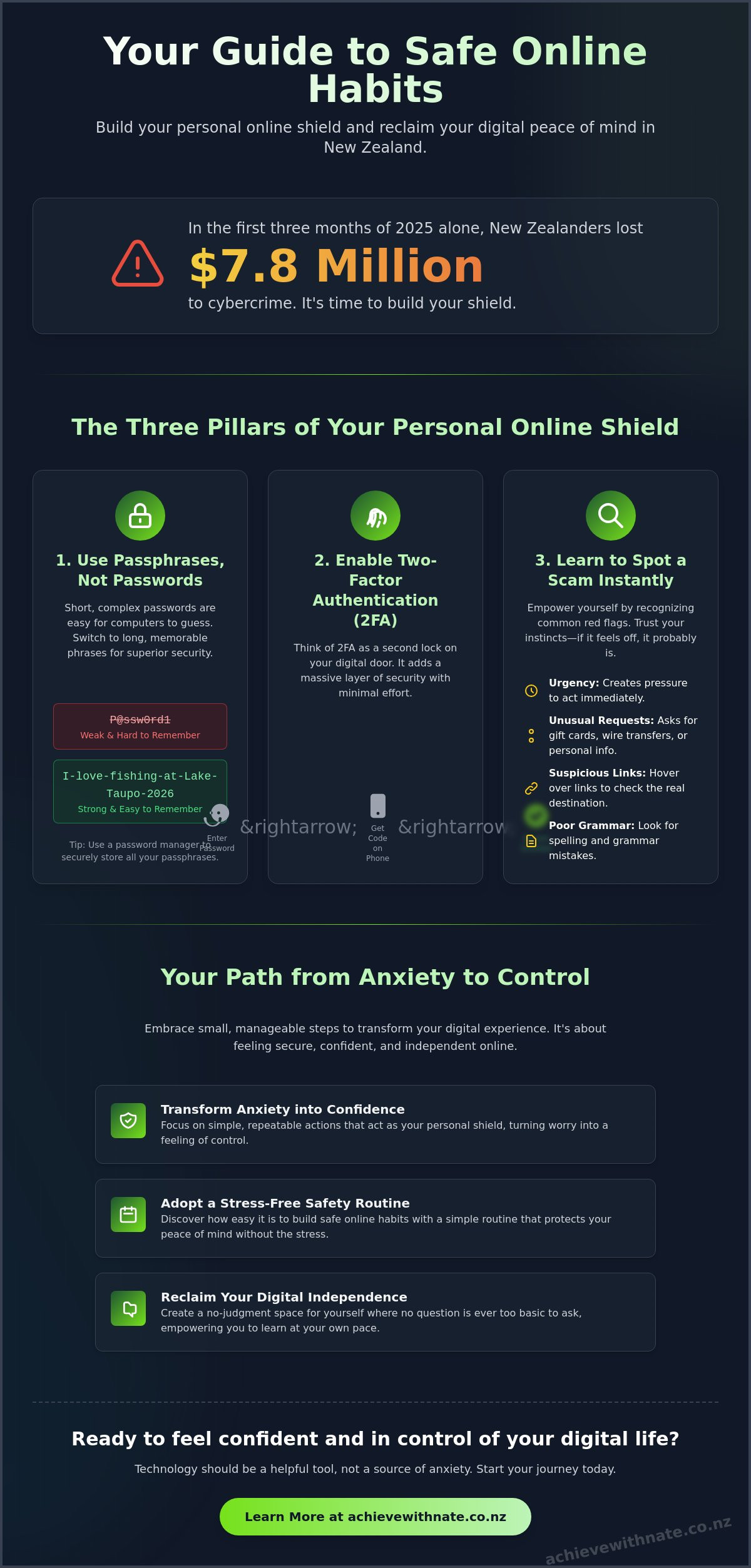
Building your protection online doesn't have to be a chore. Think of these three habits as shields that stand guard while you go about your day. They work quietly in the background, keeping you safe without needing your constant attention. In the first quarter of 2025, New Zealanders lost $7.8 million to cybercrime according to CERT NZ data. This shows why setting up these shields is a vital part of your safe online habits NZ. You don't have to do everything at once. Take these steps one at a time, at a pace that feels comfortable for you.
Passphrases Over Passwords
For a long time, we were told to use short, complex passwords with lots of symbols. These are hard to remember and easy for computers to guess. A better way is to use a passphrase. This is just a long string of words that means something to you but nothing to a stranger. For example, you might use "I-love-fishing-at-Lake-Taupo-2026". It is much longer and much stronger. To make things even easier, you can use a password manager. These tools act like a secure digital vault that remembers all your phrases for you. It's a great way to delegate the memory work so you can focus on more important things.
Two-Factor Authentication: Your Second Lock
Think of two-factor authentication, or 2FA, as having two different locks on your front door. Even if someone finds a way to get past the first lock, they still can't get in without the second key. Usually, this "second key" is just a quick code sent to your phone to prove it's really you trying to log in. It only takes a few seconds, but it adds a massive layer of security. This is especially important for your money. You can find specific tips on setting this up in our guide on how to use online banking safely nz. Government resources like Own Your Online NZ also provide excellent advice on why this extra step is so effective for everyday Kiwis.
The "Update" Habit: Keeping the Gates Closed
Software updates might seem like a nuisance when they pop up, but they are actually essential digital maintenance. Think of them as "digital repairs" for your devices. When a company finds a little hole in their security, they send out an update to patch it up. If you don't update, that hole stays open. The easiest way to handle this is to turn on "Automatic Updates" in your settings. This lets your phone or computer fix itself while you sleep. Software updates are essential digital maintenance that keeps your personal information tucked away safely behind closed gates. If you feel like your devices need a bit of a tidy-up, a digital productivity audit can help you get everything running smoothly and securely.
Spotting the "Too Good to Be True": NZ-Specific Scams
It is important to remember that scammers are professionals. They are experts at manipulation and using pressure to make you act quickly. If you have ever felt a moment of panic because of a strange text message, please know it isn't a reflection of your intelligence. These people spend all day practicing how to trick honest Kiwis. Part of building safe online habits NZ is learning to recognize their tactics before they can cause any harm. You aren't alone in this; in the 2024/25 period, the National Cyber Security Centre (NCSC) recorded 5,995 incident reports. This shows that many of us are being targeted, but staying calm keeps you in the driver's seat.
The most effective tool you have is a simple three-step method: Stop, Think, Check. Before you click any link or reply to a message, just stop for a moment. Think about whether the request feels right. Finally, check the source through a trusted channel. You can always reach out to organizations like CERT NZ, the NZ Police, or your local bank if you are unsure. Taking a breath and verifying the information is the best way to keep your digital life stress-free. It is about trusting your gut and giving yourself permission to be cautious.
Impersonation Scams: NZ Post, Inland Revenue, and Banks
You might receive a text message that looks like it is from NZ Post about a missed parcel. Or perhaps a message from Inland Revenue claiming you have a tax refund waiting. These messages often use "urgent" language to make you worry. It is a common trick designed to make you act without thinking. Remember that these organizations will never ask for your password or bank details through a text message. If you get a message like this, don't use the link provided. Instead, call the organization directly using a number you find on their official website. Taking that extra minute is a powerful way to protect your peace of mind and ensure your safe online habits NZ are working for you.
The Emotional Hook: Romance and Friendship Scams
We understand that scams involving the heart are especially difficult. They carry a heavy emotional weight that can feel very isolating. Scammers often build a relationship over weeks or months to gain your trust. They might eventually ask for money for an "emergency" or travel costs to come and visit you. These are major red flags. If someone you've met online starts asking for financial help, it's okay to take a step back and talk to someone you trust. You can find more detailed support in our guide on how to avoid romance scams nz. You deserve to feel safe in your online friendships without the fear of being exploited.
Building Your Simple, Stress-Free Safety Routine
Protecting yourself online shouldn't feel like a full-time job. It's about creating a small, manageable rhythm that fits into your life once a month. When you have a plan, the digital world feels much less intimidating. By setting aside just fifteen minutes, you can maintain your safe online habits NZ and feel truly independent with your technology. Think of it as a gentle check-up for your digital health. It is a way to ensure your devices are working for you, not against you. You can always join the movement to stay connected with others who are building these same stress-free routines.
The Monthly Digital Declutter
A great place to start is with a bit of a digital tidy-up. Look through your phone or tablet for any apps you haven't opened in months. If you don't use them, go ahead and delete them. This keeps your device running faster and reduces the amount of your personal data floating around. Next, spend a few minutes looking at your bank statements. Scammers sometimes test the waters with tiny, unfamiliar charges before trying something larger. Catching these early gives you back your power. Finally, take a moment for a RealMe account check-in. This ensures your access to vital government services remains secure and private. These small actions build a foundation of safety that doesn't cause any unnecessary stress.
Knowing Who to Call When Things Feel "Off"
Sometimes, despite our best efforts, something might feel "off." You might get a strange email or notice a change in how your device behaves. In these moments, it is helpful to have a plan already in place. It is a great idea to keep a physical list of trusted numbers by your computer or on your fridge. This could include your bank's fraud department, Netsafe, or a trusted friend. Knowing who to call is a key part of your safe online habits NZ, as it ensures you never have to face a tech problem alone. If you do encounter a problem, the process of reporting a cybercrime in New Zealand is there to support you. Don't ever feel embarrassed about reaching out. Asking for help is a sign of digital strength and wisdom, not weakness. If you want a patient partner to walk through these steps with you, our One-on-One Digital Coaching offers a safe, no-judgment space to learn.
Finding Your Digital Confidence with a Supportive Guide
Learning about safe online habits NZ is a wonderful first step. But we know that actually sitting down to change settings or set up passphrases can still feel a bit daunting. It's perfectly normal to want someone by your side as you take these actions for the first time. That's why Nate’s one-on-one coaching exists. It is a safe space designed specifically for you to learn without any pressure or rush. We call it a no-judgment zone because we truly believe that no question is too small. Whether you're worried about a "basic" email question or want to understand how to keep your private information secure, you'll always find a patient, supportive companion here.
Personalized coaching helps bridge the gap between knowing what to do and feeling confident enough to do it. Many people find that classroom settings move too fast or feel a bit impersonal. With one-on-one support, the focus is entirely on your needs and your pace. We focus on building your independence so that technology becomes a tool you enjoy using. It's about moving from a place of digital anxiety to a place of quiet empowerment. You deserve to feel in control of your digital life and secure in your own home.
Personalized Help for Your Specific Devices
Nate works directly with the tools you already have in your home. You don't need to buy anything new or learn on a different system. Whether it's your phone, tablet, or laptop, we'll walk through the steps together on your own screen. This hands-on approach makes a big difference in how much you remember. We can cover everything from the very basics of sending an email to exploring newer AI tools that might help your daily life. You set the agenda, and we provide the gentle guidance to get you there. It's your journey, and we're just here to help you find your footing without making you feel inadequate.
How to Get Started Without the Stress
Taking the next step is simple and entirely low-pressure. If you feel ready to build your digital confidence, we invite you to fill out an Expression of Interest. This isn't a commitment to a long course; it's just a way for us to start a conversation about what you need. Our approach is always unhurried and focused on your well-being. We want you to feel seen and understood as you master safe online habits NZ at your own speed. Taking incremental, manageable actions is the best way to protect your peace of mind. Technology should work for you, not the other way around.
Reclaiming Your Digital Freedom and Peace of Mind
If you still feel a bit unsure, we are here to help you bridge the gap. We provide personalized, one-on-one support in a completely non-judgmental, stress-free environment. Our coaching offers localized NZ expertise, ensuring you get the support you deserve without any unnecessary pressure. You can book a patient, one-on-one coaching session with Nate today to start your journey at your own pace. Taking that first manageable step is a wonderful way to ensure technology remains a source of joy. We look forward to helping you find your footing and your peace of mind.
Frequently Asked Questions
Is it really safe to do online banking in New Zealand?
Yes, online banking in New Zealand is very secure when you follow safe online habits NZ. Local banks use high-level encryption to protect your money and personal details. The most important thing you can do is ensure two-factor authentication is turned on. This acts as a second lock on your account, making it much harder for anyone else to get in.
What should I do if I think I’ve clicked on a scam link?
If you click a suspicious link, the first step is to stay calm and disconnect your device from the internet. You should then change your important passphrases using a different, secure device. If you entered any bank details or credit card numbers, call your bank's fraud line immediately. They are there to help you stop any unauthorized charges before they happen.
How can I remember all these different passphrases without writing them down?
A digital password manager is the best way to handle multiple passphrases without the stress of memorizing them. It works like a secure digital vault on your phone or computer that remembers everything for you. You only need to remember one master phrase to unlock the vault. This allows you to have unique, strong protection for every single account you own.
Is my iPhone or Android phone safer than my computer?
Modern smartphones are generally more secure than older computers because their software is more restricted and harder for scammers to break into. They also have built-in security like face or fingerprint recognition to keep your data private. However, your phone is only safe if you keep it updated. These updates are essential digital maintenance that ensures your safe online habits NZ remain effective.
What is the most common online scam Kiwis should watch out for in 2026?
In 2026, the most frequent threats are highly personalized "urgent" text scams and AI-enhanced phishing attempts. Scammers often pretend to be from trusted organizations like NZ Post or the Inland Revenue to create a sense of panic. New legislation like the Deepfake Digital Harm and Exploitation Bill is also being discussed to help protect Kiwis from more advanced digital tricks. Always remember to stop and think before you click.
How do I know if a website is safe to buy from?
Check for a small padlock icon in the address bar and ensure the website address starts with "https." A legitimate New Zealand business will almost always have a clear contact page with a physical address and a local phone number. If a website is offering a famous brand for a price that seems far too low, it's usually a sign to look elsewhere for a more trusted shop.
Can Nate help me set up my security settings one-on-one?
Yes, Nate offers One-on-One Digital Coaching to help you set up your security settings in a relaxed, no-judgment environment. We can work together on your own phone or laptop at a pace that feels comfortable for you. This personalized support is a great way to bridge the gap between knowing what to do and actually getting your devices secured and ready to use.
What happens if I report a cybercrime to the NZ Police?
When you report a crime, the NZ Police and agencies like Netsafe use that information to track criminal patterns and protect the wider community. As of July 2026, Netsafe serves as the Approved Agency under the Harmful Digital Communications Act to provide even better support. While they can't always catch every scammer, your report helps authorities warn other Kiwis and build a stronger defense for everyone.

Comments