


Stress-Free Password Manager Setup Help for Kiwis: A Step-by-Step Guide

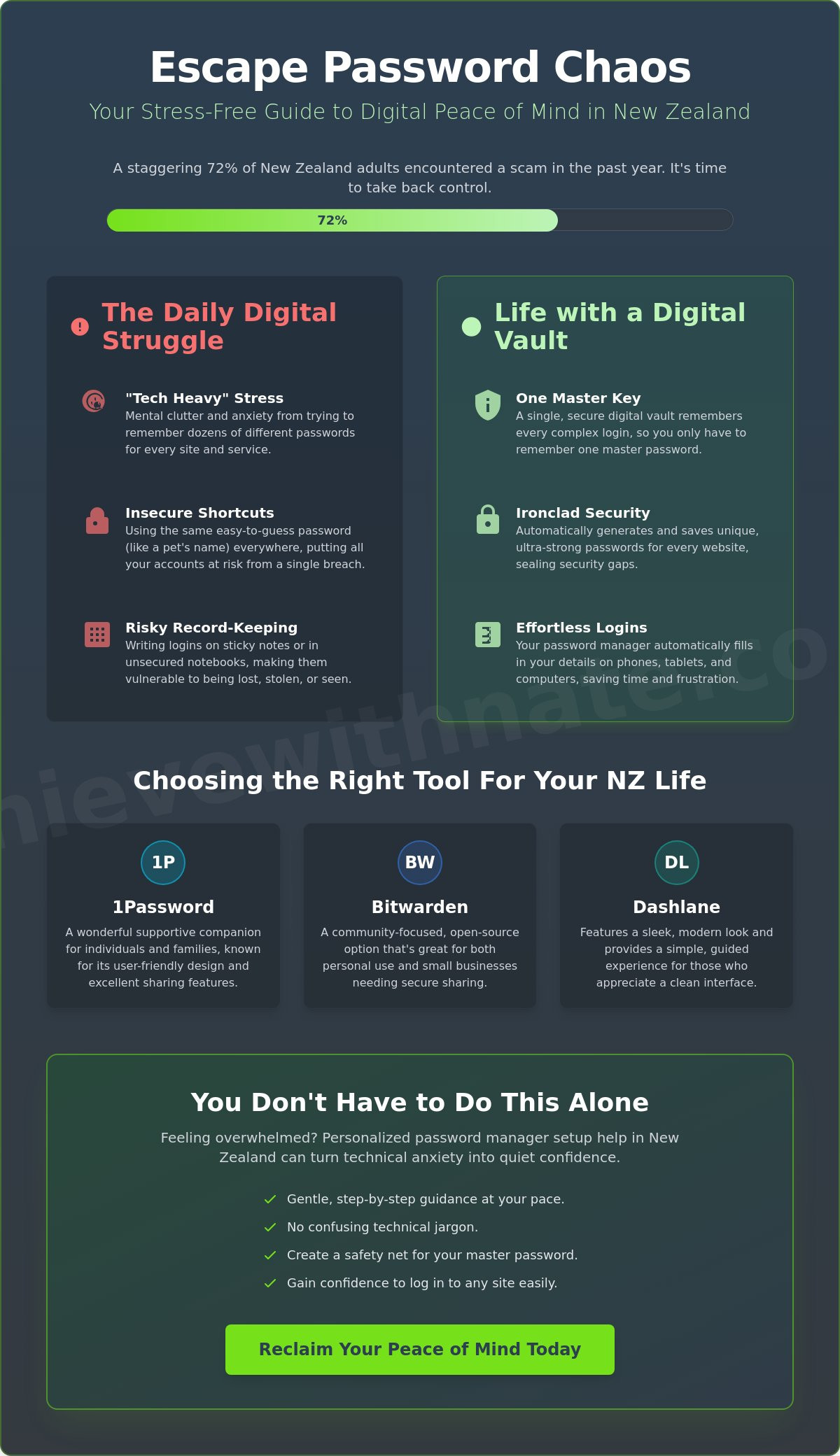
Did you know that 72% of New Zealand adults encountered a scam in the past year? It's a heavy number to carry. If you feel a knot of anxiety every time you see a "reset password" link, you aren't alone. It's completely normal to feel overwhelmed by talk of encryption or two-factor authentication. You might worry about putting all your eggs in one basket. That fear is real. It's valid. Finding the right password manager setup help nz can be the first step toward feeling safe again.
The good news is that you don't have to tackle this alone. We can work together through one-on-one digital coaching that focuses on your pace, not the software's speed. I'll help you turn that digital dread into a sense of calm control. You'll learn to use these tools safely, even if you're worried about forgetting your master password. You'll gain the confidence to log in to any site easily. You'll finally know exactly who to call if you ever feel stuck.
This guide walks you through a stress-free, step-by-step journey to secure your digital life. We'll look at how to set everything up without the jargon. We'll make sure your most important accounts are protected forever. It's time to reclaim your peace of mind.
Key Takeaways
Learn how to swap the daily stress of remembering passwords for a secure digital safe that does the heavy lifting for you.
Discover which user-friendly tools work best on your phone and tablet to keep your everyday life organized and safe.
Follow a gentle, step-by-step process to install your new vault and browser extensions without any confusing technical jargon.
Understand how personalized password manager setup help nz can turn technical anxiety into a quiet, confidence-building experience.
Find out why you never have to feel stuck alone and how patient guidance makes digital security feel manageable.
Table of Contents
Moving from Password Stress to Digital Peace of Mind
Many Kiwis feel a sense of dread when a website asks for a new password. We try to be clever. We use a pet's name or a favorite local beach. But keeping track of dozens of these in a notebook or, worse, using the same one everywhere, causes real "tech heavy" stress. This mental clutter follows you around. It makes the digital world feel like a chore instead of a tool. It's an exhausting way to live in our connected world.
A password manager is a secure vault that only you can open with one simple key. It is a digital safe that remembers every single login so you don't have to. If you've been looking for password manager setup help nz, you're starting a journey toward a much lighter mental load. To get a broader view of the technology, you can read about what is a password manager? to see how these tools protect your identity. Using this one tool makes your daily life in Aotearoa much simpler and more secure.
To better understand this concept, watch this helpful video:
Why "Simple" is Safer
We often think that security has to be complicated. We assume that if it's easy, it must be weak. That is a myth. In fact, when things are too hard, we tend to take shortcuts that make us less safe. A password manager is a supportive companion for your digital memory. It takes the "hard" out of the equation so you can stay protected without the headache or the frustration.
Acknowledging the Fear of "The Master Password"
The number one worry I hear is about the master key. People ask, "What if I forget the one password that opens everything?" It is a scary thought. However, getting password manager setup help nz means we plan for that together. We can create physical backup codes or use recovery features. You aren't just hoping for the best. You are building a system that has a safety net. Taking these small, manageable actions is how you find true peace of mind.
Choosing the Right Password Manager for Your NZ Life
Picking a tool often feels like the hardest part. There are so many names. You might see lists of a dozen different apps, but that often leads to "choice paralysis." Instead, let's focus on three that work beautifully for life in New Zealand: 1Password, Bitwarden, and Dashlane. These options are reliable and easy to use on your phone or iPad. While some offer free versions, a small monthly investment often provides more peace of mind. For example, paid plans usually include better recovery options if you get stuck. If you need password manager setup help nz, we can look at these together to see which one feels right for your hands.
The "best" one is simply the one you feel comfortable using every day. You can find expert reviews on the best password managers to see how they compare. Some people prefer the sleek look of Dashlane. Others like the community feel of Bitwarden. If you have a family, 1Password is a wonderful supportive companion. It's about matching the tool to your lifestyle. No matter which you choose, the goal is to make your digital life feel unhurried and safe.
The Best Options for Kiwi Seniors
If you're a retiree, you want a screen that's easy to read. You don't need clutter. You need large buttons and clear text. Some apps are much better at this than others. We often look for tools that feel like a helpful assistant rather than a complex puzzle. This approach is a big part of building nz seniors' confidence in the digital world. It's about making technology fit your life, not the other way around.
Tools for Small Business Owners in Aotearoa
Running a local business means you have enough on your plate already. You might need to share a login with a staff member or a partner. Tools like Bitwarden or 1Password make this safe. You don't have to text passwords or write them on sticky notes anymore. Integrating this into your business workflow optimization saves you time and stress. If you're feeling unsure, one-on-one digital coaching can help you pick the perfect fit for your team.
Step-by-Step: Setting Up Your Secure Vault Without the Worry
Before you click anything, find a quiet spot and grab your phone. It helps to have your current list of passwords nearby, even if they're just on a scrap of paper for now. This is the first step in getting password manager setup help nz that actually sticks. Once you're ready, you'll download the app to your computer and add a small tool called a browser extension. This extension is what helps the manager "see" when you're logging into a site so it can offer to save the details for you.
Creating your Master Password is a big moment, but it doesn't have to be hard. Think of a "passphrase" instead of a password. Use a few random words that mean something to you but wouldn't be guessed by a stranger. For example, "BlueKowhaiCoffeeCup" is much stronger than a complex string of symbols you'll likely forget. Once that's set, try your first save. Log into your xtra mail or your bank account. You'll see a small window pop up asking to save the password. Click yes. That's it. You've officially started your vault.
Installing on Multiple Devices
The real magic happens when your passwords follow you. By installing the same app on your smartphone, everything stays in sync. You never have to type a long, messy password on a tiny phone keyboard ever again. If you save a login on your laptop, it's waiting for you on your phone instantly. If you'd like someone to walk through these clicks with you, my one-on-one digital coaching ensures everything is connected perfectly.
Adding an Extra Layer of Safety (2FA)
You might hear about "Two-Factor Authentication," but let's just call it a digital vouch. It's like having a second person confirm it's really you. Usually, this means your phone gets a quick notification or a code when you log in to something important. It's a calm, extra layer of protection that keeps your vault even safer. It sounds technical, but it's really just a quick tap on your screen to say, "Yes, this is me."
Hands-On Password Manager Setup Help in New Zealand
Sometimes, even the clearest guide isn't enough to stop that "tech heavy" feeling from creeping in. You might get halfway through a setup screen and feel a knot in your stomach. That is perfectly okay. You don't have to figure this out alone, and you certainly don't have to struggle through it. Many people find that having a supportive companion by their side makes the entire process feel light and manageable. When you look for password manager setup help nz, you're looking for more than just a tutorial. You're looking for a way to feel safe again.
The approach at the Achieve With Nate Movement is built on a simple, steady promise. There is no judgment here, and there is absolutely no rushing. We move at your pace, ensuring you feel comfortable with every click. I can sit with you, either virtually or in person, to handle the "techy" bits while you stay completely in control of your private information. This 1-on-1 coaching turns what could be a stressful afternoon into a quiet, confidence-building session. You'll see that technology doesn't have to be a source of anxiety when you have the right support.
Beyond the Setup: Building Digital Confidence
Once your secure vault is ready, a new world of calm opens up for you. You can use your new tool for much more than just website logins. It is a wonderful, private place for storing digital certificates or important notes that you want to keep tucked away. This session is often the first step for many who choose to work with a digital confidence coach NZ. It's about moving away from feeling inadequate and toward a life where you master technology without the stress.
Book Your Stress-Free Setup Session
In a personalized setup session, we'll start exactly where you are today. We'll download the right apps for your devices, create a master passphrase you actually like, and save your most important logins together. There are no silly questions and no pressure to perform. You'll finish our time together with a secure, working system and the confidence to use it every day. Taking this first manageable action is the best way to reclaim your peace of mind. Let's work together to make your digital life in Aotearoa feel unhurried and safe.
Step Into a Calmer Digital Future
You've taken a big step by learning how to protect your digital life. Remember that a password manager isn't just a piece of software. It's a way to let go of that heavy mental load you've been carrying. By choosing a tool that fits your lifestyle and setting it up at your own pace, you're reclaiming your peace of mind. You're moving from a place of worry to a place of quiet confidence.
If you're still feeling a bit unsure about the technical side, that's completely normal. Finding password manager setup help nz shouldn't be a stressful experience. My coaching is designed to be a supportive companion for Kiwi seniors and small business owners alike. I focus on your emotional well-being and digital safety through patient, non-judgmental guidance. We'll handle the setup together so you feel completely in control of your screen again.
It's time to stop worrying about forgotten logins and start enjoying the internet safely. Book a calm, 1-on-1 password manager setup session with Nate today. We'll take those incremental, manageable actions together. You can do this. I'm here to help you find your footing.
Frequently Asked Questions
Is it really safe to keep all my passwords in one place?
It is much safer than the common habits we often fall into. Using a single password for every site means one leak can open everything to scammers, but a manager creates a unique, strong key for every account. This keeps your personal information tucked away in a vault that is incredibly difficult for anyone else to open. It's a proven way to protect your digital identity.
What happens if I forget my master password?
We build a safety net together during our session so you don't have to worry. You can print out a physical recovery key to keep with your important papers or set up an emergency contact you trust. Having these backups in place means you can breathe easy. You'll know that forgetting your master password won't lead to a digital disaster or a locked account.
Can I use a password manager on my iPhone and my Windows computer?
Yes, these tools are designed to work across all your different devices perfectly. Whether you are using an iPad, an Android phone, or a laptop, your passwords stay in sync automatically. My password manager setup help nz focuses on making sure your vault is ready on every screen you use. This makes your daily life much simpler and more unhurried since you never have to type a long password twice.
Do I have to pay for a password manager every month?
There are both free and paid options available depending on your specific needs. Some tools provide a great basic service for free, while others charge a small fee for extra features like family sharing or advanced recovery. We can compare these during our one-on-one digital coaching session to see which one fits your life best. The goal is to find a solution that feels right for your budget.
How long does it take to set everything up with Nate?
Most people find that a single 60 to 90 minute session is all they need to get started. We move at a pace that feels comfortable for you without any pressure to be "fast" or "techy." We simply focus on getting your most important accounts secured. You'll finish the day with a sense of accomplishment and a genuine feeling of peace about your digital safety.


Comments