


Taming Tech Overwhelmed: A Calm Kiwi Guide to Finding Digital Peace in 2026
- kxnath

- May 14
- 8 min read
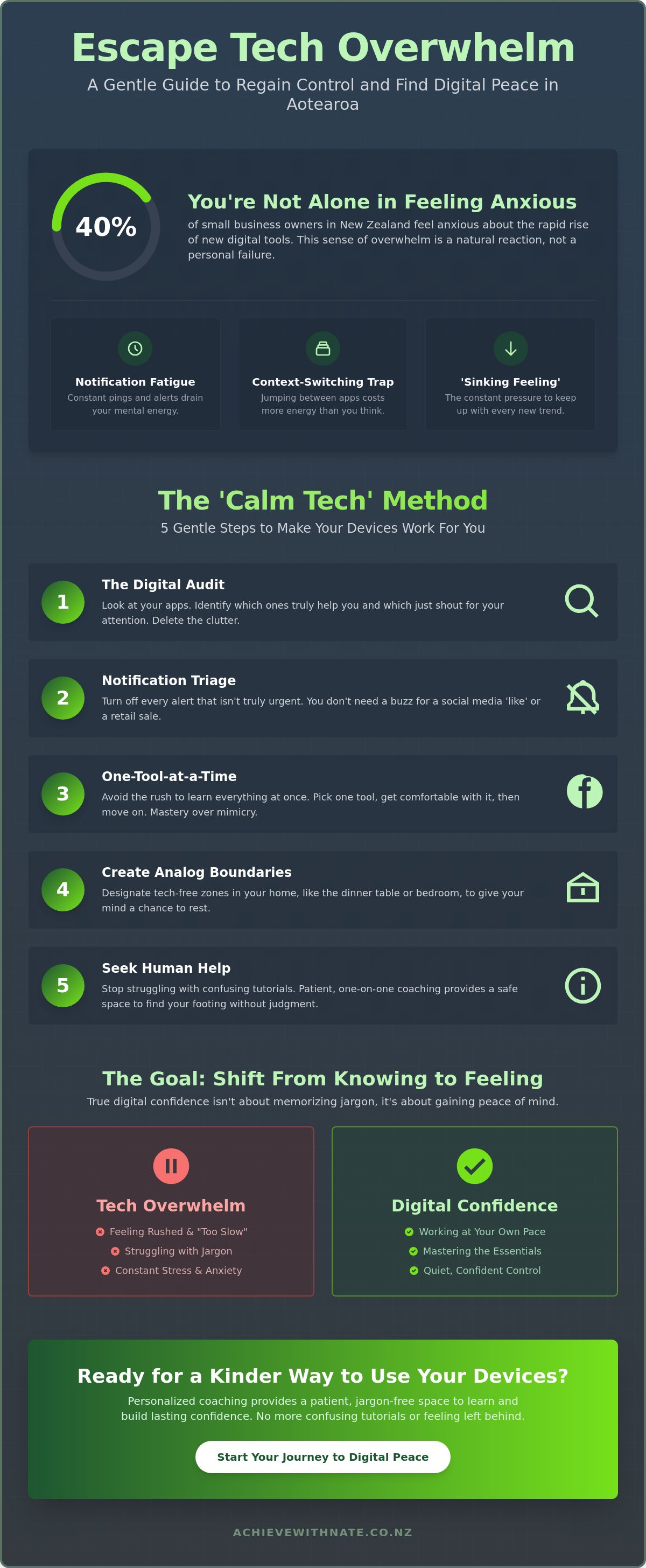
A recent survey found that 40% of small business owners across New Zealand now feel a genuine sense of anxiety about the rapid rise of AI tools. You aren't alone if you feel like the digital world is moving far too fast. It's exhausting to deal with constant notification fatigue or that sinking feeling that you're "too slow" to learn how these new systems work. This persistent sense of tech overwhelm isn't a personal failure; it's a natural reaction to a world filled with digital noise.
We believe there's a much kinder way to live with your devices. You can move from digital paralysis to a place of quiet, confident control without needing to learn any complex jargon. This guide offers a gentle, step-by-step path to help you find digital peace in 2026. We'll show you how to filter out the distractions and focus on the few tools that actually make your daily life in Aotearoa easier and more enjoyable.
Key Takeaways
Understand why switching between apps drains your mental energy and how to spot the early signs of tech overwhelm.
Learn the "Calm Tech" method to audit your devices and silence the notifications that don't add value to your day.
Explore a simple way to filter out AI noise so you only focus on tools that give you back your precious time.
Discover why one-on-one coaching provides a safer, more patient space to learn than traditional group classes.
Table of Contents
What is tech overwhelm and why is it hitting Kiwis so hard in 2026?
What is tech overwhelm? It is more than just a busy inbox. It is the physical and emotional exhaustion you feel when digital demands never seem to stop. Your brain wasn't built to handle hundreds of notifications every single day. Most people experience this as a heavy feeling in the chest or a foggy mind that makes simple tasks feel impossible.
Every time you jump from checking your personal email to logging into online banking or scrolling through social media, your brain pays a price. This is the context-switching trap. It drains your mental energy faster than a long day of physical work. By the time you sit down to relax, your mind is already spent because it has been working overtime just to keep up with the noise.
It is completely okay to feel tired of the constant updates. In 2026, the pressure to understand every new digital standard in Aotearoa is heavy. This persistent sense of tech overwhelm isn't a sign that you're too slow. You aren't failing; the system is just very loud.
The 'Sinking Feeling' of falling behind
A 2025 survey found that 40% of small and medium-sized businesses in New Zealand feel anxious about managing new AI tools. This "sinking feeling" happens when you see headlines about AI moving at light speed while you're still trying to find a lost password. Digital confidence is the ability to use tools at your own pace without feeling rushed. There is a massive difference between knowing tech and feeling confident with your devices. Knowing tech is about facts; feeling confident is about peace of mind.
Local triggers for NZ users
Often, the stress comes from things right here in our own backyard. You might be struggling with the latest Xtra mail transitions or trying to find your way through the NZ Companies Office website. Even logging into NZQA can feel like a mountain to climb if the interface has changed again. These local shifts make many Kiwis feel like they are being left behind in their own country. You deserve a guide who understands these specific hurdles without the jargon.
The 'Calm Tech' Method: 5 Steps to Regain Control
Most advice tells you to go on a digital detox. That isn't realistic if you run a local business or need to stay in touch with your family. Instead, The 'Calm Tech' Method focuses on making your devices work for you. You can reduce tech overwhelm by following these five gentle steps at your own pace.
Step 1: The Digital Audit. Look at your apps. Identify which ones actually help you and which ones just shout for your attention. If you haven't opened it in a month, it's likely just clutter.
Step 2: Notification Triage. Turn off every alert that isn't truly urgent. You don't need a buzz in your pocket for a social media like or a retail sale.
Step 3: One-Tool-at-a-Time. Avoid the rush to learn everything at once. Pick one piece of software and get comfortable with it before moving on.
Step 4: Creating Analog Boundaries. Designate physical spaces in your home, like the dinner table or the bedroom, where technology isn't allowed.
Step 5: Seeking Human Help. Stop struggling with confusing YouTube tutorials. Working with a digital confidence coach NZ provides a patient, criticism-free way to find your footing.
Taming your smartphone and email
Your phone should be a tool, not a source of stress. Organizing your home screen so only your most essential apps are visible can change your entire mood when you unlock the screen. If your inbox feels like a mountain, device and email basics training can help you set up simple filters. These small changes reduce the daily friction that leads to burnout.
The power of 'No' in a digital world
You don't need to be on every new platform that launches in 2026. True digital confidence comes from mastering the tools you already have. It's okay to say no to the latest trend if it doesn't serve your daily life. If you feel stuck, a friendly chat can often help clear the fog and show you the next manageable step.
Managing the AI Noise: A Stress-Free Approach
Many people tell me they feel "too old" to learn AI. It is a common worry, but there is a secret you should know. AI is actually designed to talk just like a human. You don't need to learn a new language or understand complex code. It is simply a tool that listens and responds to plain English. If you can have a conversation, you can use these tools to make your life easier.
Current research on technostress shows that much of our tech overwhelm comes from the pressure to adopt every new gadget that hits the market. To stay calm, I recommend using the "Utility Filter." Only pay attention to an AI tool if it saves you at least 30 minutes of admin work a week. If it doesn't give you back your time right now, you can safely ignore the noise.
AI is a companion for your day, not a replacement for your personal touch or business wisdom. It can help with the heavy lifting, but it still needs your human heart to guide it. Remember that AI training for small business New Zealand is about improving your workflow, not teaching you how to code. It is about making your tools work harder so you don't have to.
AI for the non-techy Kiwi
You can use AI for simple, everyday things. It can help you write a tricky email to a client or plan a weekend trip away. You don't need to study the whole field to get the benefits. Starting small with just one tool is much better than trying to master everything at once. It is about finding what works for your specific needs. If you want to see how these tools can fit into your life without the stress, book a personalized AI support session today.
Moving from overwhelmed to confident with personalized support
Many people try to solve their digital struggles by joining a group class. While these classes are well-meaning, they often add to your tech overwhelm. You might feel a heavy pressure to "keep up" with the rest of the room. If you miss one step, you feel lost while the teacher moves on. This environment can make you feel more behind than when you started.
Choosing one on one technology help for seniors NZ or small business owners changes the entire experience. It creates a psychological safe space where no question is too small. A patient mentor can often spot a simple fix that you have been missing for months. It might be a single setting or a hidden button that has been causing you daily grief. My approach is simple: I start with empathy and move at your speed, not the internet's speed.
Building a 'Calm Business' workflow
For those running a local company, the stress often comes from messy systems. Through business workflow optimization, we can strip away the digital clutter. There is a profound sense of relief when your email, calendar, and files finally "just work." You don't need to be an IT expert to have a professional setup. You just need a system that respects your time and your peace of mind.
Finding digital peace in 2026 isn't about learning every new feature. It is about taking incremental, manageable actions that make you feel seen and supported. When you have a reliable guide by your side, the digital world stops feeling like a threat and starts feeling like a helpful companion. You deserve to feel digitally confident in your daily NZ life, one small step at a time.
Your Path to Digital Peace Starts Here
You don't have to let the digital world dictate your mood or your schedule. Finding relief from tech overwhelm starts with the simple realization that you're already doing enough. By auditing your apps and filtering out the AI noise that doesn't serve you, you can reclaim your time and your confidence. Technology is just a tool; it should never make you feel inadequate in your own home or business.
If you're tired of struggling alone, there's a kinder way to learn. I specialize in providing patient, non-judgmental support for NZ seniors and small business owners who want to master their devices without the stress. My coaching model is built on empathy first, ensuring you always feel seen and understood as we move at your preferred pace. There are no silly questions here, only clear paths forward.
Ready to find your footing? Book a free, no-pressure chat with Nate to start your journey to digital confidence. You can take control of your digital life today by taking one small, manageable action. Let's make technology feel like a supportive companion again.
Frequently Asked Questions
What are the first signs of tech overwhelm I should look for?
The first signs are often physical and emotional rather than technical. You might feel a heavy sensation in your chest when your phone buzzes or find yourself putting off simple tasks like checking an email or an online bank statement. This avoidance is a clear signal of tech overwhelm. It means your brain is trying to protect itself from the stress of too much digital noise.
Can I really learn new tech skills if I'm a senior or 'not a computer person'?
Yes, you absolutely can. Being "not a computer person" usually just means you haven't been shown things in a way that makes sense to you. When you remove the pressure of a fast-paced classroom, learning becomes much easier. It is never about your age or your past experience. It is about having a patient, supportive companion who explains things in plain English without any confusing jargon.
How much time does it take to get over tech anxiety with a coach?
Many people feel a significant sense of relief after their very first session. While everyone moves at a different pace, focusing on just two or three essential tools usually brings a sense of calm control within a few weeks. We don't rush the process. We focus on small, manageable actions that build your confidence incrementally so you never feel rushed or pressured.
Is it better to hire a professional or just ask my grandkids for help?
Grandkids are wonderful, but they often move too fast or simply "fix" the problem for you without explaining the steps. This can leave you feeling more capable of making a mistake later. A professional mentor provides a criticism-free space where the focus is on your long-term confidence. We move at your speed and ensure you feel comfortable handling your devices on your own.
What is the most effective way to manage notification fatigue?
The most effective way is to perform a strict notification triage on your smartphone. Open your settings and turn off every alert that isn't from a real person needing an urgent response. You don't need your phone to buzz for social media likes, news updates, or retail sales. This simple change helps your device feel like a quiet, helpful tool again instead of something that constantly shouts for your attention.


Comments