


Time-Saving Tech Tips for Business Owners: A Gentle Guide to Reclaiming Your Day

Updated: Jun 29
You sit down at your desk with a fresh coffee, ready to start your morning. Before you can even take a sip, the sight of an overflowing inbox and a long list of manual tasks makes your stomach tighten. It feels like other businesses are racing ahead with the latest gadgets while you are just trying to keep your head above water. Finding the right time-saving tech tips for business owners shouldn't feel like another stressful chore on your list. It is a heavy feeling, and it is one that many of our local Kiwi business owners share every single day.
We agree that technology should be a helpful partner, not a source of constant anxiety. You might be wondering how to save time without making your life even more complicated. This guide is designed to be a gentle path forward that respects your peace of mind. You will discover how to make software work for you with simple, stress-free steps tailored for your specific needs. We will explore how to tame your emails, simplify your daily workflows, and find a clear starting point that doesn't feel scary. By the end, you will have the digital confidence to reclaim your day and focus on what matters most.
Table of Contents
Why Technology Often Feels Like a Time-Waster (and How to Flip the Script)
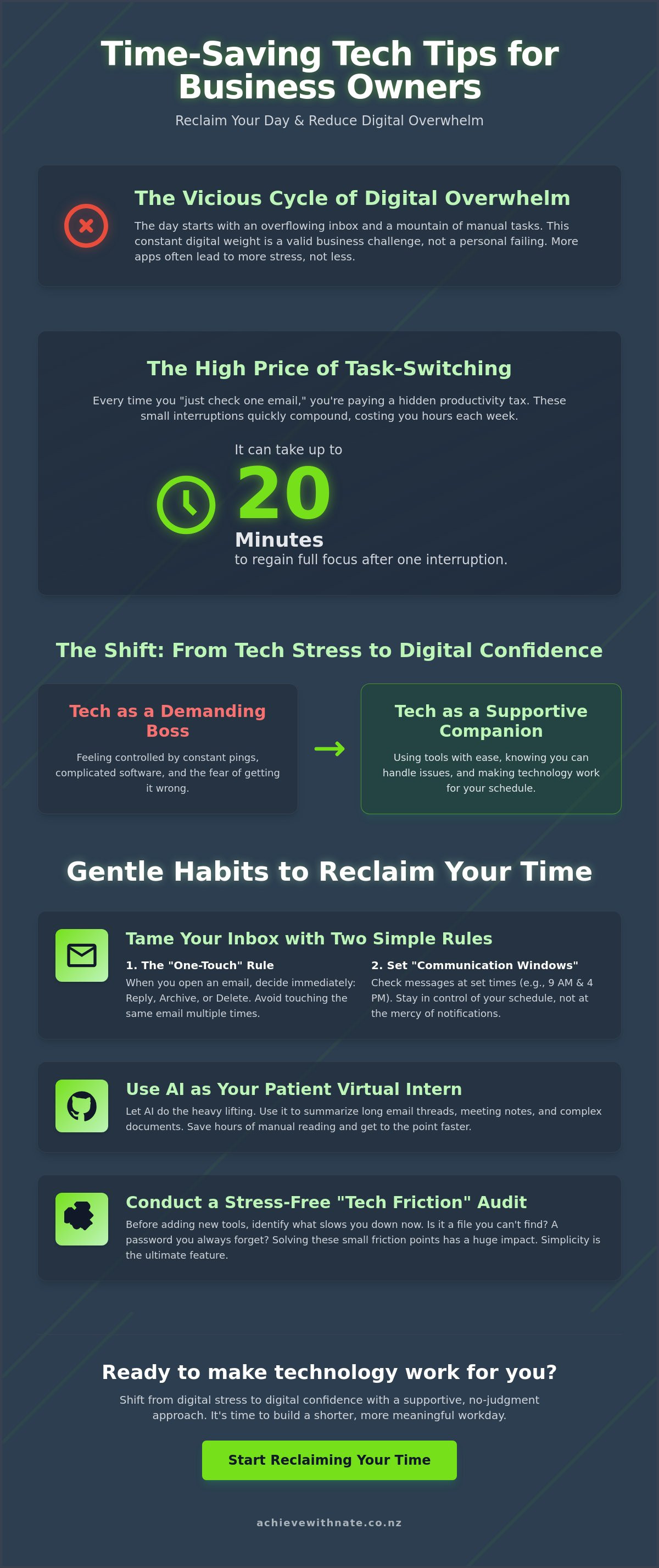
Many Kiwi business owners start their day feeling a heavy digital weight. You open your laptop and immediately feel behind. It is a common struggle. It's not because you aren't working hard enough. Digital overwhelm is a valid business challenge, not a personal failing. We often think adding more apps will solve the problem. But without a gentle approach, more apps just mean more pings and less time. Finding the right time-saving tech tips for business owners starts with changing your relationship with your devices. Your technology should be a supportive companion. It should help you breathe easier. It shouldn't be a demanding boss that shouts at you all day.
To better understand how simple changes can make a big difference, watch this helpful video:
The Hidden Cost of Task Switching in Small Business
Have you ever stopped a task to "just check one email"? Research suggests it can take up to 20 minutes to get your full focus back after a small interruption. For a small business owner, these lost minutes add up to hours every week. This is why basic time management principles are so hard to follow when your tech is messy. Poorly organized files and constant notifications cause mental fatigue. Identifying "Tech Friction" is the first step. Think about those moments where you sigh at your screen. Maybe it's a file you can't find or a login that won't work. In 2026, the best feature any tool can have is simplicity. You don't need the most powerful software. You need the one that lets you finish your work and go home.
Moving from Tech Stress to Digital Confidence
Digital confidence isn't about knowing every button on a screen. It's about being able to use your tools without that familiar feeling of fear. It is the ability to try something new and feel steady while doing it. You don't need a total digital overhaul to see results. In fact, trying to change everything at once usually leads to more stress. Small, incremental steps are much more effective. By mastering one small habit at a time, you build a foundation that lasts. True confidence comes from knowing you can handle a problem if it arises. If you feel stuck, a Digital Confidence Coach NZ can help you find your footing in a no-judgment zone. It is about making technology work for you, one gentle step at a time. Real results. Less stress.
Gentle Habits for Taming Your Inbox and Daily Clutter
Your inbox doesn't have to be a source of dread. For many Kiwi business owners, the morning starts with a quick glance at a screen filled with unread messages. It feels like a mountain you can never finish climbing. One of the most effective time-saving tech tips for business owners is the "One-Touch" rule. It's a simple, low-pressure habit. When you open an email, you make a decision right then. You either reply, archive, or delete it. By not touching the same email three or four times, you stop the cycle of indecision that drains your energy. It's about being kind to your future self by clearing the path now.
Another way to reclaim your peace is by setting "Communication Windows." You don't have to be at the mercy of every ping and buzz. Instead of reacting to notifications all day, try checking your messages at set times. Perhaps once in the morning and once before you finish for the day. This keeps you in the driver’s seat of your schedule. Creating a clean digital workspace is just as vital for your mental clarity as a tidy physical desk. When your screen is organized, your mind follows. You can find more helpful productivity tips for business owners that emphasize these steady, manageable changes to your daily routine.
Email Management That Actually Works for Kiwis
You don't need "Inbox Zero" to be successful. That's a high-pressure goal that often leads to more anxiety. Instead, focus on being in control. Use simple filters to tuck newsletters away into a separate folder so they don't clutter your client enquiries. You can also use "canned responses" for those questions you answer every single day. It isn't about being a robot. It's about having a thoughtful, pre-written note ready to go. This small step can save you hours of typing every week. If you feel like your current setup is working against you, a quick chat about Business Workflow Optimization might be the gentle nudge you need.
Digital Decluttering for Your Business Files
Finding a file shouldn't feel like a game of "search and pray." A 5-minute daily tidy-up of your desktop can work wonders. Simply move your stray downloads into organized folders before you close your laptop. Standardizing your file names is another great way to save time. Use a clear format, like "Project_Name_Date," so you and your team can find what you need instantly. It removes the friction from your workday. For a step-by-step guide on how to clean up your digital life without the stress, you can use this Digital Organization Coach NZ checklist. These small, incremental actions are the secret to a shorter, calmer workday. You've got this.
Using AI as Your Patient Virtual Assistant
The word "AI" can feel a bit overwhelming. You might see headlines about robots and feel like it belongs in a science fiction movie. Let's look at it differently. Think of AI as a patient, quiet intern sitting at the corner of your desk. It doesn't judge. It doesn't get bored. It's there to help you with the tasks that usually make you sigh. Using these time-saving tech tips for business owners isn't about becoming a software expert. It's about letting a tool do the repetitive work so you can be more human in your business. It's a gentle way to reclaim your afternoon.
Summarizing Meetings Without the Stress
We've all been in those 30-minute Zoom calls where we're so busy taking notes that we forget to actually listen. It is exhausting to try and catch every word. AI can change that for you. It can listen to the meeting and turn a long conversation into a simple, three-bullet action list. This lets you stay present with your clients or your team. You can stop worrying about missing a detail and actually look people in the eye. You can learn more about this in our guide on how to use AI to summarize meetings. It is a massive relief for your mental energy.
Using AI for summaries works well for more than just calls. You can use it to:
Turn a long, confusing email thread into a quick paragraph.
Identify exactly who promised to do what by when.
Keep a clear record of decisions without the frantic typing.
Drafting Content and Correspondence
Writer's block is a major time-waster. Staring at a blank screen while trying to write a social media post or a client letter is draining. AI is perfect for creating a "first version." You don't have to use exactly what it writes. Instead, use it to find the right words when you're feeling tired. It's like having someone hand you a rough draft that you can then polish. You can even set up simple prompts that help the AI learn your specific voice. This is a key part of AI training for small business New Zealand. It’s about getting the hard part done so you can finish your work faster. It's okay to ask for help. Even from a computer. These small steps are what lead to a much shorter workday.
How to Conduct a Stress-Free Technology Audit
When you feel overwhelmed, the temptation is to find a new app that promises to fix everything. It's a natural reaction. But often, adding more tools just adds more noise. Before you look for more time-saving tech tips for business owners, it's helpful to look at what you already have. Conducting a stress-free technology audit isn't about being an IT expert. It's about noticing where you feel "Tech Friction." These are the moments in your day where you find yourself sighing at the screen. Maybe it's a login that never works or a manual process that feels clunky. By identifying these points, you can clear the way for a smoother workday.
A simple way to start is with the "Keep, Tweak, Toss" framework. Look at each piece of software you use. If it helps you do your job well, keep it. If it’s helpful but frustrating, see if it can be tweaked. These time-saving tech tips for business owners are most effective when they simplify your life instead of adding to it. Often, tools like Xero and your CRM just need a little help talking to each other to save you hours of double-entry. If you haven't opened an app in three months, it's probably time to toss it. If this feels like a lot to handle alone, you might find a Digital Productivity Audit is the perfect way to get an expert's gentle eye on your systems.
Step-by-Step: The 15-Minute Tech Audit
You don't need a whole weekend for this. Set a timer for 15 minutes. It is a small window of time that can save you hours later. First, list every subscription you pay for. Are you actually using them? It’s okay to let go of things that no longer serve your business. Next, identify the one task that takes you the longest every week. Finally, ask yourself: "Is there a simpler way to do this?" Sometimes the best solution isn't a new app, but a better habit. This process is about making space for what truly matters.
Reclaiming Your Digital Life
Your business deserves your best energy. That energy is hard to find if you are always "on." Setting firm boundaries with your devices is a high-performance strategy, not a sign of weakness. Unplugging in the evening allows your mind to rest and reset. It makes you a more effective leader. For a step-by-step guide on finding this balance, check out this Personal Technology Audit NZ. It is a gentle checklist designed to help you reclaim your digital life without the stress. Taking these incremental, manageable actions is how you build a business that lasts. You don't have to do it all at once.
Finding Your Footing with One-on-One Digital Coaching
Sometimes the hardest part of finding time-saving tech tips for business owners isn't the technology itself. It is the feeling of being alone with a screen that won't do what you want. You might have tried watching YouTube tutorials to find answers. Often, those videos make tech anxiety worse instead of better. They move too fast. They use words you don't know. They can't hear your specific questions. One-on-one coaching creates a psychological safe space. It is a no-judgment zone where you can ask anything. You deserve a supportive companion who understands the unique pressure of running a business in New Zealand.
Personalized coaching is very different from generic IT support. An IT person might fix a broken link, but they don't always show you how to feel steady using it yourself. Our philosophy at Achieve With Nate is rooted in patience. We believe in moving at your own pace. It is about the person behind the screen, not just the software. You can learn more about this patient approach on our About page. It’s a human-centered way to master your digital world without the typical corporate stress.
Tailored Solutions for Kiwi Small Businesses
Every business is different. Your hurdles might be an overflowing inbox or a fear of using the AI tools we discussed earlier. We focus on exactly what is slowing you down. Think of it like having a "tech friend" to call when things get confusing. We help you build a workflow that fits your unique personality. You don't have to change who you are to be efficient. We just help you find a smoother path. It is about creating a workspace that feels like home, not a source of frustration.
Taking the First Manageable Step
You don't need to be a "tech person" to have a tech-efficient business. That is a common myth. Many of our most successful learners started with a lot of digital hesitation. The key is to start today with one small change. Maybe it's just one of the time-saving tech tips for business owners we've shared here. One small win leads to another. Before you know it, you'll have the digital confidence to reclaim your day. If you're ready to find your footing, we are here to walk with you. You can start by sharing your story through an expression of interest. Remember, taking incremental, manageable actions is the most powerful thing you can do for your business and your well-being. You've got this.
Reclaim Your Peace of Mind
Technology should be a tool that helps you breathe easier, not a source of constant frustration. By taming your inbox and using AI as a patient helper, you have already started to flip the script. These time-saving tech tips for business owners work best when they are applied with kindness toward yourself. You don't need to master everything at once. You just need to find a rhythm that feels right for you and your unique Kiwi business. It is about making space for the things that truly matter in your life.
If you still feel a bit stuck, you don't have to figure it out alone. We provide a no-judgment learning environment focused on practical NZ business workflows. Whether you need personalized one-on-one support or a simple digital audit, help is always available. Ready to simplify your tech? Book a gentle chat with Nate today. We are here to act as your supportive companion as you build your digital confidence. Remember, the most important thing is to keep taking incremental, manageable actions. You are doing a great job, and a calmer workday is well within your reach.
Frequently Asked Questions
What are the best time-saving tech tips for business owners on a budget?
The most effective time-saving tech tips for business owners often involve using free, built-in features you already own. You don't need to buy expensive software to see a change. Try setting up email templates in your current inbox or learning three basic keyboard shortcuts for your most-used program. These tiny, zero-cost habits remove the friction from your day and help you finish your admin tasks much faster than before.
How do I know if I need a digital productivity audit?
You might need an audit if you feel a sense of dread every time you open your laptop. It is a clear sign when you notice you are paying for several monthly subscriptions but only actually using one or two of them. An audit helps you identify where your current tools are failing you. It provides a clear, stress-free path to simplify your digital life so you can focus on your actual work.
Is AI safe to use for my small business in New Zealand?
Yes, AI is safe to use as long as you follow basic privacy steps and keep sensitive client details protected. Many Kiwi business owners use it as a patient intern to summarize long meetings or draft basic letters. It is important to treat it as a helpful assistant rather than a place to store private passwords. We help you set up these tools in a way that feels secure and manageable for your peace of mind.
Can I really save time by using fewer tools instead of more?
How long does it take to see results from digital coaching?
Most of our learners feel a significant sense of relief after their very first session. While mastering a complex new system takes time, we focus on achieving small wins immediately. Our philosophy is rooted in taking incremental, manageable actions that fit into your busy schedule. This ensures you start reclaiming your time within the first week without feeling overwhelmed by a total digital overhaul. It is a steady, supportive journey.
What is the most common time-waster for small business owners?
The biggest time-waster is often "task switching," which happens when you jump between emails, client work, and phone notifications. Research shows it can take your brain up to 20 minutes to fully refocus after a small interruption. This is why many time-saving tech tips for business owners focus on creating "communication windows." By checking your messages at set times, you protect your deep focus and get your work done much sooner.
Do I need to be "tech-savvy" to use automation tools?
No, you definitely don't need to be a technical expert to start making your computer do the boring work for you. Many modern tools use a simple "if this happens, then do that" approach that is very easy to learn. We provide a no-judgment zone where you can learn these skills at your own pace. It isn't about being a genius. It's about finding the right buttons to press to make your life easier.
How can I stop my phone from being a distraction during work hours?
Try setting firm boundaries by using "Do Not Disturb" modes or moving distracting social media apps off your home screen. Creating physical distance by putting your phone in another room during deep work can also work wonders. It is a gentle way to protect your mental energy and ensure you aren't at the mercy of every buzz. These small changes help you stay in control of your day rather than reacting to notifications.

Comments