


What Does 'Digital' Actually Mean? A Calm Guide for Everyday Kiwis in 2026

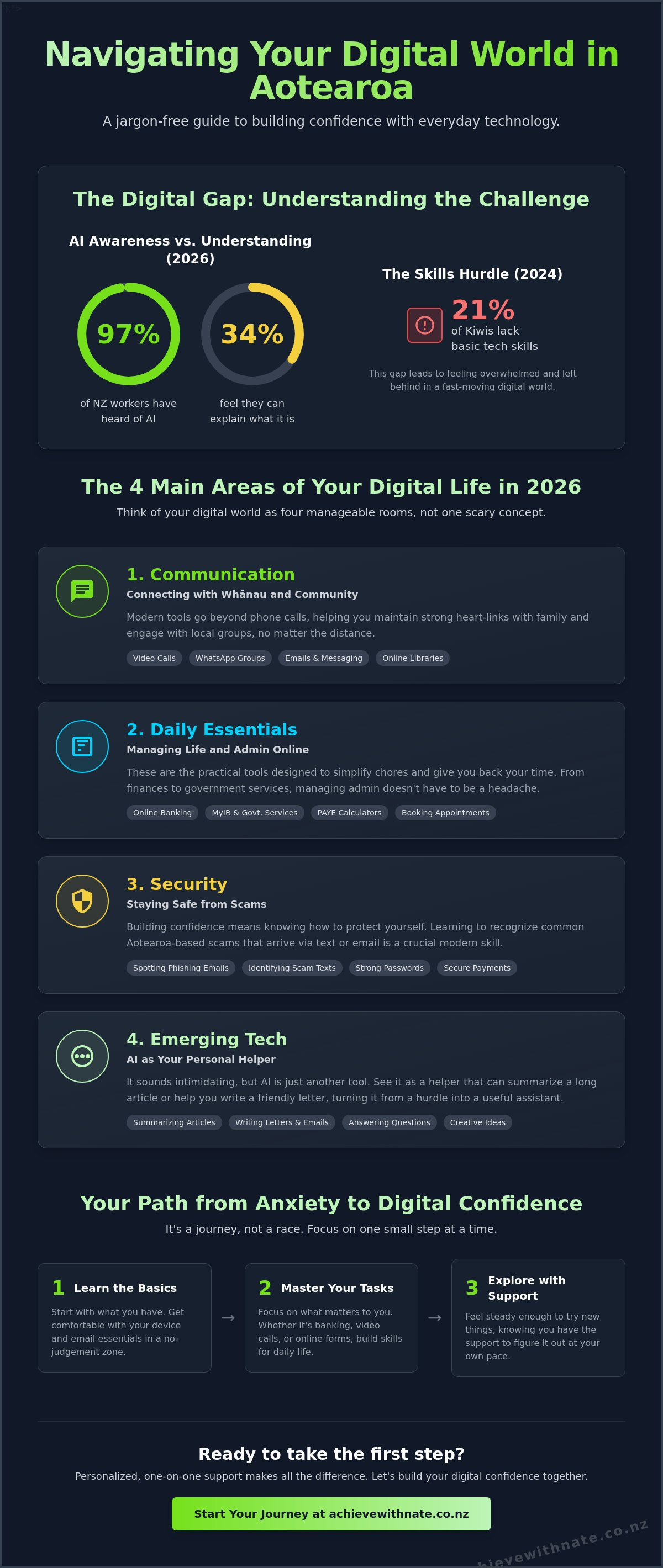
Did you know that in 2026, 97% of New Zealand workers have heard of AI, yet only 34% feel they can actually explain what it is? It's a gap that leaves many everyday Kiwis feeling like they're standing on the sidelines while the digital world moves at double speed. With 21% of us still lacking basic tech skills as of 2024, it's no wonder that many people feel more confused than capable.
You likely feel that same sense of overwhelm when you hear talk about "the cloud" or see updates on the Digital Identity Services Trust Framework. It's natural to worry about making a mistake or falling for a scam when the rules seem to change every week. I understand that pressure, and I'm here to tell you that you don't have to be a tech expert to thrive in Aotearoa today.
This guide is your calm, jargon-free path to understanding the technology around you. I promise to show you that these are just simple tools meant to support your life, not complicate it. We'll break down the most common terms and give you the practical steps to use your devices with confidence and ease, one small step at a time.
Key Takeaways
Learn a simple, jargon-free way to think about the digital world that removes the mystery and stress from everyday tech.
Discover how to manage your daily essentials with ease, from video calls with family to using online tools for banking and health.
Follow a practical roadmap that builds on the skills you already have, helping you feel more capable with your current devices.
Identify the specific "tech hurdles" holding you back and see why learning at your own pace is the best way to move forward.
Table of Contents
Why the Word 'Digital' Feels So Overwhelming (and How to Change That)
The word "digital" often sounds like something out of a science fiction movie. In reality, it is just a simple way of describing how we do things using electronics and the internet. Think of it as a set of modern tools designed to make your life a bit easier. Digital media, for example, is just a term for the photos, videos, and messages we share through our screens every day. It's not magic; it is just communication in a different format.
Feeling overwhelmed by these tools is a completely natural response to how fast things change in Aotearoa. If you feel like the world is moving too quickly, you aren't alone. It is okay to feel a bit lost when your banking app changes or a new "AI" tool pops up. Within the Achieve With Nate Movement, I believe technology should always serve you. It shouldn't be another source of stress in your busy life. True confidence isn't about knowing every single technical detail. It's about being willing to try something new, knowing you have the support to figure it out.
The Myth of the 'Tech Expert'
You don't need a computer science degree to master your smartphone or manage your emails. Many people think they are "too old" or "not tech-savvy enough," but those are just labels that hold you back. Being capable with technology doesn't mean knowing everything. It means knowing how to do the things that matter to you. We focus on a human-first approach, taking things one small step at a time. No jargon, no pressure.
From Anxiety to Digital Confidence
The goal for every Kiwi learner is what I call "Digital Confidence." This isn't about becoming a coding genius. It's about feeling steady enough to use your devices to stay connected with family or handle your daily admin without your heart racing. Sometimes, a bit of extra support makes all the difference. Working with a digital confidence coach NZ provides a safe, no-judgement zone where you can ask the "silly" questions and find your footing at your own pace.
The 4 Main Areas of Your Digital Life in 2026
Instead of a single scary concept, think of your digital life as four manageable rooms. Each room holds different tools that help you stay connected, informed, and secure. Research into the Impact of Digital Life shows that while tech can feel heavy, it also offers incredible ways to bridge distances and simplify chores. It is all about making the tools work for your specific needs.
First, there is communication. We've moved past simple phone calls. Now, we use video chats to see grandchildren's faces or WhatsApp groups to organize the local bowling club. Second, we have daily essentials. This includes everything from checking your bank balance to using a paye calculator nz to see exactly what stays in your pocket after tax. These tools are there to give you back your time.
Security is the third area. In 2026, staying safe means recognizing common Aotearoa-based scams that arrive via text or email. Finally, there is emerging tech like AI. It sounds intimidating, but it is really just a helper. It can summarize a long news article or help you write a friendly letter when you're struggling for words. When you see it as a helper rather than a hurdle, the digital world feels much smaller.
Connecting with Whānau and Community
For many nz seniors, the internet is a lifeline to family across the country or overseas. It is also a gate to local treasures. You can browse the shelves of Auckland or Christchurch libraries from your living room, borrowing audiobooks or researching local history without leaving your chair. It is about keeping those heart-links strong.
Managing Life and Admin Online
Admin doesn't have to be a headache. Navigating the NZ Companies Office or checking your details on MyIR becomes much easier when you understand the layout of the website. If you feel stuck, starting with device and email basics training provides the foundation you need. If you're feeling ready to take that first step, I'm always happy to have a quick chat about where to start.
Building Your Digital Confidence: A Practical Roadmap
Moving from understanding to doing doesn't have to be a giant leap. It is about building on the skills you already use every day. If you can send a text or take a photo of the grandkids, you already have a foundation. The key to growing your digital confidence is identifying your specific hurdles. Is it the fear of clicking the wrong button? Or perhaps the frustration of a password that just won't work? Once you name the stress, we can tackle it together.
Many people try group classes, but these often move too fast. You might feel left behind while the instructor talks to someone else. One-on-one help is different. It provides a "no jargon, no pressure" environment where the focus is entirely on your pace. You get to practice in a safe space where mistakes are just part of the learning process. It is the most effective way to turn confusion into capability.
Step 1: Get Comfortable with Your Device
Your smartphone or tablet is a powerful tool, but it should feel like a friendly one. Simple habits, like organizing your most-used apps on the front screen, can make a huge difference. In 2026, you might also need to access specific services like your NZQA login for past records or other official certificates. These are just files stored on your device. We can walk through how to find, open, and save them until the process feels like second nature.
Step 2: Master the Basics of Safety
Safety is a top priority for digital learners in Aotearoa. New Zealand's Cyber Security Strategy 2026–2030 highlights that scams are becoming more sophisticated. You might receive a text that looks exactly like it is from NZ Post or your bank. Learning to spot the tiny red flags, like a strange web link or an urgent tone, is a skill anyone can master. A quick check-in with a coach can turn a moment of panic into a moment of "I've got this."
If you're ready to clear those hurdles and feel more capable, let's book a one-on-one coaching session to get you started.
How Personalized Support Makes the Difference
Learning something new is always easier when you have a friend by your side. While group classes or online videos can be helpful, they often lack the personal touch that everyday Kiwis need. You might have a specific question about your own phone or a particular email that looks odd. In a crowded room, it is easy to feel like you are being a bother or simply falling behind. Hourly coaching changes that dynamic entirely. It puts you in the driver's seat, allowing us to solve your unique problems at a pace that feels right for you.
The shift from feeling "I just can't do this" to "I've actually got this" is a powerful moment. It usually happens when the jargon is stripped away and replaced with a simple explanation. My goal is to act as a bridge across the digital divide, using real Kiwi heart and a patient approach. We don't just look at the screen; we look at how these tools can make your life better. Whether it is setting up a video call or organizing your files, we take it one small step at a time until you feel truly capable.
Is a Digital Productivity Audit Right for You?
For those running a small business or managing a busy household, the digital world can quickly turn into a source of chaos. You might have files scattered across different devices or a calendar that feels impossible to manage. This is where digital productivity audits can make a massive difference. We look at your current systems and find simple ways to save you time. It is about moving from a state of constant "tech stress" to a calm, organized system that actually works for you.
Taking the Next Step with a Free Clarity Call
If you're still feeling a bit unsure about where to start, I invite you to reach out for a free clarity call. It is a low-stakes, friendly conversation where we can talk about what is causing you the most stress. There is absolutely no jargon and no pressure to sign up for anything. It is simply a chance for us to connect and see how I can help you find your footing. You deserve to feel confident with your technology, and I'm here to help you get there, one small step at a time.
Take Your Next Step Toward Tech Confidence
Technology doesn't have to be a source of anxiety. We have explored how the digital world is really just a collection of simple tools designed to help you stay connected and organized. You have seen that you don't need a degree to master your smartphone or keep your personal information safe from local scams. Whether it is managing your banking or finally understanding how AI can help with a letter, these are skills you can learn at your own pace.
I provide personalized one-on-one coaching across Aotearoa with real Kiwi heart. My sessions are a no jargon, no pressure, and no judgement zone. We focus on exactly what you need to know, ensuring you feel seen and supported every step of the way. You don't have to figure this out alone. My goal is to make sure you feel steady and capable in this fast-moving world.
If you're ready to move from feeling overwhelmed to feeling capable, I'm here to help. Book a Free Clarity Call with Nate today and let's have a friendly chat about your goals. We'll take things one small step at a time.
Frequently Asked Questions
What does 'digital literacy' actually mean for me?
Digital literacy is simply the ability to use your phone, tablet, or computer to do the things you need for daily life. It means feeling okay with apps and websites, like checking your bank balance or sending a photo to whānau. Since 21% of New Zealanders lacked these basic skills in 2024, it's a journey many of us are still on together. It is about being capable, not being an expert.
Is it too late for me to learn how to use modern technology?
It is absolutely never too late to learn. Modern devices are much easier to use now than they were five years ago. Most people find that once they have a patient guide to walk them through the basics, they pick things up faster than they ever expected. It is about your willingness to try a new way of doing things, not your age or your past experience.
How can I stay safe from online scams in New Zealand?
You can stay safe by taking a "stop and think" approach to every message you receive. If a text or email asks for money or your bank details urgently, it is almost certainly a scam. The New Zealand Cyber Security Strategy 2026–2030 highlights that being cautious is your best defense. Always check the official website of a company directly instead of clicking on any links sent in a random message.
What is the best way to learn digital skills if I feel overwhelmed?
The best way to learn is with a mentor who offers a "no jargon, no pressure" environment. Personalized one-on-one coaching allows you to ask the questions that matter to you without feeling rushed or judged. This approach helps you build digital skills in a way that feels natural and supportive. You get to focus on your specific hurdles and move at a pace that feels comfortable for you.
Do I need a special computer to start building my digital confidence?
You don't need any expensive or high-tech equipment to get started. Most everyday tasks can be handled on the smartphone or tablet you already own. Building your digital confidence is about mastering the tools you already have in your hand rather than buying something new. I focus on helping you use your current devices more effectively so you can feel capable without any extra costs.


Comments