


Yahoo Mail: A Simple Guide to Staying Safe and Connected in 2026

A digital inbox should provide clarity, not clutter. You likely feel the weight of an overflowing yahoo mail account or the quiet anxiety that your personal data is vulnerable to a breach. It's exhausting to fight through hundreds of marketing emails just to find one message from a loved one. Recent data shows that many New Zealanders now spend over 15 hours every week managing digital communications, which is time that belongs to your real life, not a screen.
You deserve a simpler way to stay connected. By approaching your email with intention, you can turn a chaotic tool into a streamlined system. I've spent years testing these methods to ensure they're realistic and sustainable for everyone. You don't need to be a tech expert to achieve a clean slate and regain your focus.
This guide will show you how to eliminate spam, master the 2026 interface updates, and lock down your security. You'll learn to create a quiet digital space that protects your privacy and keeps you close to your family. Let's focus on what's essential and subtract the rest.
Key Takeaways
Understand why yahoo mail remains a trusted tool for New Zealanders and how its storage supports a sustainable digital archive.
Master a simple security checklist to protect your account and provide genuine peace of mind.
Apply the principle of subtraction to your inbox to clear digital clutter and regain your focus.
Build lasting confidence by learning to make your technology serve your intentional goals.
Table of Contents What is Yahoo Mail and Why Does it Still Matter in 2026? Your Essential Yahoo Mail Security and Setup Checklist Simplifying Your Inbox: A Systems-Based Approach Building Long-Term Digital Confidence with Your Tools
What is Yahoo Mail and Why Does it Still Matter in 2026?
Yahoo Mail is a digital communication tool designed primarily for personal use. It remains a veteran web-based email service used by millions of Kiwis across the country. Many users in New Zealand have maintained their accounts for over two decades. The History of Yahoo Mail shows a platform that has survived many shifts in the digital landscape. It still matters in 2026 because it offers a generous 1TB of storage for free. This allows you to keep a lifetime of records and memories without the constant worry of running out of space.
Modern email should be a bridge to people. It shouldn't be a barrier of technical frustration. When a tool is used with intention, it creates more room for focus in your daily life. Using yahoo mail effectively means turning a noisy inbox into a quiet, organized system that supports your personal goals.
The Evolution of the Yahoo Interface
The interface has moved toward a more feature-rich design over the years. This can often feel noisy or cluttered compared to the simpler versions of the past. Many people feel overwhelmed by the current layout and the frequency of advertisements. It's important to approach your inbox with a minimalist mindset. You don't need to use every feature provided. By focusing only on the essential tools, you can reduce digital friction and maintain your peace of mind.
Web Mail vs. Mobile App: Which is Right for You?
Deciding how to access your messages depends on your daily rhythm and digital confidence. Using a web browser on a laptop provides a wide, stable view of your entire account. This is helpful for deep cleaning your folders or managing complex settings. The mobile app offers a more streamlined experience. It simplifies notifications so you only see what is urgent. Consider these points when choosing your platform:
Web Browser: Best for intentional sessions where you need to organize or search through old archives.
Mobile App: Best for staying connected on the go and receiving immediate updates without sitting at a desk.
Choose the platform that fits your lifestyle. A system only works if it feels sustainable and clear. Email is a tool for your benefit, and it should always serve your need for clarity and connection.
Your Essential Yahoo Mail Security and Setup Checklist
Security is the foundation of digital peace of mind. Many Kiwis worry about hacking. Simple systems prevent most issues. You gain clarity when you know exactly how your account is protected. Security is a habit, not a one-time setting.
Digital safety requires an intentional approach. It is about building a sustainable environment for your communication. When your tools are secure, you can focus on the work that truly matters. This discipline allows you to move through the digital world with confidence.
Strengthening Your Account Access
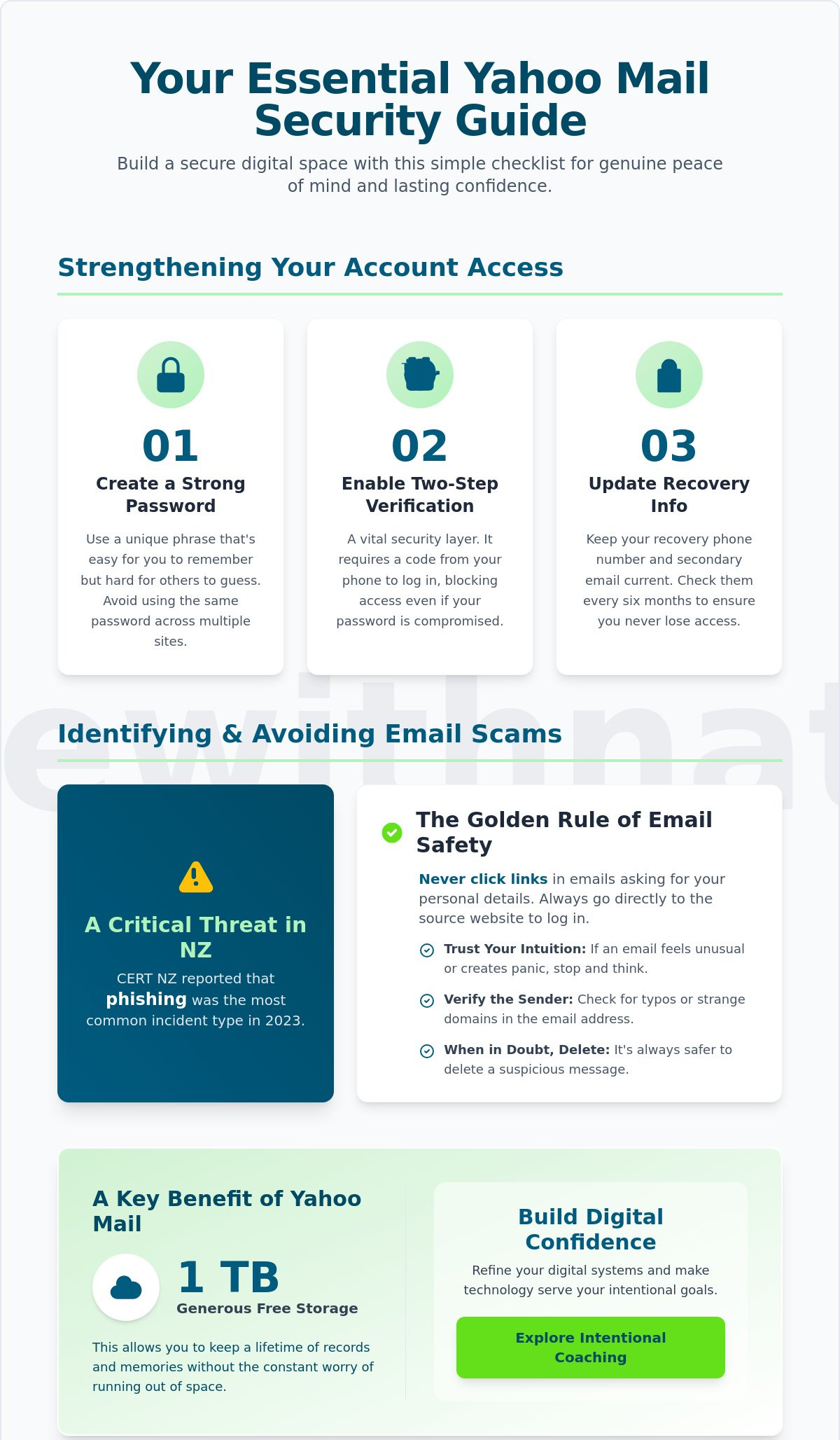
Step 1: Create a strong, intentional password. Avoid using the same password for multiple sites. A unique phrase is often easier to remember and harder to crack. This simple choice protects your personal data from common brute-force attacks.
Step 2: Enable Two-Step Verification. This is a vital layer of protection for your yahoo mail account. It requires a code from your phone to log in. Even if someone finds your password, they cannot access your inbox without that second step. It's a small barrier that provides massive security.
Step 3: Update your recovery phone number and secondary email address. These details ensure you never lose access to your digital life. Check these settings every six months to keep them current. This habit prevents significant stress during a potential lockout.
Identifying and Avoiding Email Scams
Phishing emails often pretend to be from Yahoo or a New Zealand bank. They use fake urgency to make you act without thinking. The golden rule is to never click links in emails that ask for your password or personal details. Always go directly to the source website.
Trust your intuition. If an email feels unusual or creates a sense of panic, stop. Following expert advice for avoiding phishing scams will help you maintain control. In 2023, CERT NZ reported that phishing was the most common incident type reported by New Zealanders.
Verify the sender's address carefully. Look for small typos or strange domains. If you're unsure, delete the message. This disciplined approach keeps your digital space clean and safe. If you want to refine your digital systems further, you might consider my intentional coaching services to help streamline your life.
Simplifying Your Inbox: A Systems-Based Approach
A cluttered inbox often leads to a cluttered mind. You feel the weight of every unread message. Digital overwhelm is a silent drain on your focus and energy. In a world that demands your constant attention, your inbox should be a tool for progress, not a source of stress.
Subtraction is often the best solution for digital overwhelm. You don't need more complex filing systems. You need fewer distractions. Intentional living means only keeping what adds value to your life. You can reclaim your time by managing how you interact with your mail. It's about taking back control of your morning and your peace of mind.
Dealing with Unwanted Digital Noise
The average office worker receives over 120 emails every day. This volume is unsustainable for a focused life. Use the "Unsubscribe" tool in yahoo mail to remove yourself from marketing lists that no longer serve you. It's a simple act of digital hygiene that pays dividends in mental clarity.
If a sender persists after you've unsubscribed, mark the message as spam. This trains the system to protect your space. Following email security best practices ensures you identify and block malicious senders before they reach your primary view. Set firm boundaries on when you check your messages. Try checking your inbox only twice a day, perhaps at 10:00 am and 3:00 pm. This prevents a single "ping" from derailing your entire afternoon.
Organizing for Clarity and Freedom
Create simple folders for documents that require action or record-keeping. You might have one for IRD correspondence, another for your Spark or Mercury bills, and one for travel bookings. Keep these categories broad to avoid over-complicating the system. The goal is to find what you need in under ten seconds.
Use the "Archive" function for everything else. This keeps your main view clear without deleting important memories or records. A minimalist inbox supports your overall digital wellbeing. When you open your yahoo mail, you should see a blank space or a short list of meaningful items. This clarity allows you to spend your energy on things that actually matter.
If you are ready to design a life with more freedom and less friction, join my community for practical systems delivered to your inbox.
Building Long-Term Digital Confidence with Your Tools
Technology should serve your life. It shouldn't dictate your mood or steal your time. When you use yahoo mail, it should feel like a reliable utility rather than a source of stress. Confidence comes from understanding the "why" behind the "how." Once you grasp the logic of a system, the fear of making a mistake disappears.
This sense of agency is a choice. You can decide to move from a place of reaction to a place of intention. Digital tools are just systems. Like any system, they require a small amount of maintenance and understanding to stay sustainable. Taking ownership of your digital space is the first step toward a more peaceful, organized life.
From Confusion to Capability
Many Kiwis struggle with self-teaching. It is a slow and often lonely process. You might spend an entire afternoon trying to solve a single login issue or security setting. This isn't the most efficient way to spend your time. Having a trusted guide to walk you through new systems changes the experience entirely. It turns a frustrating chore into a useful skill.
Digital confidence has a direct impact on your relationships. It allows you to stay connected with whānau across the world. When you aren't fighting with your computer, you have more energy for the people who matter. Mastery isn't about becoming a technical expert. It's about being able to send a photo or a message without feeling overwhelmed. It is about making sure your tools work for you, not against you.
How Coaching Helps You Master Your Digital Life
You don't have to figure this out alone. I provide digital confidence coaching specifically for everyday Kiwis. We work together in a calm environment. There is no pressure to move fast or learn things you don't need. We focus on the specific tasks you need to accomplish, like keeping your yahoo mail secure and your inbox clear of clutter.
Learn at your own pace in a non-judgmental setting.
Build simple systems that simplify your daily routine.
Gain the clarity needed to handle future technology updates with ease.
Ready to take the next step? You can join my community for more simple tech tips and support. Moving toward digital mastery is a quiet, powerful act of self-reliance. It ensures your tools remain exactly what they were meant to be: helpful additions to a well-lived life.
Take Control of Your Digital Space
Managing your online life doesn't need to feel like a constant battle. By applying intentional systems to your yahoo mail account, you can transform a cluttered inbox into a quiet space for focus. We've covered the essential security steps and the power of a minimalist setup. These small, consistent actions build the foundation for long-term digital peace.
Many Kiwis feel overwhelmed by the sheer volume of notifications and emails they receive daily. Real freedom comes from mastering your tools rather than letting them manage you. You deserve a digital environment that supports your lifestyle instead of draining your energy. It's about subtraction, not addition. Removing the friction in your digital habits allows you to reclaim your time for what truly matters. In 2026, clarity is your most valuable asset.
If you're ready to move past the noise, I can help you build sustainable systems tailored to your needs. My approach is calm, grounded, and designed specifically for everyday New Zealanders. We'll work together to create a setup that feels clear and manageable. Book a Digital Confidence Session with Nate to start your journey toward a more intentional digital life.
You have the ability to design a simpler future. It starts with one small, deliberate step today.
Frequently Asked Questions
How do I find the Yahoo Mail login page safely?
You can find the official yahoo mail login page by typing login.yahoo.com directly into your browser address bar. This simple habit protects you from phishing sites that mimic the real page to steal your data. Always look for the padlock icon next to the URL to confirm a secure connection.
What should I do if I forget my Yahoo Mail password?
Visit the Yahoo Sign-in Helper page if you forget your password. You'll need your recovery mobile number or an alternative email address that you previously linked to your account. This system ensures you regain access safely while maintaining the integrity of your personal information.
Can I use Yahoo Mail for free in New Zealand?
Yes, a standard yahoo mail account is free for everyone in New Zealand. It includes 1TB of storage, which is enough to hold roughly 500,000 photos. This allows you to manage your digital life without worrying about monthly subscription fees for basic storage.
How do I stop getting so much spam in my Yahoo inbox?
Click the Unsubscribe button at the top of your inbox to remove yourself from unwanted mailing lists. Yahoo filters block billions of spam messages every day, but some still slip through. You can manually mark these as spam to help the system learn your preferences and keep your digital space quiet.
Is Yahoo Mail secure enough for my personal banking communications?
Yahoo Mail is secure for general use, but you should enable Two-Step Verification for any financial conversations. This adds a second layer of security beyond just your password. For maximum safety, use your New Zealand bank's official app for high-stakes transactions and private data.
What is the difference between Yahoo Mail and Gmail?
The primary difference is the storage limit. Yahoo Mail offers 1,000GB of free space, while Gmail provides 15GB shared across all Google services. Your choice should align with your needs for either massive storage or integration with other productivity apps.


Comments