


Digital Confidence for NZ Seniors: Staying Connected and Secure in Aotearoa

Updated: Apr 25
Last Tuesday, a grandmother in Christchurch sat staring at her new smartphone, worried that one wrong tap might "break" the device or invite a scammer into her life. It's a feeling many nz seniors share; that nagging sense that the digital world is moving a bit too fast for comfort. According to the 2023 World Internet Project New Zealand report, while internet use is high, a significant gap remains in how confident older Kiwis feel when managing complex tasks online.
You're right to feel a bit overwhelmed. With banks closing physical branches and essential services like MyMSD moving to digital-first models, it can feel like you've been left behind without a manual. This guide is here to help you build your digital confidence so you can use your tablet or phone with a sense of calm. You'll discover how to protect yourself from online threats and stay connected with your whānau through simple, stress-free steps. We'll walk you through navigating local sites like Realestate.co.nz and making video calls to the grandkids without the technical headache. It's all about taking things one small step at a time, with no jargon and no pressure.
Key Takeaways
Learn to navigate digital-first services like banking and health with calm, steady confidence.
Unlock the value of essential Kiwi apps and local digital library services to stay connected with your community and whānau.
Master a simple "Red Flag" checklist to spot scams and keep your personal information safe in Aotearoa.
Discover how nz seniors can overcome tech anxiety using a gentle, jargon-free approach that puts people first.
Explore how personalized, one-on-one coaching helps you tackle specific tech hurdles one small, stress-free step at a time.
Table of Contents Navigating Life as a Senior in Digital New Zealand Essential Digital Skills for Everyday Kiwi Life Staying Safe Online: Protecting Your Identity and Peace of Mind Overcoming Tech Anxiety: Why It’s Never Too Late to Learn Personalized Support for Your Digital Journey in New Zealand
Navigating Life as a Senior in Digital New Zealand
Being a digitally confident senior in 2026 isn't about understanding how a computer is built. It's about feeling calm and capable when you pick up your tablet or phone. It means knowing you can handle your business without feeling a knot in your stomach. In Aotearoa, the shift to "digital-first" services is no longer a prediction; it's our reality. From managing your health appointments through My-Health portals to checking your tax status with IRD, the world has moved online. This change can feel fast, but it's designed to give you more control over your time.
Staying connected is a vital part of your mental well-being and independence. When you can navigate the web, you aren't just "using tech." You're making sure you can talk to your doctor, manage your own money, and stay involved in your community. As Internet access in New Zealand has become a basic part of our infrastructure, it has opened doors for everyday Kiwis to live more flexible lives. We believe in taking things one small step at a time to keep that feeling of overwhelm away.
To better understand how these skills are being shared, watch this helpful video:
The Digital Landscape for Kiwis Over 65
The world looks very different today than it did when the SuperGold card was first introduced in August 1992. Back then, "getting online" wasn't even on the radar for most nz seniors. Now, it's how we see the faces of whānau living in Perth or London. While it's tempting to "just ask the grandkids" when you get stuck, that often doesn't help you learn. They tend to click things so fast that you're left more confused than before. True confidence comes from knowing how to do it yourself, at your own pace, without the rush.
Digital Confidence vs. Technical Expertise
You don't need to be a "techie" to thrive today. You don't need to know what a processor does or how coding works. Instead, focus on the practical outcomes that matter to your life. This might mean booking a weekend trip to Napier, reading the latest news on Stuff, or sending a photo to a friend. Digital confidence is a tool for freedom that lets you live life on your own terms. It's about the result, not the jargon. By focusing on what you want to achieve, the technology starts to feel like a friendly helper rather than a hurdle. No jargon, no pressure; just one small step at a time.
Essential Digital Skills for Everyday Kiwi Life
Auckland and Christchurch libraries have incredible digital collections that are free to use. You can access thousands of e-books and magazines with just your library card number. This means you can read the latest New Zealand Woman’s Weekly or a new thriller from your own lounge. It is about staying connected to your community in a way that feels simple and stress-free.
Mastering Your Devices and Email
Many everyday Kiwis find that a tablet or smartphone feels more natural than a bulky desktop computer. These devices use touch, which often feels more intuitive and less clinical. A big part of feeling steady online is having a tidy, organized inbox. Your email acts as a safe central hub for your records. It is where you will find updates about your NZ Super or reminders for health appointments. If you feel a bit shaky with the setup, looking into device and email basics training can help clear the fog. A calm inbox leads to a calm mind. It keeps your important papers organized without the clutter of physical mail.
Connecting with Local NZ Services
Local resources are just a few clicks away once you know where to look. You might need to check the NZ Companies Office for a local business or use a council portal to pay your rates. Understanding how to use a basic login, like for MyMSD or NZQA, gives you back your independence. You don't have to wait on hold for hours when you can find the answer yourself.
Map apps are another wonderful tool for nz seniors. They help you find local "Senior Advantage" groups or community centres nearby. You can see exactly which bus to take, how long the walk is, or where the closest parking is. These apps even show you photos of the building so you know exactly what to look for when you arrive. Taking things one small step at a time makes these tools feel like helpful friends. If you ever feel stuck, a Free Clarity Call is a great way to find your feet and build your Digital Confidence.
Staying Safe Online: Protecting Your Identity and Peace of Mind
Many nz seniors tell me that the biggest thing holding them back is the fear of being scammed or having their identity stolen. It is a valid concern. Feeling safe is the absolute foundation of your digital confidence. When you know how to protect your identity, the internet stops feeling like a minefield and starts feeling like a tool you control. The goal isn't to become a computer expert. It's about building a few simple habits that keep your private life private.
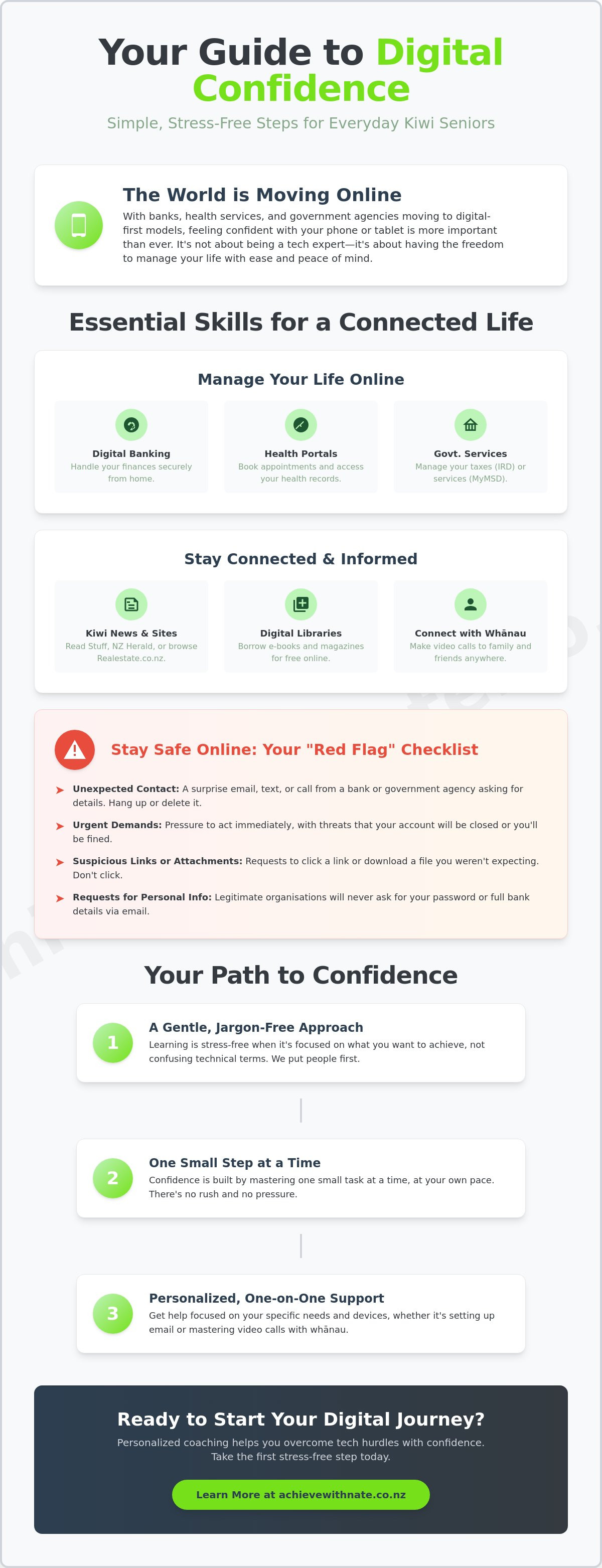
Security is mostly about awareness, not buying complex or expensive software. Think of it like locking your front door; it’s a simple action that provides immense peace of mind. Here is a quick "Red Flag" checklist to help you spot trouble before it starts:
The Rush: Messages that create a sense of panic or tell you to act "immediately" are usually fakes.
The Link: Hover your mouse over a link (or look closely on your phone) to see if the address looks strange.
The Ask: Any message asking for your PIN, bank password, or credit card details via a link is a scam.
The "Refund": Unexpected emails about a tax refund or a prize you didn't enter are almost always too good to be true.
Common Scams Targeting NZ Seniors
Scammers often pretend to be brands we trust in Aotearoa, like NZ Post or Inland Revenue (IRD). You might get a text saying a parcel is held for a small fee, or an email about a "tax refund" waiting for you. If you aren't expecting it, don't click it. If you do happen to click a link or share a detail, please remember my "No Judgment" rule. It happens to the best of us. Organizations like Netsafe are there to help you fix things without making you feel silly. Genuine digital inclusion for older people depends on having this kind of support when things go wrong.
Practical Security Habits for Retirees
One golden rule for nz seniors is to never share your bank password over the phone. Even if the person says they are from "tech support" or your bank's fraud team, they don't need your password to help you. To make things even safer, try using two-factor authentication. This sounds like jargon, but it just means your phone gets a quick text code to prove it's really you logging in. It's a simple second step that acts like a deadbolt on your digital door. We can take these things one small step at a time. No jargon, no pressure; just simple habits to keep you capable and secure.
Overcoming Tech Anxiety: Why It’s Never Too Late to Learn
It's completely normal to feel a bit of a sting when a new update changes how your phone looks or when a simple task suddenly requires a login you don't remember. Tech moves at a breakneck speed. If you feel overwhelmed, you aren't alone. Many nz seniors and everyday Kiwis tell us they feel like the digital world wasn't built for them. It's frustrating. It's okay to admit that it feels "too hard" sometimes. Your feelings are valid, but they don't have to be your final destination.
The secret to moving forward isn't about working harder or "getting smarter." It's about an empathy-first approach. Learning works best when it's built on a foundation of patience and kindness. While group classes are great for some, they often move at the speed of the fastest person in the room. This leaves others feeling left behind and discouraged. One-on-one help is different. It focuses entirely on your pace, your device, and your specific questions. No one is judging you for asking the same thing twice. We've all been there before.
The Myth of the "Old Dog and New Tricks"
The idea that you can't learn new things after a certain age is just plain wrong. In fact, many nz seniors are currently using the internet to run local community groups, manage family trusts, or grow small businesses from their living rooms in Aotearoa. Learning these skills does more than just help you send an email. It keeps your mind sharp and active. It keeps you connected to the people you love. This is the core of the digital confidence coach NZ philosophy. It's about empowering you to stay engaged with the world on your own terms, without the stress.
Finding a Supportive Learning Environment
To succeed, you need a space where there is "no jargon, no pressure." You deserve tech help that respects your life experience and your wisdom. You've navigated decades of change already; a smartphone is just another tool to master. Look for personalized coaching that skips the confusing "geek speak" and focuses on what matters to you. Whether it's safely using internet banking or video calling grandkids in London, the goal is making tech work for your life. Taking things one small step at a time makes all the difference in building lasting skills.
Ready to move past the frustration and feel capable again? Book a free clarity call with Nate today and let's build your digital confidence together.
Personalized Support for Your Digital Journey in New Zealand
Learning new technology shouldn't feel like a chore. For many nz seniors, the hardest part isn't the device itself, but the feeling of being left behind by a fast-moving world. This is where the "Achieve With Nate" movement steps in. It's a local, human-first solution designed specifically for those who want to stay connected without the stress. Nate doesn't just fix problems; he builds people up. By focusing on the person behind the screen, this service helps you move from tech overwhelm to genuine digital confidence.
Instead of struggling with a dense manual or a confusing video tutorial, you get a supportive companion. Whether you're in a busy city or a quiet corner of Aotearoa, help is available. The goal is simple: making sure you feel capable and secure every time you pick up your phone or tablet. It's about reclaiming your independence in a digital world that often feels too fast.
How One-on-One Coaching Works
The coaching process is intentionally calm and patient. There's no rushing and no complex terminology. Nate works directly with Everyday Kiwis to tackle specific hurdles, like setting up an online banking app or finally organizing years of digital photos. It's about practical skills that make your life easier today. This isn't a corporate IT department; it's a service with a real Kiwi heart. You'll work through your device at your own pace, ensuring every step makes sense before moving to the next. No jargon, no pressure. Just clear, friendly guidance that respects your experience.
Taking the First Small Step Today
You don't need to master everything at once. In fact, it's much better if you don't try to. Start by picking just one small digital goal. Maybe you want to see your grandkids' faces on a video call more often, or perhaps you want to learn how to safely use a grocery delivery app. Whatever it is, remember that no question is too simple or "silly." This is a strictly no-judgment zone where your comfort comes first.
If you're feeling stuck, the best way to move forward is with a quick, friendly conversation. You can Book a Free Clarity Call to start your digital journey. This short chat is a low-stakes way to talk about what's bothering you and see how personalized coaching can help. It's the first step toward feeling tech-savvy and independent. You've spent a lifetime gaining wisdom; don't let a small screen stand in your way. Take that small step today and rediscover how good it feels to stay connected with the people you love.
Ready to Feel Confident and Connected?
Navigating the digital world doesn't have to feel like a chore. For the 842,000 nz seniors living in New Zealand, mastering basic online tools means staying in touch with family and managing life with ease. We've looked at how to keep your identity safe and why taking small steps helps beat tech anxiety. It's about moving from feeling overwhelmed to feeling capable in a world that often moves too fast.
You deserve support that respects your experience. Nate offers personalized one-on-one help designed for your specific needs and pace. There's no jargon, no pressure, and no judgment here. It's a calm space where everyday Kiwis get the help they need to thrive online. Whether you want to video call the grandkids or manage your banking safely, we can walk through it together.
Take that first step today. Book your Free Digital Clarity Call with Nate today and start your journey toward digital independence. You've got this, and we're here to help you every step of the way.
Frequently Asked Questions
Is there free technology help for seniors in New Zealand?
Yes, you can find free technology support through local libraries and community centers across Aotearoa. Programs like "Stepping UP" offer free digital literacy workshops in over 140 locations nationwide. These sessions cover basics like email and internet safety in a relaxed environment. It's a great way for nz seniors to start their digital journey without any cost. Many local SeniorNet branches also offer introductory sessions to help you get started.
How can I tell if an email from "NZ Post" is actually a scam?
You can identify a fake NZ Post email by checking the sender's address and the links provided. Real NZ Post emails usually end in "@nzpost.co.nz" rather than a generic Gmail or Yahoo address. Scammers often use urgent language about a "missed delivery fee" or a "held package" to trick you. Never click a link if you feel unsure. Instead, go directly to the official NZ Post website to track your parcel manually.
What is the best tablet for a senior citizen living in NZ?
The Apple iPad is often considered the best choice for its simple interface and reliable performance. Most local retailers like PB Tech or Noel Leeming stock the 10.2 inch model, which is a popular size for easy reading. If you prefer a different system, the Samsung Galaxy Tab A8 is a budget-friendly alternative available in New Zealand. Both options have large screens and clear text settings. Choosing a device with a local warranty ensures you get help if things go wrong.
Can I learn how to use Zoom or FaceTime to see my grandchildren?
Yes, you can definitely learn these tools to stay connected with your family. Zoom and FaceTime are designed to be simple once you know where to click. We can walk through the setup process together, one small step at a time. You'll learn how to start a call, turn on your camera, and see those smiling faces clearly. It's about making technology work for you. No jargon, just clear instructions to help you feel confident and capable.
Do I need to be a computer expert to use the SuperGold app?
You don't need to be an expert to enjoy the benefits of the SuperGold app. The Ministry of Social Development designed it for ease of use, so you can find discounts quickly. It replaces the need to carry a physical card in many stores. Once it's set up on your phone, you just tap the screen to see local deals. It's a handy tool for nz seniors looking to save money on everyday items without any technical stress.
What should I do if I feel overwhelmed by my new smartphone?
It's completely normal to feel overwhelmed, so the first step is to take a deep breath. You don't have to learn everything in one day. Focus on one task, like making a phone call or sending a text, and ignore the rest for now. If you get stuck, put the phone down and try again later. Learning at your own pace is the best way to build lasting skills. We're here to help you find your footing in a no judgement zone.
How much does one-on-one digital coaching cost for NZ seniors?
Private digital coaching rates in New Zealand typically range from NZ$60 to NZ$120 per hour depending on the provider and location. Some community groups offer lower rates for those on a pension. At Achieve With Nate, we focus on a human-first approach to help you feel capable. You can start with a Free Clarity Call to discuss what you need. This helps us find the right path for you without any initial pressure or financial commitment.
Are there local classes for seniors to learn about AI and new tech?
Yes, many local SeniorNet branches and community education centers now offer introductory classes on AI and emerging technology. These sessions explain things like ChatGPT in plain language. You'll join other everyday Kiwis who are curious about how the digital world is changing. These classes focus on practical use rather than complex theory. It's a safe space to ask questions and explore new tools. You'll find that these high-tech concepts are much simpler than they first appear.


Comments