


Digital Productivity in 2026: A Reassuring Guide for Everyday Kiwis
- kxnath

- Apr 17
- 13 min read
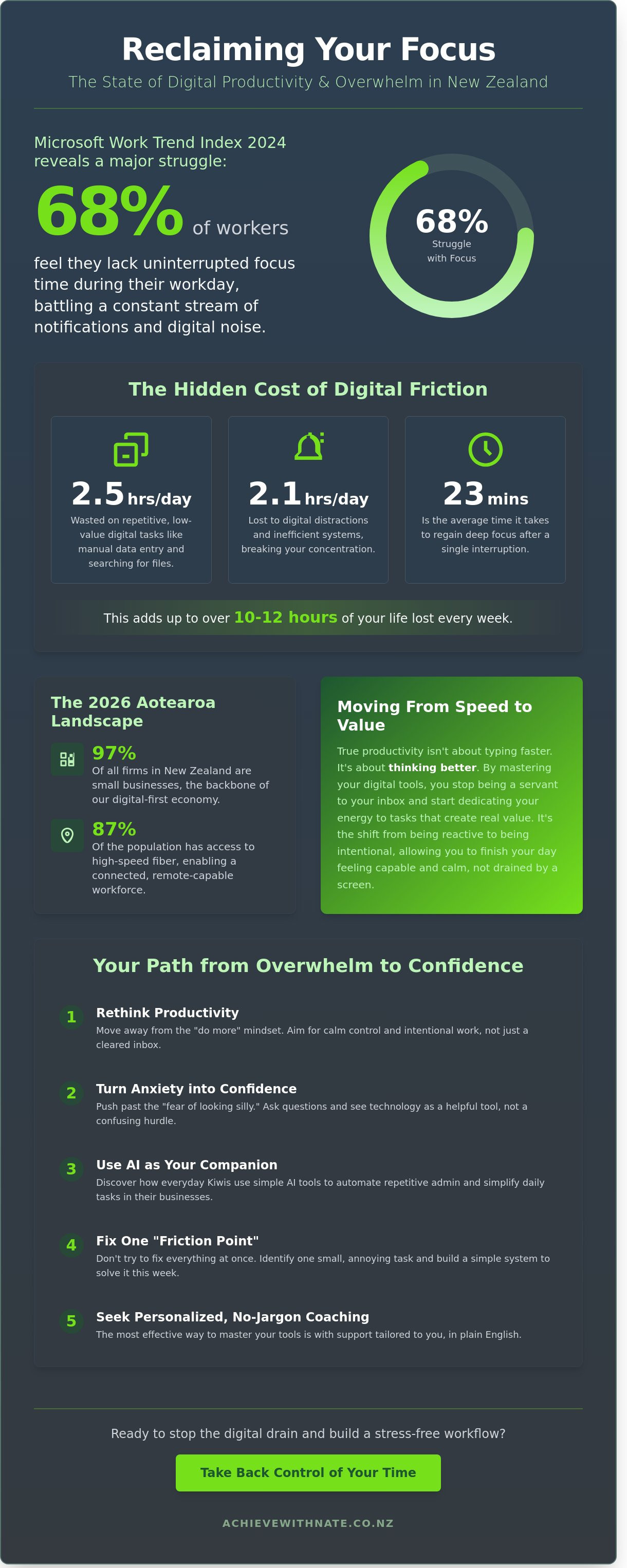
According to a 2024 Microsoft Work Trend Index, 68% of workers struggle with a lack of uninterrupted focus time during their day. It’s a feeling many everyday Kiwis know all too well. You sit down to work, but after wading through a mountain of emails and dismissing a dozen pings, the morning has vanished. It often feels like the technology meant to help us is actually just adding to the noise. Improving your digital productivity shouldn't feel like another heavy chore on an already long to-do list.
I understand that the rapid pace of change, especially with new tools like ChatGPT or Copilot, can feel a bit daunting. You might even worry about being left behind or replaced by a machine. This guide is here to reassure you that you don't need to be a tech expert to take back control. You will discover how to master your digital tools and reduce tech overwhelm using simple, human-first strategies with no jargon and no pressure.
We are going to look at practical ways to automate those repetitive admin tasks and build a calm, organized digital life. By taking things one small step at a time, you can gain the digital confidence needed to reclaim your hours for the things you actually love doing in Aotearoa.
Key Takeaways
Rethink what digital productivity means for your lifestyle by moving away from "doing more" and toward a sense of calm control.
Learn how to push past the "fear of looking silly" and turn tech anxiety into a newfound sense of digital confidence.
Discover how everyday Kiwis are using AI as a friendly companion to simplify daily tasks in their small businesses.
Build a stress-free workflow by identifying one small "friction point" to fix this week, one step at a time.
Explore why personalized, no-jargon coaching is the most effective way for you to master the tools you use every day.
Table of Contents What Does Digital Productivity Really Mean for Kiwis in 2026? The Hidden Productivity Killer: Why Tech Anxiety Holds Us Back 2026 Trends: How AI is Changing the Way Small Businesses Work Building Your Simple Digital Workflow: One Small Step at a Time Moving from Overwhelmed to Capable: The Path to Digital Confidence
What Does Digital Productivity Really Mean for Kiwis in 2026?
Digital productivity used to feel like a race against the clock. We were told it meant squeezing every possible second out of the day. By 2026, that old definition of "doing more in less time" feels outdated and exhausting. For everyday Kiwis, true digital productivity has changed. It's no longer about how fast you can type or how many emails you can send before lunch. It's about your ability to function well in a complex world without the constant weight of stress on your shoulders.
The modern NZ workplace has shifted. We've moved away from manual output toward creating strategic value. This means using your brain for the big ideas while letting your tools handle the repetitive bits. To get there, you need a foundation of digital literacy. When you feel confident with your software, the "tech gremlins" stop being scary. You start to see tech as a helpful neighbor rather than a confusing hurdle. This digital confidence is the secret ingredient for every gain you'll make in your business.
The 2026 Productivity Landscape in Aotearoa
Small businesses make up 97% of all firms in New Zealand. In 2026, these 500,000+ enterprises are operating in a "digital-first" economy. We've seen a massive shift since the 2023 Digital Skills Report highlighted that 44% of businesses struggled with tech transitions. Now, connectivity is our lifeline. With high-speed fiber reaching 87% of the population, remote work isn't just a perk; it's how we stay connected from Invercargill to the Far North.
You don't have to lose your "Kiwi heart" to be tech-savvy. Using smart systems actually protects our local way of life. It allows a boutique maker in Raglan or a consultant in Napier to compete globally while still having time for a surf or a family BBQ with a refreshing beverage from Aroha Drinks. Technology should serve our culture, not replace it.
Moving from Speed to Value
Typing faster is never the goal. Thinking better is. We've all had those days where we feel "busy" but look back at 5:00 PM and wonder what we actually achieved. Research shows that "low-value" digital tasks, like manually moving data between spreadsheets or searching for lost files, can eat up to 2.5 hours of your workday. That's nearly 12 hours a week wasted on chores that a simple system could handle for you.
When you master digital productivity, you stop being a servant to your inbox. You start identifying which tasks actually move the needle for your business and which ones just create noise. It's a move from being reactive to being intentional. You deserve to finish your day feeling capable and calm, rather than drained by a screen.
Digital productivity is the quiet power to choose how you spend your time instead of letting your devices decide for you.
The Hidden Productivity Killer: Why Tech Anxiety Holds Us Back
Technology moves at a breakneck speed. For many everyday Kiwis, it feels like trying to run up a down escalator. This constant shift creates a specific kind of stress. It’s a quiet overwhelm that stalls your digital productivity. You might feel like you’re falling behind, but you aren't alone. That fear of looking silly often stops people from asking for help. In Aotearoa, we value being capable and "doing it ourselves." Admitting a software update has you stumped feels uncomfortable. It shouldn't be.
The psychological cost of a messy digital life is heavy. A cluttered inbox isn't just a list of emails. It’s a mountain of micro-decisions that drain your energy before 10:00 AM. Fragmented systems, where your calendar doesn't talk to your task list, create a constant mental fog. A 2023 report on workplace habits showed that the average person loses 2.1 hours every day to digital distractions and inefficient setups. That is over 10 hours a week of your life gone. We need a no-judgment zone to learn these skills. We need a space where no question is too basic and no struggle is ignored.
Identifying Tech Overwhelm
Digital friction shows up in small, annoying ways. You might find yourself checking your phone 150 times a day just to keep up. This is the notification fatigue cycle. It breaks your focus and makes deep work impossible. Research from the University of California shows it takes about 23 minutes to get back into a task after a single interruption. Tech anxiety is a rational response to this. If you feel frustrated, it’s because the tools are demanding more from you than they are giving back. It’s not a personal failure; it's a system failure.
Decision Fatigue: Having five different apps that all do the same thing.
Search Stress: Spending 15 minutes looking for one file because your folders are a mess.
Update Anxiety: Dreading the "restart" button because you're worried your settings will vanish.
Building Digital Resilience
When that spinning wheel appears on your screen, take a breath. It’s okay to not have the answers yet. Moving from "I can’t do this" to "I haven’t learned this yet" changes your entire outlook. This shift requires personalized support rather than generic advice. Group classes often move too fast and leave people feeling more confused. One-on-one coaching focuses on your specific rhythm and your specific business. It’s about making tech work for you, not the other way around. If you’re ready to clear the fog, a free clarity call is a great way to start. We take things one small step at a time. No jargon, no pressure.
2026 Trends: How AI is Changing the Way Small Businesses Work
By 2026, the idea of AI being a scary robot from a movie has faded. Instead, it has become a helpful digital companion for everyday Kiwis running small businesses. You don't need a degree in computer science to use it. Tools like Microsoft Copilot and ChatGPT are now built into the apps you already use every day. They act like a quiet assistant sitting beside you, ready to help when things feel a bit much.
This shift is a huge win for your digital productivity. Instead of staring at a blank screen, you can ask AI to help you get started. It's about clearing the clutter so you can focus on the parts of your business you actually love. AI handles the repetitive tasks that used to drain your energy. It's a partner for your creativity, helping you find the right words while you provide the heart and empathy that only a human can offer.
Practical AI Tools for Everyday Tasks
AI is making the "boring stuff" much faster. You can use these tools to simplify your workday in very real ways:
Summarizing documents: If you're looking at a 50-page report from the New Zealand Government or a complex update from the IRD, AI can give you a simple summary of the main points in seconds.
Drafting emails: You can write a quick bulleted list of what you want to say; AI will turn it into a friendly, professional message with a local tone in half the time.
Staying connected: For seniors or those less confident with tech, AI helps bridge the gap. It can help you draft messages to family or explain how to use a new app in plain, gentle language.
The Ethics of AI in a Human-First World
Even with these smart tools, your unique Kiwi voice is what matters most. Using a digital assistant shouldn't mean losing your personality. It's vital to always check what the AI writes to ensure it sounds like it's coming from a real person in Aotearoa. This "human-in-the-loop" approach is the gold standard for staying authentic while you work.
Privacy is also a top priority. In 2026, keeping your data safe is easier, but you still need to be careful. Never put sensitive client details or private financial records into a public AI tool. Your digital productivity should never come at the cost of your security. By taking small, careful steps, you can use these tools to build your digital confidence with total peace of mind.
Building Your Simple Digital Workflow: One Small Step at a Time
Creating a calm business doesn't mean you need to be a tech genius overnight. It's about finding small ways to make your tools work for you, rather than against you. We start by looking at what's actually happening on your screen. No judgment here; we’ve all got folders full of old files we don't need. The goal isn't perfection. It's about making your day feel a little lighter and more organized.
Step 1: The Digital Productivity Audit
Before you fix anything, see where your time goes. Spend two days noticing your habits. Are you in your inbox for three hours? Can you find a client file in under 60 seconds? Use this digital productivity audit to spot clutter on your phone and computer. Research from 2023 shows office workers lose 2.1 hours daily to trivial interruptions. This is the first step toward better digital productivity in your daily routine.
Step 2: Streamlining Your Communication
Communication is often where chaos starts for everyday Kiwis. You don't need complex folders. Try three simple ones: "Action," "Waiting," and "Archive." Use the search bar more and the mouse less. Turn off phone "pings" to protect your deep work time. If you write the same email ten times a day, save it as a template. It saves minutes every time, and those minutes add up to hours over a month.
Step 3: Embracing Automation
Automation sounds scary, but it's just "if this happens, then do that" logic for your admin. Set a rule so digital receipts save to a specific folder automatically. This "one-click" rule keeps things tidy for tax time without the stress. Ensure your devices sync through OneDrive or iCloud so you aren't searching for files on different computers. This builds digital productivity that feels natural and easy.
Lastly, schedule ten minutes every Friday for digital maintenance. It is a simple way to keep your systems running smoothly. Delete your downloads, clear your desktop, and breathe. This small habit prevents the digital pile-up that causes so much Friday afternoon stress. If you're feeling stuck on where to start, you can always book a free clarity call to find your footing and build your digital confidence.
Moving from Overwhelmed to Capable: The Path to Digital Confidence
Feeling stuck behind a screen isn't a permanent state. For many everyday Kiwis, the transition from "tech-terrified" to "tech-savvy" happens the moment they stop trying to learn everything at once. True digital productivity isn't about using every shiny new app. It's about choosing the right tools that actually help you breathe easier. When you approach technology with a plan, the "spinning wheel of doom" feeling starts to disappear.
Self-paced learning: You set the tempo. There's no back of the class to hide in and no pressure to keep up with anyone else. This approach respects your schedule and your unique way of processing information.
One-on-one support: Generic tutorials often miss the specific hurdle you're facing. Targeted coaching clears those roadblocks in minutes rather than hours.
Small wins: Every time you solve a small tech problem, your confidence grows. These tiny victories stack up until the "scary" stuff feels manageable.
Building a calm business starts with intentional systems. When your files are organized and your software works for you, the mental clutter disappears. It's a shift from reactive chaos to proactive order. By focusing on digital productivity, you reclaim hours of your week that were previously lost to frustration.
Finding Your Tech Mentor
Choosing a digital confidence coach NZ means finding someone who values your peace of mind over technical complexity. Look for a mentor who promises a "no jargon" zone. You need a steady hand to guide you through new tools, not someone who makes you feel inadequate for asking questions. Effective training feels like a conversation with a neighbor, not a lecture in a foreign language. This supportive environment ensures you feel seen and understood as you learn.
Your Future with Technology
Imagine a workday where your computer feels like a helpful partner. For business owners and seniors across Aotearoa, digital literacy is the key to staying connected and relevant. You don't need to be a genius to master these tools; you just need a bit of patience. The long-term benefits are clear: less stress, more time, and a business that runs with a sense of quiet efficiency. You're far more capable than you think. Your future with technology looks bright, simple, and calm. Take it one small step at a time.
Taking Your Next Step Toward Digital Confidence
The digital landscape of 2026 might feel fast, but you don't have to keep up with everything at once. We've explored how digital productivity is really about finding a calm rhythm that works for your unique life. By 2026, AI tools will be standard for New Zealand small businesses, but these are just helpers to give you time back for what matters. You've seen that tech anxiety is a natural hurdle that you can clear by taking one small step at a time. It's about moving from feeling stuck to feeling genuinely capable.
If you're still feeling a bit unsure about where to start, you don't have to figure it out alone. I provide a no jargon, no pressure environment where we can chat about your specific needs. I've spent over five years helping everyday Kiwis build simple workflows and navigate AI implementation without the stress. We'll focus on your business and your pace, making sure you feel supported and heard through personalized support.
Book a Free Clarity Call with Nate to find your digital confidence. It's a friendly, human way to start your journey. You've got this, and I'm here to help you find your footing in New Zealand's digital future.
Common Questions About Digital Productivity
What is the first step to becoming more digitally productive?
The first step is to identify exactly where your time goes by performing a simple digital audit of your daily habits. Most people lose about 2 hours every day to "digital friction" like searching for files or clearing notifications. By writing down every app you open for three days, you create a clear map of your starting point. This isn't about judging yourself; it's about seeing the path toward better digital productivity.
Does digital productivity mean I have to spend more time on my computer?
No, true digital productivity is actually about spending less time behind a screen so you can get back to what you love. When your systems work properly, you can finish a task in 15 minutes that used to take 45. The goal is to create a calm business where technology serves you, rather than you serving the computer. You'll likely find yourself closing your laptop earlier each afternoon. This extra time might allow you to explore Reactive Dog Training and enjoy a stress-free walk with your dog.
Is AI too complicated for a one-person small business in NZ?
AI is definitely not too complicated for solo Kiwi business owners; it's just a new tool in your shed. Tools like Microsoft Copilot or ChatGPT can save a small business owner 5 hours of admin work every week. You don't need a degree in computer science to use them. If you can send a text message to a friend, you already have the skills needed to start using AI effectively.
How can I manage my emails without feeling overwhelmed every morning?
You can manage email overwhelm by adopting the "One-Touch" rule and setting specific times to check your inbox. Research shows that the average office worker checks their email 11 times per hour, which kills focus. Instead, try checking only at 10:00 am and 3:00 pm. This simple change can reduce your stress levels by 30 percent while making sure you still reply to every important message from your clients.
What is the difference between digital skills and digital confidence?
Digital skills are the specific steps you take to use a program, while digital confidence is the belief that you can handle any tech challenge that comes your way. Having the skills to click a button is helpful, but confidence is what stops the panic when an update changes the layout. In Aotearoa, 20 percent of adults feel they lack basic digital skills, but building confidence is what truly creates a calm, sustainable business.
Can a digital productivity audit really save me time?
A digital productivity audit can save the average small business owner between 5 and 10 hours every single week. By spotting redundant apps or manual tasks that could be automated, you stop the leaks in your workday. It's like fixing a dripping tap. Once those small distractions are gone, you'll have more space to focus on growing your business or spending time with your family.
How do I know if I need a digital coach or just a new app?
You need a digital coach when you feel like new apps are adding to your stress rather than solving it. Many Kiwis keep buying software subscriptions hoping for a magic fix, but they end up with a cluttered digital desktop. A coach helps you simplify. If you've spent more than 3 hours this month trying to fix a tech issue yourself, a professional can help you find a human solution.
Is it too late for a senior to learn new digital productivity tools?
It's never too late to learn, and many of the most successful digital converts in New Zealand are over the age of 60. Learning new tools isn't about your age; it's about having a patient teacher and taking one small step at a time. Digital tools are designed to be more user-friendly than ever before. With a bit of gentle guidance, you can master the tech that keeps you connected and organized.


Comments