


How to Feel More Confident with Technology: A Simple Guide for Kiwis

Last Tuesday, a Christchurch local named David told me he treats his $1,400 smartphone like a live landmine. He worries that one wrong tap will delete his photos or lock him out of his bank account forever. You likely feel that same knot in your stomach when a new update notification appears on your screen. Understanding how to feel more confident with technology starts with realizing that you aren't "stupid" for asking for help. It's common to feel like you're falling behind while the rest of the world moves at light speed.
Learning these skills isn't about memorizing every complex menu or setting. It's about building a simple, intentional system that works for your specific life. You deserve to use your tablet or phone without a constant sense of dread. This guide will show you how to overcome tech anxiety and build lasting digital skills through a quiet approach designed for everyday New Zealanders. We'll explore how to handle video calls with family, manage your online banking independently, and finally stop the cycle of digital overwhelm. It's time to find clarity and agency in the digital space.
Key Takeaways
Recognize tech anxiety as a natural response to rapid change and learn to replace fear with a sense of quiet curiosity.
Apply the principle of subtraction to your digital life by focusing only on the few essential tools that serve your purpose.
Discover a practical path for how to feel more confident with technology by mastering one meaningful task at a time.
Find out how personalized coaching and local New Zealand resources can create a simpler, more intentional learning experience.
Table of Contents Understanding Tech Anxiety and Why It Happens Shifting Your Mindset from Fear to Curiosity The Power of Subtraction: Learning Less to Do More Practical Steps to Build Your Digital Skills How Digital Confidence Coaching Simplifies the Journey
Understanding Tech Anxiety and Why It Happens
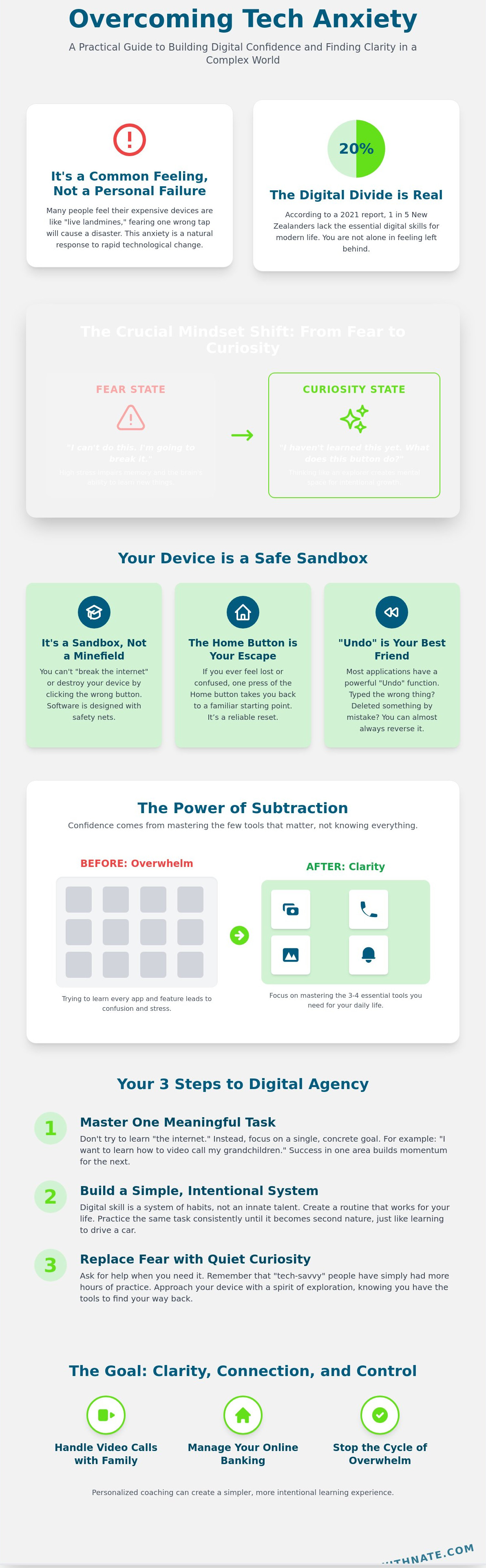
Feeling overwhelmed by a new smartphone or a banking app is common. It isn't a sign of age or a lack of intelligence. You're experiencing a natural response to the speed of change. Many New Zealanders feel this tension as services move online. Understanding Tech Anxiety (Technophobia) helps us realize that these feelings are documented and normal. It's a physiological response to an unfamiliar environment.
In 2021, the BNZ Digital Skills Report found that 20% of Kiwis lack the essential digital skills needed for modern life. This "digital divide" isn't about your personal ability. It's about how quickly our infrastructure has shifted. You've already adapted to more changes than you realize. You moved from physical bank passbooks to ATMs; then you moved to EFTPOS. Each step was a new system you mastered through repetition. You have a proven track record of adapting.
The Myth of the 'Tech Person'
No one is born with a "tech gene." Digital skill is a system of habits, not an innate talent. It's like learning to drive or cook. The people who seem "good at tech" simply have more hours of practice. They've clicked the wrong buttons more often and learned from the results. Shift your internal language. Instead of saying "I can't do this," try saying "I haven't learned this yet." This shift creates space for growth. It moves you closer to knowing how to feel more confident with technology through simple, intentional steps.
Why Modern Design Can Be Confusing
Software companies change layouts constantly. They call it "optimization," but for you, it feels like someone moved the furniture in your house overnight. Hidden menus and "hamburger" icons, those three small horizontal lines, are design choices. They aren't intuitive by nature. They are learned patterns that require memorization. When a screen feels confusing, remember that the designer failed to make it clear. It isn't your fault.
Learning how to feel more confident with technology starts with focusing on one layout at a time. Don't try to master every app at once. Focus on the one you need for your daily life today. Clarity comes from narrowing your focus. Once you understand the logic of one system, the next one becomes easier to navigate. Success is built on these small, consistent wins.
Shifting Your Mindset from Fear to Curiosity
Living intentionally means choosing tools that serve your purpose. Your smartphone or laptop should simplify your life, not complicate it. Many people view technology as a status symbol; however, it is actually a gateway to freedom and connection. When you approach a screen with fear, your brain enters a survival state. A 2022 study by the University of Cambridge found that high stress levels significantly impair the brain's ability to form new neural pathways. This is why you struggle to remember where a button is located when you feel anxious.
To learn how to feel more confident with technology, you must adopt a curiosity mindset. Think of your device as a sandbox. In a sandbox, you can build or dig without causing permanent damage. Technology works the same way. You aren't doing it wrong. You are simply exploring a system. This shift in perspective creates the mental space needed for intentional growth and long-term clarity.
The Safety of Modern Devices
It is almost impossible to break a modern device by clicking buttons. Software designers build safety nets into every layer of the experience. The Undo function can reverse the last 20 to 100 actions in most applications. The Home button is your ultimate escape hatch. If you feel lost, one click returns you to a familiar starting point. Explore your settings without hesitation. You cannot delete the internet or destroy your hardware by clicking a menu.
Embracing the Learning Curve
A growth mindset in 2026 is the quiet belief that your digital capacity is a muscle that strengthens through consistent, low-stakes practice.
Learning how to feel more confident with technology is similar to learning to drive a car or operate a new washing machine. You didn't expect to be an expert driver on your first day. You started with the basics and built confidence over time. Gaining personal agency over your tools is a slow process. It leads to a more sustainable and focused life. Focus on the long-term satisfaction of being in control of your digital world.
The Power of Subtraction: Learning Less to Do More
Confidence doesn't come from knowing every button on every device. It comes from mastering the tools that actually matter. At Achieve with Nate, I focus on the philosophy of subtraction. You don't need more features; you need more clarity. By doing less, you gain the space to do it better.
Many people feel overwhelmed because they try to keep up with every new update. A 2023 report on New Zealand digital habits showed that the average user has 80 apps installed on their phone. Most people only use 9 of them regularly. This clutter creates a mental weight that hinders your progress. To understand how to feel more confident with technology, you must first decide what to ignore.
Identifying Your Digital Essentials
Start by identifying your "Critical Few." These are the tools that align with your specific goals. If you want to manage your budget, focus on one banking app and one spreadsheet. You don't need five different fintech tools. Using one device well is more effective than using three devices poorly. It reduces the friction of switching between screens and systems.
Choose apps that serve a clear, singular purpose.
Delete anything you haven't opened in the last 90 days.
Move distracting icons off your primary home screen to reduce visual noise.
A minimalist home screen reduces visual anxiety. When you unlock your phone, you should see only what you need for your immediate task. This simple change can lower your heart rate and help you stay focused on your original intent. It's about creating a system that serves you, rather than you serving the system.
Turning Off the Noise
Notifications are an invitation for someone else to dictate your time. Most alerts are designed to trigger a dopamine response rather than provide genuine value. Reclaiming your peace starts with a "silent by default" policy. I recommend turning off all non-human notifications immediately. This means only texts or calls from real people get through.
Intentional usage is the goal. You should check your email because you decided to, not because a red bubble appeared on your screen. This shift in mindset builds a sense of agency. You're no longer reacting to your device; you're directing it. This discipline is the foundation for how to feel more confident with technology over the long term. You'll find that 15 minutes of focused work is more productive than 60 minutes of interrupted browsing.
Practical Steps to Build Your Digital Skills
Confidence grows through small, intentional actions. You don't need to learn every app on your phone today. Start with a single, high-value task that improves your life. This might be video calling a grandchild in London or checking your balance on a banking app. Focusing on one outcome makes the process manageable. This is the most effective way to learn how to feel more confident with technology without feeling overwhelmed.
Use local resources to lower the barrier to entry. Skinny Jump provides 35GB of data for $5 to eligible households. This affordable connectivity allows you to practice at home without worrying about a high monthly bill. Practice intentional repetition. When you learn a new pathway, repeat it five times in a row. This builds the muscle memory required to make the action feel automatic. Keep a physical cheat sheet in a notebook. Write down the steps in your own words so you have a reliable backup that exists outside the screen.
Use search engines like Google to find answers. Type your question exactly as you would speak it to a friend.
Look for "how-to" guides specifically written for beginners.
Focus on the "why" before the "how" to maintain your motivation.
Finding Reliable Help in New Zealand
You aren't alone in this journey. New Zealand has strong support systems like the Stepping UP workshops found in many local libraries. These sessions are free and designed for adults. When asking family for help, book a specific 15 minute slot. This creates a clear boundary and ensures you don't feel like a burden. Seek a mentor who uses everyday English instead of technical jargon. Clarity is more important than speed.
Building Safe Habits
Security is the foundation of digital freedom. Learning these safety basics is a core part of how to feel more confident with technology over the long term. Manage your passwords by using a dedicated physical journal kept in a safe place at home. This removes the stress of forgetting complex codes. Identify scams by looking for forced urgency. If an email demands immediate action, it is usually a red flag. Real institutions like your bank give you time to respond. These simple systems provide the peace of mind you need to explore the digital world safely.
To build a more intentional life through simple systems, explore my guide on
.
How Digital Confidence Coaching Simplifies the Journey
Learning a new skill doesn't have to be a loud or overwhelming experience. Digital confidence coaching is a quiet, one-on-one conversation designed to bring you clarity. It's a space where your questions are valued and your pace is respected. This intentional approach replaces the noise of the internet with a focused path forward.
When you try to learn alone, you often hit invisible walls. A single error message or a forgotten password can stall your progress for days. This friction is what makes people give up. A coach removes these barriers immediately. Instead of searching through endless help forums, you get a direct answer that fits your specific situation. This is how to feel more confident with technology without the typical stress of trial and error.
The greatest benefit is a tailored plan. Most online courses try to teach you every single feature of a program. You likely only need 20% of those tools to get 100% of the value. We ignore the clutter and focus only on what matters to your lifestyle. I act as a relatable guide, not an unreachable guru. I've spent years refining these systems in my own life so I can show you the shortest path to peace of mind.
What to Expect from a Coaching Session
Our sessions focus on practical, real-world tasks. We don't talk about abstract theories. We solve the problems sitting on your desk right now. This might include:
Setting up a secure, simple system for your passwords.
Organizing a library of 5,000 digital photos into a searchable archive.
Learning to use video calls to stay connected with family overseas.
You can expect a total absence of jargon. We use plain English and move with calm, patient support. My goal is to help you build a sustainable system. By the end of our time, you won't just have a fixed device; you'll have a repeatable process for future learning. This creates a foundation of self-reliance that lasts long after our session ends.
Take the First Step Toward Clarity
You are already more capable than you feel. Technology is often designed to be confusing, but that isn't a reflection of your ability. It's a reflection of poor design. With a few intentional shifts in your habits, you'll find that how to feel more confident with technology is simpler than you imagined.
I invite you to reach out for a conversation about your specific goals. We can discuss exactly what you want to achieve and create a roadmap to get you there. You deserve to feel in control of your digital life rather than being managed by it.
Your Path to Digital Clarity
Learning how to feel more confident with technology is about subtraction, not addition. You don't need to be a tech expert to navigate the modern world successfully. By focusing on 3 core digital skills that matter to your specific life, you can replace anxiety with a sense of agency. This shift happens when you move from a place of fear to one of quiet curiosity. It's a deliberate choice to focus on what's essential while letting go of the digital noise that doesn't serve you.
If you're ready to stop feeling left behind, I can help you build a system that works. I offer personalised coaching for everyday Kiwis that prioritises practical, real-world skills. My 1-on-1 sessions use a calm and patient approach with zero jargon to ensure you gain clarity. We'll work through your specific hurdles during a 30-minute session at a steady pace that respects your time. It's about finding freedom through simple, intentional actions that stick for the long term.
Book a free chat with Nate to build your digital confidence and start your journey toward a simpler life today. You have the capacity to master these tools on your own terms.
Frequently Asked Questions
Is it too late for me to learn how to use technology?
No, it's never too late to start your digital journey. In 2023, data showed that 78% of New Zealanders over the age of 75 used the internet every single day. Learning is a habit that rewards patience, not a race that you can lose. You can begin today with one simple task, like sending a photo to a grandchild or checking the weather online. Focus on your own pace.
What is the best way to start building digital skills from scratch?
The best way to start is by picking one specific tool that adds immediate value to your daily life. Focus on a single app, like WhatsApp or Trade Me, for 15 minutes each afternoon. This intentional approach builds a foundation without the noise of trying to learn everything at once. By mastering one system first, you create the clarity needed to tackle the next challenge with ease.
How can I stop feeling anxious every time my phone updates?
You can reduce this anxiety by understanding that updates are a maintenance system designed for your safety. Over 90% of phone updates include critical security patches that protect your personal data from hackers. Schedule your updates for 2:00 AM so the process happens while you sleep. This simple setting removes the friction of waiting and eliminates the fear of watching a progress bar during your busy day.
Can I really learn tech skills without taking a complex coding course?
You don't need to code to understand how to feel more confident with technology. Most daily tasks require basic navigation skills, not complex programming knowledge. Focus on mastering 5 core areas: searching, emailing, saving files, staying safe online, and connecting with others. These are the simple systems that create digital freedom. You can ignore the jargon and focus on what actually helps you live a better life.
How do I know which apps are safe to download?
You can identify safe apps by only downloading from the official Apple App Store or Google Play Store. Look for apps that have a rating of 4.5 stars or higher and at least 1,000 independent reviews. These platforms vet apps for 100% of known malware before they're listed for public use. Checking these two data points provides immediate peace of mind and keeps your personal device secure.
What should I do if I feel like I'm going to break my computer?
Remember that most software errors are temporary and completely reversible. In 95% of cases, a simple restart fixes the issue and returns everything to normal. If a screen freezes, press the "Esc" key or hold the power button for 10 seconds to force a shutdown. You're the one in control of the machine. Technology is a tool designed to serve you, and it's much harder to break than you think.
How much time does it take to feel confident with technology?
You can see a noticeable shift in your ability in just 21 days of consistent practice. Spend 10 minutes each morning exploring a new setting or reading a short tutorial. This small, sustainable commitment helps you learn how to feel more confident with technology through steady repetition. Confidence is a byproduct of consistent action rather than a sudden burst of genius or a stressful weekend of studying.
Where can I find a patient person to help me with tech in New Zealand?
You can find patient help at your local library or a SeniorNet learning center. There are 60 SeniorNet locations across New Zealand that are dedicated to helping Kiwis gain essential digital skills. These volunteers provide a quiet, grounded space to ask questions without any judgment or sense of rush. You can also look for "Digital Inclusion" workshops held by your local council on the first Monday of every month.


Comments