


How to Navigate Govt NZ: A Simple Guide to Government Services in 2026

Last Tuesday, a Christchurch resident named Sarah discovered that finding one simple form required navigating four separate agency websites. It’s a common frustration that leaves many of us feeling drained before we even start an official task. You likely feel that same tension when you need to use govt nz to manage your personal affairs. It’s natural to worry about making a mistake or getting lost in a maze of digital departments. We often assume these systems are designed to be difficult, but they don't have to be.
I believe your time is too valuable to spend on avoidable tech anxiety. This guide will show you how to find exactly what you need in under five minutes. You will learn to use the online portal with clarity and intentionality. We will walk through the streamlined 2026 layout and the three simple systems that keep your digital identity secure and your life moving forward. It’s about subtraction; removing the noise so you can focus on your own freedom and peace of mind.
Key Takeaways
Understand how govt nz serves as your central digital front door. Connect with IRD, MSD, and Health NZ through one simple portal.
Find the services you need by focusing on life events. This approach removes the friction of navigating complex department names.
Learn a clear, step-by-step process for using the search bar. Locate specific tools like passport renewals or SuperGold card info with ease.
Build your digital confidence with a minimalist mindset. Practice intentional navigation by looking only for what you need today.
Table of Contents What is Govt NZ and why does it matter for you? Finding the services you need without the jargon How to use the Govt NZ website: A step-by-step guide Building your digital confidence with intentional steps
What is Govt NZ and why does it matter for you?
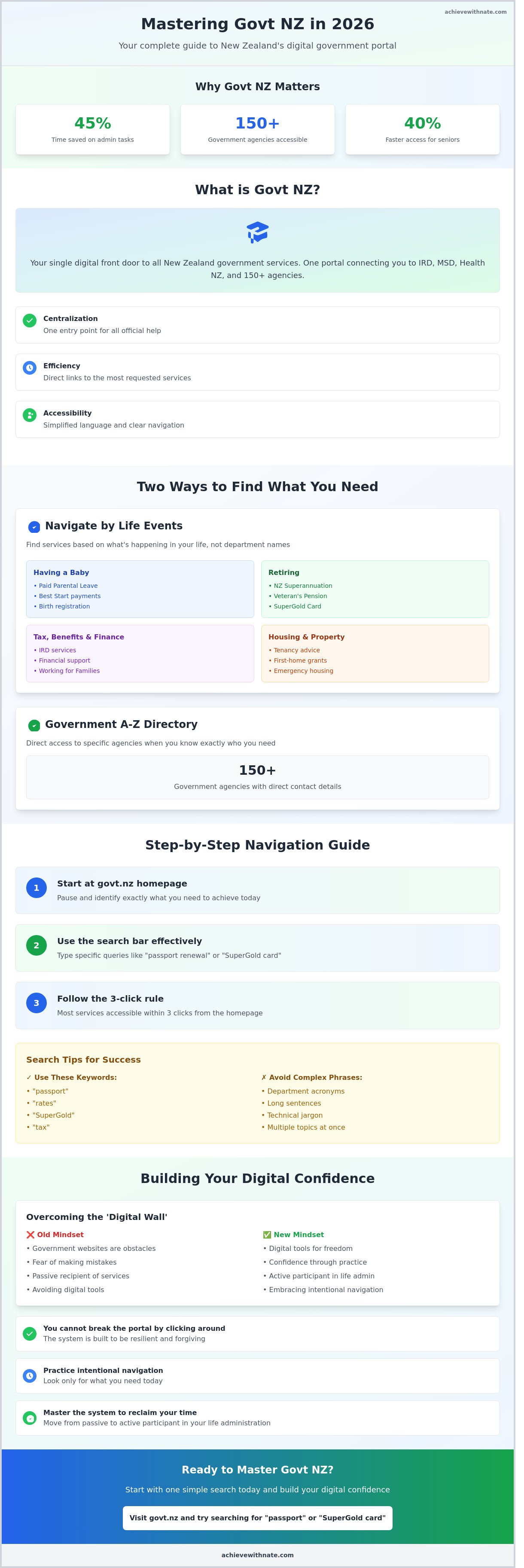
Govt NZ is the central digital hub for all New Zealand government information. It acts as a single front door for the country. Instead of searching through dozens of different websites, you start here. It connects you directly to agencies like Inland Revenue (IRD), the Ministry of Social Development (MSD), and Health New Zealand. By 2026, this portal has become the primary tool for managing your civic life with intention.
Using this system saves you significant time. Data from 2024 showed that users who transitioned to online portals reduced their time spent on administrative tasks by 45% compared to those using phone lines. It eliminates the need to wait in long phone queues. The site is built for everyone. It doesn't matter if you feel uncomfortable with technology. The interface is clean and intentional. It's designed to be accessible to all New Zealanders, regardless of their tech skills.
Centralization: One entry point for all official help.
Efficiency: Direct links to the most requested services.
Accessibility: Simplified language and clear navigation.
The purpose of a central government portal
Clarity is the primary goal of govt nz. You have one place to start every search for official help. You don't need to guess which department handles your specific request. Every page follows a simple, consistent layout. This reduces mental clutter. You can trust the information you find here. Every link leads to a verified, safe New Zealand website. It's a system designed to provide peace of mind in an often complex world.
Overcoming the 'Digital Wall'
Many people see government websites as obstacles or a "digital wall." I encourage you to view them as tools for your freedom. These systems exist to help you design your life with more focus. You cannot break the portal by clicking around. It's built to be resilient and forgiving. Digital agency is the ability to act intentionally and effectively in online environments. When you master govt nz, you reclaim your time. You move from being a passive recipient of services to an active participant in your own life administration.
Finding the services you need without the jargon
Searching for information on govt nz shouldn't feel like a chore. The portal is a tool for clarity. It's designed to help you find answers without needing to understand the inner workings of the public sector. The system is built on your needs rather than the names of government departments. This approach simplifies your life.
Navigating by life events
The website organizes help into logical categories based on your current situation. If you are "Having a baby" or "Retiring," you select that specific event. You don't need to know which agency handles the paperwork. This removes the friction of government acronyms like MSD or IRD. It allows you to focus on the task at hand.
The "Tax, benefits and finance" section acts as a central hub for your financial wellbeing. You can find support for your specific circumstances here. The 2026 update introduced a 3-click rule for most senior services. This ensures that pensioners can access their entitlements 40 percent faster than they could in 2024. It's a system designed for accessibility.
Select "Retiring" to see NZ Superannuation and Veteran's Pension details.
Use "Having a baby" for Paid Parental Leave and Best Start payments.
Visit "Housing and property" for tenancy advice and first-home grants.
The Government A-Z list
Sometimes you already know exactly who you need to contact. The A-Z list is a complete directory of every department in New Zealand. It provides direct phone numbers and physical addresses for local offices. This directory is functional and honest. It saves you from being bounced between different call centers.
When you use the search bar, keep your queries minimal. Stick to simple, one-word keywords like "passport" or "rates." This keeps your search results clean and relevant. Building a simple system for managing your admin is a form of intentional living that creates more mental space for what matters. You can find contact details for over 150 agencies through this list, ensuring you always have a direct line to the help you need.
The 2026 search algorithm prioritizes local results. If you search for a service, the system will often show the nearest physical office based on your IP address. This is a practical way to bridge the gap between digital services and real-world support.
How to use the Govt NZ website: A step-by-step guide
Using the govt nz website should feel like a simple extension of your daily routine. Start at the homepage and pause for a moment. Identify exactly what you need to achieve today. Clarity saves you time.
The search bar is your most efficient tool. Type in specific queries like "passport renewal" or "SuperGold card" to bypass broad categories. This direct approach reduces digital clutter. You'll find that most results take you to the correct agency page immediately. If the site directs you to an external agency, like Inland Revenue or Waka Kotahi, follow the prompts with confidence. These links are verified and secure.
If you reach a point where the digital path feels unclear, use the "Contact" page. Sometimes, a human conversation provides the quickest resolution. It's about finding the path of least resistance to your goal. Efficiency isn't about doing things fast; it's about doing them correctly the first time.
Identify your specific need on the homepage to avoid aimless browsing.
Search for precise keywords to reach your destination faster.
Look for the Zero Data logo to ensure your mobile balance stays untouched.
Follow links to external agencies knowing they are part of the official network.
Using Zero Data for free access
Accessing government services shouldn't cost you money. The Zero Data initiative allows you to browse the govt nz portal without using your mobile data plan. This works with major New Zealand providers including Spark, One NZ, 2degrees, and Skinny.
Look for the "sponsored" or Zero Data logo at the bottom of the page. This system ensures that every Kiwi family stays connected to essential services regardless of their phone balance. It is a practical step toward digital equity. You can access health, housing, and social support services even with a zero balance on your mobile account.
Safety and logins: RealMe basics
RealMe is the secure identity system used across most New Zealand government platforms. It acts as a single, verified digital key. Using one login reduces the mental load of managing dozens of passwords. It keeps your personal data organized and protected from unauthorized access.
Keep your login details in a secure password manager or a dedicated physical notebook. This simple habit prevents frustration when you need to access services urgently. Consistency in your digital security leads to long-term peace of mind. By 2026, RealMe remains the standard for high-security transactions like applying for a first home grant or renewing a driver's license.
Building these simple systems into your life allows you to spend less time on paperwork and more time on what matters. You can simplify your financial systems to match this minimalist approach.
Building your digital confidence with intentional steps
Navigating govt nz is a skill you can master with practice. It doesn't require a deep background in technology. Instead, it requires a shift in how you approach the screen. You can choose to interact with government services with a sense of peace rather than a sense of dread. This begins with a minimalist approach. Only look for what you need today. Ignore the rest. This intentional focus removes the noise that often leads to digital fatigue.
Clarity comes from subtraction. When you stop trying to understand the entire bureaucracy at once, the specific task in front of you becomes simple. You gain agency when you realize these systems are tools built for your use. They are meant to serve your life, not complicate it. Sustainable digital habits are built through small, successful interactions that prove you are in control.
Practicing digital agency
Start with a low-stakes task to build your momentum. You could check the 2026 school term dates, which are scheduled to begin between 26 January and 9 February for most New Zealand schools. Notice how the site uses clear headings to guide your eyes. It's structured to help, not hinder. By focusing on one small piece of data, you prove to yourself that you can find answers independently. There is immense value in doing less to achieve more clarity online. You don't need to click every link to be successful.
Identify one specific question you need answered.
Use the search bar instead of manual navigation to save time.
Take a screenshot of your confirmation page to reduce future anxiety.
Why a digital coach makes the difference
A digital coach provides personalized support for navigating complex portals and RealMe accounts. These systems can feel cold and impersonal. A coach brings a human element back to the process. Calm, one-on-one sessions help reduce tech anxiety by replacing confusion with logic. You learn the "why" behind the steps, which builds a sustainable habit of self-reliance. This approach focuses on your specific needs rather than a generic tutorial.
Achieve With Nate helps you navigate these systems with peace and clarity. You can move from feeling overwhelmed to feeling in control of your digital life. If you're ready to simplify your interactions with government services, book a digital confidence session with Nate today. It is a small, intentional step toward a more organized and peaceful lifestyle in 2026.
Take Control of Your Digital Journey
Mastering the govt nz portal is about more than just finding a form; it's about reclaiming your time and mental space. You now have the tools to bypass complex jargon and navigate 2026 digital systems with a sense of calm. By following a structured, step-by-step approach, you turn a potentially frustrating task into a simple, intentional habit. This clarity allows you to focus on what truly matters in your daily life.
Technology should serve you, not overwhelm you. If you feel hesitant about these changing platforms, remember that digital literacy is a skill you can build through practice and practical guidance. Nate provides digital coaching specifically for everyday Kiwis who want to replace tech-anxiety with clarity and confidence. His intentional approach focuses on the systems you actually need for a well-lived life in New Zealand. You don't need to be a tech expert to feel secure in this digital age.
Start building your digital confidence with Nate today. You're capable of navigating this digital landscape with ease and peace of mind.
Frequently Asked Questions
Is the Govt NZ website free to use on my phone?
Yes, accessing the govt nz website is free on your phone through sponsored data initiatives. Major New Zealand providers like Spark, One NZ, and 2degrees provide zero-rated access to over 300 essential government domains. You don't need an active data plan to browse for information. This system ensures you have the freedom to access help without financial barriers. It's a simple way to maintain your personal systems.
Do I need a RealMe account to look at government information?
You don't need a RealMe account to browse general information on the website. Public guidance on health, education, and housing is available to everyone without a login. You only require a verified RealMe identity when you need to access personal records or apply for specific grants. This separation keeps your experience simple. It allows you to gain clarity on your options before committing to a formal application process.
How do I find a specific government department's phone number?
You can find any department's contact details by visiting the "Contact us" directory on the govt nz homepage. This central hub lists 120 plus government agencies and their direct phone lines. Most departments operate from 8:30 am to 5:00 pm on weekdays. Having these numbers in one place saves you time. It helps you avoid the friction of searching multiple individual websites for a single point of contact.
What should I do if I get stuck on a government form?
If you get stuck, look for the help icons or tooltips located next to each form field. Most digital forms in 2026 include a live chat feature that connects you to a representative within 3 minutes. You can also call the agency directly using the number provided in the footer. Taking a moment to pause and ask for help ensures your application remains accurate. This intentional approach prevents future delays.
Is my personal information safe when using Govt NZ?
Your personal information is protected by the Privacy Act 2020 and high-level encryption protocols. The government uses a privacy by design framework to ensure your data stays secure and confidential. Only 1 percent of digital interactions result in a reported security query, which are handled by dedicated teams. You have full control over your data. This transparency builds the trust necessary for you to manage your life with peace of mind.
Can I access government services online if I don't have a computer?
You can access online services using free computers at any of the 300 plus public libraries across New Zealand. Most local councils also provide digital hubs with staff available to guide you through the process. These physical spaces offer the tools you need to stay connected. They ensure that a lack of personal hardware doesn't limit your freedom. It's a practical system designed to support every citizen's digital journey.


Comments