


Unsubscribe your Junk Email Safely: A Gentle Guide for Kiwis (2026)

Updated: Sep 30
Imagine sitting down with a cuppa, opening your phone, and seeing dozens of unread emails from shops you haven't visited in years. It feels messy. It feels out of control. You want to clear the noise, but you're likely worried about whether clicking a link will lead to a scam or a hack. Learning how to unsubscribe from junk email safely is about more than just a clean inbox; it's about protecting your peace of mind.
We know that technology can feel heavy and intimidating sometimes. You aren't alone in feeling that bit of anxiety when an unknown sender pops up in your personal space. This guide will give you the confidence to reclaim your digital home without any technical jargon or unnecessary stress. We'll walk through how to spot a genuine link, how to use New Zealand's 2026 privacy laws to your advantage, and how to finally stop the flood of unwanted mail for good. You can do this, and we're here to help you take those first small, manageable steps toward a calmer day.
Table of Contents
Is It Junk or Is It Spam? Knowing the Difference Before You Click
The Safety Test: When to Use the Unsubscribe Link (and When to Run)
Cleaning Your Inbox: Simple Steps for Gmail, Outlook, and Apple Mail
Beyond the Unsubscribe Link: Blocking and Protecting Your Privacy
Reclaiming Your Digital Confidence: Personalized Help to Clear the Clutter
Is It Junk or Is It Spam? Knowing the Difference Before You Click
Opening your inbox shouldn't feel like walking through a minefield. Many of us feel a sense of 'tech-shame' when we see thousands of unread messages. Please know that it isn't your fault. The digital world moves fast. To learn how to unsubscribe from junk email safely, we first need to understand what we're looking at.
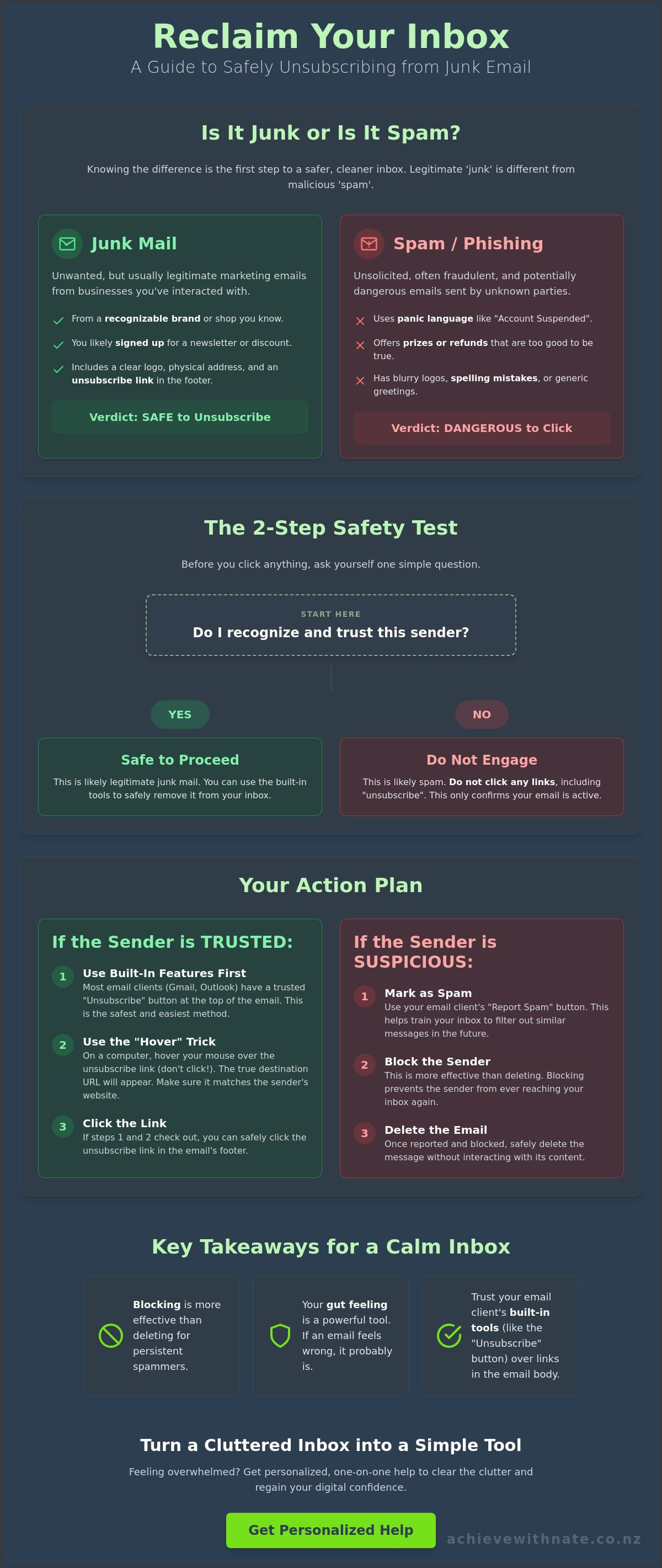
There's a big difference between 'junk' and 'spam'. Junk mail is usually legitimate. It's that newsletter from a shop you visited once or a brand you actually like but don't have time for right now. On the other hand, it helps to understand what is email spam in a broader sense. Spam is often sent by strangers. It's unsolicited, frequently fraudulent, and sometimes even dangerous. Knowing which is which helps you decide whether to click a button or just walk away.
To better understand how to clear this clutter quickly, watch this helpful video:
Your gut feeling is a powerful tool. If an email makes you feel anxious, hurried, or suspicious, listen to that. Legitimate businesses want you to feel good about their brand. They don't want to scare you. Ask yourself the 'Relationship Test' question: Did I ever give this person my email address? If the answer is no, it's likely spam. If you remember signing up for a discount code last Christmas, it's probably just junk mail.
The Anatomy of a Legitimate Newsletter
A real newsletter follows the rules. Under the Unsolicited Electronic Messages Act 2007, New Zealand businesses must be clear about who they are. You'll usually see a recognizable logo at the top. At the very bottom, you'll find a physical address and a clear way to opt out. If the sender's name matches their email address, like 'news@farmers.co.nz', it's probably just junk you can safely remove. These companies want to stay in your good books and follow our local privacy laws.
Red Flags of Malicious Spam
Malicious spam feels different. It often uses 'scare tactics' to get you to act without thinking. Spammers know that when we're stressed, we're more likely to make mistakes. Look out for these common warning signs:
Panic language: Phrases like 'Account suspended' or 'Action required immediately'.
The 'Off' factor: Logos that look blurry or spellings that aren't quite right.
Too good to be true: Unexpected tax refunds or prizes from contests you never entered.
In these cases, the safest path isn't clicking a link inside the email. Instead, we'll look at how to unsubscribe from junk email safely using the tools built right into your mail app. This keeps you in control without ever having to engage with the sender directly.
The Safety Test: When to Use the Unsubscribe Link (and When to Run)
Deciding when to click that tiny 'unsubscribe' button can feel like a big decision. It is normal to feel a bit hesitant when your inbox is full of messages you don't remember asking for. The golden rule is simple: only use the unsubscribe link if you recognize and trust the brand. Learning how to unsubscribe from junk email safely is mostly about building trust in your own judgment and knowing when to stay away.
When you click 'unsubscribe' on a scam email, you are actually telling the sender that your account is active and monitored. This simple click confirms you are a real person who reads their mail; which can lead to even more unwanted messages. For any sender you don't recognize or trust, simply hitting 'Delete' is always the safer choice. This guide helps you understand how to unsubscribe from junk email safely without the fear of making a mistake.
While we have strong local rules in Aotearoa, looking at international FTC advice on stopping junk mail shows that being selective about where you click is a global best practice. It's a small step that makes a huge difference in your digital safety.
The "Hover" Trick for Computer Users
You can check where a link goes before you ever click it. On a desktop or laptop, just rest your mouse over the link without clicking. A small box will appear at the bottom of your screen showing the true web address. Look for 'https' at the start; which tells you the connection is secure. You also want to see a domain name you recognize, like 'farmers.co.nz' or 'airnewzealand.co.nz'. If the link looks like a jumble of random letters and numbers, steer clear and delete the email instead.
Safety on Mobile Devices
On your phone, you can use the 'long-press' technique to preview links. Hold your finger down on the 'unsubscribe' text for a second or two. A preview window will pop up showing you where the link leads. Sometimes decluttering on a small screen feels too fiddly and stressful. It is perfectly okay to leave those emails alone until you are sitting comfortably at your computer. Trust your gut; if an email feels dodgy, just swipe to delete it. If you find yourself staring at a mountain of mail and feeling stuck, one-on-one digital coaching can help you clear the path forward at your own pace.
Using NZ Safety Resources
We have wonderful local teams looking out for us here in New Zealand. If you see something truly suspicious, you can report it to Scamwatch NZ or CERT NZ. These organizations stay updated on the latest threats affecting Kiwis. Recent laws like the Budapest Convention and Related Matters Legislation Amendment Act 2025 have also strengthened our protections against computer-crime. Take a deep breath and remember that one wrong click doesn't have to mean disaster. You are in control of your device; and taking these incremental steps will help you feel much more confident.
Cleaning Your Inbox: Simple Steps for Gmail, Outlook, and Apple Mail
Walking into a room full of clutter is exhausting. Your digital inbox is no different. If you're feeling weighed down by thousands of unread messages, please take a breath. You don't have to clear it all today. Learning how to unsubscribe from junk email safely is much easier when you use the tools already built into your favorite apps. These features act as a protective barrier between you and the sender.
Most modern email providers now offer their own 'unsubscribe' buttons at the very top of a message. These are often much safer than clicking a link hidden in the email body. When you use your provider's button, the app handles the request for you. This reduces the risk of landing on a dodgy website. To keep things manageable, try setting a timer for just 10 minutes. When the timer goes off, you're done for the day. This small habit prevents 'inbox fatigue' and keeps you in a calm headspace.
Following a trusted FTC guide to reducing spam is a great way to see how filters can do the heavy lifting for you. Let's look at how this works on the devices you use every day.
Unsubscribing in Gmail
Gmail makes it quite simple to spot newsletters. Look right next to the sender's name at the top of an email. You'll often see a small, blue 'Unsubscribe' link. Clicking this tells Google to ask the sender to stop, which is a very secure way to handle things. You can also use the 'Promotions' tab to see all your shopping emails in one place. Gmail's smart filters work quietly in the background to catch most threats before you even see them.
Managing Outlook and Hotmail
If you use Outlook, look for a prompt that asks, 'Getting too much email?' at the top of your messages. This is a gentle shortcut to help you opt out. Another helpful tool is the 'Sweep' function. It allows you to clear out old newsletters from a specific sender all at once. If these steps still feel a bit much, device and email basics training can provide the hands-on support you need to feel confident.
Apple Mail and iPhone Tips
On an iPhone or Mac, Apple Mail often shows a grey banner that says, 'This message is from a mailing list.' You can click 'Unsubscribe' right there. It's a quick and clean way to tidy up. You can also swipe left on any email in your list to move it straight to the trash. Keeping your Apple ID secure is important, and managing these subscriptions is a simple way to protect your digital peace. Take it one step at a time. You're doing great.
Beyond the Unsubscribe Link: Blocking and Protecting Your Privacy
Sometimes, an unsubscribe link just isn't enough. You might find a sender who ignores your request or a message that feels a bit too suspicious to engage with at all. In these moments, you have other gentle tools at your disposal. You might see adverts for third-party "cleaner" apps that promise to tidy your inbox for you. We suggest being very careful with these. Many of those services read your personal emails to sell your data to marketing companies. Keeping your information private is a big part of learning how to unsubscribe from junk email safely.
Think of your primary email address like your home phone number. You wouldn't give your number to every stranger on the street, and you don't have to give your email to every website you visit. For one-off entries or online competitions, you can use a "burner" email or a secondary account. This keeps the clutter away from your important messages. It's a simple way to protect your digital peace of mind without any extra stress.
When to Block a Sender
Blocking is your strongest tool for persistent or annoying senders. When you use the "Block" feature, you are telling your email app to never show you mail from that person again. It doesn't just hide the mail; it stops it from ever reaching your sight. This is the safest choice for any email that feels like harassment or won't take "no" for an answer. You can usually find the block button by clicking the three little dots near the "Reply" button in your mail app. It's a quick, quiet way to set a boundary.
The Power of "Mark as Spam"
There is a small but important difference between "Delete" and "Mark as Spam." When you delete an email, you're just tidying your own desk. When you mark it as spam, you are teaching your email provider what you don't like. This helps their filters get smarter for everyone. By reporting a scam, you're actually helping protect other Kiwis across Aotearoa from seeing that same message. Just remember to peek into your spam folder once a week. Sometimes a legitimate note from a friend might accidentally end up there.
Preventing Future Junk
Prevention is often the kindest thing you can do for your future self. When you're shopping online or entering a local contest, look closely at the "tick boxes" at the bottom of the form. Often, they are pre-ticked to sign you up for newsletters you don't really want. Taking a second to un-tick those boxes saves you a lot of work later. If your inbox already feels like it's out of control, a digital productivity audit can help you design a system that stays clean and manageable. Building these simple habits keeps your digital life feeling light and easy.
Reclaiming Your Digital Confidence: Personalized Help to Clear the Clutter
Sometimes, the mountain of unread mail feels too steep to climb. You might have read the tips in this guide and still feel a knot in your stomach. That is perfectly okay. We understand that technology can feel like a heavy burden when it gets out of control. If your inbox has 10 unread messages or 10,000, there is no judgment here. Nate has seen every kind of digital clutter imaginable. The goal isn't to be a tech genius; it's just to help you feel comfortable in your own digital space again. You shouldn't have to feel any "tech-shame" just because a few shops won't stop sending you mail.
Knowing how to unsubscribe from junk email safely is a skill that grows with practice. But you don't have to practice alone. Sometimes, having a patient person by your side makes all the difference in the world. One-on-one digital coaching is designed to be a supportive experience that acts as an antidote to digital stress. We move at your pace. We focus on what matters to you. It's about turning a scary tool into a peaceful one that serves your life instead of draining your energy. Learning how to unsubscribe from junk email safely is much easier when you have a guide who understands your concerns and values your well-being.
A Patient Partner in Your Tech Journey
Nate sits with you, either virtually or in person, to walk through these steps together. You won't just watch someone else do it; you will build the skills yourself. This means you won't have to wait for the grandkids to visit just to fix a messy inbox. It's about your independence and your confidence. We believe in a criticism-free environment where every question is a good one. It is like having a tech-savvy neighbor over for a chat. You can learn more about digital confidence for NZ seniors to see how we help Kiwis stay secure and connected in Aotearoa.
Your Next Steps to a Calmer Inbox
You can start reclaiming your digital peace today. Don't try to fix everything at once. Try to unsubscribe from just three emails this afternoon. That's it. This small step is a victory in itself and helps you find your footing. If you find yourself getting stuck or feeling that familiar rise of anxiety, please reach out. We are here for a gentle, low-pressure conversation whenever you're ready to clear the noise. You can book a one-on-one digital coaching session with Nate to reclaim your digital peace. Every big change starts with one small, manageable action. You've got this.
Take Control of Your Digital Home
Reclaiming your inbox doesn't have to happen all at once. By learning to spot the difference between a legitimate newsletter and a suspicious scam, you've already taken a massive step toward safety. You now have the tools to use the built-in unsubscribe features in your mail app and the hover trick to verify links before you click. These simple habits are the secret to how to unsubscribe from junk email safely without the worry of compromising your security.
Nate has been empowering Kiwis since the movement began, offering patient, one-on-one support across Aotearoa. There is strictly no tech jargon allowed in our sessions; just plain language and neighborly kindness. We are here to help you move from feeling overwhelmed to feeling completely in control of your phone and computer. Ready to clear the clutter? Book a stress-free digital coaching session with Nate today.
Be kind to yourself as you learn these new skills. Every small, manageable action you take today makes your digital world a little bit brighter and much more peaceful. You've got this, and we're right here with you.
Frequently Asked Questions
Is it safe to click the unsubscribe link in a suspicious email?
No, it is generally not safe to click links in suspicious emails. If you don't recognize the sender or the message feels "off," clicking a link can alert scammers that your account is active. This often leads to an increase in spam messages. It's much better to just delete the message or use the "Block" feature in your mail app. Trusting your gut is a powerful way to stay safe.
What happens if I click an unsubscribe link and it takes me to a login page?
Close the window immediately if an unsubscribe link asks for your password or login details. A real unsubscribe process should never require your private credentials to work. Scammers use these fake pages to steal your information and access your accounts. If you've accidentally entered details, change your password right away. It's always safer to use the built-in tools provided by trusted providers like Gmail or Outlook instead.
Will unsubscribing from junk mail stop me from getting important emails?
No, unsubscribing from one sender won't affect your other important mail. Each subscription is completely separate. If you unsubscribe from a clothing store newsletter, you'll still receive your bank statements and notes from friends. If you're worried about missing something, try checking your "Spam" folder once a week. This ensures a legitimate message hasn't accidentally been caught by your provider's filters while you were tidying up your digital home.
Why do I keep getting junk mail even after I have unsubscribed?
It can take up to five business days for an unsubscribe request to be processed under the Unsolicited Electronic Messages Act 2007. If the mail continues after that, the sender might be ignoring the rules or your address may have been shared. In these cases, learning how to unsubscribe from junk email safely involves moving from unsubscribing to blocking. Blocking ensures you never see their messages again, giving you total peace of mind.
Is there a way to unsubscribe from many emails at once safely?
Yes, you can use the "Sweep" function in Outlook or the "Promotions" tab in Gmail to handle messages in groups. We suggest staying away from third-party "cleaner" apps that ask for access to your inbox. These services often sell your personal data to marketing companies. Taking ten minutes a day to unsubscribe from three or four senders manually is a much safer and more private way to clear your clutter without any extra stress.
What is the difference between blocking an email and unsubscribing?
Unsubscribing is a polite request for a trusted brand to stop sending you mail. Blocking is a firm boundary that stops a sender's messages from ever appearing in your inbox. Use unsubscribing for newsletters you once enjoyed. Use blocking for strangers or messages that feel like harassment. Both are essential habits for those learning how to unsubscribe from junk email safely without feeling overwhelmed by a messy digital space.
How can I tell if an email is a scam or a real newsletter?
Real newsletters usually have clear branding, a physical address at the bottom, and a sender address that matches the company name. Scams often use urgent language or strange spellings to make you panic. If an email asks for money or personal details unexpectedly, it is likely a scam. When in doubt, just delete the message. You don't owe anyone your time; especially if their message makes you feel uncomfortable or pressured.
Can I get a virus just by opening a junk email?
Simply opening an email is very unlikely to give you a virus on modern phones or computers. Most risks come from clicking links or downloading attachments hidden inside the message. As long as you don't click anything suspicious, you are generally safe. Modern email providers like Apple Mail have strong security features that catch most harmful software. You can feel confident knowing that your device is working hard to keep you protected every day.


Comments