


How to Use AI to Summarize Meetings: A Stress-Free NZ Guide (2026)

Updated: May 31
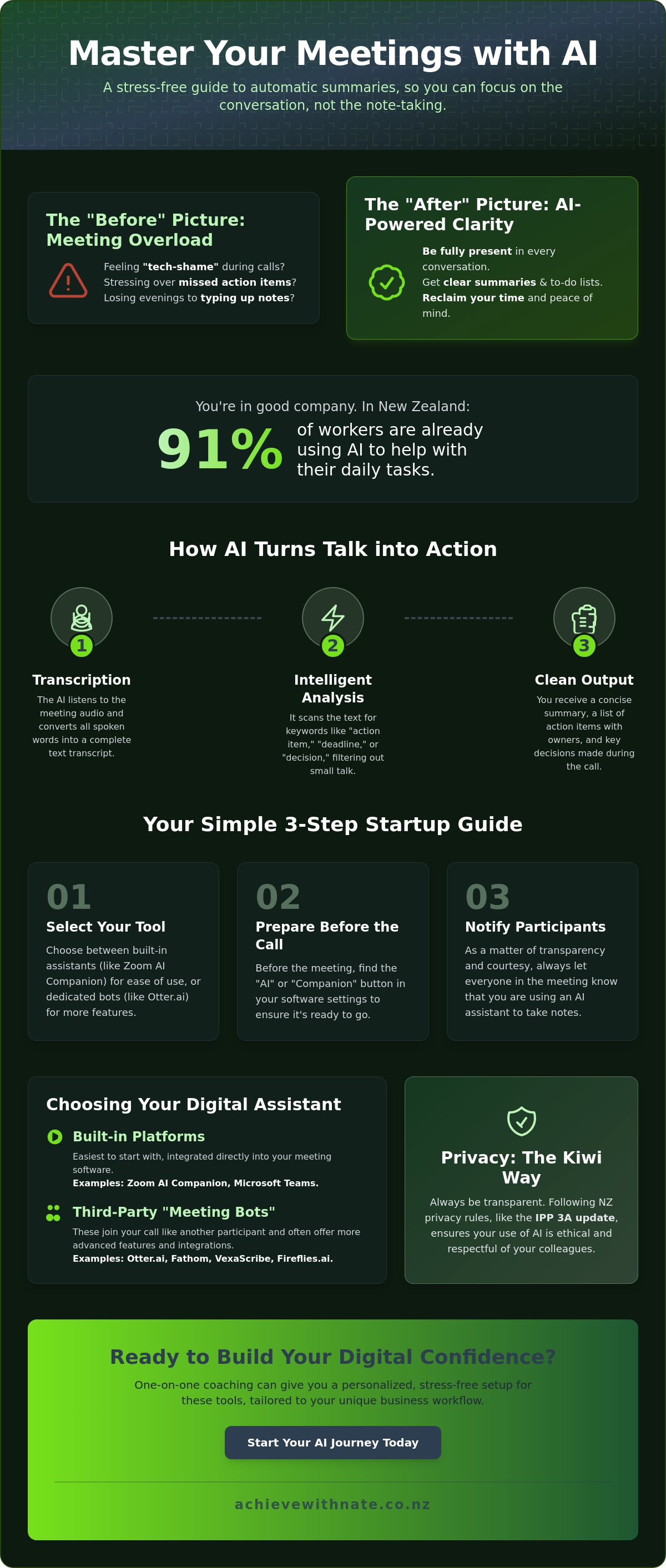
Did you know that 91% of New Zealand workers are already using AI to help with their daily tasks? Even with so many people jumping in, it is completely normal to feel a bit of "tech-shame" or worry about missing a vital detail during a long Zoom call. You shouldn't have to spend your precious evening hours typing up notes or stressing over forgotten action items. If you've been wondering how to use AI to summarize meetings in a way that feels easy and natural, you're in the right place.
We believe technology should act as a supportive companion that gives you more time for the work you actually love. This guide will show you how to let simple, friendly tools handle the heavy lifting of note-taking for you. We'll walk through the best 2026 tools like VexaScribe and Fathom, while making sure you're following the latest New Zealand privacy rules, such as the IPP 3A update. You'll discover how to get clear summaries and automatic to-do lists without the headache, so you can finally close your laptop with peace of mind.
Key Takeaways
Focus on being present. Learn how a digital assistant can capture every detail so you never have to scramble with a pen and paper again.
Discover how to use AI to summarize meetings with a straightforward 5-step process that works for both built-in apps and external tools.
Compare the most popular meeting assistants available in 2026 to see which one feels right for your specific business needs and budget.
Understand the latest New Zealand privacy rules so your use of AI is always transparent and respectful of your colleagues.
See how one-on-one coaching can help you set up these tools in a way that's completely stress-free and tailored to you.
Table of Contents
The Basics: What is AI Meeting Summarization?
Have you ever finished a Zoom call and realized you were so busy typing that you missed the actual heart of the conversation? Many of us in Aotearoa have felt that familiar sting of "tech-shame" when we realize we've forgotten a key action item. AI meeting summarization is designed to be the antidote to that stress. At its simplest, it is like having a quiet, digital assistant who sits in on your calls and writes the "minutes" for you. It isn't just about recording what was said; it is about capturing what actually mattered.
The real magic lies in how this technology has evolved. We have moved past the days of messy, word-for-word transcripts that take hours to read. Today, these tools use context to understand the difference between a casual joke and a firm deadline. For small business owners, learning how to use AI to summarize meetings is a vital part of building your digital confidence. It changes the way you work by letting you stay fully present. Instead of frantic typing, you can look your team members in the eye and truly listen, a skill emphasized in the guide by traineticsacademy.com.sg on mastering AI-driven professional interactions.
To better understand this concept, watch this helpful video:
How it works without the jargon
You don't need a degree in computer science to understand what is happening under the hood. First, the AI listens to the audio and converts those spoken words into text. This is what we call transcription. Once it has the text, it uses Automatic summarization technology to look for specific patterns. It acts like a helpful personal assistant who knows exactly what you need to see. It scans the conversation for phrases like "I will follow up on" or "the deadline is Friday" to create a tidy list of to-dos and decisions. It filters out the "ums," "ahs," and small talk so you only get the gold. This is how to use AI to summarize meetings effectively; you let the software handle the clutter while you handle the strategy.
Why 2026 is the year to start
If you have been waiting for the right time to try these tools, that time is now. By May 2026, 82% of New Zealand organizations have officially adopted AI tools, which is a big jump from just a few years ago. The technology has become incredibly accurate and, more importantly, very easy to use. You no longer have to jump through hoops to find these features. Summarization is now built directly into the platforms most Kiwis already use, like Zoom and Microsoft Teams. It has become a standard tool for mental clarity rather than just a high-tech luxury. Using these assistants means you can close your laptop at the end of a meeting feeling calm and organized. If you ever feel stuck, One-on-One Digital Coaching can help you find your footing with these tools at your own pace. It is about taking one small, manageable step toward a more relaxed workday.
How to Use AI to Summarize Meetings: A Simple 5-Step Guide
Getting started with new technology can feel like a big hurdle when you're already busy. You might worry about clicking the wrong button or feeling a bit awkward in front of a client. It's completely normal to feel that way. Taking things one small step at a time is the best way to find your footing and reclaim your energy. Here is a gentle, straightforward guide on how to use AI to summarize meetings without the stress.
Step 1: Selecting your tool
Your first choice is deciding where your digital assistant will live. You can use the built-in features in apps you already know, like the Zoom AI Companion or Microsoft Teams. These are often the easiest way to start because they're already right there in your meeting window. Alternatively, you can use a "Meeting Bot" from a service like Otter.ai or Fireflies. These bots join your call as if they were another participant. Choosing the right flow for your specific needs is a key part of Business Workflow Optimization, as it helps your entire day feel more organized and calm.
Step 2 & 3: Preparation and Notification
Before your meeting begins, take a moment to find the "AI" or "Companion" button in your software settings. It is usually found on your main dashboard or within the "Meetings" tab. Once you are in the call, the most important step is letting everyone know you're using an assistant. This isn't just about being polite; it's a legal requirement under the May 2026 New Zealand Privacy Act update (IPP 3A). You can use a simple script like: "I'm using an AI note-taker today so I can focus entirely on our conversation instead of my notepad." In New Zealand, being open about your tools isn't just about following rules; it's about showing your clients that they have your full attention and respect.
Step 4 & 5: Review and Action
AI is a wonderful helper, but it isn't perfect. It might occasionally mix up a name or miss a tiny bit of context. Once your call ends, spend just two minutes reading through the summary it sends you. This small habit helps you stay in control and builds your digital confidence over time. Finally, turn those notes into action. Most tools allow you to copy your to-do list into an email or a team chat with just one click. By keeping the process light and uncomplicated, you'll find that how to use AI to summarize meetings becomes a natural, stress-free part of your routine. If you're unsure where to start, a Digital Productivity Audit can help you identify exactly which tools will save you the most time.
Choosing Your Tool: Built-in vs. Third-Party Assistants
Finding the right software can feel like staring at a long menu when you're already hungry. You just want something that works without a fuss. When you're looking at how to use AI to summarize meetings, the choices usually fall into two camps. You can stick with what's built into your video app, or you can invite a specialist assistant to join you. Both paths are okay. The best choice is simply the one that makes you feel the most at ease.
Built-in Tools (The "Easy" Path)
If you do all your business in one place, like Zoom or Microsoft Teams, the built-in options are a wonderful starting point. For example, Zoom offers AI features in paid plans starting from $14.16 per month. The biggest benefit is simplicity. You don't need to install anything new or manage a separate login. Everything stays in one familiar window. However, these tools are often "locked" to that platform. If you occasionally use Google Meet for a client but your AI lives in Teams, you might find yourself back at square one with your notepad.
Third-Party Assistants (The "Pro" Path)
For small businesses that move between different apps, a third-party assistant might be a better fit. Tools like Otter.ai, Fireflies, or Fathom act as a bridge. They can follow you to almost any meeting. Fathom is a popular choice because it offers a free tier for unlimited recordings, while VexaScribe is a very affordable option with plans starting at just $2 per month. These specialists often have better "memories." They make it easy to search through months of meeting history to find that one specific detail you need. If you're feeling overwhelmed by the options, AI Support and Integration coaching can help you pick the tool that matches your rhythm.
Some people worry about the "creepy factor" of a digital bot sitting in the meeting. It can feel a bit strange to see a guest named "Otter Assistant" in the participant list. The best way to handle this is with total transparency. In New Zealand, our May 2026 privacy laws actually require us to notify others when we're using these tools. A quick, friendly mention at the start of the call removes the mystery. It shows you're being professional and respectful. When you're open about how to use AI to summarize meetings, it stops being a tech gimmick and becomes a helpful part of the "Kiwi way" of doing business. Taking this small, honest step helps everyone feel more comfortable and focused on the task at hand.
Privacy and Etiquette: Doing it the "Kiwi Way"
Trust is the backbone of how we do business in New Zealand. You might feel a little uneasy about where your meeting data goes, and that's a very healthy instinct. A 2026 report found that 62% of New Zealanders would stop using a service if they were worried about how AI was being used. Doing things the "Kiwi Way" means being open, honest, and protective of the people we serve. When you are learning how to use AI to summarize meetings, privacy shouldn't be an afterthought. It should be the foundation of your new workflow.
NZ Privacy Basics for AI
The rules around data have changed recently. As of May 1, 2026, the New Zealand Privacy Act includes a new principle called IPP 3A. This requires you to let people know if you are collecting their information through a third party, like an AI bot. It sounds formal, but the core idea is simple. If you wouldn't want a conversation recorded on a tape deck, don't use the AI for it. Keeping your data safe is about setting clear boundaries from the start. You can find more tips on maintaining safe online habits in NZ to keep your business and your clients protected.
Introducing AI to your clients
The best way to handle the "bot in the room" is to frame it as a benefit for your client. You could say, "I'm using this tool so I can give you my full attention instead of looking down at my notes." This shows them that they are your priority. Most people appreciate the extra focus. However, you must always be ready for a "No." If a client feels uncomfortable, simply turn the tool off. True digital confidence includes the confidence to say no to technology when it doesn't fit the moment. It is about being a person first and a user second.
Ethics in a small business are about more than just following the law. They are about making your clients feel seen and respected. When you master how to use AI to summarize meetings with transparency, you build a reputation as a modern, thoughtful professional. You don't have to figure this out alone. If you want to ensure your setup is completely secure and respectful, our One-on-One Digital Coaching provides a non-judgmental space to get your tools working perfectly. We can help you navigate these new rules so you can focus on building great relationships with your community.
Building Your Digital Confidence with Nate
Reading a guide is a wonderful first step toward reclaiming your time. However, we know that sitting down to actually configure your settings can feel quite different. It is common to feel a rush of anxiety when you try to apply what you've read. You might worry about making a mistake or looking "silly" in front of your team. This is where a supportive companion makes all the difference. Moving from feeling tech-stressed to tech-savvy doesn't have to happen overnight. It happens through small, steady actions taken with someone who understands your journey.
Nate helps Kiwis bridge the digital divide by providing a criticism-free environment. There are no "grandkid" eye-rolls here. Instead, you get patient, neighborly help that focuses on your well-being. We believe that learning how to use AI to summarize meetings should be an empowering experience; it shouldn't be a source of frustration. Our goal is to create a psychological safe space where you can ask any question without feeling inadequate. We value the person behind the screen more than the software itself.
Personalized AI coaching
We can set up your Zoom or Teams together in a focused, one-hour session. This is hands-on help tailored specifically to your business rhythm. We don't just talk about the tools; we open them up and make them work for you. Whether you need help with AI Training for Small Business NZ or just want to ensure your email is organized, we are here to guide you. This one-on-one time ensures you feel steady and capable before you ever have to use these tools with a client. It is about building a foundation of trust in your own digital skills.
Your next small step
If you aren't ready for a full session yet, try a "practice" meeting with a friend or a family member. It is a low-stakes way to see how the AI captures your words. You will quickly see that how to use AI to summarize meetings is much simpler than it first appears. Practice removes the mystery. It turns a "high-tech" obstacle into a familiar, helpful tool. Remember, technology should always work for you, not the other way around. You are the one in control of your digital world.
Taking that first step is often the hardest part of any change. We invite you to Book a free chat to see how AI can help your business. It is a gentle, no-pressure way to explore your options and find your footing. No matter how fast the digital world moves, you don't have to face it alone. We are here to help you find your digital confidence, one manageable step at a time.
Taking Your Next Step Toward a Calmer Workday
You have seen that reclaiming your time isn't about becoming a high-tech expert overnight. It is about letting simple, friendly tools handle the chores so you can focus on the people in front of you. Whether you choose a built-in assistant or a specialist third-party tool, you are taking a meaningful step toward mental clarity and better focus. Mastering how to use AI to summarize meetings means you can finally leave the "tech-shame" behind and trust that your action items are captured accurately every single time.
If the thought of setting this up alone still feels a bit heavy, please know that you don't have to carry that weight by yourself. We provide personalized one-on-one coaching right here in New Zealand to help you find your footing with ease. It is a completely no-judgment learning environment where your well-being and confidence always come first. You deserve a workspace that feels supportive rather than demanding. Join the movement and build your digital confidence today with empathetic support that moves at your own pace. Every big change starts with one small, manageable action. You have got this.
Frequently Asked Questions
Is it legal to record meetings with AI in New Zealand?
Yes, it is legal, provided you follow the latest privacy rules. As of May 2026, the New Zealand Privacy Act (IPP 3A) requires you to notify everyone in the meeting if you are using an AI tool to collect their information. It is all about being open and respectful. A simple mention at the start of your call keeps you on the right side of the law and builds trust with your team.
What is the best free AI meeting summarizer for beginners?
Fathom is a wonderful starting point because it offers a generous free tier with unlimited recordings. While it limits you to five AI summaries per month on the free plan, it is a very gentle way to see how to use AI to summarize meetings without any cost. Granola is another lovely, privacy-focused choice for Mac users that helps you take notes without feeling overwhelmed by complex settings.
Can AI summarize in-person meetings, or just online ones?
You can certainly use AI for your face-to-face conversations. Many tools, like Otter.ai or VexaScribe, have mobile apps that you can open on your phone or tablet. Simply place your device on the table and let it listen. This allows you to stay fully present and look your companion in the eye instead of staring at a notebook the whole time.
Will the AI understand my New Zealand accent?
Modern AI tools have become incredibly good at picking up our unique Kiwi rhythm. By 2026, the technology has reached a point where regional accents rarely cause major issues. You might find a few small mistakes here and there, but the overall summary is usually very accurate. It is much better than trying to decipher your own hurried handwriting after a long day.
Do I need to pay for Zoom Premium to get meeting summaries?
Yes, you generally need a paid Zoom plan to access the built-in AI Companion. These plans currently start at $14.16 per user each month. If you are not ready for a monthly subscription, you might prefer using a third-party tool. Learning how to use AI to summarize meetings through an external app can often be more flexible if you use multiple different video platforms.
How do I stop the AI bot from joining every single meeting?
You can easily manage this in your assistant's settings dashboard. Look for the "Auto-join" or "Meeting Settings" section and change it to "Manual" or "Invite Only." This puts you back in the driver's seat. You get to decide exactly when you want the extra help and when you would prefer a private, unrecorded chat.
Can I use AI to summarize meetings in Microsoft Teams for free?
While Microsoft Teams offers basic transcription on some plans, the "Intelligent Recap" features usually require a Teams Premium subscription. It is a good idea to check your specific Microsoft 365 license to see what is included. If you find the Microsoft settings a bit confusing, a quick digital coaching session can help you clear up the fog and get everything running smoothly.
Is my data safe when using third-party AI meeting assistants?
Most reputable AI companies use high-level encryption to protect your conversations. However, it is important to choose tools that have clear, easy-to-read privacy policies. Since 62% of New Zealanders say they would stop using a service over AI privacy concerns, taking a moment to check where your data is stored is a very wise and protective move for your small business.


Comments