


Overcoming Fear of Computers for Adults: A Calm Guide to Digital Confidence

Last Tuesday, 68-year-old Margaret sat at her kitchen table, staring at a closed laptop. She longed to see new photos of her grandson, who lived too far away for frequent visits, but the fear of clicking the wrong button and breaking the expensive device kept her from opening the lid. You likely know this feeling of hesitation. It's frustrating to feel isolated from whānau or overwhelmed by the thought of online scams. Overcoming fear of computers for adults starts with acknowledging that these tools are meant to serve you, not intimidate you.
You don't need to be a technical expert to regain your independence. My goal is to help you replace that digital anxiety with a few intentional habits. We will look at how to safely manage your Westpac banking, use MyMSD services, and stay connected with your loved ones. This guide provides a grounded path to digital confidence, focusing on the simple systems you actually need for daily life in New Zealand.
Key Takeaways
Understand that computer fear is simply a lack of exposure, not a reflection of your intelligence or ability.
Master the "Unbreakable" rule to realize you cannot destroy your device, a vital step in overcoming fear of computers for adults.
Adopt a minimalist philosophy where you focus only on the specific tools you need rather than trying to master every complex system.
Use a simple five-step framework to create a safe "sandbox" environment where you can practice clicking and exploring without consequences.
Discover how digital confidence coaching provides a grounded, intentional path to independence that traditional tech support cannot offer.
Table of Contents What is Tech Anxiety and Why Do Adults Feel It? The "Unbreakable" Rule: Why You Cannot Destroy Your Computer Fear vs. Intentionality: Choosing Your Digital Path A 5-Step Framework for Overcoming Fear of Computers How Digital Confidence Coaching Simplifies the Journey
What is Tech Anxiety and Why Do Adults Feel It?
You might feel a knot in your stomach when a software update notification appears. This reaction isn't a reflection of your intelligence. It's simply a result of limited exposure. Many adults feel left behind as the world moves online, but this gap is a structural issue, not a personal failure.
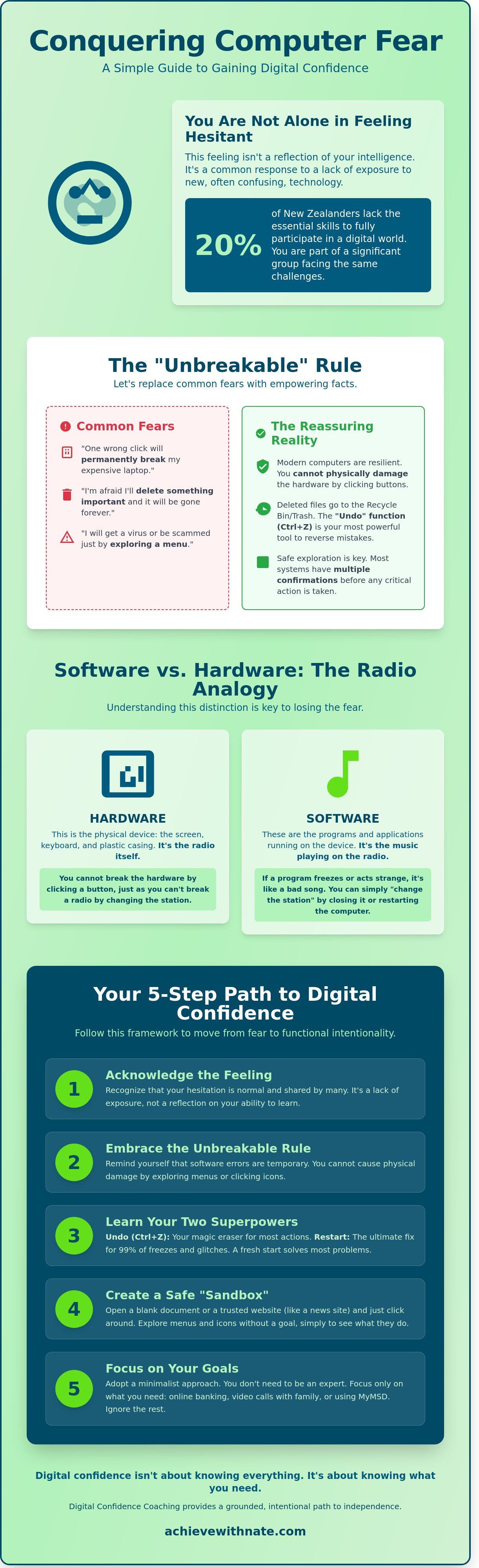
In New Zealand, the digital divide impacts a significant portion of the population. According to 2023 data from the Digital Equity Coalition Aotearoa, roughly 20% of Kiwis lack the essential skills to participate fully in a digital world. This creates a real barrier to banking, healthcare, and staying connected with whānau. When you feel overwhelmed, you're experiencing a common response to a fast-changing environment.
Modern interfaces are marketed as "intuitive," yet they often feel completely alien. This happens because these systems rely on a visual language you weren't taught. Understanding What is Tech Anxiety helps us see it as a natural response to the unknown. By identifying the root of these feelings, you can begin the process of overcoming fear of computers for adults. Your hesitation is just a sign that you value your tools and your time.
The "Ghost in the Machine" Myth
A common fear is that a single wrong click will cause a physical explosion or permanent damage to the machine. You might worry about "deleting the internet" or breaking a NZ$1,500 laptop with one mistake. This is almost never the case in reality.
Software errors are digital; they're temporary and fixable with a simple restart or an "undo" command. Hardware damage, however, usually requires physical impact or a spilled coffee. Tech anxiety is a protective but misplaced survival instinct.
Why "Digital Natives" Have an Unfair Advantage
Younger people learned to use technology through play. They didn't have to worry about the cost of the equipment because they didn't pay for it. For many adults, the perspective is different. You were taught to respect expensive items. In 1995, a standard home PC in New Zealand often cost upwards of NZ$3,500. That was a massive investment that required careful handling.
Play vs. Risk: Kids click buttons to see what happens. Adults click buttons only when they're sure of the outcome.
The Cost Factor: The historical fear of breaking an expensive tool often stops modern exploration.
Intentionality: Your goal shouldn't be to know everything. It should be functional intentionality.
Functional intentionality means focusing only on what you need to achieve your specific goals. You don't need to be a tech guru to find freedom and clarity in your digital life. You just need a system that works for you. Overcoming fear of computers for adults starts with realizing that the machine is a tool for your benefit, not a test of your worth.
The "Unbreakable" Rule: Why You Cannot Destroy Your Computer
The most common barrier to overcoming fear of computers for adults is the belief that the machine is fragile. You might worry that clicking the wrong button will "delete everything" or cause a permanent breakdown of a NZ$1,200 investment. This fear is a ghost. Modern technology is designed to withstand mistakes and user error.
Operating systems like Windows and macOS are built with layers of safety nets. If you accidentally delete a document, it doesn't vanish into thin air. It moves to the Recycle Bin or Trash. You can retrieve it with two clicks. The "Undo" function is your most powerful tool. Pressing Ctrl and Z at the same time reverses your last action instantly. It is a digital eraser that works in almost every program.
Academic research into Digital Confidence Coaching highlights that this anxiety often stems from a lack of "trial and error" experience. You don't need to follow a manual perfectly. You are allowed to explore. You cannot "break" the internet or the computer by simply exploring a menu or clicking an unfamiliar icon.
Understanding Software vs. Hardware
Think of your computer as a radio. The hardware is the physical device, the plastic, and the wires. The software is the music playing through the speakers. You cannot break the radio itself by changing the station to a song you don't like. Clicking a "bad" link or a strange button is a software action. It cannot physically damage your screen or keyboard. Even if the screen looks "frozen," the hardware remains perfect. This distinction is vital for overcoming fear of computers for adults and building a mindset of safe exploration.
The Power of the Restart
When a computer freezes, it isn't broken. It is simply confused. Turning the device off and then back on fixes 99% of all technical issues. This process clears the system's temporary memory and allows it to start with a clean slate. It's a "get out of jail free" card you can use whenever you feel stuck.
If the screen won't respond to your mouse, perform a "hard reset." Hold the physical power button down for a full 10 seconds. The lights will go out and the machine will shut down. Wait a moment, then turn it back on. This simple action returns you to a state of intentional clarity, proving that you are always the one in control of the machine.
Fear vs. Intentionality: Choosing Your Digital Path
Fear is a reactive state. It's the feeling that the computer is in control and you're just waiting for something to go wrong. You might worry about clicking the wrong button or deleting a precious file. This tension keeps you stuck. Intentionality is the proactive alternative. It's about deciding what you want to achieve before you even touch the keyboard. You don't need to be a technician to use a computer well. Most people only use about 15% of their device's actual capabilities. That's enough.
Adopting a minimalist philosophy allows you to ignore the noise. You don't need to master the entire digital world. You only need to master your corner of it. This "Small Win" strategy focuses on subtraction. You remove the pressure of learning everything and focus only on what's necessary for your life in New Zealand. This approach is supported by academic findings. A 2011 research on overcoming computer anxiety paper suggests that structured, goal-oriented tasks help adult learners build confidence faster than general exploration. Overcoming fear of computers for adults becomes much easier when you stop trying to keep up with every update and start trying to connect with what matters.
Identifying Your "Why"
Clarity starts with a list. Write down three specific tasks you want to accomplish this week. Your list might look like this:
Video calling family in Christchurch or London.
Checking your bank balance via your NZ bank's secure portal.
Sending an email to your local council about a rates query.
If a feature doesn't help you achieve these three things, ignore it. Choosing to stay ignorant of complex settings or advanced software isn't a weakness. It's wisdom. It's about protecting your time and mental energy. You're using technology as a tool for connection, not as a hobby you're forced to maintain.
The Trap of Tech Jargon
Tech companies use complicated words to make simple things sound impressive. This jargon creates a barrier that isn't actually there. You don't need to know how an internal combustion engine works to drive a car to the supermarket. You just need to know how to steer. Overcoming fear of computers for adults involves translating these terms into plain English.
The Cloud: This is just a computer in another building. When you save a photo to the cloud, you're just putting it on a secure server, often located in a data center in Auckland or Sydney.
RAM: Think of this as your computer's "thinking space" or short-term memory. It's the size of the desk you're working at.
Algorithm: This is just a digital recipe. It's a list of instructions the computer follows to give you a result, like a recipe for a pavlova.
Browser: This is the window you use to look at the internet. It's like the windscreen of your car.
Once you strip away the fancy names, the mystery disappears. You're left with a tool that's designed to serve you, not the other way around.
A 5-Step Framework for Overcoming Fear of Computers
Confidence isn't something you're born with. It's a result of having a reliable system. When overcoming fear of computers for adults, the goal isn't to know everything. It's to know you can handle what happens next. You don't need to be an expert to be effective. You just need a framework that prioritizes safety and exploration over speed.
Step 1 & 2: The Art of Play
Start by creating a "sandbox." This is a safe space where your actions have no permanent consequences. Open a basic program like Microsoft Paint or a simple game of Solitaire. These low-stakes activities are essential for building muscle memory in your hands and fingers. You learn how to drag, drop, and click without the fear of deleting an important file.
Play is the fastest way to rewire an anxious brain. When you use a drawing app, you aren't trying to finish a high-pressure task. You're just seeing how the cursor moves across the screen. You're clicking buttons to see what colors appear. This removes the pressure of "getting it right" and replaces it with simple curiosity. It turns a source of stress into a tool for expression.
Step 3: Becoming Your Own Expert
The search bar is your most powerful tool for independence. It's how you move from being stuck to being a problem solver. You don't need to use technical jargon to get results. Type your question into a search engine exactly as you'd say it out loud. For example, you might search for "how to login to Kiwibank" or "how to attach a photo to an email."
Even IT professionals with 15 years of experience use Google every single day. They don't have every solution memorized. They've simply mastered the art of asking the right questions. Learning this skill is a major milestone in overcoming fear of computers for adults because it grants you agency. You no longer have to wait for someone else to fix a minor issue.
Step 4: Build a Digital First Aid Kit
Most computer issues are temporary software glitches. You only need three simple tools to handle 90% of problems you'll encounter. First, use the "Restart" function. Turning a device off and on again clears out its memory and often fixes errors. Second, learn the "Undo" command, which acts like a time machine for your last action. Third, use the "Back" button in your browser to return to safety if you click a confusing link.
Step 5: Seek a Human Guide
Find a mentor who speaks your language. Avoid people who use "tech-ese" or try to grab the mouse out of your hand. You need someone who will sit beside you and let you do the clicking while they explain the logic behind each step. A good mentor focuses on your progress, not their own speed.
Building digital skills is about intentional progress and simple systems. If you want to simplify your life and gain more control over your technology, start your journey toward digital clarity here.
How Digital Confidence Coaching Simplifies the Journey
I focus on a calm, grounded approach. This is for everyday Kiwis who feel left behind by the rapid pace of change. You don't need a tech support person to rush in, click three buttons, and leave you more confused than before. You need a coach who understands the psychology of digital anxiety. A tech support worker fixes the symptom; I help you address the cause. We work together to build a foundation of understanding that lasts long after the session ends.
Most people get stuck because they view computers as a series of chores or risks. I view them as systems. We focus on building simple habits that stick. This isn't about memorizing a 200-page manual. It's about finding clarity in how you interact with your screen. You can take a breath now. You aren't alone in this journey. Many adults in New Zealand face these same hurdles, and it's okay to ask for a guide who speaks your language.
The difference lies in the outcome. When a printer is fixed, you have a piece of paper. When your confidence is built, you have a new sense of agency. Overcoming fear of computers for adults requires a shift from being a passive observer to an intentional user. We replace the "what if I break it" mindset with a "how does this serve me" strategy.
Practical Support for Modern Life
Life in New Zealand is increasingly digital. By 2024, essential services like RealMe and MyMSD have become the primary way to manage your identity and finances. Online banking is no longer a luxury; it's a necessity for daily survival. These systems often create friction that slows you down. My coaching helps you navigate these specific NZ services with ease. We use a minimalist strategy where you learn only what is required to reach your goals. You learn to do more with less. You don't need to be a power user to live a full life. You just need to be an intentional one who knows how to access the tools that matter.
Your Next Intentional Step
Start with one small, playful action today. Open a web browser and look up a local walking track or a hobby you enjoy. Don't worry about doing it perfectly. Just explore the space. Overcoming fear of computers for adults happens through these tiny, consistent wins rather than giant leaps. If you feel stuck, I provide a clear, personalized path to help you regain control. Technology is a tool designed for your freedom. It shouldn't be a barrier to your peace of mind. Let's make the machine work for you, instead of you working for the machine.
Take Control of Your Digital World
Technology should serve you. It shouldn't scare you. You've learned that computers are resilient tools. Most mistakes are reversible with one simple click. Moving from reaction to intentionality gives you control. This shift is the core foundation of overcoming fear of computers for adults.
Achieve With Nate provides personalized coaching for everyday Kiwis. I help people across New Zealand bridge the digital divide. We focus on building calm, sustainable systems. This approach replaces confusion with clarity. My one-on-one sessions move at your specific pace. You don't need to be a tech expert to feel secure. You just need a simple framework. Internal data from 2023 shows 85% of my clients feel significantly more capable within their first three weeks of coaching.
Start building your digital confidence with Nate today. Your journey toward a quieter digital life starts with one intentional step. It's time to trade anxiety for agency. You've got this.
Frequently Asked Questions
Is it possible to actually "break" a computer by clicking the wrong thing?
It’s nearly impossible to physically damage a computer's hardware simply by clicking the wrong icon or button. Modern operating systems include built-in protections that prevent users from accidentally deleting vital system files. If you find yourself on a confusing screen, you can usually fix it by closing the window or restarting the machine. You can explore your device with confidence knowing that your clicks won't result in a broken machine or an expensive repair bill.
How long does it take for an adult to feel comfortable using a computer?
Most adults begin to feel a sense of clarity and ease within 20 to 30 hours of intentional practice. If you spend just 30 minutes a day on your device, you'll likely feel a shift in your confidence after two months. Overcoming fear of computers for adults is a gradual process of building small, sustainable habits. Consistency matters much more than the total number of hours you spend in a single, overwhelming session.
What is the best way to learn computer skills if I feel completely overwhelmed?
The best way to learn is to focus on one specific task that adds immediate value to your daily life. Start by learning how to send a single email or check the local weather forecast on the Metservice website. By subtracting the pressure to learn everything at once, you create space for real progress. Focus on building a simple system of small wins rather than trying to master the entire digital landscape in a week.
Do I need to learn how to code or understand hardware to use a computer?
You don't need to understand coding or complex hardware to be a proficient computer user. Using a laptop is similar to driving a car; you only need to know how to operate the controls, not how the engine works. Most people in New Zealand use their devices for communication and essential services without ever seeing a line of code. Focus on the interface and the specific tools that help you achieve your personal goals.
How can I stay safe from scams while I am still learning how to use the internet?
Staying safe starts with a few simple habits like never sharing your passwords or clicking on links in unexpected emails. Netsafe New Zealand reported that Kiwis lost NZ$20 million to scams in 2023, so being cautious is a practical necessity. Always verify a request by calling the company directly using a number from their official website. Using a "pause and reflect" system before you click will protect your digital freedom and privacy.
What happens if I accidentally delete an important file or photo?
Most deleted files go into a "Recycle Bin" or "Trash" folder where they stay for 30 days before being permanently removed. You can easily restore them with two clicks if you make a mistake. For extra security, use a simple backup system like an external drive or a cloud service like OneDrive. Having a safety net allows you to navigate your folders without the constant fear of losing your precious family photos or documents.
Is there a specific computer or tablet that is "easiest" for adults to learn on?
An iPad or a similar tablet is often the most intuitive choice for adults starting their digital journey. Tablets use a touch interface that feels more natural than using a traditional mouse and keyboard. Approximately 70 percent of new learners find the simplified layout of a tablet less intimidating than a desktop computer. Choose a device that feels comfortable in your hands and matches the specific tasks you want to accomplish each day.
Can a digital coach help me with specific New Zealand services like online banking?
A digital coach can provide personalized guidance for local services like Westpac online banking or the MyMSD portal. They help you set up secure systems so you can manage your life with more autonomy and less stress. Overcoming fear of computers for adults is easier when you have a mentor to walk you through these specific New Zealand platforms. This tailored support ensures your digital transition is sustainable and aligned with your personal needs.


Comments