Technology Training in NZ: Stress-Free Answers for Everyday Kiwis
- kxnath
- May 12
- 9 min read
Updated: May 20
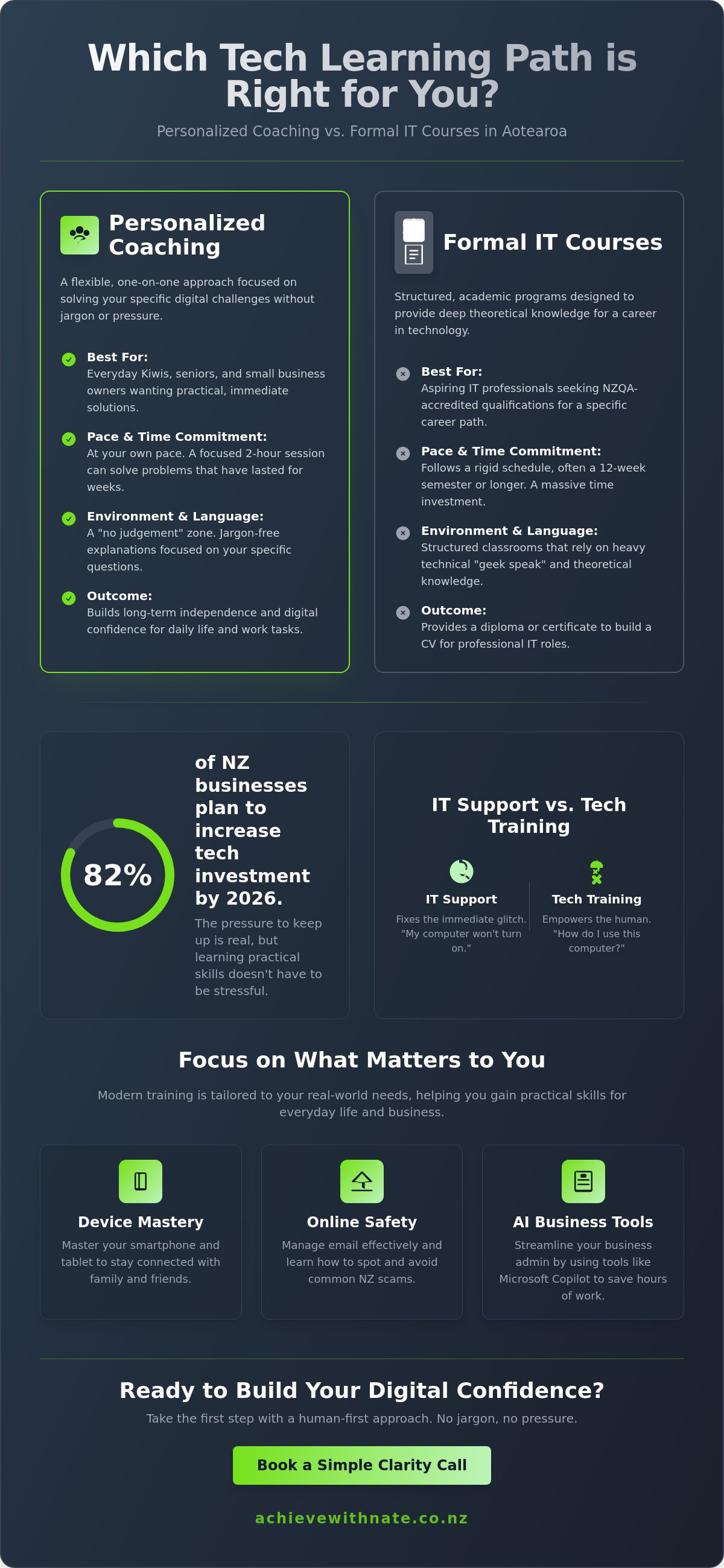
What if you could master your new device or finally understand AI without ever opening a 300-page manual? Many everyday Kiwis feel like they are falling behind the digital curve. It is completely normal to feel a bit of anxiety about breaking something expensive or getting lost in technical jargon. With 82 percent of New Zealand businesses planning to increase their technology investment in 2026, the pressure to keep up can feel heavy. However, effective technology training doesn't have to be a source of stress. It should feel like a helping hand from a patient friend, not a high-pressure classroom.
You likely just want to get your work done, stay safe online, and feel independent with your tools. We agree that the best way to learn is at your own pace, focusing on the tasks that actually matter to your daily life. This guide provides a clear, jargon-free look at your options for building digital confidence in Aotearoa. We will explore how you can gain independence with your devices and streamline your business workflows; all while taking things one small step at a time.
Key Takeaways
Learn how technology training in Aotearoa can be simplified into practical steps that help you master your devices and explore AI without the stress.
Understand why personalized coaching is often a better fit than formal IT courses for Kiwis who want to gain confidence in their daily digital lives.
Find out how to identify your specific digital pain points to ensure you choose a mentor who prioritizes your comfort over technical speed.
Discover the benefits of a "no jargon, no pressure" environment that focuses on building your digital confidence one small step at a time.
Table of Contents
What exactly is technology training for everyday Kiwis?
Technology training in Aotearoa is the bridge that connects the feeling of being overwhelmed to the feeling of being capable. It isn't about sitting in a cold lecture hall or earning a certificate to put on a resume. For most of us, it's simply the process of building the practical skills needed to use digital tools without the headache. Whether you want to send a photo to your grandkids or use a new app for your small business, this training is about making your life easier.
While some institutions focus on academic credits, real-world technological literacy is about what you can actually do with your devices. It ranges from device basics to advanced AI implementation for small businesses. You might start with the basics of your smartphone and eventually move toward using tools that save you hours of admin time. The goal is always the same; to help you feel in control of your tech rather than the other way around.
To better understand how these skills fit into your life, watch this helpful video:
The difference between 'IT Support' and 'Tech Training'
It helps to know that training is different from support. If your computer won't turn on, you call IT support to fix the machine. If you want to know how to use that computer to organize your life, you look for training. Support fixes the immediate glitch; training empowers the human behind the screen. When you learn the "how" behind a task, you prevent the same frustrating problem from happening again next week. It's about building long-term independence.
Common topics covered in modern training
Modern technology training is tailored to your specific needs. It isn't a one-size-fits-all lesson. Many Kiwis focus on these areas:
Smartphone and tablet mastery to stay connected with family and friends.
Email management and online safety to help you spot and avoid common NZ scams.
AI tools like Microsoft Copilot to help streamline your business admin tasks.
Ultimately, these lessons help you reach digital confidence. This isn't about becoming a computer expert. It's about feeling calm and capable every time you sit down at your desk or pick up your phone. Taking things one small step at a time makes the whole process feel natural.
Personalized coaching vs. formal IT courses: Which fits you?
Choosing the right path for your technology training depends entirely on your end goal. Are you looking to change careers, or are you just trying to change how you feel when you open your laptop? Formal courses are designed for the former. They are excellent if you want a diploma to show a future employer. However, for most Kiwis, a 12-week semester is a massive time commitment just to learn how to manage a digital calendar or organize photos.
Personalized coaching offers a different rhythm. Instead of months of study, you might only need two hours of focused help to solve a problem that has been bothering you for weeks. Classroom settings often rely on heavy technical jargon. This "geek speak" can leave beginners feeling more confused than when they started. Coaching skips the fluff and focuses on your specific hurdles. It's often much more cost-effective to pay for a few hours of expert guidance than to invest in a full degree you don't actually need.
When to choose a formal tertiary provider
A formal provider is the right choice if your heart is set on a high-level career. If you want to work in Cloud Engineering or Software Development, you need an NZQA-accredited qualification. These programs provide the deep theoretical knowledge required for professional IT roles. They are intense, structured, and perfect for building a CV.
For those with specific accessibility needs who are looking to enter the workforce, platforms like IDEALNI.ORG demonstrate how digital tools can help find inclusive career paths.
When to choose one-on-one digital coaching
One-on-one coaching is perfect if you have specific "how-to" questions about your own phone or computer. It creates a "no judgement" zone where you can ask "silly" questions without feeling embarrassed. This approach is especially helpful for one-on-one technology help for seniors NZ, where the focus is on practical life skills. If you're feeling stuck, you can always book a simple clarity call to see which path fits your needs best.
How to choose the right technology training in 2026
Finding the right technology training shouldn't feel like another exhausting job on your to-do list. The first step is to look inward and identify your "Digital Pain Points." What exactly is causing you the most stress right now? Maybe it's a messy inbox that feels out of control or a nagging fear of clicking the wrong link. Once you know what's hurting, look for a "Human-First" trainer. You want someone who prioritizes empathy and patience over how fast they can click through a menu.
It's also vital that you learn on your own equipment. Learning on a lab computer at a polytechnic doesn't help when you get home and your own tablet looks completely different. You need to know where your buttons are and how your specific settings work. Make sure your trainer understands the local landscape too. Whether you need help with your Xtra mail account or navigating the NZ Companies Office website, local context makes a huge difference. Training should feel like a friendly neighbor walking you through a task, not a distant expert talking down to you.
A checklist for your first session
Preparation helps keep things calm and productive. Before your trainer arrives, try to follow these small steps:
Write down your top three frustrations so you don't forget them in the moment.
Ensure you have your passwords and logins ready in a safe, private place.
Ask for "small steps" instead of trying to overhaul your entire digital life at once.
Small business considerations
If you run a local business, your needs are a bit more specific. You might be looking for business workflow optimization to finally reclaim your weekends. With 51 percent of NZ businesses focusing on AI adoption in 2026, you might also want to explore how tools like ChatGPT or Copilot can help you. A good trainer will help you implement these without making it feel like a chore. If you're ready to start, you can book a free clarity call today to see how we can help you find your footing.
Building digital confidence with Nate: A human-first approach
Nate doesn't focus on training the next generation of IT professionals. Instead, he helps Everyday Kiwis who feel a bit left behind by the speed of change. This is technology training with a real heart. It's about personal connection and understanding the frustration that comes with a screen that won't behave. Unlike distance learning or crowded group classes where you might feel like just another number, this is one-on-one. You get the space to learn without feeling rushed or judged.
The "No Jargon, No Pressure" guarantee is at the core of every session. If a concept sounds too complicated, we stop and find a simpler way to explain it. We use plain English to make sense of your tools. This personal touch often leads to faster breakthroughs than any manual could provide. You don't have to wait for a teacher to finish a lecture before you can ask a question. We focus on exactly what you need to know right now. It is the quickest way to move from "I can't do this" to "I've got this."
From basic devices to AI integration
Every learner has a different starting point. For some, it's about staying connected with loved ones through device and email basics training. This helps seniors navigate their tablets and smartphones with ease. For others, it's about staying competitive in a changing market. Nate supports local owners with ai training for small business New Zealand. Whether the goal is simple or complex, the approach remains patient and kind.
Your journey to a calmer digital life
Having a digital confidence coach NZ in your corner changes how you view your devices. You no longer have to fear breaking something or feeling inadequate. Technology becomes a tool for your benefit, not a source of anxiety. If you are ready to find your footing, you can book a Free Clarity Call. It is a simple, low-stakes way to see if this support is the right fit for you. Let's take that first small step together.
Take control of your digital world today
Finding the right path to digital confidence doesn't have to be a struggle. We've explored how personalized technology training can save you months of frustration compared to formal courses. By focusing on your specific needs and using your own devices, you can bypass the jargon and get straight to the results that matter. Whether you're a senior wanting to stay connected or a business owner looking to simplify your workflow, the support you need is right here in Aotearoa.
You deserve a learning environment with no judgment and plenty of patience. Nate provides personalized 1-on-1 support with a "no jargon, no pressure" guarantee. It's about bringing real Kiwi heart and empathy to every session. If you're ready to move from feeling overwhelmed to feeling capable, it's time to take that first step. Book a Free Clarity Call with Nate today to see how we can help you master your tech. You've got this, and we're here to help you find your footing, one small step at a time.
Frequently Asked Questions
Is technology training only for people looking for a new career?
No, technology training is for anyone who wants to feel more capable and confident in their daily life. While some people learn to get a better job, many everyday Kiwis just want to stay connected with family or manage their personal affairs safely. It is about gaining independence with the tools you already own. You don't need a career goal to deserve a stress-free digital experience.
What is the difference between a technology course and a digital coach?
A formal technology course usually follows a set curriculum and often leads to an NZQA qualification. In contrast, a digital coach works one-on-one with you to solve your specific problems at your own pace. If you have a list of random questions about your phone or laptop, a coach provides a "no judgement" zone to walk you through them. It is the difference between a classroom and a friendly chat.
Can I get technology training if I am a senior and have never used a computer?
Yes, absolutely, and it is never too late to start. Training for seniors often begins with the very basics, such as how to turn the device on or use a touch screen. We take things one small step at a time so you never feel overwhelmed. The goal is to help you reach a level of digital confidence where you can safely send emails or video call your grandkids without help.
How much does technology training in New Zealand typically cost?
Costs vary depending on the type of learning you choose. For 2026, the New Zealand government has capped domestic tuition fee increases for existing courses at six percent. Some providers, like the Southern Institute of Technology, still offer a Zero Fees Scheme for certain programs. Private coaching is usually charged at an hourly rate. This allows you to pay only for the time you actually need to solve your specific challenges.
Do I need to buy new software or equipment before starting training?
No, you definitely don't need to buy anything new. In fact, it is much better to learn on the equipment you already have in your home or office. This ensures that you become familiar with your own buttons and settings. We work with what you have to make your current digital life easier. If you eventually decide to upgrade, your trainer can help you understand your options without any sales pressure.

Comments